1. Bubuka
This manual provides detailed instructions for the installation, configuration, and operation of your NETGEAR ProSAFE XS712T 12-Port 10GBase-T Gigabit Smart Managed Switch. Designed for small to medium-sized businesses (SMBs), this switch offers high-performance 10-Gigabit connectivity, advanced Layer 2 features, and easy web-based management to meet diverse networking needs.
2. Fitur konci
- Advanced VLAN features such as MAC (Media Access Control), protocol-based VLAN and guest VLAN.
- Advanced QoS (Quality of Service) including Q-in-Q.
- Dynamic VLAN assignment - Increases security by imposing consistent policy and user credentials across the network, regardless of where users connect.
- MLD snooping - Increases network efficiency by forwarding multicast traffic to designated hosts only, rather than flooding multicast packets across all ports.
- Security management.
- IPv6 for management, QoS and ACL.
- Gampang-dipake Web-manajemén dumasar.
3. Eusi Paket
Pariksa yén pakét anjeun ngandung barang-barang ieu:
- NETGEAR ProSAFE XS712T 12-Port 10GBase-T Gigabit Smart Managed Switch
- Kabel listrik
- Kit Rack-mount (upami aya)
- Guide instalasi
4. Produk Langkungview
The NETGEAR ProSAFE XS712T switch features a robust design with multiple ports and indicators for efficient network management.
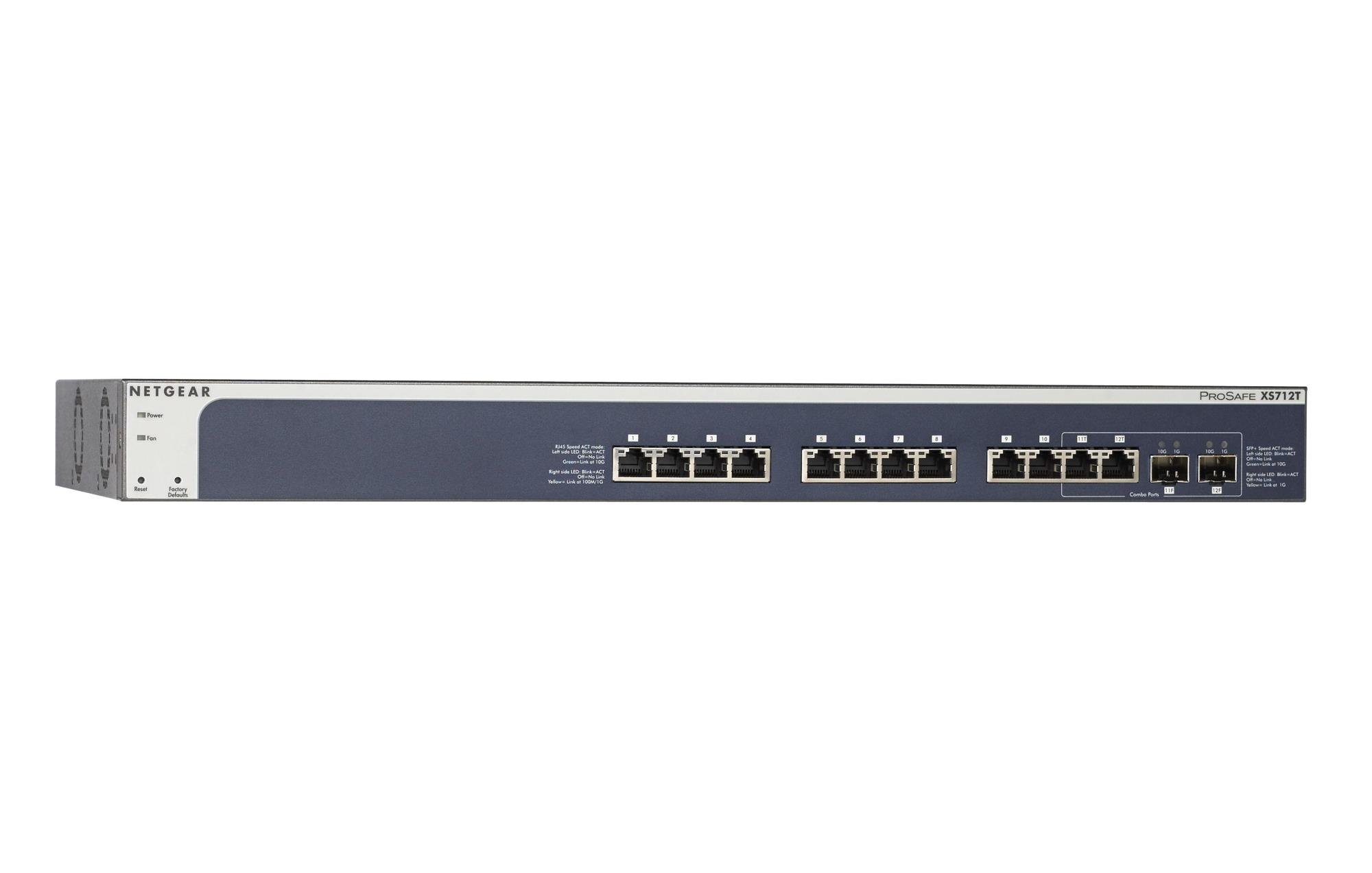
Figure 1: Front Panel of NETGEAR ProSAFE XS712T Switch
This image displays the front panel of the NETGEAR ProSAFE XS712T switch, showing the 12 10GBase-T ports, two combo SFP+ ports, and LED indicators for power, fan status, and port activity. The reset and factory defaults buttons are also visible on the left side.
Komponen Panel Hareup:
- LED kakuatan: Nunjukkeun status kakuatan alat.
- Kipas LED: Nunjukkeun status operasional kipas pendingin.
- Tombol Reset: Used to restart the switch.
- Tombol Standar Pabrik: Used to restore the switch to its factory default settings.
- Port RJ45 (1-10): 10GBase-T Ethernet ports for high-speed network connections. Each port has associated Link/Act LEDs (Left side LED: Blink=ACT, Off=No Link, Green=Link at 100M/1G; Right side LED: Blink=ACT, Off=No Link, Yellow=Link at 10G).
- Combo Ports (11, 12): These ports can function as either 10GBase-T RJ45 ports or SFP+ fiber ports. Each combo port has associated SFP+ Speed/ACT LEDs (Left side LED: Blink=ACT, Off=No Link, Green=Link at 10G; Right side LED: Blink=ACT, Off=No Link, Yellow=Link at 1G).
5. Setélan
5.1 Pamasangan Rak (Opsional)
If you intend to install the switch in a standard 19-inch equipment rack, use the provided rack-mount kit. Secure the mounting brackets to the sides of the switch using the screws provided. Then, attach the switch to the rack using appropriate rack screws.
5.2 Panempatan Desktop
For desktop use, ensure the switch is placed on a flat, stable surface. Allow adequate ventilation around the device to prevent overheating.
5.3 Sambungan Daya
- Connect one end of the provided power cord to the AC power inlet on the rear panel of the switch.
- Colokkeun tungtung kabel listrik anu sanés kana stop kontak listrik anu dibumikeun.
- Pariksa yén LED Daya dina panel hareup hurung, nunjukkeun yén saklar nampi daya.
5.4 Sambungan Jaringan
- Connect your network devices (servers, workstations, other switches) to the RJ45 ports (1-10) using appropriate Ethernet cables (Cat6a or higher for 10G speeds).
- For fiber optic connections, insert compatible SFP+ transceivers into the combo SFP+ ports (11F, 12F) and connect fiber optic cables.
- Observe the Link/Act LEDs for each connected port. A solid green or yellow light indicates a successful link, and blinking indicates activity.
6. Parentah Operasi
6.1 Operasi Dasar
The NETGEAR ProSAFE XS712T is a plug-and-play device for basic connectivity. Once powered on and connected, it will automatically detect and configure connected devices for optimal performance.
6.2 WebManajemén -Based
For advanced configuration and management, access the switch's web-panganteur dumasar:
- Pastikeun komputer anjeun nyambung ka saklar.
- Buka a web browser and enter the default IP address of the switch (refer to the Quick Start Guide or NETGEAR support for the specific default IP).
- Log in using the default username and password (typically "admin" and "password" or similar, check documentation).
- Ti web interface, you can configure VLANs, QoS settings, security features, and monitor network status.
7. Pangropéa
- Pembaruan firmware: Rutin pariksa dukungan NETGEAR websitus pikeun apdet firmware panganyarna pikeun mastikeun kinerja sareng kaamanan anu optimal.
- beberesih: Tetep saklar beresih jeung bébas tina lebu. Anggo kaén anu lemes sareng garing pikeun beberesih. Entong nganggo pembersih cair atanapi aerosol.
- Ventilasi: Pastikeun yén bukaan ventilasi teu diblokir pikeun nyegah overheating.
- Manajemén Kabel: Organize network cables to prevent strain on ports and improve airflow.
8. Cara ngungkulan
- Henteu aya kakuatan: If the Power LED is off, ensure the power cord is securely connected to both the switch and the electrical outlet. Try a different outlet or power cord.
- Henteu aya tautan dina Port: Pariksa sambungan kabel Ethernet dina duanana tungtung. Coba kabel atawa port béda. Pastikeun alat nu disambungkeun dihurungkeun tur fungsina bener.
- Lambat Jaringan: Verify that you are using appropriate cables (Cat6a or higher for 10G). Check for network congestion or misconfigurations in the switch's settings (e.g., QoS).
- Teu Bisa Aksés Web panganteur: Ensure your computer's IP address is in the same subnet as the switch's IP address. Verify the switch's IP address and login credentials. Try resetting the switch to factory defaults if necessary (this will erase all custom configurations).
- Bising kipas: The switch may generate fan noise during operation, especially under heavy load or in warmer environments. This is normal. Ensure proper ventilation.
9. Spésifikasi
| Fitur | Rincian |
|---|---|
| merek | NETGEAR |
| Nomer modél | XS712T-100NES |
| Jumlah Palabuhan | 12 (10GBase-T RJ45, 2 Combo SFP+) |
| Laju Mindahkeun Data | 10000 Megabit Per Detik (10 Gigabit) |
| Tipe panganteur | RJ45, SFP+ |
| Bahan Kasus | palastik |
| Item Beurat | 1.32 pon |
| Dimensi produk | 22.44 x 3.54 x 13.74 inci |
| Peunteun Suhu luhur | 40 Derajat Celcius |
| Ram | 2 MB |
| Basa | Inggris |
10. Garansi jeung Rojongan
For warranty information, technical support, and product registration, please visit the official NETGEAR support website or refer to the warranty card included in your product package. Keep your purchase receipt for warranty claims.
Sumberdaya Online:


