Bubuka
This manual provides comprehensive instructions for the installation, operation, and maintenance of your Grandstream GXV3672-HD-36 Series Outdoor Day/Night HD IP Camera. The GXV3672 series are robust, weatherproof Infrared HD IP cameras designed for professional surveillance applications in outdoor environments. They feature advanced image processing, H.264 real-time video compression, integrated Power over Ethernet (PoE), and an IR-CUT filter for effective day/night mode operation. Please read this manual thoroughly before using the device to ensure proper setup and optimal performance.
Produk Leuwihview
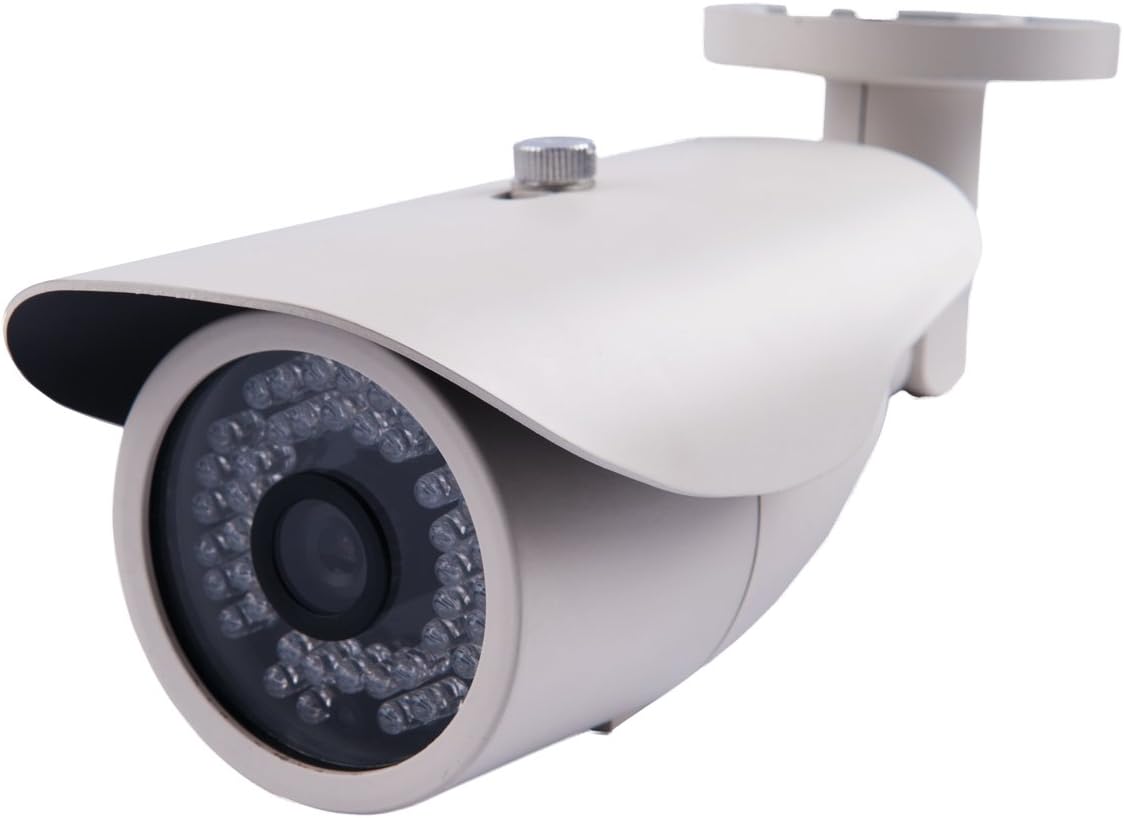
Gambar 1: Hareupeun view of the GXV3672-HD-36 IP Camera, showing the lens and infrared LEDs.

Gambar 2: Samping view of the GXV3672-HD-36 IP Camera, illustrating the adjustable mounting bracket.

Gambar 3: Angled view of the GXV3672-HD-36 IP Camera, highlighting the Grandstream branding and robust casing.
Setup sareng Instalasi
1. Eusi Paket
Sateuacan ngamimitian pamasangan, pariksa yén sadaya komponén aya dina bungkusan:
- Grandstream GXV3672-HD-36 IP Camera
- Mounting Kit (screws, anchors)
- Guide Instalasi Gancang
2. Instalasi fisik
The GXV3672-HD-36 is designed for outdoor use and can be ceiling or wall mounted. Choose a location that provides the desired field of view and is within reach of a network cable with Power over Ethernet (PoE) capability.
- Lokasi Pasang: Select a sturdy surface capable of supporting the camera's weight. Ensure the location offers optimal surveillance coverage and is protected from direct impact.
- Pangeboran: Use the mounting template (if provided in the quick guide) to mark drill holes. Drill pilot holes appropriate for the included screws and anchors.
- Pamasangan Aman: Attach the camera's mounting bracket securely to the surface using the provided screws.
- Sambungan kabel: Connect an Ethernet cable (RJ45) from your PoE-enabled network switch or PoE injector to the camera's network port. The camera will power on automatically.
- Saluyukeun Sudut: Leupaskeun sekrup pangatur dina awak kaméra pikeun nempatkeun kaméra dina posisi anu dipikahoyong viewsudut. Kencengkeun sekrup saatos disaluyukeun.
3. Konfigurasi Jaringan
The camera obtains an IP address via DHCP by default. To access the camera's web panganteur:
- Discover IP Address: Use Grandstream's GSurf_Pro software or a network scanner tool to discover the camera's IP address on your local network.
- Aksés Web panganteur: Buka a web browser and enter the camera's IP address in the URL bar.
- Lebet: Enter the default username (usually "admin") and password (usually "admin" or found in the quick guide). It is highly recommended to change the default password immediately after the first login for security purposes.
- Konfigurasi awal: Follow the on-screen prompts to set up basic network settings, date/time, and video parameters.
Parentah Operasi
1. Hirup View
Sakali asup kana web antarmuka, arahkeun ka "Live View" section to see the real-time video feed from the camera. You can adjust stream quality, resolution, and other display settings from this interface.
2. Ngarékam sareng Nyimpen Video
The GXV3672-HD-36 supports various recording options:
- Rékam Kontinyu: Ngarékam vidéo terus-terusan.
- Ngarekam Deteksi Gerak: Records only when motion is detected in the configured zones.
- Rekaman Dijadwalkeun: Catetan dina waktos-waktos khusus dina sadinten atanapi saminggu.
Recordings can be stored on a Network Video Recorder (NVR), a Network Attached Storage (NAS), or managed via Grandstream's GSurf_Pro software or other ONVIF compliant VMS.
3. Deteksi gerak sareng Tanda
Konpigurasikeun zona deteksi gerak sareng setelan sensitipitas dina kaméra web interface. When motion is detected, the camera can trigger various alerts:
- Email notifications with snapshots.
- FTP upload of recorded video clips or images.
- Triggering external alarm devices (if supported by your setup).
4. Day/Night Mode
The camera automatically switches between day (color) and night (black and white, infrared) modes based on ambient light conditions, thanks to its integrated IR-CUT filter and infrared illuminators. This ensures clear images even in low-light or complete darkness.
Pangropéa
1. beberesih
Regularly clean the camera lens and housing to ensure optimal image quality and prevent accumulation of dirt or debris, especially in outdoor environments.
- Ngagunakeun lemes, damp cloth to wipe the camera body.
- For the lens, use a lens cleaning solution and a microfiber cloth to avoid scratches.
- Entong nganggo bahan kimia kasar atanapi beberesih kasar.
2. Apdet firmware
Pariksa périodik resmi Grandstream website for firmware updates. Firmware updates often include bug fixes, performance improvements, and new features. Follow the instructions provided by Grandstream for safe firmware upgrade procedures.
3. Environmental Checks
Ensure the camera's mounting remains secure and that cables are not damaged or exposed to excessive wear. Verify that the camera's weatherproof seals are intact.
Pamérésan masalah
| Masalah | Mungkin Cukang lantaranana | Solusi |
|---|---|---|
| Taya feed video | No power; Network cable disconnected; Incorrect IP address; Firewall blocking access. | Verify PoE connection; Check network cable; Confirm IP address; Adjust firewall settings. |
| Kualitas gambar henteu saé | Lénsa kotor; Fokus teu bener; Kaayaan cahaya goréng; Masalah bandwidth jaringan. | Bersihkeun lénsa; Atur fokus via web interface; Ensure adequate lighting or check IR functionality; Check network speed. |
| Deteksi gerak teu jalan | Motion detection not enabled; Sensitivity too low; Incorrectly configured zones. | Enable motion detection; Increase sensitivity; Redraw motion detection zones. |
| Teu bisa ngakses web panganteur | Incorrect IP address; Network connectivity issue; Browser cache. | Verify IP address; Ping the camera; Clear browser cache or try a different browser. |
If problems persist, consult the Grandstream support websitus atanapi ngahubungan rojongan teknis.
spésifikasi
| Fitur | Rincian |
|---|---|
| Modél | GXV3672-HD-36 |
| merek | Grandstream |
| Resolusi Video Éféktif | 720 piksel (HD) |
| Téhnologi konektipitas | Kabel (PoE) |
| Pamakéan jero rohangan / outdoor | Luar |
| Peunteun Protection Internasional | IP66 (Tahan Cuaca) |
| Téhnologi Lampu Lemah | Day/Night with Infrared |
| Tipe Sumber Cahaya | LEDs Infrabeureum |
| Tipe Siaga | Gerak Ngan |
| Tipe Pamasangan | Ceiling Mount (also suitable for wall mount) |
| Warna | Bodas |
| Ukuran produk (L x W x H) | 10.5 x 7.25 x 5.5 inci |
| Item Beurat | 1.15 pon |
| Dianjurkeun Mangpaat | Panjagaan Kaamanan |
Garansi sareng Rojongan
Produk Grandstream biasana dilengkepan ku garansi produsén anu kawates. Pikeun syarat sareng katangtuan garansi khusus, mangga tingali kartu garansi anu kalebet dina produk anjeun atanapi kunjungi Grandstream resmi. websitus. Simpen resi pameseran anjeun salaku bukti pameseran.
For technical support, frequently asked questions, firmware downloads, and additional resources, please visit the Grandstream support portal:


