Bubuka
This manual provides essential instructions for the safe and effective use of your Pentax MX-1 Digital Camera. Please read this manual thoroughly before using the camera and keep it in a safe place for future reference.
Produk Leuwihview
The Pentax MX-1 is a high-end compact digital camera featuring a 12-megapixel back-illuminated CMOS sensor and a 4x optical zoom lens (28-112mm equivalent) with an f/1.8-2.5 aperture. It includes a 3-inch tilting LCD display and a dual shake reduction system for clear images and video.

Gambar 1: Hareupeun view of the Pentax MX-1 Digital Camera.
Disetél
1. Pamasangan Batré sareng Ngecas
- Buka panutup kompartemen batré anu aya di handapeun kaméra.
- Insert the provided Lithium-Ion battery, ensuring the correct orientation as indicated inside the compartment.
- Tutup panutup kompartemen batré aman.
- Connect the camera to the AC adapter using the supplied USB cable. The charging indicator will illuminate.
- Cas batréna nepi ka pinuh sateuacan dianggo pikeun anu munggaran. Ngecas batréna nepi ka pinuh biasana peryogi waktu kira-kira 3 jam.
2. Pamasangan Kartu Mémori
- Panggihan slot kartu memori, biasana padeukeut jeung kompartemen batré atawa di sisi kaméra.
- Selapkeun kartu memori SD, SDHC, atanapi SDXC kana slotna kalayan labélna nyanghareup ka arah anu leres dugi ka ngaklik kana tempatna.
- To remove the card, push it in gently until it springs out.

Gambar 2: Sisi view of the camera showing the open port cover for USB/HDMI connections.
3. Setélan Awal
- Hurungkeun kaméra ku mencét tombol ON/OFF kancing.
- Turutan parentah dina-layar pikeun nyetel basa, kaping, jeung waktu.
- Format the memory card before first use to ensure optimal performance. Navigate to the MENU, pilih DISETÉL, teras salajengna Kartu FORMAT.
Ngoperasikeun kaméra
1. Dasar Fotografi
- Daya Hurung: Pencét éta ON/OFF tombol. Lénsa bakal manjang.
- Pilih Mode: Rotate the mode dial on the top of the camera to select your desired shooting mode (e.g., Auto Pict, Program, Aperture Priority, Shutter Priority, Manual).
- fokus: Point the camera at your subject. Press the shutter button halfway down to focus. The focus frame will turn green when focus is achieved.
- némbak: Pencét tombol jepret sapinuhna ka handap pikeun nyandak gambar.

Gambar 3: Top view of the camera showing the mode dial, shutter button, and exposure compensation dial.
2. Using the Tilting LCD Monitor
The 3-inch LCD monitor can be tilted up or down to facilitate shooting from various angles, such as low-angle shots or overhead shots. Gently pull the top or bottom edge of the LCD screen to adjust its position.
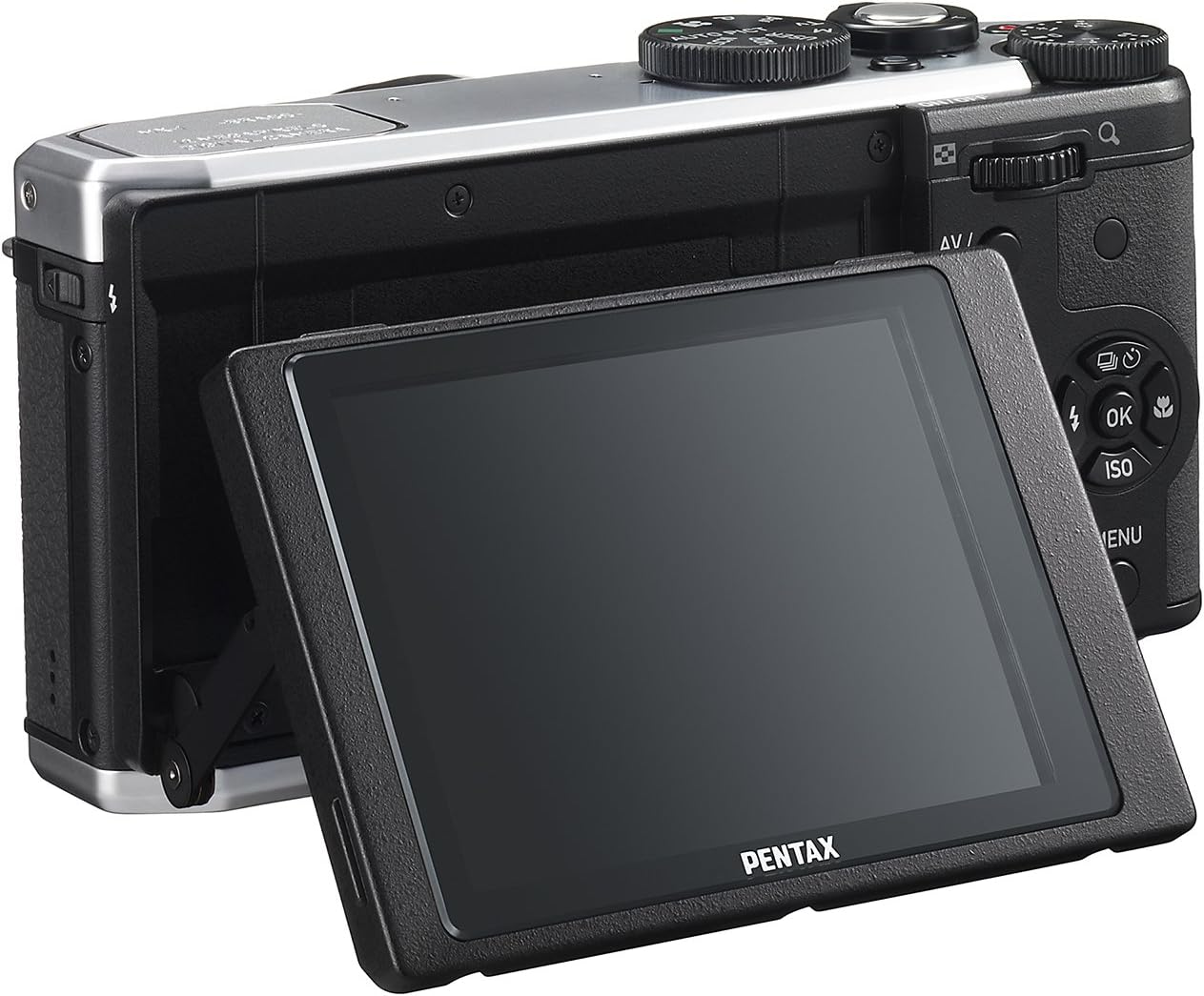
Gambar 4: Tukangeun view of the camera demonstrating the tilting LCD screen.
3. Operasi Flash
To use the built-in flash, slide the flash release lever to pop up the flash unit. The flash modes (Auto, On, Off, Slow Sync, Rear Curtain Sync) can be selected via the camera's menu or a dedicated button, depending on the shooting mode.

Gambar 5: Hareupeun view of the camera with the pop-up flash in the extended position.
4. Modeu Puterkeun
- Pencét éta ulin tombol pikeun ngasupkeun mode playback.
- Use the directional pad to scroll through your photos and videos.
- Pencét éta OK tombol pikeun view information about the selected image or to play a video.
- Pencét éta MENU button to access playback options such as deleting, rotating, or resizing images.
Pangropéa
1. Ngabersihan Kaméra
- Awak kaméra: Anggo kaén anu lembut sareng garing pikeun ngusap awak kaméra. Keur kokotor bandel, rada dampen the cloth with water or a mild cleaning solution. Avoid using organic solvents.
- Lensa: Use a lens brush or a blower to remove dust. For smudges, use a lens cleaning cloth and lens cleaning fluid. Do not touch the lens surface with your fingers.
- Monitor LCD: Gently wipe the screen with a soft, lint-free cloth. Avoid pressing hard on the screen.
2. Panyimpenan
- Lamun teu dipaké pikeun période nambahan, cabut batré tina kaméra.
- Store the camera in a cool, dry, and well-ventilated place, away from direct sunlight, high temperatures, and humidity.
- Use a desiccant to prevent mold growth if storing in humid environments.
Pamérésan masalah
If you encounter issues with your Pentax MX-1, refer to the table below for common problems and their solutions.
| Masalah | Mungkin Cukang lantaranana | Solusi |
|---|---|---|
| Kaméra teu hurung. | Batré béak atawa teu bener diselapkeun. | Cas batréna atanapi pasang deui kalayan leres. |
| Teu tiasa nyandak gambar. | Kartu memori pinuh, dikonci, atawa teu diselapkeun. | Insert a memory card, unlock it, or delete unnecessary files. |
| Gambar blur. | Kaméra oyag, fokus salah, atanapi lénsa kotor. | Tahan kaméra ajeg, pastikeun fokus bener, atawa bersih lensa. |
| Flash teu seuneu. | Flash is set to "Off" or not popped up. | Pop up the flash and set the flash mode to "Auto" or "On". |
| layar LCD hese ningali dina lampu caang. | Cahaya ambient anu luhur. | Adjust the tilting LCD for a better viewing angle or find shade. |
spésifikasi
| Fitur | Rincian |
|---|---|
| Ngaran modél | Pentax MX-1 |
| Resolusi Sénsor Poto | 12 MP |
| Ukuran Sénsor Poto | 1/1.7 inci |
| Zoom optik | 4x |
| Lensa Focal Length | 28-112mm (sarua 35mm) |
| Kisaran apertur | f/1.8-2.5 |
| Stabilisasi Gambar | Sénsor-shift |
| Ukuran layar | 3 inci |
| Tipe tampilan | LCD anu tiasa dimiringkeun |
| Dirojong File Formatna | JPEG 2.3, RAW |
| Resolusi Video | FHD 1080p (H.264) |
| Rentang ISO (Dilegakeun) | 100-12800 |
| Rentang Speed Shutter | 30 detik nepi ka 1/8000 detik |
| Tipe Kartu Mémori | SD / SDHC / SDXC |
| Konektipitas | HDMI (Mini HDMI type-D), USB |
| Jenis Batré | Litium Ion |
| Item Beurat | 13.76 ons |
Garansi sareng Rojongan
Émbaran jaminan
The Pentax MX-1 Digital Camera comes with a garansi 1 taun covering parts and labor from the date of purchase. This warranty covers manufacturing defects and malfunctions under normal use. It does not cover damage caused by misuse, accidents, unauthorized repairs, or normal wear and tear. Please retain your proof of purchase for warranty claims.
Rojongan Palanggan
For technical assistance, service, or further inquiries, please visit the official Pentax support website or contact their customer service department. Refer to the product packaging or the official Pentax websitus pikeun inpo kontak panganyarna.
Nganjang ka Toko Pentax di Amazon pikeun émbaran produk tambahan jeung asesoris.


