1. Bubuka
The Canon PowerShot S110 is a compact digital camera designed for high-quality imaging and versatile shooting. It features a 12.1 Megapixel High-Sensitivity CMOS sensor, a DIGIC 5 Image Processor, and a bright f/2.0 lens with 5x Optical Zoom. This camera also includes built-in Wi-Fi for convenient image sharing and a capacitive touch panel LCD for intuitive operation. This manual provides essential information for setting up, operating, and maintaining your PowerShot S110 camera.

Gambar 1.1: Hareupeun view tina Kaméra Digital Canon PowerShot S110. Gambar ieu nampilkeun lénsa kaméra, lampu kilat, sareng desain kompak sacara umum.
2. Naon dina Box
Pastikeun yén sadaya item di handap ieu kalebet dina pakét anjeun:
- Canon PowerShot S110 Digital Camera
- Pek batré
- Carjer batré
- Kabel USB
- Kabel HDMI
- Tali pigeulang
- Software CD-ROM (for bundled software)
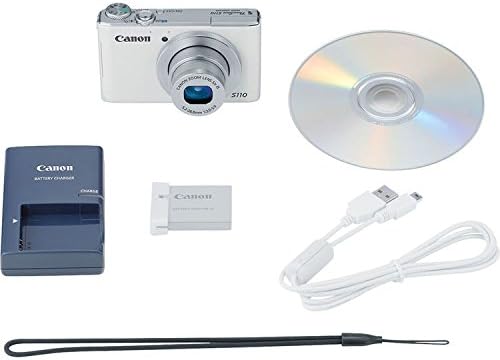
Gambar 2.1: The Canon PowerShot S110 camera alongside its standard accessories, including the battery, charger, cables, and software disc.
3. Setélan
3.1. Ngecas Batré
- Insert the battery pack into the provided battery charger.
- Colokkeun carjer ka colokan listrik. Lampu indikator ngecas bakal hurung.
- Sakali ngecas réngsé, lampu indikator bakal robah atanapi pareum. Cabut batréna.
3.2. Nyelapkeun Batré sareng Kartu Mémori
- Buka panutup kompartemen batré/kartu di handapeun kaméra.
- Insert the charged battery pack firmly until it clicks into place.
- Insert an SD/SDHC/SDXC memory card into the card slot with the label facing the correct direction, pushing until it clicks.
- Tutup panutup kompartemen aman.
3.3. Setélan Awal
Upon first power-on, you will be prompted to set the date, time, and language. Follow the on-screen instructions using the camera's controls or touch screen.
3.4. Nyambungkeun ka Wi-Fi
The PowerShot S110 features built-in Wi-Fi for image transfer. To connect:
- Pencét éta MENU button and navigate to the Wi-Fi settings.
- Select your desired connection method (e.g., connect to a smartphone, computer, or Wi-Fi printer).
- Follow the on-screen prompts to establish a connection. For smartphone connectivity, download the free Canon CameraWindow app.
4. Operasi
4.1. Dasar Fotografi
Pikeun nyandak poto:
- Hurungkeun kaméra ku mencét tombol POWER kancing.
- Pigura shot anjeun nganggo layar LCD 3.0 inci.
- Pencét tombol jepret satengahna ka handap pikeun fokus. Pigura pokus bakal héjo nalika pokus kahontal.
- Pencét pinuh tombol jepret pikeun moto gambar.
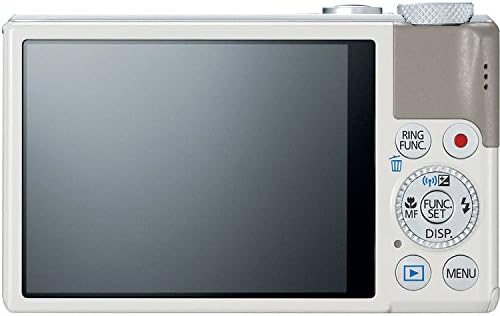
Gambar 4.1: Tukangeun view of the Canon PowerShot S110, showing the LCD screen, control buttons, and the control ring.
4.2. Modeu shooting
The PowerShot S110 offers various shooting modes accessible via the mode dial or menu:
- Otomatis pinter: The camera automatically selects optimal settings based on the scene.
- Program AE (P): The camera sets aperture and shutter speed, while you control other settings like ISO and white balance.
- AE prioritas rana (Tv): Anjeun nyetel laju jepret, sarta kaméra nyaluyukeun aperture. Idéal pikeun ngadalikeun blur gerak.
- AE prioritas apertur (Av): You set the aperture, and the camera adjusts the shutter speed. Useful for controlling depth of field.
- Manual (M): Kadali pinuh kana aperture, speed rana, sareng ISO.
- Custom (C): Save and recall your preferred settings.
- Special Scene Modes (SCN): Includes modes like Portrait, Smooth Skin, Handheld Night Scene, Snow, and Fireworks for specific situations.
- Saringan kreatif: Apply effects such as Toy Camera Effect, Miniature Effect, Super Vivid, and Color Accent.
- Ringkesan Pilem: Records a short video clip before each still image and compiles them into a daily video.
4.3. Ngarekam Pidéo
To record Full HD (1080p) video:
- Pencét dedicated Pilem button (red dot icon) located on the rear of the camera.
- Pencét deui tombol pikeun ngeureunkeun ngarékam.
The camera supports zooming during video recording, and audio is captured in stereo. Videos can be viewed on an HDTV via the HDMI output.
4.4. Image Stabilization (Intelligent IS)
The Intelligent IS system automatically selects the optimal image stabilization mode for your shooting conditions:
- IS Normal: Corrects general camera movement for stills.
- Panning IS: Disables vertical shake correction when panning horizontally.
- Makro (Hibrida) IS: Corrects shift-type shake common in close-up photography.
- IS Dinamis: Effective for video shooting at wide-angle, reducing shake while walking.
- Didukung IS: Compensates for hand movement during telephoto video recording.
- Tripodna nyaéta: Automatically disables IS when a tripod is detected.
4.5. Touch Panel LCD and Control Ring
The 3.0-inch capacitive touch panel allows for intuitive control:
- Touch Shutter: Tap the screen to focus and take a picture.
- Playback Gestures: Use pinch-to-zoom and swipe gestures to navigate images.
- Penyesuaian Setélan: Quickly select camera settings by tapping.
The control ring around the lens barrel can be customized to adjust settings such as focus, aperture, shutter speed, ISO, or exposure compensation. Use the dedicated RING FUNC. button to select its function.
4.6. RAW+JPEG Recording
The camera supports simultaneous recording of RAW and JPEG images, providing maximum flexibility for post-processing. RAW files capture all sensor data, while JPEG files are processed in-camera for immediate use.
4.7. GPS Tagging
Utilize the Canon CameraWindow app on your smartphone to record GPS data. This data can then be wirelessly transferred to your camera to tag images with location information, aiding in organization.
4.8. Image Transfer and Printing
Images and videos can be transferred wirelessly to social networking sites via CANON iMAGE GATEWAY, to a PC, or to iOS/Android devices using the Canon CameraWindow app. You can also print directly to Wi-Fi compatible printers.
5. Pangropéa
5.1. Ngabersihan Kaméra
- Awak kaméra: Ngusap ku lawon lemes, garing. Pikeun kokotor bandel, make kaen hampang dampdikumbah ku cai tuluy digaringkeun.
- Lensa: Use a lens blower to remove dust, then gently wipe with a lens cleaning cloth. Avoid touching the lens surface with your fingers.
- Layar LCD: Use a soft, dry cloth. For smudges, use a screen cleaner specifically designed for electronics.
Do not use organic solvents such as alcohol, benzene, or paint thinner, as these can damage the camera finish.
5.2. Kaperawatan batré
- Simpen batré di tempat anu tiis sareng garing upami henteu dianggo.
- Hindarkeun sering-sering ngecas batré pikeun manjangkeun umurna.
- Upami kaméra henteu dianggo kanggo waktos anu panjang, cabut batréna.
5.3. Panyimpenan
Store the camera in a dry, well-ventilated area, away from direct sunlight, high temperatures, and humidity. Consider using a desiccant to prevent mold growth, especially in humid environments.
6. Cara ngungkulan
6.1. Kaméra Teu Hurung
- Pastikeun batre tos dicas pinuh sareng diselapkeun leres.
- Pariksa yén panutup kompartemen batré parantos ditutup pageuh.
6.2. Lens Error / Lens Not Extending
- Check for any obstructions around the lens barrel.
- Turn the camera off and then on again. If the error persists, contact customer support.
6.3. Gambar Kabur
- Pastikeun lénsa beresih.
- Confirm that the camera has focused correctly (focus frame turns green).
- In low light, use a higher ISO setting or enable flash.
- Hold the camera steady or use a tripod, especially with slower shutter speeds.
6.4. Masalah Sambungan Wi-Fi
- Ensure your smartphone or computer's Wi-Fi is enabled and within range.
- Verify that the correct password or network settings are entered.
- Restart both the camera and the connecting device.
- Ensure the Canon CameraWindow app is updated to the latest version.
7. Spésifikasi
| Ngaran modél | Canon PowerShot S110 |
| Resolusi Sénsor Poto | 12.1 MP |
| Tipe Sensor Poto | CMOS |
| Zoom optik | 5x |
| Panjang Fokus Minimum | 24 mm |
| Panjang Fokus Maksimum | 120 mm |
| Aperture maksimum | f/2.0 |
| Stabilisasi Gambar | Optik |
| Tipe tampilan | Layar Toél LCD 3.0 inci |
| Resolusi Video | HD lengkep 1000p |
| Konektipitas | HDMI, USB, Wi-Fi |
| Dirojong File Formatna | JPEG, RAW |
| Tipe Mémori Flash | SD / SDHC / SDXC |
| Item Beurat | 6.98 ons |
8. Garansi jeung Rojongan
8.1. Émbaran jaminan
The Canon PowerShot S110 Digital Camera comes with a Kawates 1-Taun Garansi. This warranty covers defects in materials and workmanship under normal use. For full terms and conditions, please refer to the warranty card included with your product or visit the official Canon websitus.
8.2. Rojongan Palanggan
For technical assistance, service, or additional information, please contact Canon customer support. You can find contact details and support resources on the official Canon websitus: www.usa.canon.com/support.
Before contacting support, please have your camera's model name (PowerShot S110) and serial number ready.


