Bubuka
This manual provides detailed instructions for the operation and maintenance of your PENTAX Q10 digital interchangeable lens camera. The PENTAX Q10 is a super-compact and lightweight camera designed to deliver high-quality photography with a 12.4MP CMOS image sensor and improved autofocus performance.
Naon dina Box
- PENTAX Q10 Camera Body
- 02 Standard Zoom Lens (5-15mm)
- Batré Litium-Ion Rechargeable
- Carjer batré
- Kabel USB
- Tali
- Body Mount Cap
- Caps lénsa (hareup jeung pungkur)
- Parangkat lunak CD-ROM
- Manual Pitunjuk (dokumén ieu)
Kaméra Ngalangkunganview

Gambar 1: Hareupeun View (Lens Removed) - This image displays the front of the Pentax Q10 camera body with the lens detached, revealing the image sensor and the Q-mount for interchangeable lenses. The 'PENTAX' logo is visible at the top, and 'SR' (Shake Reduction) is indicated on the grip.
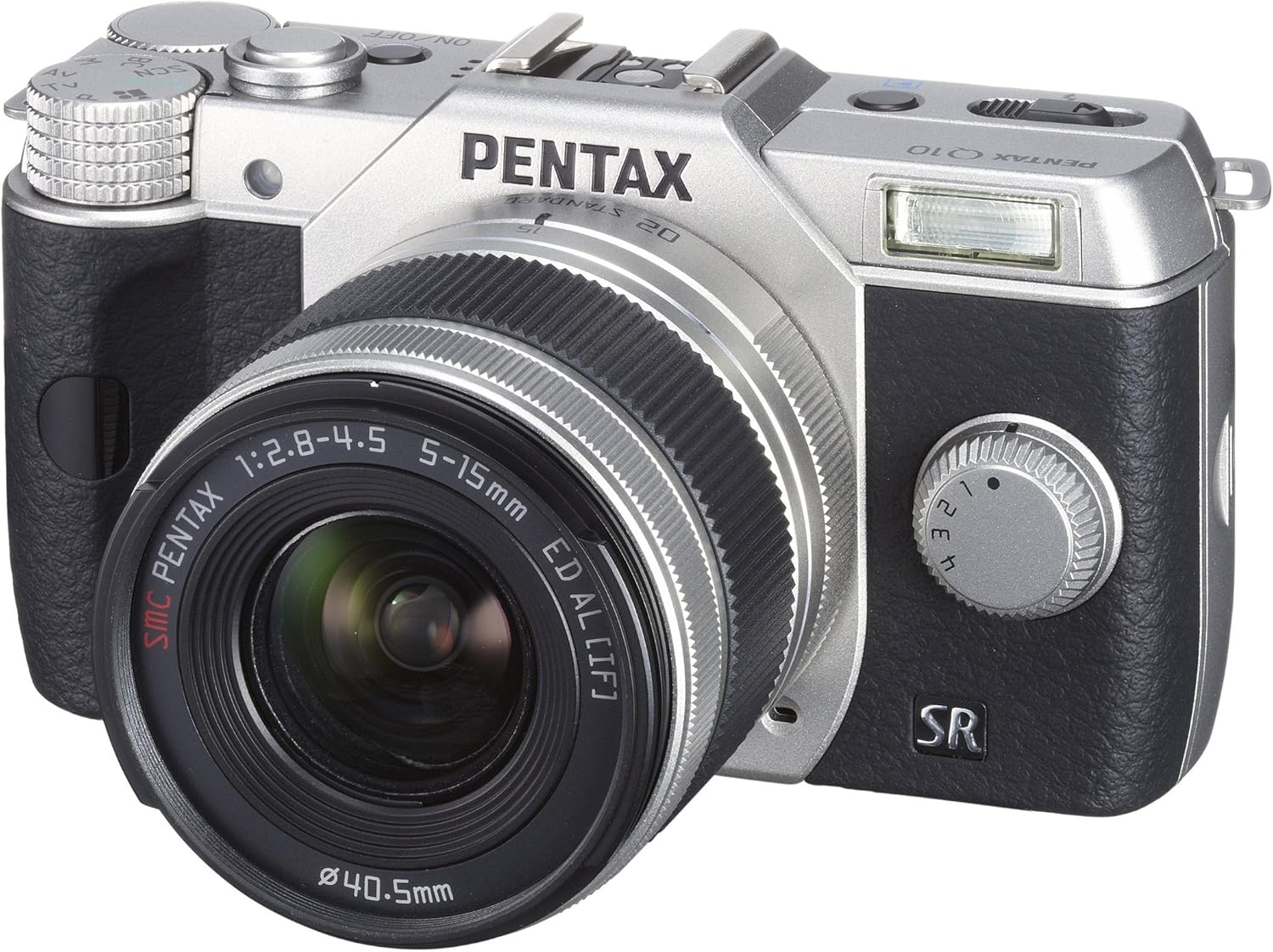
Gambar 2: Hareupeun View with Lens Attached - The Pentax Q10 camera is shown with the 02 Standard Zoom Lens (5-15mm) mounted. This view highlights the compact size of the camera with its standard kit lens.

Gambar 3: Top View - This overhead view of the Pentax Q10 shows the main controls on the top panel, including the mode dial (with Auto, P, Av, Tv, M, SCN settings), the power ON/OFF button, the shutter release button, and the hot shoe for external flash units.

Gambar 4: Hareupeun View with Flash Activated - The Pentax Q10 is depicted with its built-in pop-up flash extended, ready for use. This view also shows the 02 Standard Zoom Lens attached.

Gambar 5: Tukangeun View - The back of the Pentax Q10 camera features the 3-inch LCD screen, along with various control buttons such as the playback button, delete button, ISO, OK, WB, and menu navigation buttons.
Setup Dasar
1. Ngecas Batré
Insert the provided rechargeable battery into the battery charger. Connect the charger to a power outlet. The charging indicator light will show the charging status. Once fully charged, remove the battery.
2. Nyelapkeun Batré sareng Kartu Mémori
Open the battery/memory card compartment cover located at the bottom of the camera. Insert the charged battery with the correct orientation until it clicks into place. Insert an SD/SDHC/SDXC memory card into the card slot until it locks. Close the compartment cover securely.
3. Ngalampirkeun Lensa
Align the red dot on the lens with the red dot on the camera's lens mount. Rotate the lens clockwise until it clicks into place. To remove the lens, press the lens release button on the camera body and rotate the lens counter-clockwise.
4. Setélan Awal
Upon first power-on, the camera may prompt you to set the date, time, and language. Follow the on-screen instructions using the control buttons and LCD screen.
Ngoperasikeun kaméra
Daya Hurung/Pareuman
Pencét éta ON/OFF button located on the top panel to power the camera on or off.
Modeu shooting
Puterkeun kenop modeu dina luhureun kaméra pikeun milih modeu motret nu dipikahoyong:
- Otomatis: Fully automatic shooting for ease of use.
- P (Program AE): Camera sets aperture and shutter speed, but allows for program shift.
- Av (Aperture Priority AE): Anjeun nyetel aperture, kaméra nyetél speed jepret.
- Tv (Shutter Priority AE): Anjeun nyetél laju jepret, kaméra nyetél aperture.
- M (Manual): Anjeun nyetél aperture sareng laju jepret.
- SCN (Scene Modes): Pre-set modes for specific situations (e.g., Portrait, Landscape, Night Scene, Macro, Blue Sky, Forest, Blur control).
Nyokot Poto
- Select a shooting mode using the mode dial.
- Pigura shot anjeun ngagunakeun monitor LCD.
- Press the shutter release button halfway down to focus. The camera will confirm focus.
- Pencét pinuh tombol pelepas jepret pikeun nyandak gambar.
Ngarékam pidéo
The PENTAX Q10 supports Full 1080p HD video recording at 30 frames per second with H.264 compression. To record video:
- Switch the camera to movie mode (if available on the mode dial or via menu setting).
- Press the dedicated movie recording button (if present) or the shutter release button to start recording.
- Pencét deui tombol pikeun ngeureunkeun ngarékam.
Operasi Flash
The camera features a built-in pop-up flash. To activate the flash, slide the flash release lever. The flash has various modes (e.g., Auto, Flash On, Red-eye Reduction) which can be selected via the camera's menu or dedicated flash button.
Sistem pokus otomatis
The PENTAX Q10 utilizes a contrast detection autofocus system with 25 autofocus points. Available AF modes include Continuous, Face Detection, Multi-area, Selective single-point, Single, and Tracking. Select the appropriate AF mode from the camera's menu to suit your shooting conditions.
Stabilisasi Gambar
The camera incorporates a sensor-shift shake reduction system to minimize blur caused by camera shake, especially in low light conditions or when using longer focal lengths.
Pangropéa
Ngabersihan Awak Kaméra
Ngusap awak kaméra nganggo kaén anu garing sareng lemes. Keur kokotor bandel, rada dampen the cloth with water or a mild cleaning solution specifically designed for electronics. Avoid using strong solvents.
Ngabersihan Lensa
Use a lens blower to remove dust from the lens surface. For smudges, use a specialized lens cleaning cloth and lens cleaning fluid. Never touch the lens surface with your fingers.
Beberesih sénsor
The PENTAX Q10 features an integrated DRII (Dust Removal II) dust reduction system. If dust spots appear on your images, consult a professional service center for sensor cleaning. Attempting to clean the sensor yourself can cause damage.
Perawatan batré
Store batteries in a cool, dry place. Do not expose them to extreme temperatures. If the camera will not be used for an extended period, remove the battery.
Pamérésan masalah
Kaméra Henteu Hurung
- Pastikeun batre tos dicas pinuh sareng diselapkeun leres.
- Pariksa lamun kontak batréna beresih.
Teu Bisa Nyokot Gambar
- Pastikeun yén kartu mémori diselapkeun sareng gaduh rohangan bébas anu cekap.
- Check if the lens is properly attached and unlocked.
- Ensure the camera is not in playback mode.
- If the flash is set to a slow sync mode, the shutter may not release immediately.
Gambar Kabur
- Pastikeun lénsa beresih.
- Check if the camera is properly focused.
- Use a faster shutter speed or increase ISO in low light conditions.
- Confirm that the image stabilization (SR) is active if needed.
Kasalahan Kartu Mémori
- Pasangkeun deui kartu memori.
- Coba kartu mémori anu béda, cocog.
- Pormat kartu mémori (catetan: ieu bakal mupus sadaya data).
spésifikasi
| Ngaran modél | Pentax Q10 |
| Sénsor Gambar | 12.4 MP Backlit CMOS (1/2.3-inch) |
| Resolusi Masih Éféktif | 12.4 MP |
| Pasang Lensa | Pentax Q-mount |
| Stabilisasi Gambar | Sénsor-shift |
| Resolusi Video | Full HD 1080p (1920x1080) at 30fps (H.264) |
| tampilan | LCD 3 inci (460,000 titik) |
| Sensitipitas ISO | Expanded ISO Minimum 100 |
| Laju jepret | 1/8000 ka 30 detik |
| Sistem pokus otomatis | Contrast Detection (25 points) |
| Shooting kontinyu | Nepi ka 5 fps |
| Média Panyimpenan | SD / SDHC / Kartu Mémori SDXC |
| Konektipitas | HDMI (Type C Mini), USB |
| Beurat (Kira-kira.) | 0.44 Pon (Awak hungkul) |
Catetan: Spésifikasi tiasa robih tanpa aya bewara.
Garansi sareng Rojongan
Émbaran jaminan
The PENTAX Q10 camera comes with a Bagian 1 taun sareng jaminan tenaga kerja from the date of purchase. Please retain your proof of purchase for warranty claims. This warranty covers manufacturing defects and workmanship under normal use.
Rojongan Palanggan
For technical assistance, service, or further inquiries, please visit the official Pentax support websitus atanapi ngahubungan departemén layanan palanggan maranéhna. Inpormasi kontak biasana tiasa dipendakan dina produsén websitus atawa dina kartu jaminan kaasup kalayan produk Anjeun.


