1. Produk Langkungview
The ASUS TUF SABERTOOTH 990FX R2.0 is an ATX motherboard designed for AMD Socket AM3+ processors, supporting up to 8-core AMD FX Series CPUs and compatible with previous generation AM3 processors. This motherboard emphasizes stability, compatibility, and durability, ensuring reliable operation under various conditions.
Key features include CeraM!X premium ceramic-coating technology for enhanced heat dissipation, TUF Thermal Radar with 10 hardware sensors for real-time thermal detection, and DIGI+ Power Control for precise CPU and DRAM voltage regulation. It also incorporates ASUS E.S.P. for efficient power switching, MemOK! for memory boot compatibility, and ESD Guards for component protection. The board supports Quad-GPU SLI and Quad-GPU CrossFireX for multi-GPU configurations and utilizes military-standard TUF capacitors, chokes, and MOSFETs for extended lifespan.
2. Setup jeung Instalasi
2.1. CPU Installation (Socket AM3+)
Carefully align your AMD AM3+ processor with the motherboard socket. Ensure the CPU is correctly oriented before gently lowering it into place. Close the retention lever to secure the CPU.
2.2. Pamasangan RAM (DDR3)
This motherboard supports DDR3 memory. Open the clips on the DIMM slots. Align the memory module's notch with the slot's key and press down firmly on both ends until the clips snap into place. Refer to the motherboard layout for recommended dual-channel configurations.
2.3. Storage Device Installation (SATA 6Gb/s)
Connect your SATA 6Gb/s storage devices (HDDs, SSDs) to the available SATA ports on the motherboard using SATA data cables. Ensure power cables from your power supply are also connected to the devices.
2.4. Pamasangan Kartu Ékspansi (PCIe)
Insert your PCI Express expansion cards (e.g., graphics cards, sound cards) into the appropriate PCIe slots. Press down firmly until the card is seated correctly and secure it with a screw to the chassis.
2.5. Sambungan Kakuatan
Connect the 24-pin ATX main power connector and the 8-pin ATX 12V power connector from your power supply to the corresponding sockets on the motherboard.
2.6. Sambungan Panel hareup
Connect the front panel headers (power button, reset button, HDD LED, power LED, USB ports, audio jacks) from your chassis to the corresponding pins on the motherboard. Refer to the motherboard manual for exact pin assignments.
3. Parentah Operasi
3.1. Konfigurasi mios / UEFI
Upon initial boot, press the designated key (usually DEL or F2) to enter the BIOS/UEFI setup utility. Here you can configure boot order, system time, and various hardware settings. The DIGI+ Power Control allows for advanced power management and tuning.
3.2. Pamasangan supir
After installing your operating system, install all necessary drivers from the provided support DVD or the ASUS website. This includes chipset drivers, audio drivers, LAN drivers, and any other peripheral drivers to ensure optimal system performance.
3.3. Pangimeutan Sistim
Utilize the TUF Thermal Radar software to monitor real-time thermal conditions across 10 hardware sensors on the motherboard. This allows for customized cooling settings and proactive thermal management.
4. Pangropéa
4.1. Dust Cleaning
Rutin ngabersihan lebu tina motherboard sareng komponén pendinginan nganggo hawa anu dikomprés. Pastikeun sistem dipareuman sareng dicabut colokan sateuacan beberesih.
4.2. BIOS Apdet
Pariksa dukungan ASUS sacara berkala website for BIOS/UEFI updates. Updating the BIOS can improve system stability, compatibility, and performance. Follow the instructions provided by ASUS carefully during the update process.
4.3. Pamariksaan Komponen
Ensure all cables and components are securely seated. Loose connections can lead to system instability or non-functionality.
5. Cara ngungkulan
5.1. System Not Booting
- Pariksa deui naha sadaya sambungan daya kana motherboard sareng komponénna aman.
- Check that the CPU and RAM are correctly installed.
- Mangpaatkeun MemOK! button on the motherboard to resolve memory compatibility issues if the system fails to boot due to RAM.
- Ensure the graphics card is properly seated and connected to power, if applicable.
5.2. Peripheral Recognition Issues
- Pastikeun sadaya supir dipasang leres sareng diropéa.
- Check USB and SATA connections for proper seating.
- Test peripherals on different ports to rule out faulty ports.
5.3. Sistim instability / kacilakaan
- Monitor system temperatures using TUF Thermal Radar to check for overheating.
- Ensure adequate cooling and airflow within the PC case.
- Verify RAM stability using diagnostic tools.
- Check for the latest BIOS/UEFI firmware and update if necessary.
Fitur motherboard ESD Guards to protect components from electrostatic discharge, which can help prevent certain types of hardware failures.
6. Spésifikasi
| Fitur | Rincian |
|---|---|
| merek | ASUS |
| Runtuyan | SABERTOOTH 990FX R2.0 |
| Nomer modél | SABERTOOTH 990FX R2.0 |
| CPU Socket | Soket AM3+ |
| Prosesor cocog | AMD FX Series (up to 8-core), AMD Athlon, AMD Sempron |
| Tipe Chipset | AMD 990FX |
| Téhnologi Mémori RAM | DDR3 SDRAM |
| Max RAM Dirojong | 32 GB DDR3 |
| Laju mémori | Nepi ka 2666 MHz |
| palabuhan SATA | SATA 6 Gb/s |
| USB 2.0 palabuhan | 2 (rear panel) + internal headers |
| USB 3.0 palabuhan | 2 (rear panel) + internal headers |
| Ukuran produk (L x W x H) | 10.47 x 2.99 x 13.03 inci |
| Item Beurat | 4.45 pon |
7. Visuals produk
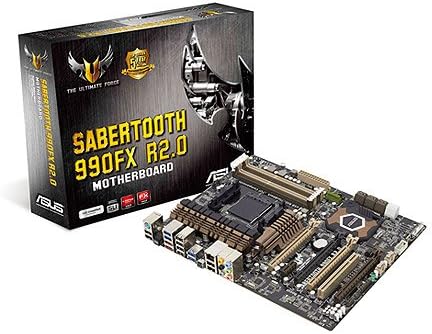
7.1. Gambar produk




7.2. Video Produk Resmi
video ieu nyadiakeun leuwih umumview of the product, highlighting its design and features. It is an official product video from the seller.
8. Garansi jeung Rojongan
Kanggo inpormasi garansi anu lengkep, mangga tingal ka situs wéb resmi ASUS website or the documentation included with your purchase. Product support, including driver downloads and further troubleshooting guides, can also be found on the official ASUS support portal.
Please note the legal disclaimer: "Item is nonrefundable once purchased. Still has original packaging." This information is provided by the seller and may pertain to specific purchase conditions.


