
Bubuka
This manual provides detailed instructions for the setup, operation, and maintenance of your iLive ISB212B Bluetooth Speaker. This compact speaker delivers audio wirelessly from compatible Bluetooth devices and also supports wired connections. Please read this manual thoroughly before using your speaker.
Eusi pakét
- iLive ISB212B Bluetooth Speaker
- Mini-USB to USB Charging Cable
Fitur produk
- Wireless audio streaming via Bluetooth
- LED pairing indicator for connection status
- Compact, cylindrical design
- Rechargeable battery with approximately 2 hours of playback
- Mini-USB port for battery recharging
- 3.5mm Audio Input for wired connections
Kontrol jeung Indikator
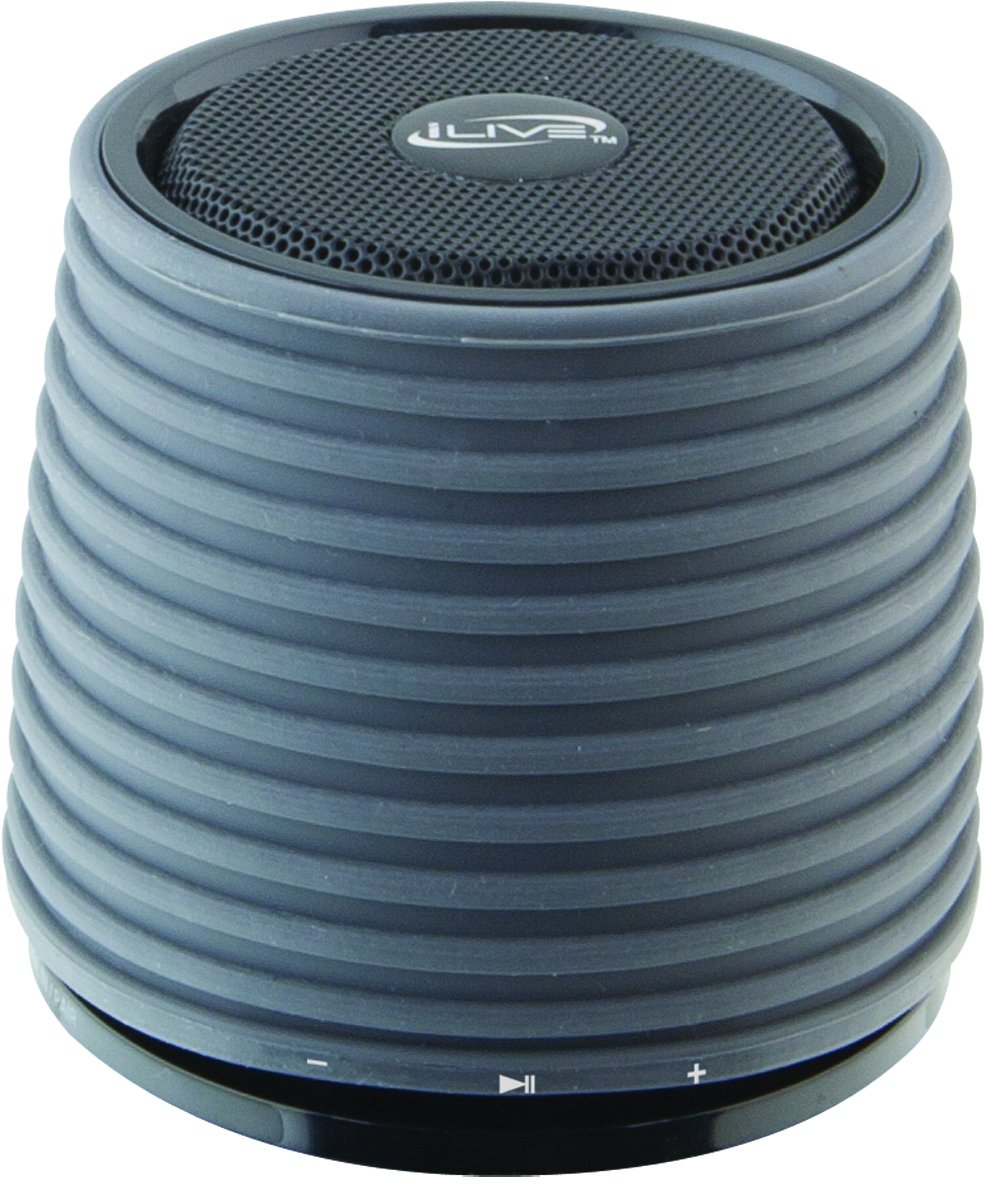
This image displays the iLive ISB212B Bluetooth Speaker. It features a cylindrical shape with a textured grey body and a black speaker grille on top. A band around the middle shows control buttons for play/pause, volume up/next track, and volume down/previous track.
- Tombol Daya: Pencét jeung tahan pikeun mareuman/nonaktipkeun.
- Tombol Puter/Reureuh: Ngadalikeun playback audio.
- Volume Kaluhur / Tombol Lagu Salajengna: Pencét pondok pikeun polumeu ka luhur, pencét panjang kanggo lagu salajengna.
- Volume Turunkeun / Tombol Lagu Saméméhna: Pencét pondok pikeun volume handap, pencét lila pikeun lagu saméméhna.
- LED Pairing Indicator: Nembongkeun status sambungan Bluetooth.
- Port mini-USB: Pikeun ngecas batré internal.
- Input Audio 3.5mm: For connecting external audio devices via an auxiliary cable (not included).
Disetél
1. Ngecas Batré
- Connect the small end of the included Mini-USB to USB charging cable to the Mini-USB port on the speaker.
- Sambungkeun tungtung kabel ngecas USB anu ageung kana port USB anu diaktipkeun (contona, komputer, adaptor témbok USB).
- Indikator LED bakal nyaangan nalika ngecas sareng mareuman atanapi robih warna nalika dicas pinuh.
- A muatan pinuh nyadiakeun kira 2 jam waktu playback.
2. Powering on / Pareum
- To power on, press and hold the Power button until the LED indicator illuminates.
- To power off, press and hold the Power button again until the LED indicator turns off.
Parentah Operasi
1. Papasangan Bluetooth
- Pastikeun spiker hurung sareng aya dina jarak 30 kaki ti alat Bluetooth anjeun.
- The LED pairing indicator will flash, indicating it is in pairing mode.
- On your Bluetooth device (smartphone, tablet, etc.), enable Bluetooth and search for new devices.
- Select "iLive ISB212B" from the list of available devices.
- Once paired, the LED pairing indicator will become solid, and you may hear an audible confirmation.
- Upami pasangan gagal, pareuman speaker sareng alat anjeun, teras balikan deui léngkah-léngkahna.
2. Midangkeun Audio
- After successful Bluetooth pairing, begin playing audio on your connected device.
- Paké tombol Play / Reureuh on spéker pikeun ngadalikeun playback.
- Use the Volume Up/Down buttons for volume adjustment. Long press for track navigation.
3. Using the 3.5mm Audio Input
- Connect one end of a 3.5mm audio cable (not included) to the 3.5mm Audio Input port on the speaker.
- Sambungkeun tungtung kabel anu sanésna kana jack headphone atanapi output audio alat audio éksternal anjeun.
- Spéker bakal otomatis pindah ka modeu input bantu.
- Adjust volume using your external device and the speaker's volume controls.
Pangropéa
- Ngabersihan spéker nganggo kaén anu lemes sareng garing. Ulah make cleaners abrasive atawa pangleyur.
- Jauhkeun speaker tina cai, beueus, sareng suhu anu ekstrim. Produk ieu henteu tahan cai.
- Simpen spéker dina tempat anu tiis sareng garing upami henteu dianggo kanggo waktos anu lami.
- Ulah nyobian ngabongkar atanapi ngarobih speaker. Ieu bakal ngabatalkeun garansi.
Pamérésan masalah
| Masalah | Solusi |
|---|---|
| Speaker teu hurung. | Ensure the battery is charged. Connect the speaker to a power source using the Mini-USB cable. |
| Teu tiasa dipasangkeun sareng alat Bluetooth. |
|
| Taya sora atawa volume low. |
|
| hirup batré pondok. | Pastikeun speaker parantos dicas pinuh sateuacan dianggo. Daya tahan batré tiasa bénten-bénten dumasar kana tingkat volume sareng panggunaan. |
spésifikasi
| Fitur | Rincian |
|---|---|
| Nomer modél | ISB212B |
| Konektipitas | Bluetooth, 3.5mm Auxiliary, Mini-USB (charging) |
| Speaker Kaluaran Power | 3 Watt |
| Jenis Batré | 1 Litium Ion (kaasup) |
| Kahirupan batré (approx.) | 2 Jam |
| Dimensi produk | 7.8 x 7.8 x 7.01 cm |
| Item Beurat | 295 g |
| Negara asal | Cina |
| Tahan cai | No |
Garansi sareng Rojongan
This iLive ISB212B Bluetooth Speaker comes with a garansi 90 poé from the date of purchase. This warranty covers manufacturing defects. For technical support or warranty claims, please refer to the contact information provided with your product packaging or visit the official iLive websitus.