1. Bubuka
This manual provides detailed instructions for the installation, operation, and maintenance of your GIGABYTE GA-H77-DS3H motherboard. Please read this manual thoroughly before attempting any installation or configuration to ensure proper functionality and to prevent damage to your system components.
The GIGABYTE GA-H77-DS3H is an ATX motherboard designed for Intel LGA 1155 processors, featuring Intel H77 Express Chipset, Dual UEFI BIOS, and support for AMD CrossFireX technology. It incorporates GIGABYTE's Ultra Durable 4 Classic design for enhanced stability and longevity.
2. Fitur konci
- Dukungan CPU: Compatible with 3rd Gen Intel 22nm CPUs and 2nd Gen Intel Core CPUs (LGA1155 socket).
- Chipset: Intel H77 Express Chipset.
- Mémori: 4 x 1.5V DDR3 DIMM sockets, supporting up to 32 GB of system memory. Dual channel memory architecture with support for DDR3 1600/1333/1066 MHz, non-ECC, and Extreme Memory Profile (XMP) modules.
- Audio: VIA VT2021 codec.
- LAN: Atheros GbE LAN chip (10/100/1000 Mbit).
- Slot ékspansi: 1 x PCI Express x16 slot (x16), 1 x PCI Express x16 slot (x4), 2 x PCI Express x1 slots, 2 x PCI slots. Supports AMD CrossFireX technology.
- Antarbeungeut Panyimpen: 2 x SATA 6Gb/s connectors, 3 x SATA 3Gb/s connectors, 1 x mSATA. Supports RAID 0/1/5/10.
- USB: Up to 4 USB 3.0/2.0 ports and up to 8 USB 2.0/1.1 ports.
- Kaluaran Video: HDMI/DVI interface for HD video playback.
- Fitur husus: GIGABYTE 3D BIOS (Dual UEFI), Ultra Durable 4 Classic, GIGABYTE 333 Onboard Acceleration (USB 3.0, SATA 3.0 & 3x USB Power), GIGABYTE On/Off Charge for USB devices.
3. Setup jeung Instalasi
3.1. Eusi Paket
Before you begin, ensure all components listed below are present in your motherboard package:
- GIGABYTE GA-H77-DS3H Motherboard
- Abdi / O Perisai
- Kabel SATA
- Buku Panduan Pamaké sareng CD Supir
3.2. Layout motherboard
Familiarize yourself with the layout of the motherboard before installation. This image shows the overall layout of the GIGABYTE GA-H77-DS3H motherboard, highlighting key components such as the CPU socket, DIMM slots, and expansion slots.

Gambar 3.2.1: Top-handap view of the GIGABYTE GA-H77-DS3H motherboard, showing the CPU socket, RAM slots, and various connectors.
3.3. Masang CPU
- Tangtukeun lokasi stop kontak LGA1155 CPU dina motherboard nu.
- Buka uas stop kontak CPU jeung cabut panutup pelindung.
- Carefully align your Intel LGA1155 processor with the socket, ensuring the notches on the CPU match the keys on the socket. Do not force the CPU into place.
- Turunkeun CPU kana stop kontak.
- Close the CPU socket lever to secure the processor.
3.4. Masang Mémori (RAM)
- Tangtukeun lokasi opat liang DIMM DDR3.
- Buka klip dina kadua tungtung slot DIMM.
- Align modul memori sareng slot, mastikeun kiyeu dina modul cocog konci dina slot.
- Pencét pageuh dina kadua tungtung modul mémori dugi ka jepitan dipasang dina tempatna.
- For dual-channel operation, install memory modules in matching colored slots (e.g., both blue or both white).
3.5. Connecting Storage Devices
The motherboard features 2 x SATA 6Gb/s connectors and 3 x SATA 3Gb/s connectors. Connect your SATA hard drives or SSDs using the provided SATA cables. The mSATA connector supports compatible mSATA SSDs.
3.6. Nyambungkeun Power Supply
Connect the 24-pin ATX main power connector and the 4-pin ATX 12V power connector from your power supply to the corresponding headers on the motherboard.
3.7. Connecting Peripherals (Back Panel)
This image illustrates the various ports available on the back panel of the motherboard. Connect your keyboard, mouse, display, and other peripherals to the appropriate ports.
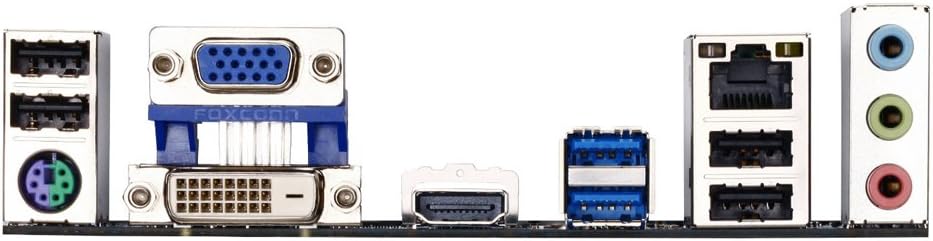
Figure 3.7.1: Rear I/O panel of the GIGABYTE GA-H77-DS3H motherboard, showing ports for PS/2, D-Sub, DVI-D, HDMI, USB 3.0/2.0, USB 2.0/1.1, RJ-45, and audio jacks.
- Port PS/2: Pikeun nyambungkeun PS / 2 keyboard atawa mouse.
- Palabuhan Video: D-Sub, DVI-D, and HDMI for display output.
- Port USB: 2 x USB 3.0/2.0 ports (blue) and 4 x USB 2.0/1.1 ports (black).
- Port RJ-45: Pikeun sambungan jaringan Gigabit Ethernet.
- Jacks audio: Three audio jacks for line-in, line-out, and microphone.
4. Operating System and BIOS
4.1. Setup mios
The GIGABYTE GA-H77-DS3H features GIGABYTE 3D BIOS (Dual UEFI). To enter BIOS setup, press the DEL key during system startup. The BIOS allows you to configure system settings, boot order, and monitor hardware status.
The Dual UEFI BIOS provides a backup BIOS chip, ensuring system stability and recovery in case of main BIOS corruption. LED indicators on the motherboard show the status of the main and backup BIOS.
4.2. Pamasangan supir
After installing your operating system, install the necessary drivers from the included driver CD or download the latest drivers from the GIGABYTE official websitus. Ieu kalebet driver chipset, driver audio, driver LAN, sareng driver periferal anu sanésna.
5. Pangropéa
- Tetep Bersih: Rutin ngabersihan lebu tina motherboard sareng komponenana nganggo hawa anu dikomprés. Pastikeun sistem dipareuman sareng dicabut colokan sateuacan beberesih.
- Pembaruan BIOS: Pariksa périodik GIGABYTE websitus kanggo apdet BIOS. Apdet BIOS ngan upami diperyogikeun sareng turutan pitunjukna kalayan saksama.
- Cék komponén: Ensure all cables and components are securely connected. Loose connections can cause system instability.
6. Cara ngungkulan
- Henteu aya kakuatan: Check all power connections (24-pin ATX, 4-pin ATX 12V, CPU fan, system fans). Ensure the power supply is switched on.
- Henteu aya tampilan: Verify that the graphics card (if dedicated) or integrated graphics output is correctly connected to the monitor. Reseat RAM modules.
- Instabilitas Sistem / Kacilakaan: This could be due to incompatible RAM, overheating, or faulty components. Check RAM compatibility, ensure proper cooling, and test components individually.
- Masalah BIOS: If the system fails to boot due to BIOS issues, the Dual UEFI BIOS should automatically recover. If not, consult the GIGABYTE support website for specific recovery procedures.
7. Spésifikasi
| Fitur | Rincian |
|---|---|
| CPU Socket | Intel LGA 1155 |
| Prosesor cocog | Intel Core i7/i5/i3/Pentium/Celeron (3rd Gen 22nm & 2nd Gen) |
| Chipset | Intel H77 Express |
| Slot mémori | 4 x DDR3 DIMM sockets |
| Max mémori | 32 GB DDR3 |
| Laju mémori | 1600/1333/1066 MHz |
| palabuhan SATA | 2 x SATA 6Gb/s, 3 x SATA 3Gb/s, 1 x mSATA |
| Port USB (Patukangan) | 2 x USB 3.0/2.0, 4 x USB 2.0/1.1 |
| Kaluaran Video | 1 x D-Sub, 1 x DVI-D, 1 x HDMI |
| LAN | Atheros GbE LAN chip (10/100/1000 Mbit) |
| Audio | VIA VT2021 codec |
| slot ékspansi | 1 x PCIe x16 (x16), 1 x PCIe x16 (x4), 2 x PCIe x1, 2 x PCI |
| Faktor Bentuk | ATX |
| Diménsi | 13 x 11 x 3 inci |
8. Garansi jeung Rojongan
Kanggo inpormasi garansi, mangga tingal kartu garansi anu kalebet dina produk anjeun atanapi kunjungan ka GIGABYTE resmi website. Technical support and driver downloads are available on the GIGABYTE support page.
GIGABYTE Resmi Websitus: www.gigabyte.com
9. Video produk
9.1. Produk Langkungview Video
Pidéo 9.1.1: Produk umum di luhurview pidéo casing the features and design of a motherboard. This video provides a visual introduction to the product's capabilities and aesthetics.
9.2. B75 Motherboard Display Video
Video 9.2.1: This video demonstrates the features and interfaces of a B75 motherboard, including CPU socket, RAM slots, PCI-E slots, SATA ports, and rear I/O. While not the exact model, it illustrates common motherboard components and connections.
9.3. H61 LGA1155 Motherboard Overview
Video 9.3.1: Sakeudeungview of an H61 LGA1155 motherboard. This video highlights the physical aspects and connectivity options typical for motherboards using the LGA1155 socket, which is relevant to the GA-H77-DS3H.


