Bubuka
This manual provides comprehensive instructions for the installation, operation, and maintenance of your Sony XM-GTX6041 600W Amplifier. Designed for car audio systems, this 4-channel amplifier delivers clear, precise, and distortion-free sound. It features advanced thermal control and a high-capacity air cooling system to ensure stable performance even under demanding conditions. Please read this manual thoroughly before using the amplifier to ensure proper setup and to maximize its performance and longevity.
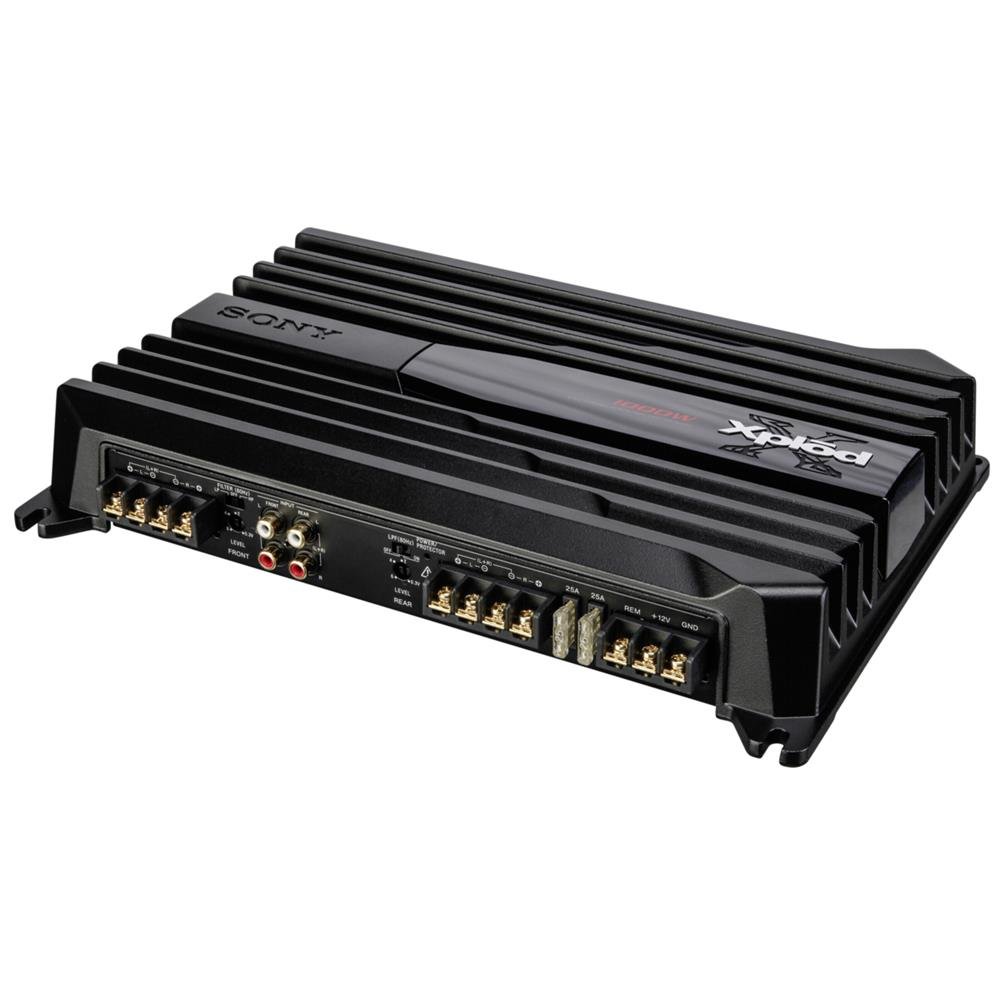
Image: Sony XM-GTX6041 600W Amplifier. This image shows the top view tina amplifier unit, highlighting its compact design and connection terminals.
Émbaran Kasalametan
- Sasayogian tanaga: Nyambungkeun amplifier only to a 12V DC car battery with a negative ground.
- Wiring: Ensure all wiring is correctly connected and insulated to prevent short circuits and electrical hazards. Use appropriate gauge wires for power and ground connections.
- Pamasangan: Gunung nu ampLifier aman dina lokasi anu ngamungkinkeun pikeun ventilasi nyukupan sarta ditangtayungan tina Uap jeung panas kaleuleuwihan.
- Tingkat volume: Avoid prolonged listening at extremely high volume levels to prevent hearing damage.
- Pamasangan profésional: If you are unsure about any installation steps, consult a qualified professional car audio installer.
Disetél
1. Ngabongkar bungkusan
Ati-ati ngaleupaskeun amplifier and all accessories from the packaging. Verify that all components are present before proceeding with installation.
2. Lokasi pamasangan
Pilih lokasi pamasangan nyaéta:
- Garing sareng dijaga tina kalembaban.
- Ventilasina alus pikeun ngamungkinkeun pembuangan panas anu leres.
- Secure and stable to prevent movement during vehicle operation.
- Jauh tina sinar panonpoé langsung atanapi sumber panas.
Lokasi umum kalebet handapeun korsi, dina bagasi, atanapi di tukangeun panel.
3. Sambungan Wiring
Follow these general guidelines for wiring your amppanguat:
- Daya (BATT+): Connect a heavy-gauge power cable directly from the positive terminal of your car battery to the BATT+ terminal on the amplifier. Install an in-line fuse (not supplied) as close to the battery as possible.
- Taneuh (GND): Sambungkeun kabel ground gauge beurat tina terminal GND dina amplifier to a clean, unpainted metal surface of the vehicle chassis. Ensure a solid electrical connection.
- Jauh (REM): Sambungkeun kawat péngkolan jauh tina kaluaran jauh unit sirah anjeun ka terminal REM dina amppangangkat. Ieu bakal ngahurungkeun amplifier sareng mareuman sareng unit sirah anjeun.
- Input RCA: Connect RCA cables from your head unit's pre-out outputs to the RCA input jacks on the amppangagung.
- Kaluaran Speaker: Connect your speakers to the speaker output terminals on the amplifier. Ensure correct polarity (+ to + and - to -) for each speaker. The XM-GTX6041 supports 4-channel speaker configurations.
Always double-check all connections before applying power to the amppangagung.
Parentah Operasi
1. Powering on / Pareum
The amplifier will automatically power on when your head unit is turned on (via the remote wire connection) and power off when the head unit is turned off.
2. Adjusting Gain Control
The gain control (often labeled "LEVEL" or "GAIN") matches the ampsensitivitas input lifier kana tingkat output head unit anjeun. Pikeun nyetel gain:
- Hurungkeun ampkontrol gain lifier kana setélan minimum (sapinuhna ngalawan arah jarum jam).
- Turn your head unit volume up to about 75-80% of its maximum level.
- Lalaunan ningkatkeun teh ampNgaronjatkeun kontrol sora lifier nepi ka anjeun ngadéngé distorsi, teras eureunkeun saeutik nepi ka sorana jelas.
The gain control is not a volume control; it is for matching signal levels.
3. Crossover Settings (High-Pass / Low-Pass Filters)
The XM-GTX6041 features built-in high-pass (HPF) and low-pass (LPF) filters to optimize sound output for different speakers:
- Saringan High-Pass (HPF): Ngamungkinkeun frékuénsi di luhur the set point to pass through. Use for full-range speakers or tweeters to prevent them from playing low bass frequencies they cannot reproduce effectively.
- Saringan Low-Pass (LPF): Ngamungkinkeun frékuénsi handap the set point to pass through. Use for subwoofers to ensure they only reproduce bass frequencies.
Saluyukeun filter ieu numutkeun jinis spiker anjeun sareng pro sora anu dipikahoyongfile. Refer to your speaker's specifications for recommended crossover points.
Pangropéa
1. beberesih
Bersihkeun bagian luar sacara berkala amplifier with a soft, dry cloth. Do not use harsh chemicals or abrasive cleaners. Ensure that the cooling fins and ventilation openings are free from dust and debris to maintain optimal airflow.
2. Manajemén termal
The XM-GTX6041 features an advanced thermal control system and high-capacity air cooling to prevent overheating. Ensure that the amplifier is mounted in a location with sufficient air circulation. Avoid blocking any ventilation openings. If the amplifier enters thermal protection mode (indicated by a protection light, if present), reduce the volume or allow it to cool down before continued use.
Pamérésan masalah
| Masalah | Mungkin Cukang lantaranana | Solusi |
|---|---|---|
| Teu daya/ Amplifier teu hurung |
|
|
| Taya kaluaran sora |
|
|
| Sora distort |
|
|
| Amplifier overheats / Enters protection mode |
|
|
spésifikasi
| Fitur | Rincian |
|---|---|
| merek | Sony |
| Nomer modél | XMGTX6041 |
| Jumlah Saluran | 4 |
| Kaluaran kakuatan maksimum | 600 Watt |
| Voltage | 12 Volt (DC) |
| Tipe Pamasangan | Permukaan Gunung |
| Suhu Operasi | Nepi ka 125 Derajat Celsius |
| Ukuran (L x W x H) | 10 x 10 x 10 séntiméter |
| Kodeu Artikel Internasional (UPC) | 04905524761740 |
Garansi sareng Rojongan
Émbaran jaminan
Specific warranty details for the Sony XM-GTX6041 amplifier are typically provided with the product at the time of purchase or can be found on the official Sony websitus. Punten tahan bukti pameseran anjeun pikeun klaim garansi.
Rojongan Palanggan
For further assistance, technical support, or service inquiries, please contact Sony customer support through their official websitus atanapi inpormasi kontak anu disayogikeun dina dokuméntasi produk anjeun.


