1. Bubuka
This manual provides comprehensive instructions for the installation, operation, and maintenance of your OSD Audio PC540 Black 5.25-inch 2-Way Single 8 Ohm, 70V Pendant Speaker. Please read this manual thoroughly before installation and use to ensure proper function and safety.
The OSD Audio PC540 is a versatile pendant speaker designed for commercial applications, offering both 8 Ohm and 70V operation. It features a 5.25-inch polypropylene woofer and a 1-inch tweeter, delivering clear audio performance.
2. Parentah Kasalametan
- Always disconnect power before installing or servicing the speaker.
- Pastikeun sadaya sambungan kabel aman sareng terpolarisasi kalayan leres.
- Ulah ngalaan spiker ka beueus kaleuleuwihan atawa suhu ekstrim.
- Use appropriate mounting hardware and techniques to secure the pendant speaker safely. Consult a qualified installer if unsure.
- Avoid placing the speaker near heat sources or in direct sunlight for prolonged periods.
- Do not attempt to repair the speaker yourself. Refer all servicing to qualified personnel.
3. Eusi Paket
Pastikeun yén sadaya komponén aya dina bungkusan:
- OSD Audio PC540 Pendant Speaker (Black)
- 70V Transformer (integrated)
- Mounting Hardware (e.g., suspension cable, ceiling plate)
- Manual Pitunjuk (dokumén ieu)
4. Setup jeung Instalasi
The OSD Audio PC540 speaker is designed for pendant-style installation. Proper installation is crucial for both performance and safety.
4.1 Milih Lokasi
Select a location that provides optimal sound dispersion and is structurally capable of supporting the speaker's weight. Ensure the chosen location allows for safe and secure suspension from the ceiling.
4.2 Wiring Connections (8 Ohm vs. 70V)
The PC540 speaker can operate in either 8 Ohm or 70V mode. The integrated 70V transformer has multiple tap settings. Select the appropriate wiring method for your audio system.
- Operasi 8 Ohm: For standard home audio receivers or amplifiers, connect the speaker directly to the amplifier's speaker outputs. Ensure the 70V transformer is bypassed or set to the 8 Ohm setting if available (consult specific product diagram for switch/tap setting).
- 70V Operasi: For commercial audio systems utilizing 70V constant voltage amplifiers, select the desired wattage tap (20W, 10W, 5W, or 2.5W) on the speaker's transformer. Connect the speaker to the 70V amplifier output. This allows for multiple speakers to be connected in parallel.
penting: Do not connect the speaker to both 8 Ohm and 70V outputs simultaneously. Incorrect wiring can damage the speaker and amppangagung.
4.3 Pasang Speaker
- Prepare the Mounting Point: Securely attach the provided ceiling plate or mounting bracket to a structural ceiling beam or appropriate anchor point. Ensure it can safely support the speaker's weight (5.7 pounds).
- Sambungkeun Wiring: Route the speaker wire through the ceiling plate and connect it to the speaker's terminals according to your chosen 8 Ohm or 70V configuration.
- Attach Suspension Cable: Securely attach the suspension cable to the speaker's top mounting point and then to the ceiling plate. Adjust the cable length to achieve the desired hanging height.
- Cék ahir: Double-check all connections and ensure the speaker is securely suspended before applying power.

Gambar 1: Top view of the PC540 speaker, illustrating the suspension point and connection area. This image shows the top of the spherical speaker with the suspension cable extending upwards, and the area where wiring connections are made.
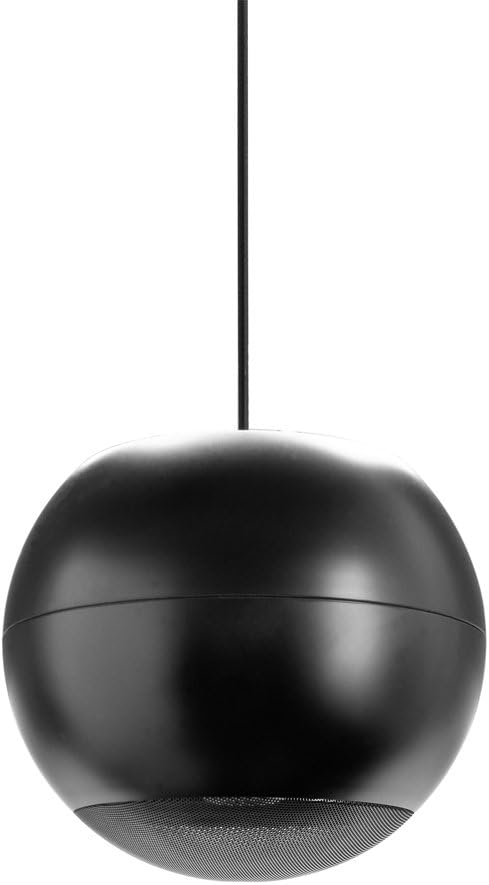
Gambar 2: Pinuh view of the OSD Audio PC540 pendant speaker. The image displays the black spherical speaker hanging from a single suspension cable, showcasing desain na.
5. Ngoperasikeun Speaker
Once properly installed and wired, operating the PC540 speaker is straightforward.
- Daya Hurung: Hurungkeun audio anjeun amplifier atawa panarima.
- Pilihan Sumber: Pilih sumber audio anu dipikahoyong dina alat anjeun amppangagung.
- Penyesuaian volume: Laun-laun ningkatkeun polumeu ka tingkat dengekeun anu nyaman.
The PC540 speaker is designed for consistent audio output. For 70V systems, the volume for individual speakers is determined by the selected wattage tap setting during installation.

Figure 3: Close-up of the speaker grille. This image provides a detailed view of the perforated metal grille covering the speaker drivers at the bottom of the PC540 unit.
6. Pangropéa
The OSD Audio PC540 speaker requires minimal maintenance.
- beberesih: Wipe the speaker cabinet with a soft, dry cloth. Do not use abrasive cleaners or solvents.
- Pamariksaan: Periodically check the suspension cable and mounting hardware for any signs of wear or loosening.
- Lingkungan: While designed for commercial use, avoid exposing the speaker to direct water spray or extreme environmental conditions not specified for its use.
7. Cara ngungkulan
| Masalah | Mungkin Cukang lantaranana | Solusi |
|---|---|---|
| Taya Sora |
|
|
| Sora Distort |
|
|
| Sora intermittent |
|
|
8. Spésifikasi
| Modél | PC540 |
| Tipe Speaker | Pendant, 2-Way |
| Supir | 5.25" Polypropylene Woofer, 1" Tweeter |
| Impedansi | 8 ohm |
| 70V trafo Taps | 20W, 10W, 5W, 2.5W |
| Penanganan kakuatan | 10 ka 40 Watt |
| Réspon Frékuénsi | 120Hz nepi ka 22kHz |
| Panyebaran | 140 derajat |
| Dimensi (Produk) | 11.5 x 10.5 x 11 inci (kira-kira) |
| Item Beurat | 5.7 pon |
| Warna | Hideung |
| Produsén | Audio OSD |
| UPC | 810281016382 |
9. Émbaran jaminan
The OSD Audio PC540 speaker comes with a Limited Warranty. For specific terms and conditions, please refer to the warranty card included with your product or visit the official OSD Audio websitus. Garansi ieu biasana nutupan cacad dina bahan sareng padamelan dina panggunaan normal.
Punten tahan bukti pameseran anjeun pikeun klaim garansi.
10. Rojongan jeung Kontak
If you encounter any issues or have questions not covered in this manual, please contact OSD Audio customer support.
- Websitus: Nganjang ka OSD Audio Store pikeun inpormasi produk sareng sumber dukungan.
- Kontak: Refer to the OSD Audio website for current contact information, including phone numbers and email addresses for technical support.


