Bubuka
This manual provides essential instructions for the safe and efficient operation of your Sony DVPSR210P DVD Player. Please read this manual thoroughly before using the device and retain it for future reference.

Gambar 1: Hareupeun view of the Sony DVPSR210P DVD Player.
Naon dina Box
Pastikeun yén sadaya barang aya dina bungkusan:
- Sony DVPSR210P Progressive Scan DVD Player
- Kabel A/V
- 2 x Batré AA
- Remote Control (RMT-D197A)
- 1-Year Parts & 90-Day Labor Warranty Information
Disetél
Follow these steps to connect your DVD player to your television:
- Posisi: Place the DVD player on a stable, flat surface near your television. Ensure adequate ventilation and avoid placing it near heat sources such as radiators, heat registers, stoves, or other heat-producing apparatus (including amppangangkat).
- Connect Video: This DVD player uses AV cables for video output. Connect the yellow RCA plug of the A/V cable to the "VIDEO OUT" port on the rear of the DVD player and the corresponding yellow "VIDEO IN" port on your television. For higher quality video, use component video (Y, Pb, Pr) if your TV supports it. Connect the green (Y), blue (Pb), and red (Pr) plugs from the component video output on the DVD player to the matching inputs on your TV.
- Sambungkeun Audio: Connect the white (left audio) and red (right audio) RCA plugs of the A/V cable to the "AUDIO OUT" ports on the rear of the DVD player and the corresponding "AUDIO IN" ports on your television or audio receiver. For digital audio, connect a coaxial digital audio cable from the "DIGITAL OUT (COAXIAL)" port on the DVD player to a compatible input on your audio receiver.
- Sambungan Daya: Colokkeun kabel listrik kana outlet AC.
- Selapkeun Batré: Open the battery compartment on the remote control and insert the two AA batteries provided, ensuring correct polarity.

Figure 2: Rear panel connections for video and audio output. Note: This model does not feature an HDMI port.
Operasi
Operating your Sony DVPSR210P DVD Player is straightforward:
Basic Controls (Front Panel)
- Power Button (I/O): Press to turn the player on or off.
- Open/Close Button (Triangle with line): Pencét pikeun muka atawa nutup baki disc.
- Tombol Puter (Segitiga): Press to start playback of a disc.
- Tombol Eureun (Kotak): Pencét pikeun ngeureunkeun playback.

Figure 3: Front panel controls for basic operation.
Inserting and Playing a Disc
- Pencét éta Buka/Tutup tombol pikeun muka baki disk.
- Simpen DVD atanapi CD kana baki disk kalayan sisi labélna ngadep ka luhur.
- Pencét éta Buka/Tutup button again to close the disc tray. The player will begin reading the disc.
- If the disc does not start automatically, press the Maén kancing.
Ngagunakeun Remote Control
The included remote control (RMT-D197A) provides full functionality for your DVD player and can also control basic functions of a multi-brand TV.
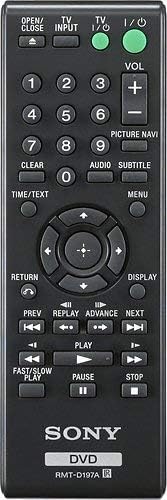
Figure 4: The RMT-D197A remote control for the Sony DVPSR210P DVD Player.
- Input TV: Milih sumber input TV.
- TV I/O: Ngahurungkeun atawa mareuman TV.
- VOL +/-: Nyaluyukeun polumeu TV.
- Tombol Jumlah (0-9): Pikeun lagu langsung / pilihan bab.
- Gambar Navi: Accesses picture navigation features.
- Audio: Selects audio tracks.
- Judul: Selects subtitle languages.
- Menu: Ngaksés ménu disk.
- Directional Buttons & Enter: Navigates ménu jeung confirms selections.
- Balik deui: Mulih ka layar atawa ménu saméméhna.
- tampilan: Shows disc information on screen.
- Saméméhna/Salajengna: Skips to previous/next track or chapter.
- Replay/Advance: Skips backward/forward by a short interval.
- Fast/Slow Play: Controls playback speed.
- Reureuh: Ngareureuhkeun playback.
Fitur
- Putereun Multi-format: Supports playback of various DVD and CD media formats.
- Scan Progresif: Enhances picture quality for compatible televisions.
- JPEG Slideshow with MP3 Background Music: View photo slideshows with accompanying music.
- Multi-Disc Resume: Remembers the stopping point of multiple discs, allowing you to resume playback from where you left off.
- Multi-Brand TV Remote: The included remote control can operate basic functions of various TV brands.
- Desain kompak: Ultra-compact 10.63 inch design for easy placement.
- Fast and Slow Playback with Sound: Adjust playback speed while retaining audio.
- Kodeu wewengkon: DVD Disc (1).
Pangropéa
To ensure the longevity and optimal performance of your DVD player:
- beberesih: Wipe the exterior of the player with a soft, dry cloth. Do not use abrasive cleaners or solvents.
- Perawatan Cakram: Handle discs by their edges. Keep them clean and free of scratches. Use a soft, lint-free cloth to wipe discs from the center outwards.
- Ventilasi: Ensure the player has adequate ventilation. Do not block ventilation openings.
- Kaayaan Lingkungan: Ulah nepi ka pamaén kakeunaan suhu anu ekstrim, kalembaban, atanapi sinar panonpoé langsung.
Pamérésan masalah
If you encounter issues with your DVD player, refer to the following common solutions:
| Masalah | Solusi |
|---|---|
| Taya kakuatan | Check if the power cord is securely plugged into the player and the AC outlet. Ensure the outlet is functional. |
| Taya gambar | Verify that the A/V cables (yellow for video) are correctly connected to both the DVD player and the TV. Ensure the TV input is set to the correct source (e.g., AV1, Video 1). |
| Taya sora | Check the audio cables (white and red RCA) are properly connected. Ensure the TV or audio receiver volume is not muted or too low. Confirm the correct audio input is selected on your TV/receiver. |
| Disc teu diputer | Ensure the disc is inserted correctly (label side up). Check if the disc is clean and free of scratches. Verify the disc format is supported by the player (DVD, CD). |
| Kadali jauh teu jalan | Check if the batteries are inserted correctly and are not depleted. Ensure there are no obstructions between the remote and the player's sensor. |
spésifikasi
| Fitur | Rincian |
|---|---|
| Dimensi produk | 10.63 x 8.23 x 1.52 inci |
| Item Beurat | 2.6 pon |
| Nomer modél | DVPSR210P |
| Jenis Média | DVD, CD |
| Resolusi | 480 p |
| Tipe Panyambung | AV cable (Composite, Component), Coaxial Digital Audio |
| Mode Kaluaran Audio | Stereo |
| Konsumsi Daya (Siaga) | Kurang leuwih 0.5 Watts |
| Batré Diperlukeun | 2 batré AAA (pikeun jauh) |
Garansi sareng Rojongan
This Sony DVPSR210P DVD Player comes with a 1-Year Parts & 90-Day Labor Warranty. For warranty claims or technical support, please refer to the contact information provided in your product packaging or visit the official Sony support websitus.
Catetan: Simpen bukti pameseran anjeun kanggo tujuan garansi.


