
Bubuka
Hatur nuhun pikeun meuliasing the Edifier Tick Tock Retro Multifunctional Alarm Clock. This device combines a retro design with modern functionality, offering an alarm clock, FM radio, and media playback from SD cards, USB drives, and auxiliary input. This manual provides detailed instructions for setup, operation, and maintenance to ensure optimal performance and longevity of your device.
Fitur produk
- SD card reader and USB input port for media playback.
- LCD display screen for time, date, alarm status, and input mode (SD/USB/FM/AUX).
- Alarm clock function with customizable audio sources: SD card, USB drive, FM radio, or Auxiliary input.
- Auxiliary 3.5mm input jack for connecting external audio devices.
- FM radio function with 24 preset channels for easy access to your favorite stations.
- Two 360° omni-directional full-range speakers for rich, multi-directional sound.
Kontrol jeung palabuhan
Palabuhan Panel Rear
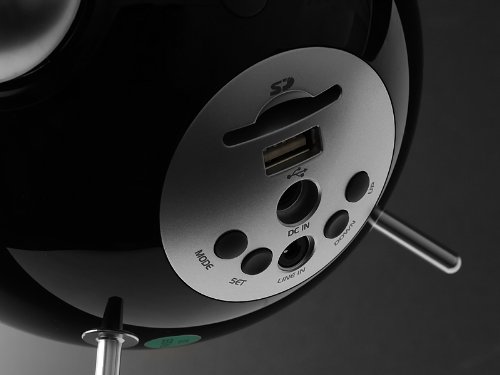
This image displays the rear panel of the Edifier Tick Tock alarm clock. Visible ports and buttons include:
- Slot Kartu SD: Insert an SD card for music playback.
- Port USB: Sambungkeun flash drive USB pikeun muterkeun musik.
- DC IN: Input daya pikeun adaptor AC anu kalebet.
- LINE IN (AUX): Input audio 3.5mm pikeun alat éksternal.
- Tombol MODE: Cycles through input modes (SD, USB, FM, AUX).
- Tombol SET: Used for entering settings menus (e.g., time, alarm).
- Tombol luhur/handap: Navigate menus, adjust volume, or change settings.
Kadali Panel Top
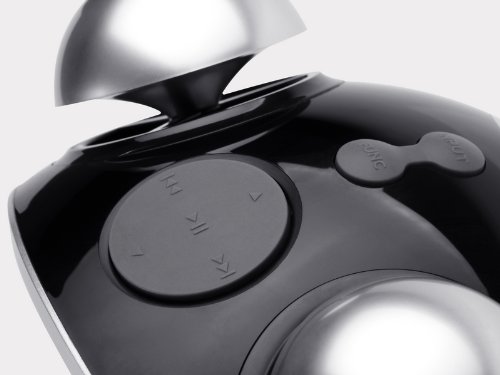
This image shows the top panel controls of the Edifier Tick Tock alarm clock. These include:
- Tombol Puter/Reureuh: Ngamimitian atanapi ngeureunkeun puteran média.
- Kancing Lagu Saméméhna/Salajengna: Skips to the previous or next track during media playback. Also used for tuning FM radio.
- Tombol Luhur / Turun: Nyaluyukeun volume kaluaran audio.
- Tombol SNOOZE/LAMPU: Ngaktipkeun snooze nalika alarm disada atanapi nyaluyukeun kacaangan tampilan.
Disetél
- Ngabongkar bungkusan: Carefully remove the alarm clock and all accessories from the packaging. Ensure all components are present: the alarm clock unit, AC power adapter, and this user manual.
- Sambungan Daya: Connect the AC power adapter to the "DC IN" port on the rear of the alarm clock. Plug the adapter into a standard wall outlet. The display should illuminate.
- Daya mimiti Hurung: The unit should power on automatically. If not, press the power button (if available, otherwise it's always on when plugged in).
- Antenna (FM Radio): Extend the FM antenna located at the back of the unit for optimal radio reception.
Parentah Operasi
Nyetel waktos sareng kaping
- Pencét jeung tahan tombol SET tombol nepi ka tampilan waktu mimiti kedip-kedip.
- Ngagunakeun éta UP jeung TURUN tombol pikeun nyaluyukeun jam. Pencét SET kanggo mastikeun sareng ngalih ka menit.
- Atur menit nganggo UP jeung TURUN. Pencét SET pikeun mastikeun.
- Continue this process to set the year, month, and day. Press SET pikeun kaluar tina modeu setelan waktos/tanggal.
Nyetel Alarm
- Pencét éta SET button once (do not hold) to enter alarm setting mode. The alarm time will flash.
- Ngagunakeun éta UP jeung TURUN tombol pikeun nyaluyukeun jam alarm. Pencét SET kanggo mastikeun sareng ngalih ka menit.
- Atur menit nganggo UP jeung TURUN. Pencét SET pikeun mastikeun.
- Next, select the alarm source (FM, SD, USB, AUX). Use UP jeung TURUN to cycle through options. Press SET pikeun mastikeun.
- If FM is selected, use UP jeung TURUN to select a preset FM station (P01-P24).
- If SD or USB is selected, ensure a card/drive with audio is inserted. The alarm will play the first track.
- If AUX is selected, ensure an external device is connected and playing audio.
- Pencét SET deui pikeun ngaktipkeun alarm. Ikon alarm bakal muncul dina tampilan.
- To deactivate the alarm, press SET nepi ka ikon alarm ngaleungit.
- Nalika alarm disada, pencét éta SNOOZE / CAHAYA button to activate snooze (typically 9 minutes). To turn off the alarm completely, press any other button.
Operasi Radio FM
- Pencét éta MODÉ button repeatedly until "FM" appears on the display.
- Pindai Otomatis sareng Preset: Pencét jeung tahan tombol MUTER / Reureuh button. The radio will automatically scan for available stations and save them to presets (P01-P24).
- Tuning Manual: Ngagunakeun éta saméméhna / lagu salajengna tombol pikeun fine-Ngepaskeun frékuénsi.
- Milih prasetél: In FM mode, briefly press the saméméhna / lagu salajengna tombol pikeun ngalilingi stasiun prasetél anu disimpen.
- Saluyukeun polumeu nganggo UP jeung TURUN buttons on the rear panel.
SD Card / USB Playback
- Insert an SD card into the SD card slot or a USB flash drive into the USB port on the rear panel.
- Pencét éta MODÉ button repeatedly until "SD" or "USB" appears on the display. The device will automatically start playing audio files.
- Ngagunakeun éta MUTER / Reureuh tombol pikeun ngareureuhkeun atawa neruskeun playback.
- Ngagunakeun éta saméméhna / lagu salajengna buttons on the top panel to skip tracks.
- Saluyukeun polumeu nganggo UP jeung TURUN buttons on the rear panel.
Auxiliary Input (LINE IN)
- Connect an external audio device (e.g., smartphone, MP3 player) to the "LINE IN" (3.5mm) port on the rear panel using an audio cable (not included).
- Pencét éta MODÉ Pencét tombol "AUX" sababaraha kali nepi ka muncul dina layar.
- Start playback on your connected external device.
- Saluyukeun polumeu nganggo UP jeung TURUN buttons on the rear panel, and also control volume from your external device.
Kacaangan tampilan
Pencét sakeudeung SNOOZE / CAHAYA button on the top panel to cycle through different display brightness levels.
Pangropéa
- beberesih: Use a soft, dry cloth to clean the surface of the alarm clock. Do not use abrasive cleaners, waxes, or solvents.
- panempatan: Place the unit on a stable, flat surface. Avoid direct sunlight, high temperatures, humidity, or dusty environments.
- kakuatan: Cabut adaptor daya tina stop kontak upami unit ieu moal dianggo salami waktos anu lami.
Pamérésan masalah
| Masalah | Mungkin Cukang lantaranana / Solusi |
|---|---|
| Henteu aya kakuatan / tampilan pareum |
|
| Teu aya sora ti panyatur |
|
| panarimaan radio FM goréng |
|
| Alarm does not sound or plays static |
|
| Layarna caang teuing peuting |
|
spésifikasi
| merek | Edifier |
| Nomer modél | MF240Reto |
| Tipe tampilan | LCD |
| Téhnologi konektipitas | AUX, USB |
| Fitur husus | Alarm, Radio, SD Card Reader, USB Playback |
| Sumber Daya | Kabel Listrik |
| Bahan | palastik |
| Item Beurat | 0.74 Pon (kira-kira 0.34 kg) |
| Produsén | Edifier USA |
Garansi sareng Rojongan
This Edifier product comes with a 2-taun jaminan produsén. For warranty claims, technical support, or further assistance, please contact Edifier USA customer service. Please retain your proof of purchase for warranty validation.
For the most up-to-date support information, please visit the official Edifier websitus.