BlackBerry BB 9900

BlackBerry BB 9900 Bold Touch Smartphone User Manual

Model: BB 9900

1. Bubuka

This manual provides essential instructions for setting up, operating, and maintaining your BlackBerry BB 9900 Bold Touch smartphone. Please read this guide thoroughly to ensure proper use and to maximize the device's capabilities. The BlackBerry BB 9900 Bold Touch combines a capacitive touchscreen with a full QWERTY keyboard, running on BlackBerry OS 7.

2. Eusi Paket

Pariksa yén pakét anjeun ngandung barang-barang ieu:

3. Alat Leuwihview

Familiarize yourself with the physical features of your BlackBerry BB 9900 Bold Touch.

3.1 Hareup View

BlackBerry BB 9900 Bold Touch front view, showing the screen, QWERTY keyboard, and navigation buttons.

Gambar: Hareupeun view of the BlackBerry BB 9900 Bold Touch, highlighting the 2.8-inch touchscreen and the physical QWERTY keyboard below it. The device also features a trackpad and call/end buttons.

  • Layar rampa: 2.8-inch capacitive display for interactive navigation.
  • Kibor QWERTY: Full physical keyboard for efficient typing.
  • Optical Trackpad: For precise navigation and selection.
  • Call/End Buttons: Standard telephony controls.

3.2 Tukangeun View

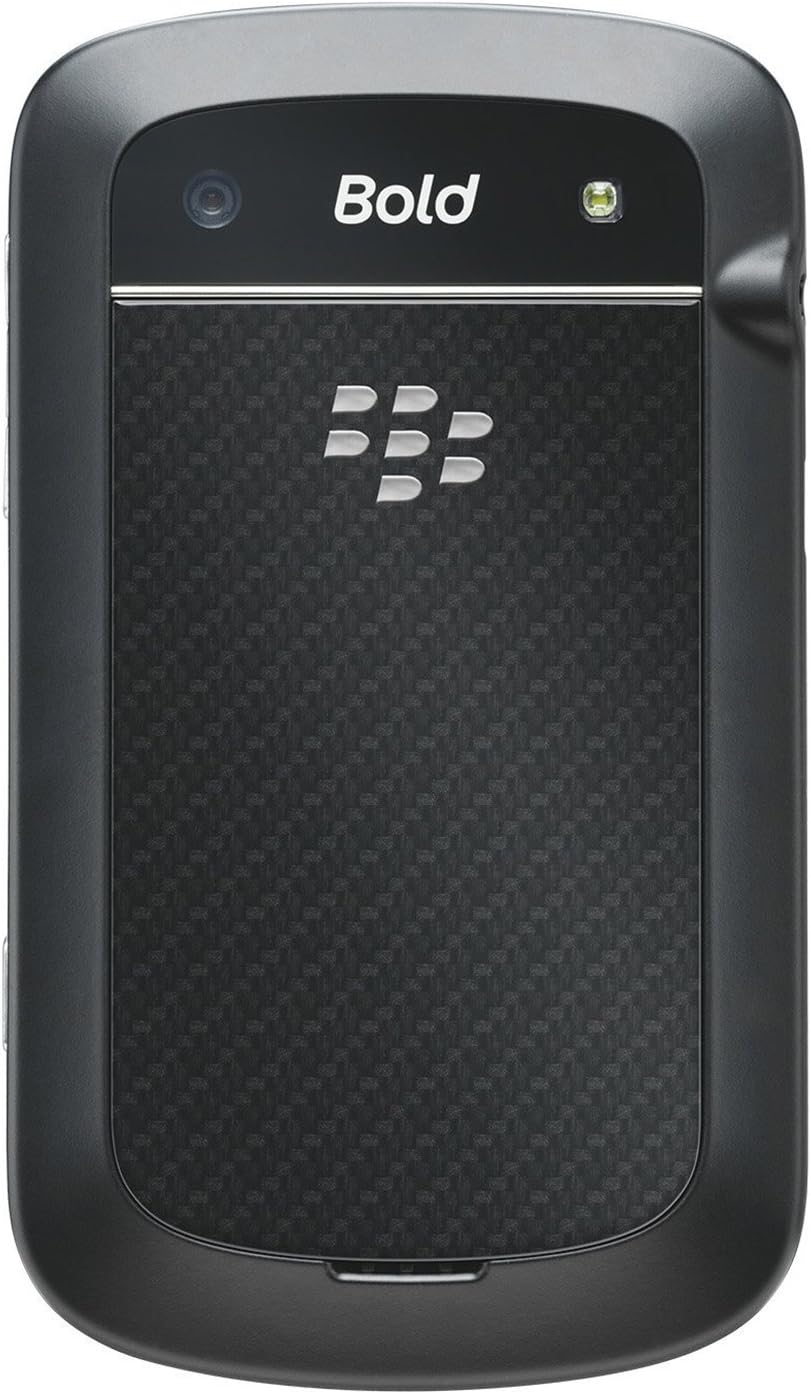
BlackBerry BB 9900 Bold Touch rear view, showing the 5MP camera lens and LED flash.

Gambar: Tukangeun view of the BlackBerry BB 9900 Bold Touch, featuring the 5-megapixel camera lens, LED flash, and the BlackBerry logo.

  • Kaméra 5MP: Primary camera with autofocus and LED flash.
  • Panutup batré: Removable cover for battery and SIM card access.

3.3 Samping View

BlackBerry BB 9900 Bold Touch side view, showing volume buttons and convenience key.

Gambar: Sisi view of the BlackBerry BB 9900 Bold Touch, illustrating the placement of the volume control buttons and a customizable convenience key.

  • Tombol Volume: Saluyukeun tingkat audio.
  • Convenience Key: Customizable shortcut button.

4. Setélan

4.1 Nyelapkeun Kartu SIM

  1. Remove the battery cover from the back of the device.
  2. Pilarian slot kartu SIM.
  3. Selapkeun kartu SIM kalayan kontak emasna ngadep ka handap sareng pojok potong sajajar sareng slot.
  4. Ensure the SIM card is securely in place.

4.2 Nyelapkeun Batré

  1. After inserting the SIM card, align the battery's gold contacts with the contacts in the battery compartment.
  2. Pencét batréna lalaunan kana tempatna dugi ka ngaklik.
  3. Ganti panutup batré.

4.3 Ngecas Alat

  1. Connect the USB cable to the charging port on your device.
  2. Plug the other end of the USB cable into the wall charger, then into a power outlet.
  3. Ngidinan alat pikeun ngecas pinuh sateuacan dianggo heula. Indikator batré dina layar bakal nembongkeun status ngecas.

4.4 Powering on / Pareum

  • Pikeun Ngahurungkeun: Press and hold the Power/Lock button (usually located on the top edge) until the BlackBerry logo appears.
  • Pikeun mareuman: Press and hold the Power/Lock button until the 'Power Off' option appears on the screen. Tap 'Power Off' to confirm.

5. Parentah Operasi

5.1 Navigasi Layar Toél

  • Ketok: Touch the screen briefly to open applications, select items, or activate buttons.
  • Gesek: Drag your finger across the screen to scroll through lists or switch between home screen panels.
  • Ciwit-pikeun-Zoom: Use two fingers to zoom in or out on photos, web pages, or maps.

5.2 Using the QWERTY Keyboard

The physical QWERTY keyboard allows for fast and accurate text entry. Each key corresponds to a letter, number, or symbol. Use the 'Alt' key for alternate characters and the 'Shift' key for capitalization.

5.3 Nelepon

  1. From the home screen, tap the Phone icon or press the green Call button.
  2. Enter the phone number using the keyboard.
  3. Pencét tombol Telepon héjo pikeun ngamimitian telepon.
  4. Pikeun mungkas telepon, pencét tombol Réngsékeun Telepon anu beureum.

5.4 Ngirim Talatah

  1. Tap the Messages icon from the home screen.
  2. Select 'Compose New' or similar option.
  3. Asupkeun nomer panarima atawa pilih ti kontak.
  4. Type your message using the QWERTY keyboard.
  5. Tap 'Send'.

5.5 Ngagunakeun kaméra

  1. Ketok ikon Kamera pikeun muka aplikasi kaméra.
  2. Pigura shot anjeun ngagunakeun layar salaku a viewanu mendakan
  3. Tap the screen or press the convenience key (if configured) to take a photo.
  4. The 5MP camera features autofocus and an LED flash for improved image quality.

5.6 Nyambungkeun ka Wi-Fi

  1. Go to 'Options' > 'Networks and Connections' > 'Wi-Fi'.
  2. Hurungkeun Wi-Fi. Alat bakal nyeken jaringan anu sayogi.
  3. Pilih jaringan anu dipikahoyong sareng lebetkeun kecap akses upami dipenta.
  4. Once connected, the Wi-Fi indicator will appear in the status bar.

5.7 Using NFC (Near Field Communication)

The BlackBerry BB 9900 Bold Touch supports NFC for short-range wireless communication. This allows for quick pairing with compatible accessories or sharing data with other NFC-enabled devices by tapping them together.

  1. Pastikeun NFC diaktipkeun dina setelan alat Anjeun.
  2. Hold your device close to another NFC-enabled device or tag.
  3. Follow on-screen prompts to complete the desired action (e.g., pairing, data transfer).

6. Pangropéa

6.1 Ngabersihan Alat Anjeun

  • Anggo lawon anu lemes sareng henteu ngaganggu pikeun ngusap layar sareng awak alat.
  • Hindarkeun ngagunakeun bahan kimia kasar, pembersih abrasive, atanapi semprot aerosol.
  • Ulah ngalaan alat ka beueus kaleuleuwihan.

6.2 Perawatan Batré

  • Hindari suhu anu ekstrim, anu tiasa ngirangan kinerja batré.
  • Use only the original or approved charger.
  • Ulah nyucuk atawa ngaruksak batréna.

6.3 Apdet parangkat lunak

Periodically check for software updates to ensure your device has the latest features and security enhancements. Updates can typically be found in the device's 'Options' or 'Settings' menu under 'Software Updates'.

7. Cara ngungkulan

7.1 Alat Teu Dihurungkeun

  • Pastikeun batréna leres diselapkeun sareng dicas.
  • Connect the device to the charger and wait a few minutes before attempting to power on again.
  • If the issue persists, try removing and reinserting the battery.

7.2 Masalah Konektipitas Jaringan

  • Check if your SIM card is correctly inserted and activated with your carrier.
  • Verify that cellular data or Wi-Fi is enabled in your device settings.
  • Balikan deui alat.
  • If using Wi-Fi, ensure your router is working and you have entered the correct password.

7.3 Layar Toél Teu Ngarespon

  • Balikan deui alat.
  • Pastikeun layar beresih jeung bebas tina lebu atawa lembab.
  • If the issue is intermittent, check for any recent software installations that might be causing conflicts.

8. Spésifikasi

Fitur Rincian
Ngaran modél BB 9900
Sistem operasi BlackBerry OS 7
tampilan 2.8-inch Capacitive Touchscreen, 640 x 480 Resolution
Prosesor Not specified (typically 1.2 GHz for this model)
Ram 768 MB
Panyimpenan internal 8 GB
Kaméra tukang 5 MP, Autofocus, LED Flash
Konektipitas Wi-Fi 802.11 b/g/n, NFC, Bluetooth, GPS
Rojongan jaringan Quad-band GSM/GPRS/EDGE, Tri-band HSPA+
Diménsi 4.53 x 2.6 x 0.41 inci (115 x 66 x 10.5 mm)
Beurat 4.6 ons (130 gram)
Audio Jack 3.5 mm

9. Pangrojong sareng Jaminan

9.1 Rojongan Palanggan

For technical assistance, troubleshooting beyond this manual, or service inquiries, please visit the official BlackBerry support website or contact your local service provider. Refer to the packaging or official websitus pikeun detil kontak husus.

9.2 Émbaran jaminan

Your BlackBerry BB 9900 Bold Touch is covered by a limited warranty. Please refer to the warranty card included in your product packaging or visit the official BlackBerry websitus pikeun istilah jeung kaayaan lengkep, kaasup jaman jaminan na spésifik cakupan. Simpen bukti pameseran anjeun pikeun klaim garansi.

Dokumén Patali - BB 9900

Praview BlackBerry Q10 Smartphone Guide pamaké
Pituduh komprehensif pikeun Smartphone BlackBerry Q10, ngawengku fitur sapertos BlackBerry Hub, keyboard, BBM Video, kaméra, babagi media, sareng setelan alat. Diajar kumaha ngamaksimalkeun produktivitas sareng ngaropea pangalaman anjeun.
Praview BlackBerry Java Development Environment: GPS jeung BlackBerry Maps Development Guide
Pituduh ieu ngajéntrékeun integrasi fungsionalitas GPS jeung BlackBerry Maps dina Lingkungan Pangembangan BlackBerry Java, jadi sumber téknis pikeun pamekar ngawangun aplikasi anu sadar lokasi.
Praview Tugas BlackBerry pikeun Pituduh Pamaké Android | Manajemén Tugas Aman
BlackBerry Tasks resmi pikeun Pituduh Pamaké Android (v3.17) nyadiakeun pitunjuk lengkep ngeunaan pamasangan, aktivasina, manajemén tugas, setélan, sareng ngungkulan pikeun aplikasi manajemén tugas perusahaan anu aman BlackBerry.
Praview Pituduh Pamaké Smartphone BlackBerry Q5: Setup, Fitur, sareng Operasi
Buku pituduh komprehensif ieu nyadiakeun inpo wincik jeung parentah pikeun operasi BlackBerry Q5 Smartphone. Ieu nyertakeun fitur sarta pungsi BlackBerry 10 OS, versi 10.2.1, dirancang pikeun ngaronjatkeun produktivitas jeung konektipitas.
Praview Pituduh Pamaké Smartphone BlackBerry Z30: Fitur, Setup, sareng Operasi
Manggihan pituduh pamaké komprehensif pikeun BlackBerry Z30 Smartphone (Vérsi 10.3.2). Pituduh ieu nyadiakeun pitunjuk lengkep ngeunaan setelan alat, fitur napigasi, ngatur komunikasi, ngamangpaatkeun kamampuhan media, ngaropéa setelan, jeung ningkatkeun kaamanan pikeun pangalaman pamaké optimal.
Praview BlackBerry Work, Notes, and Tasks Administration Guide
Comprehensive administration guide for BlackBerry Work, Notes, and Tasks, detailing setup, configuration, management, and troubleshooting for IT administrators using BlackBerry UEM.