Sony SANS300

Sony SA-NS300 Wireless Multi-Room Audio Speaker User Manual

Model: SA-NS300 (SANS300)

Bubuka

The Sony SA-NS300 is a compact wireless multi-room audio speaker designed to stream music wirelessly within your home environment. It integrates with your home network to play audio from compatible devices such as a PC or a Sony Blu-ray Disc home theater system. This speaker supports multi-room audio playback, allowing you to enjoy your music in various rooms by adding more compatible speakers.

This manual will guide you through the setup, operation, and maintenance of your SA-NS300 speaker to ensure optimal performance and longevity.

Émbaran Kasalametan

Parentah Kasalametan penting

  • Baca parentah ieu tuntas saméméh operasi unit.
  • Tetep parentah ieu pikeun rujukan hareup.
  • Heed sagala warnings on produk jeung dina parentah operasi.
  • Turutan sagala parentah.
  • Entong nganggo alat ieu caket cai.
  • Ngabersihan ngan ku kaén garing.
  • Ulah meungpeuk sagala bukaan ventilasi. Pasang saluyu sareng parentah produsén.
  • Entong dipasang di deukeut sumber panas sapertos radiator, register panas, kompor, atanapi aparat sanésna (kalebet ampLiifiers) anu ngahasilkeun panas.
  • Nangtayungan kabel listrik tina leumpang atawa diciwit, utamana dina colokan, wadah merenah, jeung titik dimana aranjeunna kaluar tina aparat.
  • Ngan anggo kantétan/aksésori anu ditunjuk ku produsén.
  • Cabut colokan alat ieu nalika badai kilat atanapi nalika henteu dianggo kanggo waktos anu lami.
  • Rujuk sadayana jasa ka tanaga jasa anu mumpuni. Diperlukeun ngalayanan nalika aparatur ruksak ku cara naon waé, sapertos kabel catu daya atanapi colokan rusak, cairan tumpah atanapi barang murag kana aparatur, aparatur parantos kakeunaan hujan atanapi lembab, henteu beroperasi normal. , atawa geus turun.

Naon dina Box

Upon unpacking your Sony SA-NS300, ensure all components are present:

Note: The SA-NS300 includes an integrated subwoofer.

Disetél

1. Nempatkeun fisik

Place the speaker on a stable, flat surface. Ensure there is adequate ventilation around the unit. Avoid placing it in direct sunlight, near heat sources, or in excessively humid or dusty environments. For optimal wireless performance, position the speaker within reasonable range of your Wi-Fi router.

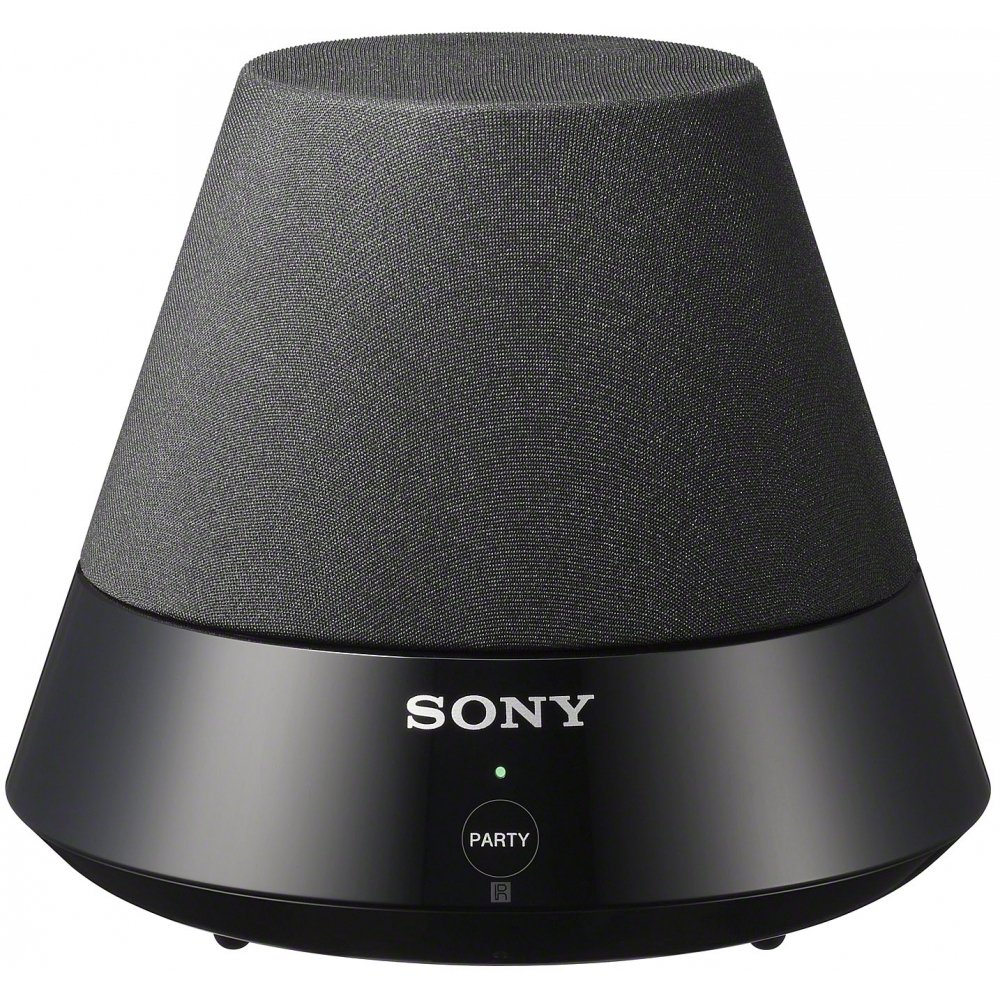
Sony SA-NS300 Wireless Multi-Room Audio Speaker, front view

Gambar: Hareupeun view of the Sony SA-NS300 Wireless Multi-Room Audio Speaker, showing the speaker grille and the control panel with the Sony logo and 'PARTY' button.

2. Sambungan Daya

  1. Connect the supplied AC power adapter to the DC IN jack on the rear of the speaker.
  2. Colokkeun adaptor kakuatan AC kana stop kontak témbok.
  3. The power indicator on the speaker will illuminate, indicating it is receiving power.

3. Network Connection (Wi-Fi Setup)

The SA-NS300 connects to your home network via Wi-Fi. You will need your Wi-Fi network name (SSID) and password.

  1. Setup Awal: For the first-time setup, it is recommended to use the Sony Network Audio Remote application on your smartphone or tablet, or follow the on-screen instructions if connecting via a compatible Sony Blu-ray Disc player or TV.
  2. WPS (Wi-Fi Protected Setup): If your router supports WPS, press the WPS button on your router, then press and hold the "WPS" button (often combined with another function or indicated by an icon) on the SA-NS300 speaker within two minutes. The network indicator will show connection status.
  3. Setup Manual: Refer to the detailed instructions in the Sony Network Audio Remote application or your compatible Sony device's manual for manual Wi-Fi configuration.

Ensure your Wi-Fi network is active and within range for a stable connection.

4. Konfigurasi awal

Once connected to the network, the speaker may require a brief update or configuration. Follow any prompts from the Sony Network Audio Remote app or your connected Sony device.

Parentah Operasi

1. Nyambungkeun ka Sumber Audio

The SA-NS300 is designed to stream audio from various sources over your Wi-Fi network.

  • From a PC: You can stream music from your computer using compatible software, such as Windows Media Player 11 or later, or a DLNA-compliant media server (e.g., Twonky). Ensure your PC is connected to the same Wi-Fi network as the speaker.
  • From a Sony Blu-ray Disc Home Theater System: If you have a compatible Sony Blu-ray Disc home theater system, you can stream audio directly from it to the SA-NS300. Refer to your home theater system's manual for specific instructions on enabling network audio streaming.
  • DLNA Compatibility: The speaker is DLNA (Digital Living Network Alliance) compliant, allowing it to play media from other DLNA-certified devices on your network.

2. PartyStream Playback

PartyStream allows you to synchronize music playback across multiple compatible Sony network speakers in different rooms.

  1. Initiate music playback on your primary Sony network device (e.g., Blu-ray player or another network speaker).
  2. On the SA-NS300, press the pésta button. The indicator light will change to confirm it has joined the PartyStream group.
  3. To exit PartyStream, press the pésta tombol deui.

Note: PartyStream functionality may vary depending on the source device and content. Some internet streaming services may not support PartyStream due to content protection or licensing.

3. Kontrol jeung Indikator

The SA-NS300 features a minimalist control panel.

  • POWER (I/O) Button: Located on the side/rear, this button turns the speaker on or off.
  • PARTY Button: Located on the front panel, used to join or leave a PartyStream group.
  • Kontrol Volume (+/-): Typically located near the power button or controlled via the Network Audio Remote app.
  • Indikator: Various LED indicators (e.g., Power, Network, Party) provide status information. Refer to the full manual for detailed indicator meanings.

Pangropéa

Ngabersihkeun Unit

  • Lap bagian luar speaker ku lawon anu lemes sareng garing.
  • Ulah make hampang abrasive, bubuk scouring, atawa pangleyur kayaning alkohol atawa bénzéna, sabab ieu bisa ngaruksak finish.
  • Avoid spraying water or cleaning solutions directly onto the speaker.

Pembaruan firmware

Sony may release firmware updates to improve performance or add new features. Ensure your speaker is connected to the internet to receive these updates. Updates are typically performed automatically or prompted via the Network Audio Remote app.

Pamérésan masalah

If you encounter issues with your SA-NS300 speaker, refer to the following common problems and solutions:

MasalahMungkin Cukang lantaranana / Solusi
Taya kakuatan
  • Ensure the AC power adapter is securely connected to the speaker and a working wall outlet.
  • Pariksa naha stop kontak listrik fungsina.
Taya sora
  • Check the volume level on the speaker and the source device.
  • Ensure the speaker is properly connected to your Wi-Fi network.
  • Verify that the correct audio source is selected on your streaming device.
  • Restart the speaker and the source device.
Teu bisa nyambung ka jaringan Wi-Fi
  • Pastikeun router Wi-Fi anjeun hurung sareng tiasa dianggo kalayan leres.
  • Verify the Wi-Fi network name (SSID) and password are correct.
  • Move the speaker closer to the Wi-Fi router to improve signal strength.
  • Restart your Wi-Fi router and the speaker.
  • If using WPS, ensure the WPS process is completed within the time limit.
Music playback is intermittent or drops out
  • Poor Wi-Fi signal strength. Move the speaker closer to the router or reduce interference.
  • Network congestion. Try reducing the number of devices using your Wi-Fi network.
  • Interference from other wireless devices (e.g., cordless phones, microwaves).
  • Pastikeun firmware router anjeun geus up to date.
PartyStream not working with certain content
  • Some internet streaming services or protected content may not support PartyStream functionality.
  • Ensure all PartyStream-enabled devices are on the same network and compatible.

For further assistance, please refer to the Sony support websitus atanapi ngahubungan layanan palanggan.

spésifikasi

FiturRincian
merekSony
Nomer modélSA-NS300 (SANS300)
Tipe SpeakerMulti-Room, Subwoofer
Téhnologi konektipitasNirkabel (Wi-Fi)
Téknologi Komunikasi NirkabelWifi
Mode Kaluaran AudioStereo
Speaker Maksimum Kaluaran Power6 Watt
Diaméter Subwoofer5 inci
Item Beurat1.5 Pon (kira-kira 0.68 kg)
Ukuran produk (L x W x H)5.67 x 4.87 x 5.67 inci (kira-kira 14.4 x 12.4 x 14.4 cm)
Sumber DayaKabel Listrik
Dianjurkeun MangpaatHome entertainment, music streaming, living room audio, computer audio enhancement
Métode kontrolRemote (via app/compatible device)
Pamakéan jero rohangan / outdoorjero rohangan

Garansi sareng Rojongan

Émbaran jaminan

This product is covered by a limited warranty provided by Sony. The specific terms and duration of the warranty may vary by region. Please refer to the warranty card included with your product or visit the official Sony support websitus kanggo inpormasi garansi lengkep.

Simpen bukti pameseran anjeun pikeun klaim garansi.

Rojongan Palanggan

Kanggo dukungan téknis, bantuan ngungkulan masalah, atanapi patarosan layanan, mangga buka dukungan resmi Sony. website or contact Sony customer service in your region. You can typically find contact information and support resources by searching for "Sony Support" and your product model number (SA-NS300).

Online resources often include FAQs, software downloads, and additional troubleshooting guides.

Dokumén Patali - SANS300

Praview Promosi régulasi: Soundbar Sony sareng zyskaj akcesorium tina 1 zł
Oficjalny regulamin promocji TERG SA (Media Expert) 'Kup soundbar Sony jeung zyskaj akcesorium już od 1 zł'. Szczegóły dotyczące produktów, nu geus sadia pikeun uczestnictwa.
Praview Sony HT-ST9 Service Manual - Technical Guide
Official service manual for the Sony HT-ST9 Sound Bar (SA-ST9). Provides detailed technical information, repair procedures, schematics, and troubleshooting for service professionals.
Praview Manual Servis Sony HT-Z9F/Z9RF/ZF9 - Ngabeledug Views sarta spésifikasi
Manual layanan lengkep pikeun sistem soundbar HT-Z9F, HT-Z9RF, sareng HT-ZF9 Sony. Ngawengku spésifikasi lengkep, nami modél komponén, sareng fitur anu ngabeledug. view diagram kalawan pedaran bagian pikeun ngungkulan masalah sareng perbaikan.
Praview Pitunjuk Operasi Sound Bar Sony HT-SC40
Pitunjuk operasi anu lengkep pikeun sistem Sony HT-SC40 Sound Bar, anu ngajelaskeun sacara rinci setelan, sambungan, fitur, pangaturan sora, ngungkulan masalah, sareng spésifikasi téknis.
Praview Buku Panduan Layanan Subwoofer Aktif Sony SA-WMSP2/WMSP4
Manual layanan pikeun subwoofer aktif Sony SA-WMSP2 sareng SA-WMSP4, spésifikasi anu lengkep, prosedur kaamanan, diagram sirkuit, exploded views, sareng daptar suku cadang listrik anu lengkep.
Praview Pitunjuk Operasi Speaker Tukang Sony SA-RS5 - Setelan, Sambungan, sareng Pangungkulan Masalah
Pitunjuk operasi anu lengkep pikeun spiker tukang nirkabel Sony SA-RS5, anu ngawengku setelan, pamasangan, sambungan, ngungkulan masalah, sareng spésifikasi. Diajar kumaha ngahijikeun spiker ieu sareng sistem audio Sony anu cocog pikeun pangalaman sora surround anu ditingkatkeun.