Bubuka
This manual provides instructions for the ASUS Eee Slate EP121-1A011M 12.1-inch Tablet PC. This device features a capacitive LED-backlit touchscreen display with both finger and pen input capabilities, powered by an Intel Core i5 processor and a solid state drive. It operates on Windows 7 Home Premium, offering a full desktop computing experience with multi-touch and pen support. The included folio allows the tablet to stand for use with the Bluetooth keyboard, and external displays can be connected via the mini HDMI port.

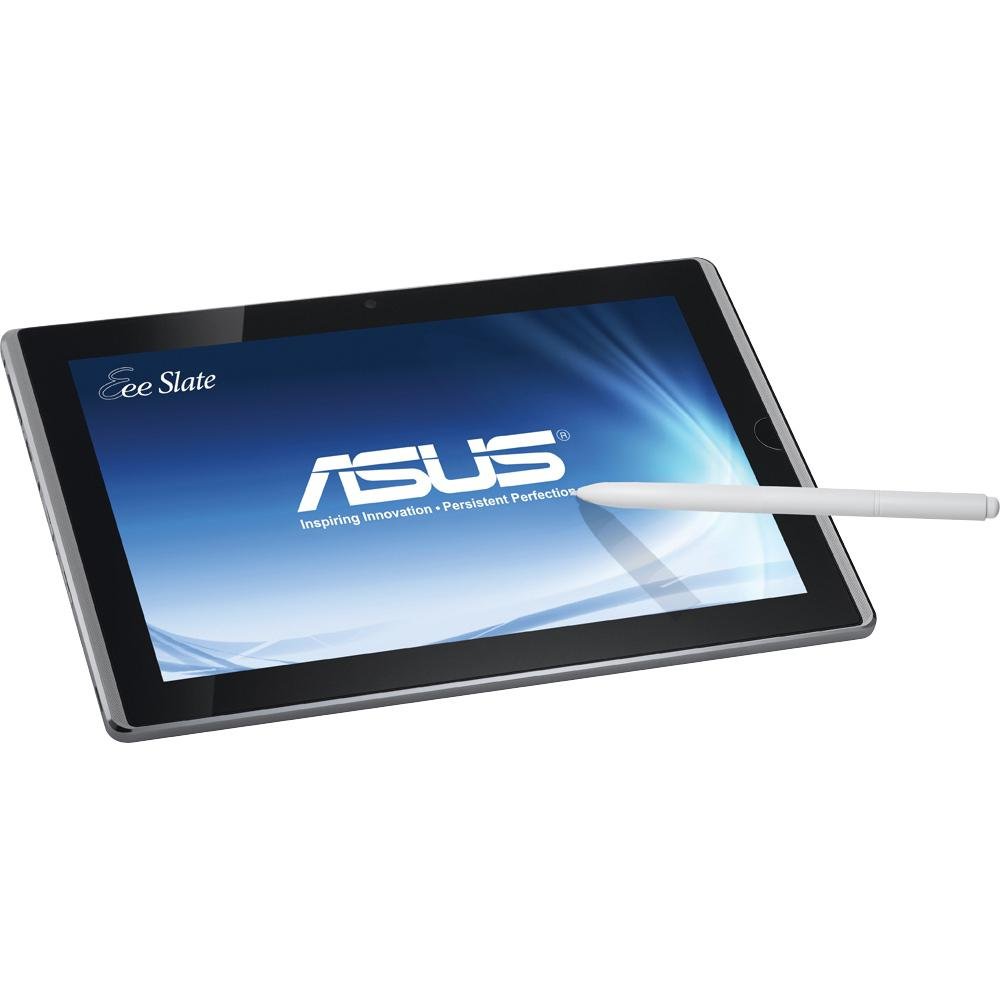
Gambar: Hareupeun view of the ASUS Eee Slate EP121-1A011M Tablet PC, showcasinlayarna 12.1 inci.
Disetél
Follow these steps to set up your ASUS Eee Slate EP121-1A011M Tablet PC for the first time.
- Ngeusi batre alat: Connect the power adapter to the tablet's charging port and plug it into a power outlet. Allow the device to charge fully before initial use.
- Daya Hurung: Press and hold the power button located on the device until the ASUS logo appears.
- Setup Windows Awal: Follow the on-screen prompts to complete the Windows 7 Home Premium setup, including language selection, time zone, and user account creation.
- Connect Bluetooth Keyboard:
- Ensure the Bluetooth keyboard is charged and in pairing mode.
- On the tablet, navigate to the Bluetooth settings (typically via the Control Panel or system tray).
- Milarian pikeun and select the ASUS Bluetooth keyboard from the list of available devices to pair.
- Stylus Setup: The digitizer pen is typically ready for use upon first power-on. No specific pairing is usually required.
- Install Folio: Place the tablet into the provided folio case. The folio is designed to protect the tablet and allow it to stand upright for desktop use.

Image: The ASUS Eee Slate EP121-1A011M placed in its protective folio, accompanied by the Bluetooth keyboard.
Parentah Operasi
This section details the primary functions and usage of your ASUS Eee Slate EP121-1A011M.
Touchscreen and Pen Input
- The 12.1-inch display supports multi-touch gestures for navigation, zooming, and scrolling.
- Use the digitizer pen for precise input, drawing, and handwriting recognition, especially useful with applications like Windows Journal or OneNote. The screen is pressure-sensitive for varied line thickness and control.
- A short tap with your finger or pen acts as a left-click, while a long press often functions as a right-click, similar to a mouse.
Nyambungkeun Alat éksternal
- Port USB: The tablet includes two USB 2.0 ports for connecting peripherals such as external hard drives, USB flash drives, or a wired mouse/keyboard. Ensure correct orientation when inserting USB devices to avoid damage.
- Mini HDMI: Connect an external monitor or TV using a mini HDMI cable for a larger display experience.
- Slot Kartu SD: Insert an SD card to expand storage or transfer files.
Software jeung Aplikasi
Running Windows 7 Home Premium, the Eee Slate EP121-1A011M supports a wide range of desktop applications. You can install software directly without relying on an app store. For example, graphic design software like Adobe Photoshop can be installed and utilized for creative tasks.
Video: An artist demonstrates using the ASUS Eee Slate EP121-1A011M for digital art creation and showcasing their work, highlighting its full Windows 7 capabilities and pen input.

Image: The ASUS Eee Slate EP121-1A011M displayed alongside its Bluetooth keyboard, ready for productivity tasks.
Pangropéa
Pangropéa anu leres mastikeun umur panjang sareng kinerja tablet anjeun anu optimal.
- Ngabersihan layar: Use a soft, lint-free cloth specifically designed for electronics to clean the touchscreen. Avoid harsh chemicals or abrasive materials.
- Perawatan batré: To maximize battery life, avoid extreme temperatures. For long-term storage, charge the battery to about 50% and store the device in a cool, dry place.
- Apdet parangkat lunak: Regularly check for and install Windows updates to ensure system stability, security, and performance.
- Manajemén Panyimpenan: With a 32GB SSD, regularly manage your files and uninstall unused applications to maintain sufficient free space for optimal performance.
- Perlindungan fisik: Always use the provided folio or a suitable protective case to guard against scratches and impacts.

Image: The ASUS Eee Slate EP121-1A011M held in a hand, illustrating its thin and portable design.
Pamérésan masalah
This section addresses common issues you might encounter with your ASUS Eee Slate EP121-1A011M.
| Masalah | Mungkin Cukang lantaranana | Solusi |
|---|---|---|
| Device does not power on or respond. | Low battery, system crash. | Ensure the device is charged. Perform a hard reset by holding the power button for 10-15 seconds. |
| Bluetooth keyboard not connecting. | Keyboard battery low, not in pairing mode, interference. | Charge the keyboard. Ensure it's in pairing mode. Re-pair the keyboard via Bluetooth settings. Check for other Bluetooth devices causing interference. |
| kinerja lalaunan. | Seueur teuing aplikasi anu dijalankeun, rohangan panyimpen rendah, supir anu tos lami. | Close unnecessary applications. Free up storage space on the SSD. Update Windows and device drivers. |
| Weak Wi-Fi signal or disconnections. | Distance from router, interference, driver issues. | Move closer to the Wi-Fi router. Check for physical obstructions. Update Wi-Fi drivers. Restart the tablet and router. |
| USB devices difficult to insert/remove. | Incorrect orientation. | Ensure the USB device is oriented correctly before attempting to insert or remove it. Do not force connections. |
| hirup batré pondok. | High screen brightness, background apps, aging battery. | Reduce screen brightness. Close background applications. Consider battery replacement if significantly degraded. |
spésifikasi
Detailed technical specifications for the ASUS Eee Slate EP121-1A011M.
| Fitur | Rincian |
|---|---|
| Nomer modél | EP121-1A011M |
| Ukuran tampilan | 12.1 inci |
| Resolusi layar | 1280 x 800 piksel |
| Prosesor | Intel Core i5-470UM (1.3 GHz) |
| Ram | 2 GB DDR3 |
| Panyimpenan | 32 GB SSD |
| Grafik Coprocessor | Intel HD 3000 |
| Sistem operasi | Windows 7 Imah Premium |
| Tipe Wireless | 802.11b, 802.11g, 802.11n |
| USB 2.0 palabuhan | 2 |
| Rata Kahirupan Batré | 3 Jam |
| Item Beurat | 2.56 pon |
| Dimensi produk | 12.28 x 8.16 x 0.67 inci |
| Tukangeun WebResolusi cam | 2 MP |
Gambar: Tukangeun view of the ASUS Eee Slate EP121-1A011M Tablet PC, showing the ASUS logo and ventilation.
Garansi sareng Rojongan
For warranty information, technical support, or service inquiries, please refer to the documentation included with your product at the time of purchase or visit the official ASUS support websitus. Simpen bukti pameseran anjeun pikeun klaim garansi.
Dukungan ASUS: www.asus.com/support


