Bubuka
This manual provides comprehensive instructions for the safe and efficient use of your BlackBerry HS-300 Wireless Bluetooth Headset. Please read this manual thoroughly before operating the device and retain it for future reference. The BlackBerry HS-300 is designed for hands-free communication with compatible Bluetooth-enabled devices.
Eusi pakét
Pariksa yén pakét anjeun ngandung barang-barang ieu:
- BlackBerry HS-300 Wireless Bluetooth Headset
- Ear hook (optional, for secure fit)
- Ear gels/tips (various sizes for comfort)
- Kabel ngecas
- Manual pangguna (dokumén ieu)
Alat Langkungview
Familiarize yourself with the components of your BlackBerry HS-300 headset.
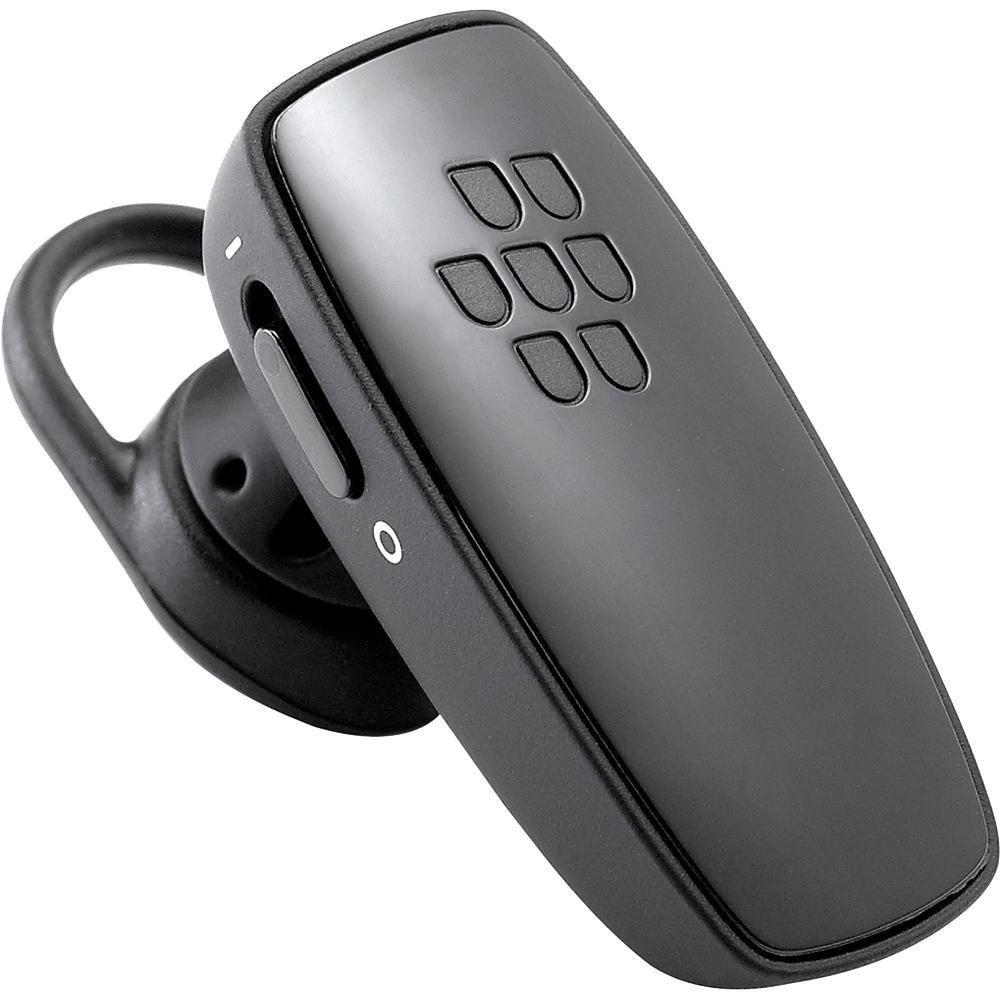
Gambar 1: Hareupeun view of the BlackBerry HS-300 Wireless Bluetooth Headset. The image displays the main body of the headset, featuring the BlackBerry logo (seven-dot pattern) on the front surface. A slender button, likely for volume control or multi-function, is visible on the side. An ear hook is attached, designed to secure the headset over the ear. A small indicator light is also present near the button.
- Tombol multi-fungsi: Used for answering/ending calls, voice commands, and pairing.
- Tombol Kontrol Volume: Adjusts call and media volume.
- Lampu Indikator LED: Némbongkeun status (kakuatan, pasangan, ngecas).
- Mikropon: Captures your voice during calls.
- Saklar kakuatan: Ngahurungkeun atawa mareuman headset.
- Port ngecas: Nyambungkeun kana kabel ngecas.
Disetél
1. Ngecas Headsét
Before initial use, fully charge your headset. The HS-300 features rapid charge capabilities.
- Connect the charging cable to the headset's charging port and to a compatible USB power source.
- The LED indicator will show the charging status (e.g., solid red for charging, solid blue for fully charged).
- A full charge provides up to 4 hours of talk time.
2. Nyapasangkeun sareng Alat Bluetooth
To use your headset, it must be paired with a Bluetooth-enabled phone or device.
- Pastikeun headset dipareuman.
- Press and hold the Multi-function Button until the LED indicator flashes blue and red alternately. This indicates pairing mode.
- On your phone, enable Bluetooth and search for new devices.
- Select "BlackBerry HS-300" from the list of available devices.
- Upami dipenta pikeun kodeu aksés, lebetkeun "0000" (opat nol).
- Sakali dipasangkeun, indikator LED bakal berkedip biru périodik.
Parentah Operasi
Daya Hurung/Pareuman
- Pikeun Ngahurungkeun: Slide the Power Switch to the 'On' position. The LED indicator will flash blue.
- Pikeun mareuman: Slide the Power Switch to the 'Off' position. The LED indicator will turn off.
Nelepon jeung Narima Telepon
- Ngajawab Telepon: Pencét tombol Multi-fungsi sakali.
- Nutup Telepon: Pencét Tombol Multi-fungsi sakali nalika nelepon.
- Nolak Telepon: Press and hold the Multi-function Button for approximately 2 seconds.
- Nelepon: Dial the number on your phone. The call will automatically transfer to the headset if connected.
- Telepon Sora (upami dirojong ku telepon): Press the Multi-function Button once when not on a call.
Volume Control
- Use the Volume Control Buttons on the headset to adjust the call or media volume.
Pangropéa
- Bersihkeun headset sacara rutin nganggo lawon anu lemes sareng garing.
- Ulah nepi ka headset kakeunaan suhu anu ekstrim, kalembaban, atanapi zat korosif.
- Simpen headset dina tempat anu tiis sareng garing upami henteu dianggo.
- Do not attempt to disassemble or modify the headset, as this will void the warranty and may cause damage.
Pamérésan masalah
| Masalah | Solusi |
|---|---|
| Headset teu hurung. | Ensure the headset is charged. Connect it to a power source using the charging cable. |
| Cannot pair the headset with my phone. |
|
| Teu aya audio atanapi kualitas audio anu goréng. |
|
| Headset sering pegat sambungan. |
|
spésifikasi
| Fitur | Rincian |
|---|---|
| Nomer modél | HS-300 |
| Konektipitas | Bluetooth Wireless (Version 2.1) |
| Waktu Ngobrol | Nepi ka 4 jam |
| Ngecas | Rapid charge capable |
| Kadali | Volume control, Multi-function button |
| Mikropon | terpadu |
| Faktor Bentuk | On-ear (single ear) |
| Beurat | Kira-kira 3.2 ons |
| Diménsi | 2.5 x 2 x 6.5 inci (kira-kira) |
Garansi sareng Rojongan
For warranty information and technical support, please refer to the documentation provided at the time of purchase or visit the official BlackBerry support websitus. Simpen bukti pameseran anjeun pikeun klaim garansi.
Dukungan Online: www.blackberry.com/support


