1. Bubuka
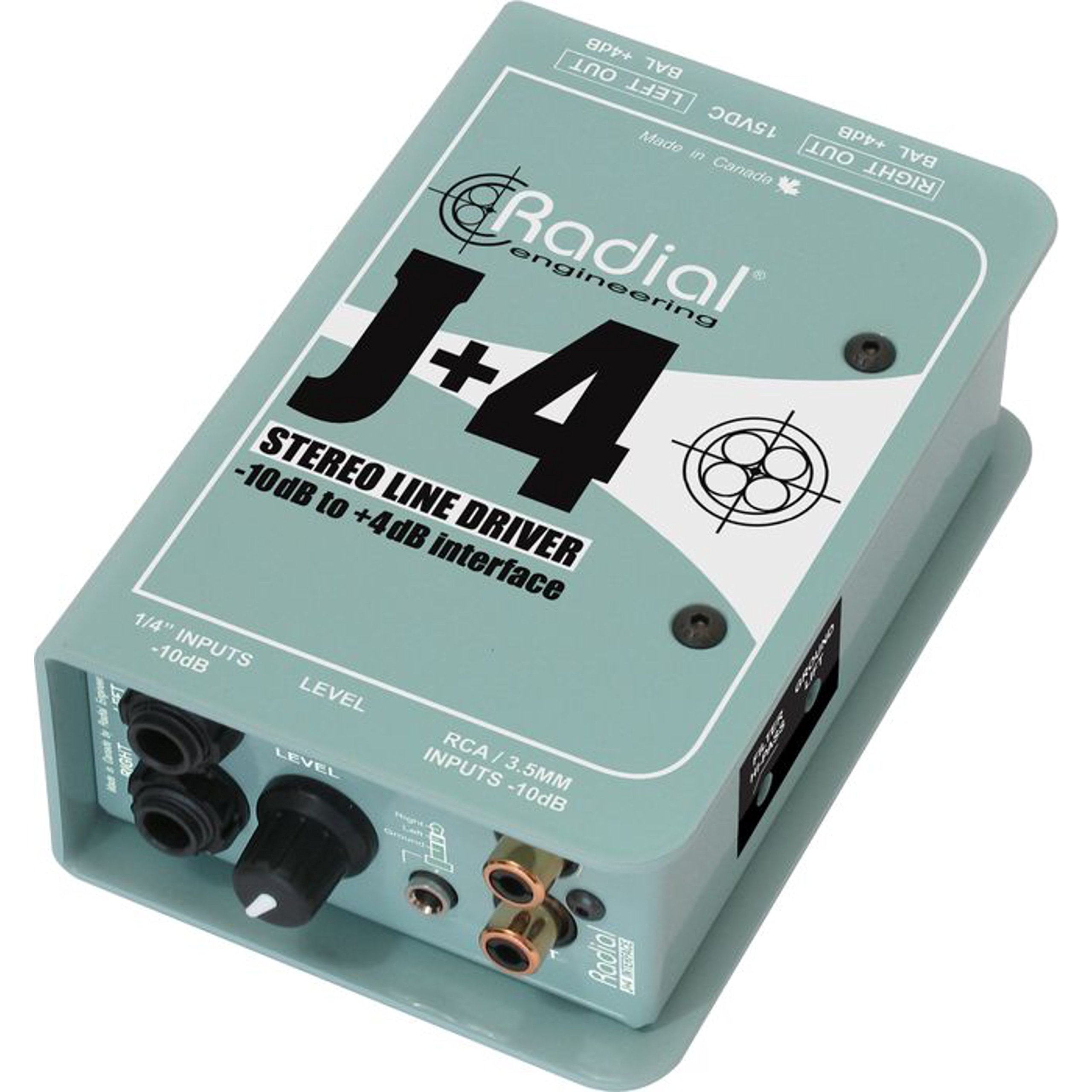
The Radial J+4 is a 2-channel signal level driver designed to interface professional audio equipment with consumer-level or low-output devices. It effectively boosts incoming signals from -10dB to a professional +4dB line level, ensuring optimal signal integrity and compatibility within recording studios, broadcast environments, and live sound applications. Its robust construction and active circuitry provide reliable performance and noise reduction.
2. Émbaran Kasalametan penting
- Sumber Daya: Use only the specified power adapter for this unit. Incorrect voltage bisa ngaruksak alat jeung batal jaminan.
- Uap: Ulah ngantepkeun unit ieu ka hujan, kalembaban, atanapi kalembaban anu kaleuleuwihi.
- Panas: Ulah neundeun unit ieu caket kana sumber panas sapertos radiator, pancatat panas, kompor, atanapi alat penghasil panas anu sanésna.
- Ventilasi: Pastikeun ventilasi anu leres. Ulah meungpeuk sagala bukaan ventilasi.
- Palayanan: Rujuk sadayana jasa ka tanaga jasa anu mumpuni. Entong nyobian ngalayanan produk ieu nyalira.
- Kabel: Ensure all cables are securely connected and free from damage to prevent signal loss or electrical hazards.
3. Fitur konci
- Operasi 2-Kanal: Processes two independent audio channels.
- Signal Level Matching: Boosts -10dB consumer-level signals to +4dB professional line level.
- Discrete Circuitry: 100% discrete signal path for optimal audio fidelity.
- Active Buffering: Maintains signal integrity over long cable runs.
- Transformer Isolation: Helps eliminate ground loop hum and noise.
- Stereo Gain Control: Allows precise level adjustment for both channels.
- Saringan Highpass: Reduces unwanted low-frequency rumble and noise.
- Ground lift switch: Breaks the ground connection to further combat hum.
- Input serbaguna: Features dual 1/4" TRS, RCA, and a stereo 1/8" TRS input.
- Konstruksi awét: Built with 14-gauge steel for roadworthy reliability.
4. Kontrol jeung sambungan
The Radial J+4 features a straightforward layout for easy integration into any audio setup.
Panel hareup
The front panel provides access to input connections and primary controls.
- INPUTS (1/4" TRS, RCA, 1/8" TRS): Connect your low-level audio sources here. The 1/4" and RCA jacks are typically for stereo pairs, while the 1/8" TRS is for portable devices.
- Kontrol GAIN: A rotary knob to adjust the output level of the boosted signal.
- HIGHPASS Filter Switch: Engages a filter to remove low-frequency content.
- GROUND LIFT switch: Disconnects the audio ground from the chassis ground to eliminate hum and buzz caused by ground loops.
Panel tukang
The rear panel houses the output connections and power input.
- OUTPUTS (XLR): Balanced XLR outputs for connecting to professional audio equipment such as mixers, audio interfaces, or power amplifsters.
- Input kakuatan: Connection point for the external power supply.
5. Setup Guide
Follow these steps for initial setup of your Radial J+4:
- Pareuman Sadaya Peralatan: Before making any connections, ensure all audio equipment (source devices, mixers, amplifiers) are powered off.
- Sambungkeun Sumber Input: Connect your low-level audio source (e.g., MP3 player, computer, instrument output) to the appropriate input jacks on the front panel of the J+4 (1/4" TRS, RCA, or 1/8" TRS).
- Kaluaran Sambungkeun: Connect the XLR outputs of the J+4 to the line-level inputs of your professional audio equipment (e.g., mixer, audio interface). Use balanced XLR cables for optimal performance.
- Sambungkeun Kakuatan: Connect the provided power adapter to the POWER INPUT on the rear panel of the J+4, then plug the adapter into an appropriate power outlet.
- Daya Hurung: Power on your professional audio equipment first, then power on your source device. The J+4 will power on automatically when connected to its power supply.
- Setélan Gain Awal: Set the GAIN control on the J+4 to its minimum position before playing audio.
6. Operasi
Once connected, operating the J+4 is straightforward:
- Ngaluyukeun Gain: Play audio from your source device. Slowly increase the GAIN control on the J+4 until the desired output level is achieved at your professional audio equipment. Monitor the input levels on your mixer or interface to avoid clipping.
- Using the Highpass Filter: If you notice excessive low-frequency rumble or unwanted bass content, engage the HIGHPASS filter switch. This can help clean up the signal, especially with vocal or acoustic instrument sources.
- Addressing Hum and Buzz: If you experience a persistent hum or buzz, try engaging the GROUND LIFT switch. This can often resolve ground loop issues by breaking the electrical ground connection between the J+4 and other equipment. If the hum persists, check all cable connections and try different power outlets.
7. Pangropéa
The Radial J+4 is designed for durability and requires minimal maintenance.
- beberesih: Anggo lawon anu lemes sareng garing pikeun ngabersihkeun bagian luar unit. Entong nganggo pembersih abrasif, pangleyur, atanapi lilin.
- Pamariksaan: Périodik mariksa kabel sareng sambungan upami aya tanda-tanda ngagem atanapi karusakan.
- Panyimpenan: Upami teu dianggo salami lami, simpen unit ieu di tempat anu garing sareng bébas lebu.
8. Cara ngungkulan
If you encounter issues with your Radial J+4, refer to the following common problems and solutions:
| Masalah | Mungkin Cukang lantaranana | Solusi |
|---|---|---|
| Taya kaluaran sora |
|
|
| Hum atanapi Buzz |
|
|
| Sora distort |
|
|
9. Spésifikasi
- model: R800 8015
- Jumlah Saluran: 2
- Téknologi konektipitas: 1/4" TRS, 1/8" TRS, RCA (inputs), XLR (outputs)
- Signal Level Conversion: -10dB dugi + 4dB
- Tipe Bahan: Beusi sténless
- Ukuran produk: 10.8 x 4.9 x 2.8 inci
- Beurat barang: 0.01 ons
- Alat anu cocog: Personal Computer, various audio sources
- Parangkat Lunak anu Dirojong: Pro Tools, Logic Pro, Ableton Live, FL Studio, Cubase (when used with compatible audio interfaces)
10. Garansi jeung Rojongan
For warranty information and technical support, please refer to the official Radial Engineering websitus atanapi ngahubungan departemén layanan palanggan maranéhna. Simpen resi pameseran anjeun salaku bukti pameseran pikeun klaim garansi.


