
1. Bubuka
This manual provides instructions for the installation and maintenance of the Leviton 78013 1-Gang .406 Inch Hole Device Telephone/Cable Wallplate. This standard-size, thermoset wallplate is designed to cover a single telephone or cable device mounted in a standard electrical box, providing a clean and finished appearance.
The Leviton 78013 wallplate is resistant to fading, discoloration, grease, oil, organic solvents, and moisture scratches, ensuring long-lasting durability and aesthetic appeal.
2. Émbaran Kasalametan
PERHATOSAN: To avoid fire, shock, or death, always turn off power at the circuit breaker or fuse box before installing or servicing this product. Always use caution when working with electrical components.
- Pastikeun sadaya kode listrik lokal sareng nasional diturutan.
- Upami anjeun henteu yakin kana bagian mana waé tina pitunjuk ieu, konsultasi ka tukang listrik anu mumpuni.
- Entong nganggo produk ieu pikeun tujuan salain tujuanna.
3. Eusi Paket
- One (1) Leviton 78013 1-Gang .406 Inch Hole Device Telephone/Cable Wallplate (Light Almond)
- Dua (2) Sekrup Pemasangan
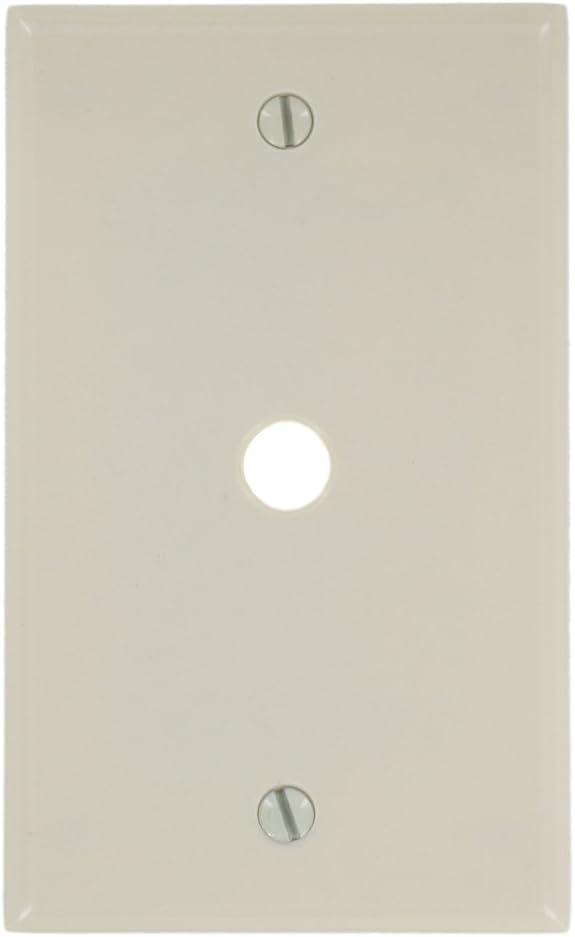
Gambar: Hareupeun view of the Leviton 78013 1-Gang Telephone/Cable Wallplate in Light Almond, showing the single .406 inch hole and two screw openings.
4. Parentah instalasi
This wallplate is designed for easy installation over a pre-existing telephone or cable device. Follow these steps carefully:
- Nyiapkeun wewengkon: Ensure the power to the circuit is turned off at the main electrical panel before beginning. If replacing an existing wallplate, carefully remove the old plate and its mounting screws.
- Posisi Alat: Ensure the telephone or cable device is properly installed and secured within the electrical box. The device's connector should protrude through the .406 inch hole of the new wallplate.
- Align the Wallplate: Place the Leviton 78013 wallplate over the device and align the screw holes on the wallplate with the mounting holes on the electrical box or device bracket.
- Amankeun Pelat Dinding: Insert the provided mounting screws into the top and bottom holes of the wallplate. Gently tighten the screws until the wallplate is flush with the wall surface. Ulah overtighten, as this can crack the wallplate or strip the screw threads.
- Mulangkeun Daya: Once the wallplate is securely installed, restore power to the circuit at the main electrical panel.
5. Operasi
The Leviton 78013 wallplate serves as a protective and aesthetic cover for your telephone or cable device. Once installed, it requires no further operation. Ensure any cables or telephone lines are properly connected to the device behind the wallplate.
6. Pangropéa
To maintain the appearance and integrity of your wallplate:
- Beresih ku hipu, damp lawon.
- Avoid abrasive cleaners, harsh chemicals, or solvents, as these can damage the finish.
- Periodically check that the mounting screws are snug. Do not overtighten.
7. Cara ngungkulan
- Pelat témbok teu pas rata: Ensure the device behind the wallplate is properly seated and not protruding excessively. Check for any obstructions within the electrical box.
- Sekrup henteu saluyu: Verify that the electrical box or device bracket is correctly installed and aligned. If replacing an older plate, ensure the new plate's screw spacing matches the existing setup.
- Wallplate appears damaged after installation: This may be due to overtightening the mounting screws. Loosen the screws slightly. If the damage is significant, the wallplate may need replacement.
8. Spésifikasi
| Fitur | Rincian |
|---|---|
| Nomer modél | 78013 |
| merek | Leviton |
| Bahan | Thermoset Plastic |
| Warna | Almond Lampu |
| Konfigurasi | 1-Gang, .406 Inch Hole Device |
| Ukuran (W x H) | 2.75" x 4.5" |
| Tipe Pamasangan | Box Mount, Screw-In |
| Sertifikasi | CSA, UL |
| UPC | 078477276518 |
9. Émbaran jaminan
Produk Leviton ieu ditutupan ku 2-Taun jaminan kawates. For detailed warranty terms and conditions, please refer to the official Leviton websitus atanapi ngahubungan rojongan customer.
10. Rojongan Palanggan
For further assistance, technical support, or to inquire about replacement parts, please visit the official Leviton websitus atanapi ngahubungan departemén layanan palanggan maranéhna.
Leviton Resmi Websitus: www.leviton.com