
HEWLETT PACKARD J9450A
HP Procurve 1810G-24 Switch (J9450A) User Manual
Modél: J9450A
Bubuka
The HP Procurve 1810G-24 Switch (J9450A) is a managed Gigabit Ethernet switch designed for small and medium-sized businesses. It provides reliable network connectivity with advanced features for enhanced performance and security. This manual provides essential information for the setup, operation, maintenance, and troubleshooting of your switch.

Figure 1: HP Procurve 1810G-24 Switch (J9450A) - Front Angled View
This image shows the overall design of the HP Procurve 1810G-24 Switch, highlighting its compact form factor and the arrangement of its ports and indicators.
Eusi pakét
Pastikeun yén sadaya item aya dina bungkusan:
- HP Procurve 1810G-24 Switch (J9450A)
- Kabel kakuatan
- Rét-mount kit
- Kabel konsol
Disetél
1. Instalasi fisik
The HP Procurve 1810G-24 Switch can be placed on a desktop or mounted in a standard 19-inch equipment rack using the included rack-mount kit.
- Pamasangan rak: Attach the rack-mount brackets to the sides of the switch using the provided screws. Secure the switch into the rack.
- Penempatan Desktop: Ensure adequate ventilation around the switch. Do not block any ventilation openings.
2. Sambungan Daya
Connect the provided power cable to the power inlet on the rear of the switch and then to a grounded AC power outlet. The switch will power on automatically.

Figure 2: Rear Panel of the Switch
This image displays the rear panel of the HP Procurve 1810G-24 Switch, showing the power input and product labels.
3. Sambungan jaringan
Connect your network devices (computers, servers, other switches) to the RJ45 ports on the front panel of the switch using standard Ethernet cables. The switch supports 10/100/1000 Mbps connections.

Gambar 3: Panel Hareup Saklar
gambar ieu nyadiakeun jelas view of the front panel of the HP Procurve 1810G-24 Switch, detailing the 24 Gigabit Ethernet ports and indicator lights.
The switch also features dual-personality ports (ports 23 and 24) which can function as either 10/100/1000 RJ45 ports or mini-GBIC (SFP) slots for optional fiber connectivity (e.g., Gigabit-SX, -LX, -LH, or 100-FX).

Figure 4: Front Panel Indicators and Controls
This close-up image highlights the power indicator, fault locator, LED mode, and speed indicators on the front panel of the HP Procurve 1810G-24 Switch.
Ngoperasikeun Switch
Web Manajemén panganteur
The HP Procurve 1810G-24 Switch features an intuitive web-based management interface for configuration, monitoring, and administration. To access the web panganteur:
- Pastikeun komputer anjeun nyambung ka saklar.
- Buka a web browser and enter the default IP address of the switch (refer to the product documentation or sticker for the default IP).
- Log in using the default credentials (if applicable).
- Ti web interface, you can configure various settings, including:
- VLAN Support and Tagging: Configure up to 64 port-based VLANs and dynamic IEEE 802.1Q VLAN tagging for network segmentation and security.
- Konfigurasi Port: Adjust port speed, duplex settings, and enable/disable ports.
- Link Aggregasi: Combine multiple ports for increased bandwidth and redundancy.
- Kualitas Pelayanan (QoS): Prioritaskeun lalu lintas jaringan pikeun aplikasi anu penting.
Indikator LED
Panel hareup LEDs nyadiakeun status visual saklar jeung palabuhan na:
- LED kakuatan: Nunjukkeun status kakuatan.
- Fault Locator LED: Indicates system faults.
- Link/Aktivitas LEDs (per port):
- Solid Green: Link established.
- Flashing Green: Activity on the port.
- Speed LEDs (per port):
- Off: 10 Mbps
- Flash: 100 Mbps
- On: 1000 Mbps (Gigabit)
Pangropéa
The HP Procurve 1810G-24 Switch is designed for low maintenance. It operates without internal fans, contributing to a quiet environment and reduced dust accumulation.
- Pembaruan firmware: Periodically check the official HP website for firmware updates to ensure optimal performance and security. Follow the instructions provided with the firmware update package.
- beberesih: Anggo lawon anu lembut sareng garing pikeun ngabersihan bagian luar saklar. Entong nganggo pembersih cair atanapi aerosol.
- Ventilasi: Pastikeun yén bukaan ventilasi teu ngahalangan pikeun nyegah overheating.
Pamérésan masalah
Taya Daya
- Pastikeun kabel daya parantos disambungkeun kalayan pageuh kana saklar sareng stop kontak.
- Pastikeun colokan listrik tiasa dianggo ku cara nguji sareng alat anu sanés.
No Link Light on Port
- Pariksa sambungan kabel Ethernet di dua tungtungna (switch sareng alat anu nyambung).
- Coba kabel Ethernet béda.
- Test the port with a known working device.
- Pastikeun alat nu disambungkeun dihurungkeun tur fungsina bener.
Connectivity Issues After Power Failure
In some rare instances, the switch may not fully restore network connectivity to all ports immediately after a power outage. If this occurs:
- Siklus kakuatan: Disconnect the power cable from the switch, wait for approximately 30 seconds, and then reconnect it.
- Reseat Cables: Physically disconnect and reconnect the Ethernet cables for affected devices.
- Pabrik Reset: If issues persist, a factory reset may be necessary. This will revert all settings to their default values. Consult the detailed product manual for the specific procedure, which often involves using a small pointed object (like a paperclip) to press a reset button.
Web Interface Inaccessible
- Verify your computer's IP address is in the same subnet as the switch's default IP address.
- Pupus cache sareng cookies browser anjeun.
- Coba béda web browser.
- Perform a factory reset if you have forgotten the login credentials or if the interface remains unresponsive.
spésifikasi
| Fitur | Katerangan |
|---|---|
| Nomer modél | J9450A |
| Pindah Tipe | Diurus Gigabit Ethernet Pindah |
| Jumlah Palabuhan | 24 (22 x 10/100/1000BASE-T, 2 x Dual-Personality 10/100/1000BASE-T or SFP) |
| Laju Mindahkeun Data | 1000 Megabits Per Detik (Gigabit) |
| Tipe panganteur | RJ45, SFP |
| Bahan Kasus | logam |
| Ukuran (L x W x H) | 17 x 7 x 2 inci (kira-kira) |
| Item Beurat | 5 pon |
| Input kakuatan | 100-127V ~ 0.75A (0.75A), 200-240V ~ 0.4A (0.4A) |
| Suhu Operasi | 0°C nepi ka 40°C (32°F nepi ka 104°F) |
| Niiskeun | Tanpa kipas |
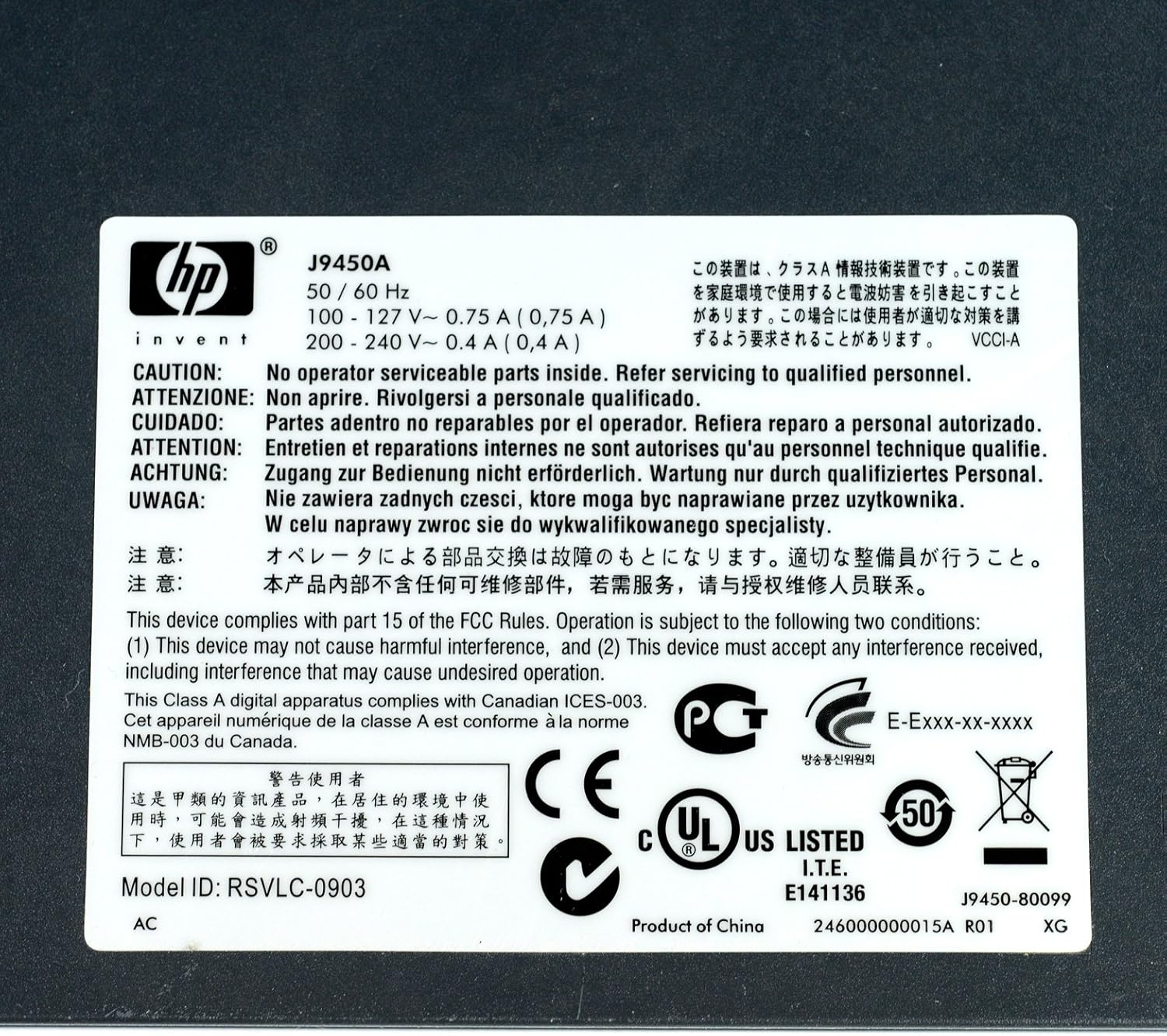
Figure 5: Product Label with Specifications
This image displays the product label, which includes the model number, electrical ratings, and various compliance marks.
Garansi sareng Rojongan
Émbaran jaminan
The HP Procurve 1810G-24 Switch typically comes with a Garansi ngagantian saumur hirup for the original owner. Please refer to the official HP warranty documentation for complete terms and conditions, as warranty details may vary by region and purchase date.
Bantosan Téknis
For technical assistance, product registration, or to download the latest drivers and firmware, please visit the official HP support website. Have your product model number (J9450A) and serial number ready when contacting support.
You can typically find support resources at: www.hp.com/support