Bubuka
The Vivitar 2X Auto Focus Teleconverter Lens (2X4C) is designed to extend the focal length of your existing Canon EF mount lenses by a factor of two. This accessory allows you to achieve greater magnification for distant subjects without needing a dedicated super-telephoto lens. Featuring a 4-element, multicoated optical glass design, it aims to maintain high definition and clarity in your images.
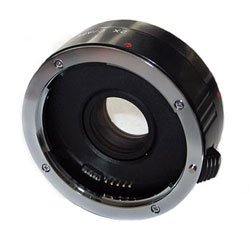
Image: Vivitar 2X Auto Focus Teleconverter Lens (2X4C) for Canon. This image displays the teleconverter lens, typically a compact cylindrical device with mounting rings on both ends, designed to fit between a camera body and a primary lens.
Setup sareng Instalasi
- Power Off Camera: Ensure your Canon camera is powered off before attaching or detaching any lenses or accessories.
- Leupaskeun lensa: Detach your primary lens from the camera body by pressing the lens release button and twisting the lens counter-clockwise. Place the lens cap on the rear of your primary lens.
- Attach Teleconverter to Camera: Align the mounting index mark on the Vivitar 2X Teleconverter with the corresponding mark on your camera body. Gently insert the teleconverter and twist it clockwise until it clicks into place, indicating it is securely locked.
- Attach Primary Lens to Teleconverter: Align the mounting index mark on your primary lens with the corresponding mark on the Vivitar 2X Teleconverter. Gently insert the lens and twist it clockwise until it clicks into place.
- Hurungkeun Kaméra: You may now power on your camera. The camera should recognize the teleconverter and adjust its display to reflect the new effective focal length and aperture.
Always handle the teleconverter and lenses by their barrels, avoiding contact with the glass elements or electronic contacts.
Parentah Operasi
- Ngagedekeun Panjang Fokus: Teleconverter ngagandakeun panjang fokus lénsa anu dipasang. Contonaample, a 70-300mm lens will become a 140-600mm lens when used with this 2X teleconverter.
- Light Loss: Using a 2X teleconverter results in a loss of approximately two stops of light. This means your effective maximum aperture will be two stops darker (e.g., an f/2.8 lens becomes an f/5.6 lens). You may need to compensate by increasing ISO or using slower shutter speeds, especially in low-light conditions.
- Performa Fokus Otomatis: While this teleconverter supports auto focus, its performance can be affected. Autofocus may become slower or less reliable, particularly in dim lighting or when using lenses with smaller maximum apertures. For optimal results, consider using a single-point autofocus mode or switching to manual focus when necessary.
- Kualitas Gambar: The teleconverter is designed with multicoated optical glass to maintain image quality. However, some reduction in sharpness or contrast, especially at the edges of the frame or at wider apertures, may be observed depending on the primary lens used. Stopping down the aperture (using a higher f-number) can often improve sharpness.
- Stabilitas: Due to the increased focal length, camera shake becomes more pronounced. Using a tripod or monopod is highly recommended for sharp images, especially with longer lenses or slower shutter speeds.
Pangropéa sareng Perawatan
- Ngabersihkeun Élémen Lénsa: Use a soft, lint-free microfiber cloth specifically designed for optical lenses. For stubborn dust, use a lens blower brush first. For smudges or fingerprints, apply a small amount of lens cleaning solution to the cloth, not directly to the lens.
- Ngabersihan awak: Wipe the exterior of the teleconverter with a clean, dry cloth. Avoid using harsh chemicals or solvents.
- Panyimpenan: When not in use, store the teleconverter in a dry, dust-free environment, preferably in a lens pouch or case. Keep both ends capped to prevent dust and scratches.
- Hindarkeun Kaayaan Ekstrim: Do not expose the teleconverter to extreme temperatures, high humidity, or direct sunlight for prolonged periods.
- Nanganan kalayan ati-ati: Avoid dropping or subjecting the teleconverter to strong impacts, as this can damage the optical elements or internal mechanisms.
Pamérésan masalah
- Autofocus is Slow or Not Working:
- Ensure there is sufficient light for the camera's autofocus system.
- Try switching your camera to a single-point autofocus mode, focusing on a high-contrast area.
- Consider using manual focus, especially with lenses that have a smaller maximum aperture or in challenging lighting conditions.
- Clean the electronic contacts on both the teleconverter and your camera/lens with a clean, dry cloth.
- Images Appear Soft or Blurry:
- Increase your shutter speed or use a tripod to minimize camera shake, which is more noticeable at longer focal lengths.
- Stop down the aperture (use a higher f-number) to improve overall sharpness.
- Ensure the lens and teleconverter are securely mounted and free from dust or smudges.
- Verify that your camera's focus is accurate.
- Teleconverter Not Recognized by Camera:
- Ensure the teleconverter and lens are properly and securely attached to the camera body, with audible clicks.
- Clean the electronic contacts on all components.
- Power cycle your camera (turn off, remove battery, reinsert, turn on).
- Rattling Sound from Teleconverter:
- If you hear a rattling sound from inside the teleconverter, this may indicate an internal component issue. Discontinue use and contact Vivitar customer support for assistance.
spésifikasi
| Fitur | Katerangan |
|---|---|
| Nomer modél | 2X4C |
| Magnification | 2X (doubles focal length of primary lens) |
| Desain optik | 4 Elements, Multicoated Optical Glass |
| Mountings cocog | Canon ef |
| Dimensi produk | 3.2 x 3 x 2.8 inci |
| Item Beurat | 6.4 ons |
| Produsén | Live |
| Tanggal Kahiji Sadia | 11 Juli 2009 |
Garansi sareng Rojongan
Vivitar products are typically covered by a limited warranty. For specific warranty details, including duration and coverage, please refer to the warranty card included with your purchase or visit the official Vivitar websitus.
For technical support, service, or inquiries regarding your Vivitar 2X Auto Focus Teleconverter Lens (2X4C), please contact Vivitar Customer Service through their official website or the contact information provided in your product packaging. Please have your model number (2X4C) and proof of purchase available when contacting support.
Vivitar Official Websitus: www.vivitar.com