Bubuka
Hatur nuhun pikeun meuliasing the Muse M-12 CR Radio Alarm Clock. This compact and versatile device combines an FM radio with a dual alarm clock, offering convenience and functionality for your daily routine. Featuring a clear red LED display and intuitive controls, the M-12 CR is designed for ease of use. Please read this manual carefully to ensure proper operation and to fully utilize all features of your new alarm clock.
Eusi pakét
Punten parios yén sadaya barang aya sareng dina kaayaan anu saé:
- Muse M-12 CR Radio Alarm Clock Unit
- Adaptor kakuatan
- Manual pangguna (dokumén ieu)
Produk Leuwihview jeung Kontrol
Familiarize yourself with the various parts and controls of your Muse M-12 CR Radio Alarm Clock.

Gambar 1: Hareup sareng luhur view of the Muse M-12 CR Radio Alarm Clock, highlighting the red LED display and the arrangement of control buttons.
Tombol Kontrol (Panel Luhur):
- SNOOZE / DIMMER Button: Press to temporarily silence the alarm (snooze function). Press and hold to adjust display brightness.
- Tombol ALARM 1: Press to activate/deactivate Alarm 1. Press and hold to set Alarm 1 time.
- Tombol ALARM 2: Press to activate/deactivate Alarm 2. Press and hold to set Alarm 2 time.
- Tombol SET WAKTU: Press and hold to set the current time.
- Tombol HR (Jam): Used to adjust the hour during time or alarm setting.
- Tombol MIN (Menit): Used to adjust the minute during time or alarm setting.
- VOL- / PREV Button: Decreases volume. In radio mode, short press for previous preset station, long press for backward auto-scan.
- VOL+ / NEXT Button: Increases volume. In radio mode, short press for next preset station, long press for forward auto-scan.
- FM / MEM Button: Press to switch to FM radio mode. Press and hold to automatically scan and store FM stations.
- Tombol SLEEP: Aktipkeun pungsi timer sare.
- NAP Button: Activates the nap timer function.
Disetél
1. Sambungan Daya
- Unpack the Muse M-12 CR unit and the power adapter.
- Insert the DC plug of the power adapter into the DC IN jack located at the back of the unit.
- Plug the power adapter into a standard AC wall outlet (100-240V, 50/60Hz). The display will light up, and the clock will be ready for time setting.
2. Nyadangkeun Batré (Opsional)
Pikeun ngajaga setélan waktos sareng alarm salami pareum listriktage, you can install backup batteries (not supplied). The unit typically uses AAA batteries. Refer to the battery compartment on the bottom of the unit for correct battery type and polarity.
Parentah Operasi
Nyetél Waktos
- Pencét jeung tahan tombol WAKTU WAKTU tombol nepi ka digit jam mimiti flash.
- Pencét éta HR button repeatedly to adjust the hour.
- Pencét éta MIN tombol sababaraha kali pikeun nyaluyukeun menit.
- Pencét éta WAKTU WAKTU tombol deui pikeun ngonfirmasi tur kaluar mode setelan waktos.
Nyetel Alarm (Alarm 1 sareng Alarm 2)
The M-12 CR features two independent alarms.
- Pencét jeung tahan tombol ALARMA 1 or ALARMA 2 tombol nepi ka jam alarm hurung hurup.
- Pencét éta HR tombol pikeun ngeset jam alarm nu dipikahoyong.
- Pencét éta MIN tombol pikeun nyetél menit alarm anu dipikahoyong.
- Pencét éta ALARMA 1 or ALARMA 2 button again to select the alarm source (Radio or Buzzer). The corresponding indicator will light up.
- Pencét éta ALARMA 1 or ALARMA 2 button one more time to confirm and activate the alarm. The alarm indicator (1 or 2) will appear on the display.
Pikeun nganonaktipkeun alarm, pencét tombol nu cocog ALARMA 1 or ALARMA 2 button until its indicator disappears from the display.
Operasi Radio (FM)
- Pencét éta FM / MEM tombol pikeun pindah ka modeu radio FM. Frékuénsi bakal dipintonkeun.
- Automatic Scan and Store: Pencét jeung tahan tombol FM / MEM button to automatically scan for and store available FM stations (up to 20 presets).
- Tuning Manual: Ngagunakeun éta VOL- / PREV jeung VOL+ / NEXT buttons to manually tune to a specific frequency. Long press for auto-scan to the next strong station.
- Milih prasetél: Pencét pondok VOL- / PREV or VOL+ / NEXT buttons to cycle through stored preset stations.
- Nyaluyukeun Volume: Ngagunakeun éta VOL- / PREV jeung VOL+ / NEXT buttons (when not in tuning mode) to adjust the radio volume.
Fungsi Snooze
Nalika alarm disada, pencét éta SNOOZE / DIMMER button to temporarily silence the alarm. The alarm will sound again after a few minutes (default snooze time is usually 9 minutes, refer to specific product behavior if different).
Fungsi Timer Saré
Timer sare ngamungkinkeun anjeun bobo ku radio, anu bakal otomatis pareum saatos sababaraha waktos.
- Nalika radio nuju diputer, pencét tombol SARE button repeatedly to cycle through available sleep timer durations (e.g., 120, 90, 60, 30, 15, 10, 5 minutes, or OFF).
- Radio bakal otomatis pareum saatos waktos anu dipilih.
Fungsi Timer Sare waktu beurang
The nap timer sets an alarm to sound after a short, predefined period.
- Pencét éta NAP button repeatedly to select a nap duration (e.g., 120, 90, 60, 30, 15, 10, 5 minutes, or OFF).
- Alarm bakal disada saatos waktos sare siang anu dipilih parantos kalangkung.
Paparan Dimmer
Pikeun nyaluyukeun kacaangan tampilan LED:
- Pencét éta SNOOZE / DIMMER button (when the alarm is not sounding) to cycle through different brightness levels (e.g., High, Medium, Low, Off).
Pangropéa
- beberesih: Anggo kaén anu garing sareng lemes pikeun ngabersihan bagian luar unit. Ulah make cleaners abrasive, lilin, atawa pangleyur sabab bisa ngaruksak finish.
- panempatan: Teundeun unit dina tempat anu stabil, datar jauh tina sinar panonpoé langsung, sumber panas, sareng lebu atanapi Uap anu kaleuleuwihan.
- Ventilasi: Pastikeun ventilasi anu cekap di sakitar unit pikeun nyegah panas teuing. Ulah ngahalangan liang ventilasi.
- Pegatkeun daya: If the unit is not going to be used for a long period, unplug the power adapter from the wall outlet.
Pamérésan masalah
| Masalah | Mungkin Cukang lantaranana | Solusi |
|---|---|---|
| Henteu aya kakuatan / tampilan pareum | Power adapter not connected or faulty. Power outlet not active. | Pastikeun adaptor daya dipasang pageuh kana unit sareng stop kontak témbok anu tiasa dianggo. Cobi stop kontak anu sanés. |
| Alarm teu disada | Alarm not activated. Alarm volume too low (for radio alarm). Incorrect alarm time set. | Ensure the alarm indicator (1 or 2) is visible on the display. Increase radio volume if using radio alarm. Verify alarm time is correctly set. |
| panarimaan radio goréng | Antenna not extended or positioned correctly. Interference from other electronic devices. Weak signal in the area. | Fully extend and adjust the FM wire antenna for best reception. Move the unit away from other electronics. Try auto-scanning for stronger stations. |
| Tombol teu ngabales | Temporary system glitch. | Unplug the unit from power for a few minutes, then plug it back in to reset. |
spésifikasi
| Modél | M-12 CR |
| Tipe tampilan | LED (Beureum) |
| Ukuran tampilan | 1.5 cm (0.6 inci) |
| Frékuénsi Radio | FM (with 20 preset stations) |
| Fungsi Alarm | Dual Alarm (Radio or Buzzer), Snooze, Sleep, Timer (Nap) |
| Sumber Daya | Wired (AC Power Adapter) |
| Ukuran (L x W x H) | 12.9 x 5.3 x 6.5 cm (kira-kira) |
| Beurat | 290 g (sakitar) |
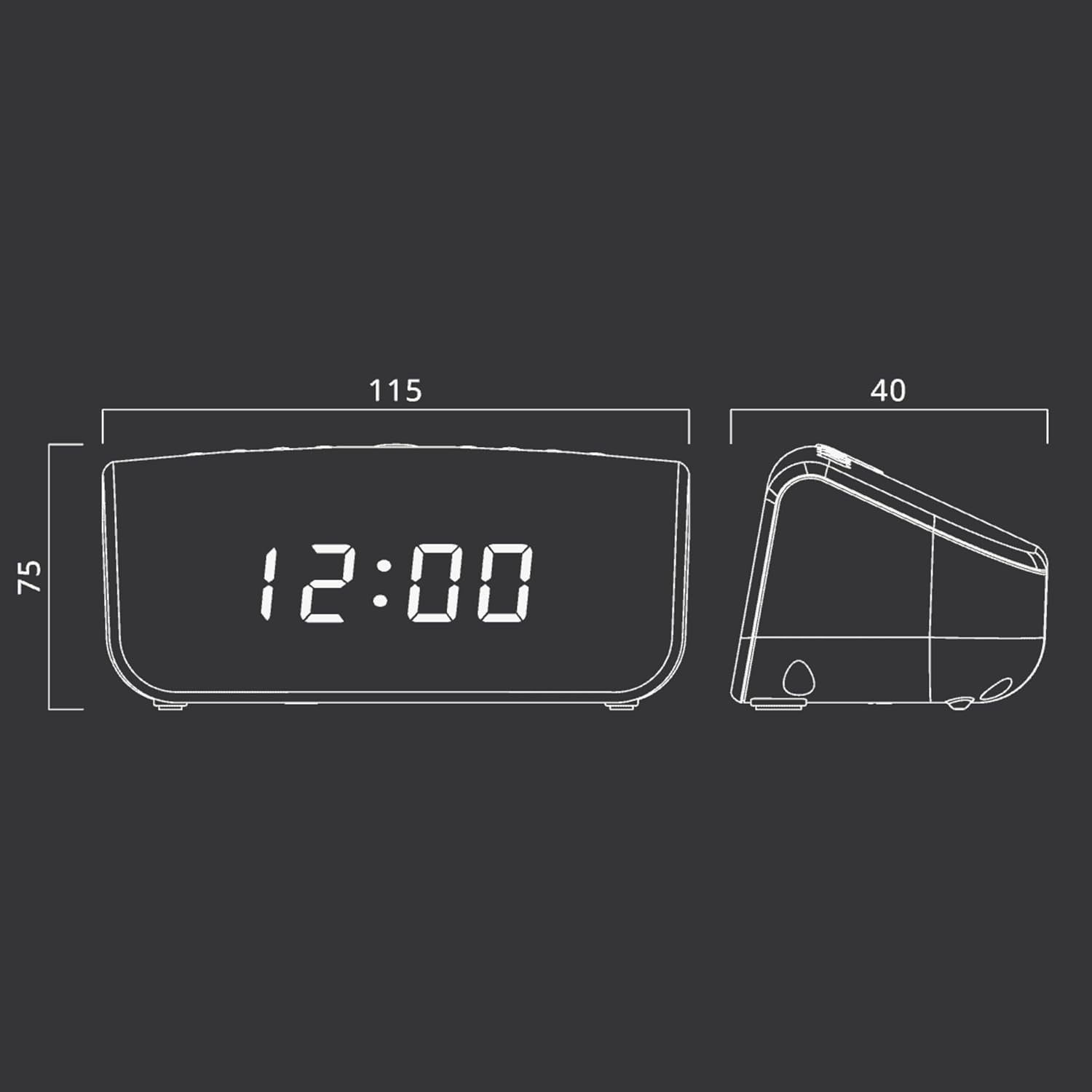
Gambar 2: Approximate dimensions of the Muse M-12 CR unit.
Garansi sareng Rojongan
For warranty information and technical support, please refer to the warranty card included with your product or visit the official Muse websitus. Simpen resi pameseran anjeun salaku bukti pameseran pikeun klaim garansi.
For further assistance, please contact Muse customer service.


