
Gulungan MX122
Manual Instruksi Mixer/Mikrofon Rolls MX122 MiniMix Pro
Model: MX122 | Brand: Rolls
Bubuka
The Rolls MX122 MiniMix Pro is a versatile five-channel audio mixer designed to combine a single microphone signal with four stereo instrument or line-level signals. This compact unit is ideal for musicians, presenters, and anyone needing to blend multiple audio sources into a single output. It features an XLR microphone input with trim control and switchable +12VDC phantom power, making it suitable for a variety of microphone types, including condenser microphones.
Fitur konci
- 1 XLR Mic Input with rear panel Trim control, balanced.
- 4 individual 1/4" Stereo Inputs.
- Balanced 1/4" TRS Outputs.
- Balance control on each stereo channel (Pan on the Mic channel).
- Headphone / Auxiliary Outputs.
- +12VDC Phantom Power for condenser microphones.
- External Power Supply included for low noise operation.
Eusi pakét
- Rolls MX122 MiniMix Pro 4-Channel Stereo Mixer with Microphone Input
- External 12VDC Power Supply
Note: Cables for audio connections are not included and must be purchased separately.
Disetél
Hareup Panel Langkungview

Gambar 1: Front panel of the Rolls MX122 MiniMix Pro. This view displays the five input level controls (one for microphone, four for stereo/line), a master level control, a headphone/auxiliary level control, and the headphone/auxiliary output jacks. Each stereo input also has a balance control, while the microphone input has a pan control.
- MIC LEVEL (Channel 1): Adjusts the input level for the microphone.
- LEVEL (Channels 2-5): Adjusts the input level for each stereo/line input.
- PAN (Channel 1): Adjusts the stereo position of the microphone signal.
- BAL (Channels 2-5): Adjusts the balance between the left and right channels for each stereo input.
- TINGKAT MASTER: Controls the overall output level of the mixed signal.
- PHONE/AUX LEVEL: Adjusts the output level for the headphone/auxiliary outputs.
- PHONE/AUX OUTPUTS: 1/4" and 1/8" (3.5mm) stereo jacks for headphones or auxiliary devices.
- LED PWR: Nunjukkeun iraha unit dihurungkeun.
Panel Rear Leuwihview

Gambar 2: Rear panel of the Rolls MX122 MiniMix Pro. This view shows the 12VDC power input, left and right main outputs, four stereo/mono 1/4" input pairs, an XLR microphone input with a trim control, and a phantom power switch for the microphone input.
- Input 12 VDC: Connect the included external power supply here.
- OUTPUT (Left/Right): Balanced 1/4" TRS outputs for connecting to an amplampu, speaker anu dikuatkeun, atanapi alat rékaman.
- STEREO/MONO Inputs (Channels 2-5): Four pairs of 1/4" jacks. Use both Left and Right for stereo sources, or just the Left jack for mono sources.
- MIC Input (Channel 1): Balanced XLR input for connecting a microphone.
- MIC TRIM: Adjusts the gain for the microphone input. Use a small screwdriver to adjust.
- PHANTOM POWER Switch: Activates +12VDC phantom power for condenser microphones connected to the MIC input.
Connecting Your Mixer
- Sambungan Daya: Ensure the MX122 is turned off. Connect the included 12VDC power supply to the "12 VDC" input on the rear panel. Plug the power supply into a suitable electrical outlet.
- Sambungan Kaluaran: Connect the "OUTPUT" (Left and Right) 1/4" TRS jacks on the rear panel to your amplifier, powered speakers, or recording interface using appropriate balanced or unbalanced cables.
- Sambungan Mikropon: Connect your microphone to the "MIC" XLR input on the rear panel. If using a condenser microphone that requires phantom power, ensure the PHANTOM POWER switch is set to "on". Adjust the MIC TRIM control on the rear panel using a small screwdriver to set an appropriate input gain for your microphone.
- Stereo/Line Input Connections: Connect your stereo or line-level sources (e.g., keyboards, media players, computer audio interfaces) to the "STEREO/MONO" 1/4" inputs (Channels 2-5). For stereo sources, use both Left and Right jacks. For mono sources, connect to the Left jack only.
- Headphone/Auxiliary Connection: Connect your headphones or an auxiliary monitoring device to either the 1/4" or 1/8" "PHONE/AUX OUTPUTS" on the front panel.
Parentah Operasi
- Daya Hurung: Once all connections are made, turn on the MX122. The PWR LED on the front panel will illuminate.
- Atur Tingkat Input:
- For the microphone (Channel 1), speak into the microphone at your normal volume and adjust the front panel "MIC LEVEL" control. If the signal is too weak or too strong, fine-tune the "MIC TRIM" control on the rear panel.
- For stereo/line inputs (Channels 2-5), play your audio source and adjust the corresponding front panel "LEVEL" control.
- Aim for a strong signal without distortion.
- Adjust Pan/Balance:
- Use the "PAN" control for the microphone channel to position its sound within the stereo field.
- Use the "BAL" controls for stereo/line channels to adjust the left/right balance of each stereo source.
- Set Master Output: Adjust the "MASTER LEVEL" control to set the overall volume of the mixed signal sent to your main outputs.
- Monitor with Headphones: Adjust the "PHONE/AUX LEVEL" control to set the desired volume for your headphones or auxiliary monitoring device. This level does not affect the main outputs.
Pangropéa
The Rolls MX122 MiniMix Pro is designed for reliable operation with minimal maintenance. Follow these guidelines to ensure longevity:
- beberesih: Anggo kaén anu garing sareng lemes pikeun ngabersihan bagian luar unit. Hindarkeun pembersih abrasive atanapi pangleyur.
- Lingkungan: Operate the mixer in a clean, dry environment. Avoid excessive dust, moisture, and extreme temperatures.
- Sasayogian tanaga: Always use the original or a Rolls-approved replacement 12VDC power supply.
- Ventilasi: Pastikeun aliran hawa nyukupan sabudeureun unit pikeun nyegah overheating. Ulah meungpeuk bukaan ventilasi.
Pamérésan masalah
| Masalah | Mungkin Cukang lantaranana | Solusi |
|---|---|---|
| Teu aya kakuatan (LED PWR pareum) | Power supply not connected or faulty; outlet not working. | Check power supply connection to unit and wall outlet. Test outlet with another device. Ensure correct 12VDC power supply is used. |
| No sound from main outputs | Incorrect connections; input/master levels too low; amplifier / speaker dipareuman atanapi muted. | Verify all audio cables are correctly connected. Increase individual channel LEVELs and MASTER LEVEL. Check amplifier / spiker kakuatan sarta volume. |
| No sound from a specific input channel | Source device off; cable faulty; channel LEVEL too low; incorrect input selected (e.g., mono source into stereo L/R). | Ensure source device is on and playing. Test with a different cable. Increase the specific channel LEVEL. For mono sources, connect to the Left input jack. |
| Mikropon teu jalan | Phantom power off (for condenser mics); MIC TRIM too low; faulty microphone or cable. | If using a condenser mic, ensure PHANTOM POWER is ON. Adjust MIC TRIM on the rear panel. Test with a different microphone or cable. |
| Hum or noise in audio | Ground loop; faulty cables; interference from other electronics; dirty power. | Ensure all equipment is on the same electrical circuit. Use balanced cables where possible. Move mixer away from power transformers or other noisy electronics. Consider a power conditioner. |
| Headphone output issues (e.g., only one side) | Headphone cable faulty; headphones faulty; headphone jack partially inserted. | Test with different headphones and cable. Ensure headphone plug is fully inserted into the jack. |
spésifikasi
| Fitur | Rincian |
|---|---|
| Nomer modél | MX122 |
| merek | Gulungan |
| Jumlah Saluran | 5 (1 Mic, 4 Stereo/Line) |
| Input mikropon | 1 x XLR (balanced) with rear panel Trim control |
| Kakuatan Phantom | +12VDC (switchable) |
| Stereo/Line Inputs | 4 x 1/4" Stereo (L/R pairs, can be used mono) |
| Kaluaran Utama | 2 x 1/4" TRS (balanced) |
| Headphone/Aux Outputs | 1 x 1/4" Stereo, 1 x 1/8" (3.5mm) Stereo |
| Sumber Daya | External 12VDC Power Supply (included) |
| Voltage | 12 volt DC |
| Item Beurat | 2 pon (0.91 kg) |
| Dimensi produk | Approximately 8.4" (W) x 1.7" (H) x 5" (D) (21.3cm x 4.3cm x 12.7cm) |
| Téhnologi konektipitas | XLR, Auxiliary |
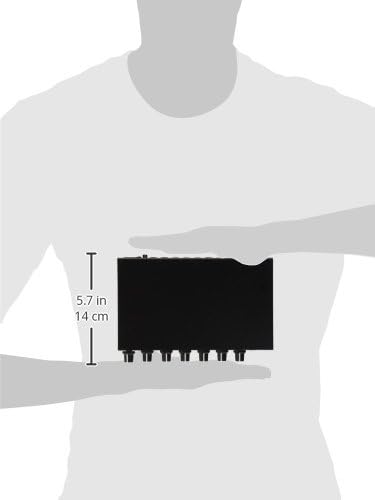
Gambar 3: Samping view of the Rolls MX122 MiniMix Pro, illustrating its compact size. The image indicates a dimension of 5.7 inches (14 cm), which corresponds to the depth of the unit.
Garansi sareng Rojongan
For detailed warranty information, technical support, or service inquiries regarding your Rolls MX122 MiniMix Pro, please refer to the official Rolls website or contact their customer support directly. Warranty terms and conditions may vary by region and retailer.
Produsén Websitus: www.rolls.com
Ask a question about this manual
Ask about setup, troubleshooting, compatibility, parts, safety, or missing instructions. Manuals+ will review the question and use this page’s manual context to help answer it.