Bubuka
This manual provides detailed instructions for the safe and effective use of your Sony Cybershot DSC-S650 digital camera. Please read this manual thoroughly before operating the camera and retain it for future reference. The Sony Cybershot DSC-S650 is a 7.2-megapixel point-and-shoot digital camera featuring a 3x optical zoom lens, designed for capturing high-quality still images and video.
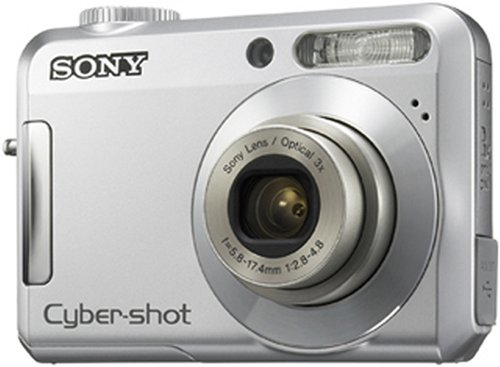
Gambar 1: Hareupeun view of the Sony Cybershot DSC-S650 Digital Camera. This image shows the lens, flash, and grip area.
Émbaran Kasalametan
- Kasalametan batré: Use only specified batteries. Do not expose batteries to excessive heat or dispose of them in fire. Keep batteries out of reach of children.
- Cai sareng Uap: This camera is not waterproof. Do not expose it to rain, moisture, or immerse it in water.
- Penanganan: Avoid dropping the camera or subjecting it to strong impacts. Do not attempt to disassemble or modify the camera.
- Perawatan lensa: Do not touch the lens surface directly. Use a soft, clean cloth for cleaning.
- Suhu operasi: Operate the camera within the recommended temperature range (typically 0°C to 40°C / 32°F to 104°F).
Eusi pakét
Pastikeun yén sadaya item anu didaptarkeun di handap kalebet kana pakét kaméra anjeun:
- Sony Cybershot DSC-S650 Digital Camera
- Batteries (Lithium Ion)
- Kabel USB
- Tali pigeulang
- Software CD-ROM (bisa rupa-rupa dumasar wewengkon)
- Manual Pitunjuk (dokumén ieu)
Kaméra Ngalangkunganview
Familiarize yourself with the main components of your camera:
- Hareup: Lens, Flash, Self-timer lamp/Autofocus illuminator.
- luhur: Power button, Shutter button, Mode dial.
- Balik: 2-inch LCD screen, Zoom lever, Playback button, Menu button, Control buttons (directional pad), Delete button.
- Samping: USB/AV out terminal cover.
- handap: Battery/Memory card compartment cover, Tripod socket.
Note: For a visual guide to camera components, refer to the diagrams typically found in the printed manual.
Disetél
1. Nyelapkeun Batré
- Buka panutup kompartemen batré/kartu mémori di handapeun kaméra.
- Insert the supplied Lithium Ion battery, ensuring the correct orientation as indicated inside the compartment.
- Close the compartment cover securely until it clicks into place.
Ngeusi batre: Connect the camera to a power source using the supplied USB cable and AC adapter (if included) to charge the battery. The charging indicator will illuminate during charging and turn off when complete.
2. Nyelapkeun Kartu Mémori
The camera has approximately 24 MB of internal memory. For extended shooting, a Memory Stick Duo or Memory Stick PRO Duo card is recommended (up to 32 GB supported).
- Buka panutup kompartemen batré/kartu mémori.
- Selapkeun kartu memori kana slotna kalayan orientasi anu leres dugi ka ngaklik.
- Tutup panutup kompartemen.
Formatting a Memory Card: New memory cards or cards used in other devices should be formatted in the camera before first use. Go to the camera's menu, navigate to "Setup" or "Settings," and select "Format." Formatting erases all data on the card.
Ngoperasikeun kaméra
1. Powering on / Pareum
Pencét éta POWER tombol ayana dina luhureun kaméra pikeun ngahurungkeun atawa mareuman.
2. Basic Photography (Still Images)
- Pilih Modeu Nyetak: Turn the Mode Dial (if present) or navigate through the menu to select a shooting mode, such as "Auto" for general photography. The DSC-S650 primarily operates in automatic shooting modes.
- Pigura Shot Anjeun: Anggo layar LCD 2 inci pikeun nyusun gambar anjeun.
- Zum: Anggo tuas zum (W/T) pikeun nyaluyukeun zum optik (3x) sareng zum digital (dugi ka 6x).
- fokus: Press the shutter button halfway down. The camera will automatically focus, and a focus indicator will appear on the LCD.
- némbak: Pencét tombol jepret sapinuhna ka handap pikeun nyandak gambar.
Using the Flash: The built-in flash has modes such as Auto and On/Fill. Access flash settings through the camera's menu or a dedicated flash button (if available) to select the appropriate mode for your lighting conditions.
3. Ngarékam Pidéo
- Pilih Mode Video: Turn the Mode Dial to the video camera icon or select "Movie" from the menu.
- Mimitian Ngarékam: Press the shutter button to start recording. A recording indicator will appear on the screen. The camera records video in MP4 format at 720p resolution.
- Eureun Rekaman: Pencét deui tombol jepret pikeun ngeureunkeun ngarékam.
4. Puterkeun deui
- Pencét éta PLAYBACK tombol pikeun ngasupkeun mode playback.
- Anggo tombol arah pikeun ngagulung poto sareng pidéo anjeun.
- Ka view a video, select it and press the center button to start playback.
- Pencét éta PLAYBACK button again or the shutter button to return to shooting mode.
5. Deleting Images/Videos
- Dina modeu playback, pilih gambar atawa video nu Anjeun hoyong pupus.
- Pencét éta PUPUS tombol (sering ditandaan ku ikon tempat sampah).
- Konfirmasi pilihan anjeun nalika dipenta.
Pangropéa
- Ngabersihan lensa: Use a soft, lint-free cloth or a lens brush to gently remove dust and smudges. Do not use chemical cleaners.
- Ngabersihan Layar LCD: Wipe the screen gently with a soft, dry cloth. Avoid pressing hard on the screen.
- Ngabersihan awak kaméra: Anggo kaén anu lembut sareng garing pikeun ngusap awak kaméra. Keur kokotor bandel, rada dampen the cloth with water and wipe, then dry thoroughly.
- Panyimpenan: When not in use for extended periods, remove the battery and store the camera in a cool, dry place away from direct sunlight and extreme temperatures.
Pamérésan masalah
| Masalah | Solusi |
|---|---|
| Kaméra teu hurung. | Ensure the battery is correctly inserted and fully charged. Try reinserting the battery. |
| Teu tiasa nyandak gambar. | Check if the memory card is full or correctly inserted. Ensure the lens cap is removed. |
| Gambar blur. | Ensure the lens is clean. Hold the camera steady. Check focus before fully pressing the shutter button. |
| Flash teu seuneu. | Check flash settings; it might be set to "Off" or "Auto" in bright conditions. |
| "Kasalahan Kartu Mémori" pesen. | Reinsert the memory card. Try formatting the card (this will erase all data). If the problem persists, try a different memory card. |
spésifikasi
- Ngaran modél:
- DSC-S650
- Resolusi Tetep Éféktif:
- 7.2 MP
- Zoom optik:
- 3x
- Ngazum Digital:
- 6x
- Stabilisasi Gambar:
- Digital, Optik
- Téknologi Sénsor Poto:
- CMOS
- Ukuran layar:
- 2 Inci (LCD)
- Dirojong File formatna:
- JPEG, RAW
- Resolusi Video:
- 720 p
- Format Capture Video:
- MP4
- Téknologi konektipitas:
- USB
- Jenis Batré:
- Litium Ion
- Beurat barang:
- 130 gram
- Flash Memory Installed Size:
- 24 MB (internal)
- Ukuran Maksimum anu Didukung Mémori Flash:
- 32 GB
- Laju Rana Minimum:
- 1/4000 detik
- Kontrol Paparan:
- Otomatis
- Jenis fokus:
- Pokus Otomatis
Garansi sareng Rojongan
Kanggo inpormasi jaminan sareng dukungan pelanggan, mangga tingal kartu garansi anu kalebet sareng produk anjeun atanapi kunjungan dukungan resmi Sony websitus. Simpen bukti pameseran anjeun pikeun klaim garansi.
Sumberdaya Online: For additional support, software updates, and FAQs, visit the Sony support website. You can often find detailed guides and video tutorials there.
Inpormasi kontak: Refer to your regional Sony website for specific contact details, including phone numbers and service center locations.


