1. Bubuka
This manual provides essential instructions for the safe and efficient operation of your Sharp LC-37XD1E Full HD LCD Television. Please read this manual thoroughly before using the television and retain it for future reference. It covers setup, operation, maintenance, and troubleshooting.
2. Émbaran Kasalametan
- Sumber Daya: Connect the television only to an AC 220V-240V, 50Hz power supply.
- Ventilasi: Pastikeun ventilasi di sabudeureun televisi cekap. Ulah ngahalangan liang ventilasi.
- Cai sareng Uap: Ulah nepikeun televisi ka hujan atawa kalembaban. Ulah neundeun barang-barang anu dieusi cairan dina televisi.
- beberesih: Cabut colokan televisi tina stop kontak sateuacan dibersihkeun. Anggo lawon anu lemes sareng garing.
- Palayanan: Entong nyobian ngalayanan produk ieu nyalira. Rujuk sadayana ngalayanan ka tanaga jasa anu mumpuni.
3. Eusi Paket
Pastikeun yén sadaya item aya dina bungkusan:
- Sharp LC-37XD1E LCD Television
- Unit kadali jauh
- Kabel listrik
- Table Stand (if included)
- Manual pangguna (dokumén ieu)
4. Setélan
4.1. Nempatkeun fisik
Place the television on a stable, level surface using the provided table stand, or mount it on a wall using a compatible VESA wall mount (sold separately). Ensure proper ventilation by leaving space around the unit.
4.2. Nyambungkeun périferal
Connect your external devices to the television's input ports. Ensure the television is powered off before making any connections.
- HDMI: For high-definition video and audio from devices like Blu-ray players, game consoles, or set-top boxes. The TV has 2 HDMI ports.
- SKART: For standard-definition video and audio from devices like DVD players or VCRs. The TV has 2 SCART ports.
- AV/S-Video In: For composite video and S-Video connections.
- PC In: Pikeun nyambungkeun komputer.
- RS232C: For service or control purposes.
- Audio Kaluar: Pikeun nyambungkeun sistem audio éksternal.
4.3. Sambungan Daya
After all connections are made, plug the power cord into the television's power input, then into a wall outlet (AC 220V-240V, 50Hz).
4.4. Mimiti Setup Wizard
Upon first power-on, the television may guide you through an initial setup wizard to configure language, country, and channel scanning. Follow the on-screen instructions.
5. Parentah Operasi
5.1. Operasi dasar
- Hurungkeun/Pareuman: Pencét éta Kakuatan tombol dina kadali jauh atawa TV.
- Pilihan Saluran: Ngagunakeun éta CH +/- buttons or the number buttons on the remote.
- Penyesuaian volume: Ngagunakeun éta VOL +/- tombol dina jauh.
5.2. Kadali jauh
The remote control allows full functionality of your Sharp LC-37XD1E television. Familiarize yourself with its buttons.
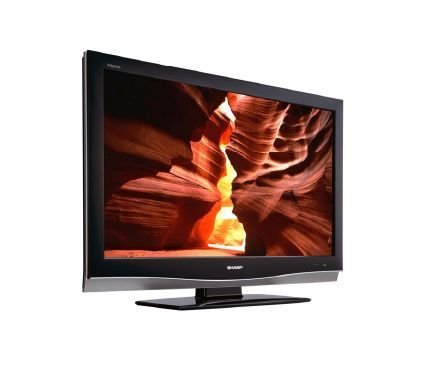
Image: Sharp LC-37XD1E Remote Control. This image displays the black remote control unit for the Sharp LC-37XD1E television, featuring various buttons for power, channel, volume, input selection, menu navigation, and numeric input.
- Tombol Daya: Ngahurungkeun atawa mareuman TV.
- Tombol Jumlah (0-9): Pilih saluran langsung.
- DTV/EPG/ESD/RADIO: Buttons for digital TV functions, Electronic Program Guide, and radio.
- Volume Kaluhur/Turun (+/-): Nyaluyukeun tingkat sora.
- Channel Up/Down (P ^/v): Robah saluran sacara berurutan.
- MODE AV: Cycles through available AV modes.
- LINGKUNGAN: Activates or deactivates surround sound.
- MENU: Opens the main menu for settings adjustments.
- Tombol Navigasi (Kaluhur/Turun/Kénca/Katuhu): Used to navigate through menus.
- Tombol OK: Konfirmasi pilihan dina ménu.
- EXIT/RETURN: Exits menus or returns to the previous screen.
- Tombol Warna (Beureum, Héjo, Konéng, Biru): Used for specific functions in certain menus or interactive services.
5.3. Pamilihan Input
Pencét éta Input or Sumber button on the remote control to cycle through connected input sources (HDMI1, HDMI2, SCART1, SCART2, AV, S-Video, PC).
5.4. Napigasi Menu jeung Setélan
Pencét éta MENU button to access the main settings menu. Use the navigation buttons to move between options and OK to select. Common settings include:
- Setélan Gambar: Adjust brightness, contrast, color, sharpness, and aspect ratio (16:9).
- Setélan Audio: Adjust bass, treble, balance, and select audio modes (Nicam A2 / Surround).
- Setélan saluran: Pilari saluran, édit daptar saluran.
- Setélan waktos: Set current time and sleep timer.
6. Pangropéa
- Ngabersihan layar: Lembut usap layar nganggo lawon anu lemes sareng teu aya serat. Pikeun tanda nekad, rada dampen lawon jeung cai atawa cleaner layar husus. Ulah nyemprot cairan langsung kana layar.
- beberesih Kabinet: Wipe the television cabinet with a soft, dry cloth.
- Ventilasi: Periodically check that the ventilation openings on the back of the television are not obstructed by dust or debris.
- Kabel listrik: Inspect the power cord regularly for any damage. If damaged, replace it with an approved cord.
7. Cara ngungkulan
Sateuacan ngahubungi dukungan palanggan, cobian solusi ieu pikeun masalah umum:
| Masalah | Solusi anu mungkin |
|---|---|
| Taya kakuatan | Pastikeun kabel listrikna dipasang pageuh kana TV sareng stop kontak. Pariksa naha stop kontakna tiasa dianggo. |
| Henteu aya gambar, tapi aya sora | Check the input source selection. Ensure the connected device is powered on and sending a signal. |
| Henteu aya sora, tapi aya gambar | Pariksa tingkat polumeu sareng pastikeun TV teu dijempékeun. Pariksa sambungan kabel audio pikeun alat éksternal. |
| Kadali jauh teu jalan | Ganti batré dina kadali jauh. Pastikeun teu aya halangan antara jauh sareng sénsor IR TV. |
| Kualitas gambar henteu saé | Adjust picture settings (brightness, contrast, sharpness). Check antenna or cable connections. For external devices, ensure high-quality cables are used. |
8. Spésifikasi
Technical specifications for the Sharp LC-37XD1E LCD Television:
| Fitur | Rincian |
|---|---|
| Ngaran modél | LC-37XD1E |
| Ukuran layar | 37 inci (93.98 cm) |
| Téknologi tampilan | LCD |
| Resolusi | 1920 x 1080 piksel (Full HD) |
| Rasio Aspék | 16:9 (1.78:1) |
| Caang | 450 cd/m² |
| Babandingan Kontras | 1200:1 |
| Waktu Tanggapan | 6 ms |
| ViewSudut (H/V) | 176° / 176° |
| Sistim Audio | Nicam A2 / Surround |
| Speaker Kaluaran Power | 20 Watt |
| Palabuhan HDMI | 2 |
| Palabuhan SCART | 2 |
| Input anu sanés | AV/S-Video In, PC In, RS232C |
| Kaluaran Audio | Sumuhun |
| Sarat kakuatan | AC 220V-240V, 50Hz |
| Konsumsi Daya | 20 Watt (biasa) |
| Ukuran (W x H x D) | 92 cm x 60 cm x 11.5 cm (tanpa nangtung) |
| Beurat | 21 kg |
9. Garansi jeung Rojongan
Kanggo inpormasi jaminan, mangga tingal kartu garansi anu kalebet dina produk anjeun atanapi kunjungan ka Sharp resmi websitus. Pikeun rojongan teknis atanapi inquiries jasa, mangga ngahubungan layanan palanggan Sharp ngaliwatan saluran resmi maranéhanana.


