1. Bubuka
The ZyXEL PL100KIT HomePlug Powerline 85 Mbps Ethernet Adapter provides an extended access solution to create a network using your existing electrical wiring. This kit allows you to transform your home's power lines into a network infrastructure without the need for additional cabling. It supports data transfer rates up to 85 Mbps and includes 56-bit Data Encryption Security (DES) for secure network access and sharing.
This manual provides detailed instructions for the proper installation, operation, and maintenance of your PL100KIT.
2. Eusi Paket
Pariksa yén pakét anjeun ngandung barang-barang ieu:
- 2 x ZyXEL PL-100 HomePlug Powerline Ethernet Adapters
- 2 x Kabel Ethernet
- 2 x Kabel Listrik
- Pituduh Mimiti Gancang (atanapi dokuméntasi anu sami)
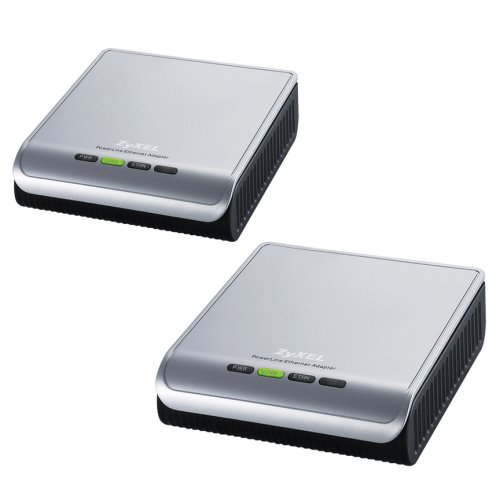
Image: ZyXEL PL100KIT HomePlug Powerline 85 Mbps Ethernet Adapter units.
3. Parentah Setup
Follow these steps to set up your ZyXEL PL100KIT:
- Sambungkeun Adaptor Kahiji: Plug one PL-100 adapter directly into a wall power outlet near your internet router or modem. Do not use a power strip or surge protector, as this may degrade performance.
- Nyambung ka Router/Modem: Use an Ethernet cable to connect the PL-100 adapter to an available LAN port on your internet router or modem.
- Sambungkeun Adaptor Kadua: Plug the second PL-100 adapter directly into a wall power outlet in the room where you want to extend your network (e.g., near your computer, gaming console, or smart TV).
- Nyambung ka Alat: Use another Ethernet cable to connect this second PL-100 adapter to the Ethernet port of your desired network device.
- Pariksa sambungan: Once both adapters are powered on and connected, observe the LED indicators on each unit. A solid green 'Power' LED and a solid green 'Ethernet' LED indicate a successful connection. A 'Powerline' LED should also illuminate, indicating a connection between the two adapters over the power lines.
- Secure Your Network (Optional but Recommended): For enhanced security, press the 'Security' or 'Pairing' button on the first adapter for a few seconds, then within two minutes, press the same button on the second adapter. This will establish a secure, encrypted connection between the two units. Refer to the Quick Start Guide for specific button locations and timing.
Catetan: For optimal performance, ensure both adapters are on the same electrical circuit. Performance may vary depending on the quality of electrical wiring and distance.
4. Operasi
Once the setup is complete, your devices connected to the PL-100 adapters will automatically join the network. The Powerline adapters function as a transparent bridge, extending your existing Ethernet network over your home's electrical wiring.
4.1. Aksés jaringan
Any device connected via Ethernet to a PL-100 adapter will have network and internet access, provided the first adapter is connected to a working internet router/modem. No additional software or configuration is typically required for basic operation.
4.2. Kaamanan Data
The PL100KIT supports 56-bit Data Encryption Security (DES). This encryption helps protect your network traffic from unauthorized access over the power lines. It is highly recommended to enable this feature during setup by pairing the devices.
4.3. Indikator LED
- LED kakuatan:
- Héjo padet: Alat dihurungkeun.
- Pareum: Device is off or not receiving power.
- LED Jalur Listrik:
- Héjo padet: Connected to another Powerline device.
- Kiceup: Data is being transmitted over the powerline network.
- Pareum: No Powerline connection detected.
- LED Ethernet:
- Héjo padet: Ethernet link established with a connected device.
- Kiceup: Data is being transmitted over the Ethernet connection.
- Pareum: Taya link Ethernet kauninga.
5. Pangropéa
To ensure the longevity and optimal performance of your ZyXEL PL100KIT, observe the following maintenance guidelines:
- beberesih: Use a soft, dry cloth to clean the exterior of the adapters. Do not use liquid or aerosol cleaners.
- Lingkungan: Keep the devices in a cool, dry place, away from direct sunlight, heat sources, and moisture.
- Ventilasi: Ensure that the ventilation openings on the adapters are not blocked. Adequate airflow is essential to prevent overheating.
- Outlet listrik: Always plug the adapters directly into a wall power outlet. Avoid using power strips, extension cords, or surge protectors, as these can interfere with Powerline signal transmission and reduce performance.
- Pembaruan firmware: Periodically check the ZyXEL support website for any available firmware updates for your model. Firmware updates can improve performance, add features, or fix bugs.
6. Cara ngungkulan
If you encounter issues with your ZyXEL PL100KIT, refer to the following common problems and solutions:
- Henteu aya sambungan jaringan:
- Pariksa kakuatan: Ensure both PL-100 adapters are plugged into live wall outlets and their Power LEDs are solid green.
- Pariksa Kabel Ethernet: Verify that all Ethernet cables are securely connected to the adapters and your network devices/router. The Ethernet LEDs should be solid green or blinking.
- Check Powerline Connection: Confirm that the Powerline LED on both adapters is solid green. If not, try plugging them into different wall outlets.
- Pasangkeun deui Alat: If you have previously paired the devices or if the Powerline LED is off, try re-pairing them using the security button as described in the Setup section.
- Hindarkeun Power Strips: Ensure adapters are plugged directly into wall outlets, not power strips or surge protectors.
- Lambat Jaringan:
- Direct Wall Outlet: Confirm both adapters are plugged directly into wall outlets.
- Gangguan listrik: Large appliances (refrigerators, washing machines, microwaves) on the same circuit can cause interference. Try moving the adapters to outlets on different circuits if possible, or away from such appliances.
- Jarak: While Powerline works over electrical wiring, very long distances or complex wiring can reduce performance.
- Pemutus sirkuit: Powerline performance can be affected by passing through multiple circuit breakers.
- Powerline LED is Off:
- This indicates no Powerline connection. Ensure both adapters are powered on and try re-pairing them.
- Ensure they are on the same electrical phase within your home.
7. Spésifikasi
| Nomer modél | PL-100 KIT |
| merek | ZYXEL |
| Laju Mindahkeun Data | 85 Megabits per detik |
| Protokol Patalina Data | Ethernet |
| Panganteur Hardware | Ethernet |
| Kaamanan | 56-bit DES Encryption |
| Dimensi produk | 4.41 x 4.17 x 1.34 inci |
| Item Beurat | 5.8 ounces (each adapter) |
| ASIN | B000ITVYXK |
| UPC | 760559111786, 760559113964 |
| Produsén | ZyXEL |
| Tanggal Kahiji Sadia | 7 Juli 2004 |
8. Émbaran jaminan
ZyXEL products are covered by a limited warranty. The specific terms and duration of the warranty may vary by region and product. Please refer to the warranty card included with your product or visit the official ZyXEL websitus kanggo inpormasi garansi sareng prosedur pendaptaran anu lengkep.
Simpen resi pameseran anjeun salaku bukti pameseran pikeun klaim garansi.
9. Rojongan Palanggan
For further assistance, technical support, or to download the latest drivers and firmware, please visit the official ZyXEL support websitus:
https://www.zyxel.com/us/en/support
Anjeun ogé tiasa mendakan sumber daya anu mangpaat, FAQ, sareng forum komunitas dina situs wébna. websitus.


