1. Bubuka
This manual provides detailed instructions for the proper use and maintenance of your Vivitar VIVICAM-X30 10.0 MegaPixel Slim Camera. Please read this manual thoroughly before operating the camera to ensure optimal performance and longevity.
The Vivitar VIVICAM-X30 features a 10.0 megapixel sensor, 3x optical zoom, and an 8x digital zoom, allowing for high-resolution images and versatile shooting. It includes a 2.5-inch color LTPS screen for convenient viewing and playback. Key features include electronic image stabilization, AVI movie recording at 640x480 at 30fps, and a compact design.
2. Produk Langkungview
Familiarize yourself with the various components of your Vivitar VIVICAM-X30 camera.
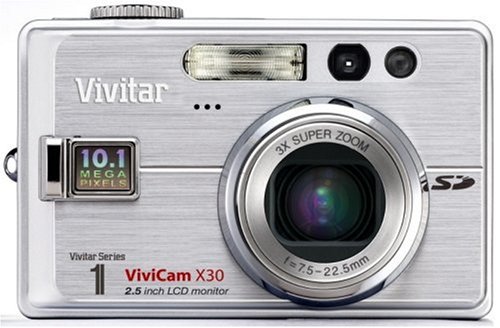
Gambar 2.1: Hareupeun view of the Vivitar VIVICAM-X30, showing the lens, flash, and Vivitar branding.
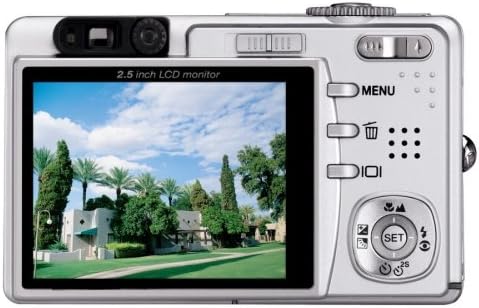
Gambar 2.2: Tukangeun view of the Vivitar VIVICAM-X30, showing the 2.5-inch LCD monitor, control buttons (MENU, delete, playback), and a directional pad with SET button. The zoom rocker is visible at the top right.
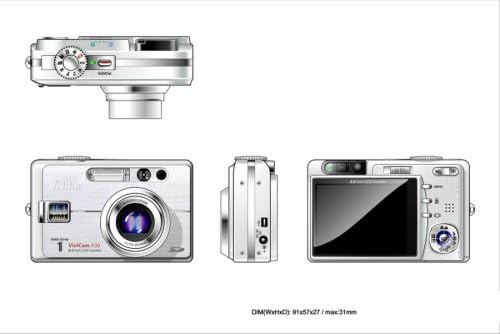
Gambar 2.3: Multi-view diagram of the Vivitar VIVICAM-X30. This includes a top view with the mode dial, a front view showing the lens and flash, a side view with the USB port, and a rear view with the LCD and controls. Dimensions are indicated as 91x57x27 / max 31mm.
2.4 Komponén kaméra
- Lensa: 3x optical zoom lens.
- Flash: Lampu kilat diwangun-di pikeun kondisi cahaya remen.
- Monitor LCD: 2.5-inch color LTPS screen for viewdina jeung playback.
- Tombol kontrol: MENU, Delete, Playback, and directional pad with SET button.
- Lever zum: Ngontrol zum optik sareng digital.
- Mode Dial: Selects shooting modes (e.g., Auto, Movie, Scene).
- Tombol jepret: Ngarebut poto.
- Tombol Daya: Ngahurungkeun / mareuman kaméra.
- Port USB: Pikeun nyambungkeun ka komputer.
- Kompartemen batré: Houses the Li-Ion battery.
- Slot Kartu SD: Pikeun nyelapkeun kartu memori.
3. Setélan
3.1 Ngecas Batré
- Insert the supplied Li-Ion battery into the battery charger.
- Sambungkeun carjer ka colokan listrik.
- Lampu indikator ngecas bakal némbongkeun status ngecas. Cas batréna pinuh sateuacan dianggo pikeun anu munggaran.
Catetan: A fully charged battery is essential for optimal camera performance.
3.2 Masang Batre
- Buka panutup kompartemen batré anu aya di handapeun kaméra.
- Insert the charged Li-Ion battery according to the polarity indicators inside the compartment.
- Tutup panutup kompartemen batré aman nepi ka klik kana tempatna.
3.3 Nyelapkeun Kartu Mémori
The Vivitar VIVICAM-X30 uses SD (Secure Digital) memory cards (not included). A memory card is required to store photos and videos.
- Pilari slot kartu SD, biasana di sisi atawa handapeun kaméra.
- Selapkeun kartu SD kalayan kontak logam nyanghareup ka arah nu bener (tingali diagram deukeut slot).
- Push the card gently until it clicks into place. To remove, push the card again until it springs out.
Catetan: Ensure the camera is powered off before inserting or removing the memory card.
4. Ngoperasikeun kaméra
4.1 Powering on / Pareum
Press the Power button to turn the camera on or off. The LCD screen will illuminate upon power-on.
4.2 Fotografi Dasar
- Pilih Mode: Rotate the mode dial to select your desired shooting mode (e.g., Auto for general use, SCN for scene modes).
- Pigura Shot Anjeun: Use the 2.5-inch LCD monitor to compose your image.
- Zum: Use the zoom lever to adjust the optical (3x) and digital (8x) zoom.
- fokus: The camera will automatically focus when the shutter button is half-pressed.
- Capture: Fully press the shutter button to take a picture.
The camera features an Image Stabilizer to help prevent blur, especially in challenging conditions.
4.3 Scene Modes (SCN)
The VIVICAM-X30 offers various scene modes to optimize settings for specific shooting conditions. These may include Sport, Portrait, Night, and Candelight. Access these modes via the mode dial or the camera's menu system.
4.4 Rékam pidéo
The camera can record AVI format movie clips up to 640 x 480 resolution at 30 frames per second.
- Rotate the mode dial to the Movie mode icon.
- Pencét tombol jepret pikeun ngamimitian ngarékam.
- Pencét deui tombol jepret pikeun ngeureunkeun ngarékam.
4.5 Playback
Ka view poto sareng video anu anjeun candak:
- Pencét tombol Playback (sering dituduhkeun ku ikon segitiga).
- Anggo pad arah pikeun nganapigasi gambar sareng video anjeun.
- Press the SET button to play videos.
4.6 Nyambung kana Komputer
To transfer photos and videos to your computer:
- Pastikeun kaméra dipareuman.
- Sambungkeun kaméra ka komputer Anjeun nganggo kabel USB nu disadiakeun.
- Power on the camera. It should be recognized as a removable disk or mass storage device.
- Access the camera's memory card contents through your computer's file ngajajah.
5. Pangropéa
5.1 Ngabersihan Kaméra
- Lensa: Use a soft, lint-free cloth specifically designed for camera lenses. Do not use abrasive materials or harsh chemicals.
- Layar LCD: Lap lalaunan ku lawon anu lemes sareng garing. Pikeun kokotor anu bandel, anggo pembersih layar anu dirancang khusus pikeun éléktronik.
- Awak kaméra: Wipe with a soft, dry cloth. Avoid moisture near ports and buttons.
5.2 Perawatan Batré
- Simpen batréna di tempat anu tiis sareng garing upami henteu dianggo.
- Hindarkeun sering-sering ngecas batré pikeun manjangkeun umurna.
- Upami kaméra henteu dianggo kanggo waktos anu panjang, cabut batréna.
5.3 Panyimpenan
When storing the camera, especially for long periods, ensure it is clean, dry, and the battery is removed. Store it in the supplied storage case or a protective bag to prevent dust and scratches.
6. Cara ngungkulan
If you encounter issues with your Vivitar VIVICAM-X30, refer to the following common problems and solutions:
| Masalah | Mungkin Cukang lantaranana / Solusi |
|---|---|
| Kaméra teu hurung. |
|
| Camera shuts off automatically too quickly. |
|
| Photos are too bright or washed out (especially with flash). |
|
| Teu tiasa nyimpen poto/pidéo. |
|
| Kaméra henteu dikenal ku komputer. |
|
7. Spésifikasi
Below are the technical specifications for the Vivitar VIVICAM-X30 digital camera:
| Fitur | Rincian |
|---|---|
| Ngaran modél | VIVICAM X30 |
| Resolusi Masih Éféktif | 10 MP |
| Zoom optik | 3x |
| Zum Digital | 8x |
| Ukuran layar | 2.5 Inches (LTPS TFT LCD) |
| Stabilisasi Gambar | Éléktronik |
| Resolusi Video | 480p (640 x 480 at 30fps) |
| Format Capture Video | AVI |
| Dirojong File Formatna | AVI (Video), JPEG (Still Image) |
| Téhnologi konektipitas | USB |
| Jenis Batré | Litium Ion |
| Panjang Fokus Minimum | 7.5 mm |
| Panjang Fokus Maksimum | 22.5 mm |
| Téhnologi Pokus Otomatis | Deteksi Kontras |
| Setélan Kasaimbangan Bodas | Otomatis |
| Dimekarkeun ISO Maximum | 3200 |
| Item Beurat | 2.22 pon |
| Ukuran (W x H x D) | 91 x 57 x 27 mm (max 31mm) |
8. Garansi jeung Rojongan
8.1 Émbaran jaminan
The Vivitar VIVICAM-X30 comes with a 1-Taun jaminan kawates ti tanggal pameseran. Garansi ieu ngawengku cacad manufaktur sareng padamelan dina panggunaan normal. Mangga simpen bukti pameseran anjeun kanggo klaim garansi.
For specific terms and conditions of the warranty, please refer to the warranty card included with your product or visit the official Vivitar websitus.
8.2 Rojongan Palanggan
If you require further assistance, have questions not covered in this manual, or need technical support, please contact Vivitar customer service. Contact information can typically be found on the Vivitar official websitus atanapi dina bungkusan produk.
When contacting support, please have your camera model (VIVICAM-X30) and serial number (if applicable) ready.


