1. Bubuka
Welcome to the user manual for your new Singing Machine SMVG-620 CD+G Karaoke System. This system is designed to provide hours of entertainment with its CD+G playback capabilities, built-in camera, 5.5-inch monitor, and AM/FM radio. Please read this manual thoroughly before operating your unit to ensure proper use and to maximize your enjoyment.
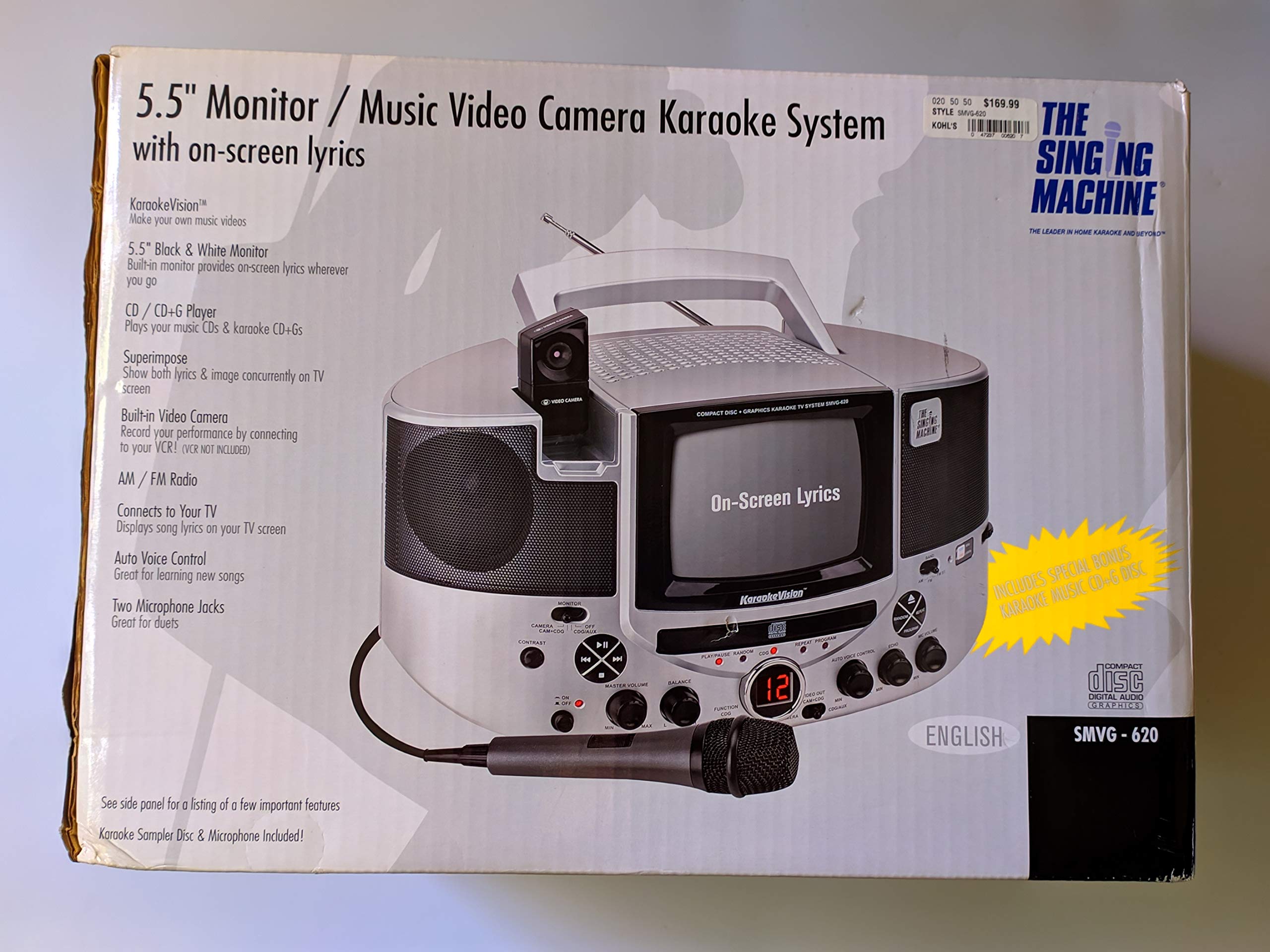
Gambar 1.1: The Singing Machine SMVG-620 CD+G Karaoke System.
For optimal performance and safety, always follow the instructions and warnings provided.
2. Émbaran Kasalametan penting
- Baca pituduh: Sadaya parentah kaamanan sareng operasi kedah dibaca sateuacan alat dioperasikeun.
- Ngajaga parentah: Parentah kaamanan sareng operasi kedah dipikagaduh pikeun rujukan ka hareup.
- Perhatoskeun Perhatosan: Sadaya peringatan ngeunaan alat sareng petunjuk operasi kedah dipatuhi.
- Turutan parentah: Kabéh parentah operasi sarta pamakéan kudu dituturkeun.
- Cai sareng Uap: Entong nganggo alat ieu caket cai.
- beberesih: Ngabersihan ngan ku kaén garing.
- Ventilasi: Ulah meungpeuk sagala bukaan ventilasi. Pasang saluyu sareng parentah produsén.
- Panas: Entong dipasang di deukeut sumber panas sapertos radiator, register panas, kompor, atanapi aparat sanésna (kalebet ampLiifiers) anu ngahasilkeun panas.
- Perlindungan Kabel-kabel: Nangtayungan kabel listrik tina leumpang atawa diciwit, utamana dina colokan, wadah merenah, jeung titik dimana aranjeunna kaluar tina aparat.
- Kantétan/Asesoris: Ngan anggo kantétan/aksésori anu ditunjuk ku produsén.
- kilat: Cabut colokan alat ieu nalika badai kilat atanapi nalika henteu dianggo kanggo waktos anu lami.
- Palayanan: Rujuk sadayana ngalayanan ka tanaga jasa anu mumpuni. Pelayanan diperyogikeun nalika aparat parantos rusak sagala cara.
3. Eusi Paket
Carefully unpack your Singing Machine SMVG-620 system and ensure all items listed below are present and in good condition.
- SMVG-620 CD+G Karaoke System
- One (1) Microphone
- Sampler CD+G Disc
- Audio/Video RCA Cables
- Adaptor Daya AC
- Instruksi Manual

Gambar 3.1: Contents of the box, including the microphone, RCA cables, and the instruction manual.
4. Produk Langkungview
Familiarize yourself with the various parts and controls of your SMVG-620 Karaoke System.

Gambar 4.1: Tukangeun view of the product packaging highlighting key features and components of the SMVG-620 system.
Fitur konci:
- 5.5" Black & White Monitor: For on-screen lyrics from CD+G discs.
- Built-in Color Camera: Allows you to see yourself on the monitor or connected TV.
- Dual Microphone Jacks: Connect two microphones for duets (one microphone included).
- Radio AM/FM: Ngepaskeun kana stasiun radio karesep anjeun.
- Pamuter CD + G: Plays standard audio CDs and CD+Graphics discs.
- Kontrol Sora Otomatis (AVC): Helps maintain vocal balance by automatically reducing the main vocal track when you sing.
- Kontrol Gema: Adds depth and resonance to your voice.
- Professional Style Microphone: For clear vocal pickup.
- Kaluaran Audio/Video: Connects to your TV for larger screen display and enhanced audio.
5. Setélan
5.1 Sambungan Daya
- Pastikeun unit disimpen dina permukaan datar anu stabil.
- Connect the AC power adapter to the DC IN jack on the back of the SMVG-620 unit.
- Plug the other end of the AC power adapter into a standard wall outlet (AC 120V ~ 60Hz).
5.2 Nyambungkeun ka Télévisi
Ka view lyrics on a larger screen and enhance audio, connect the SMVG-620 to your television using the supplied Audio/Video RCA cables.
- Locate the AUDIO OUT (white and red) and VIDEO OUT (yellow) jacks on the back of the SMVG-620.
- Connect the white plug of the RCA cable to the white AUDIO OUT jack on the karaoke system and to the white AUDIO IN jack on your TV.
- Connect the red plug of the RCA cable to the red AUDIO OUT jack on the karaoke system and to the red AUDIO IN jack on your TV.
- Connect the yellow plug of the RCA cable to the yellow VIDEO OUT jack on the karaoke system and to the yellow VIDEO IN jack on your TV.
- Turn on your TV and select the correct A/V input source (e.g., AV1, Video 1) that corresponds to the jacks you used.
5.3 Sambungan Mikropon
Plug the microphone into either the MIC 1 or MIC 2 jack on the front of the SMVG-620 unit.
6. Operasi
6.1 Powering on / Pareum
Pencét éta POWER button located on the front panel to turn the unit ON or OFF.
6.2 CD+G Playback
- Open the CD compartment door and carefully place a CD+G disc (or standard audio CD) onto the spindle with the label side facing up. Close the door.
- Pilih CD+G mode using the FUNCTION selector.
- Pencét éta MUTER / Reureuh tombol pikeun ngamimitian playback.
- Saluyukeun JILID MASTER kenop ka tingkat déngékeun nu Anjeun hoyongkeun.
- Ngagunakeun éta LEWAT kancing (<< or >>) pikeun napigasi antara lagu.
- Pikeun ngareureuhkeun, pencét MUTER / Reureuh deui. Pencét deui pikeun neruskeun.
- Pikeun ngeureunkeun putereun deui, pencét éta EUREUN kancing.
6.3 Pamakéan Mikropon
- Ensure the microphone is connected to a MIC jack.
- Saluyukeun MIC jilid knob to control the microphone's output level.
- Hurungkeun ECHO knob to add an echo effect to your voice.
- The AUTO VOICE CONTROL (AVC) switch can be toggled ON/OFF. When ON, the original vocal track on a CD+G disc will be reduced when you sing into the microphone.
6.4 AM / Radio FM
- Pilih AM or FM mode using the FUNCTION selector.
- Panjangkeun anteneu FM pikeun panarimaan anu langkung saé.
- Hurungkeun TUNING kenop pikeun milih stasiun radio anu dipikahoyong.
- Saluyukeun JILID MASTER kenop.
6.5 Fungsi Kaméra
The built-in camera allows you to display your image on the 5.5-inch monitor or a connected TV.
- Ensure the unit is powered on and connected to a TV if you wish to use an external display.
- The camera feed will automatically display when the unit is in CD+G or Video mode, or when no other video source is active.
7. Pangropéa
7.1 Ngabersihan Unit
- Salawasna cabut unit tina stop kontak sateuacan beberesih.
- Anggo kaén anu lembut sareng garing pikeun ngabersihan permukaan luar.
- Ulah make cleaners abrasive, lilin, atawa pangleyur sabab bisa ngaruksak finish.
- Pikeun lénsa CD, paké piringan pembersih lénsa CD khusus.
7.2 Kamanusaan sarta Studi CD
- Nanganan CD dina edges maranéhna pikeun nyegah sidik dina beungeut maén.
- Keep discs in their cases when not in use to prevent scratches.
- Bersihkeun cakram nganggo kaén anu lembut, teu aya serat, usap ti tengah ka luar.
8. Cara ngungkulan
If you encounter any issues with your SMVG-620, please refer to the following common problems and solutions.
| Masalah | Mungkin Cukang lantaranana | Solusi |
|---|---|---|
| Taya kakuatan | Kabel listrik teu nyambung leres. | Pastikeun adaptor AC dipasang pageuh kana unit sareng kana stop kontak témbok anu tiasa dianggo. |
| Teu aya sora ti panyatur | Master Volume is too low. Incorrect function mode selected. | Increase the MASTER VOLUME. Select the correct FUNCTION (CD+G, AM, FM). |
| Taya sora tina mikropon | Mikropon teu nyambung. MIC VOLUME is too low. Saklar mikropon PAREUM. | Plug microphone into MIC 1 or MIC 2 jack. Increase the MIC VOLUME. Ensure microphone switch is ON. |
| No video on TV / No lyrics | RCA cables not connected correctly. Incorrect TV input selected. Not a CD+G disc. | Check all RCA cable connections (yellow for video). Select the correct A/V input on your TV. Ensure you are playing a CD+G disc for lyrics. |
| Ngaluncatan CD | Cakram kotor atanapi corétan. Unit aya dina permukaan anu teu stabil. | Bersihkeun disk atanapi cobian disk anu sanés. Place the unit on a stable, vibration-free surface. |
9. Spésifikasi
| Nomer modél | SMVG-620 (SIN SMVG620) |
| Sumber Daya | AC 120V ~ 60Hz (via AC Adapter) |
| Ngawaskeun | 5.5-inch Black & White |
| Speaker Count | 2 |
| Alat nu cocog | Televisi |
| Jenis Média | CD, CD+G |
| Ukuran produk (L x W x H) | 35.8 x 20.8 x 19.3 cm (14.1 x 8.2 x 7.6 inci) |
| Item Beurat | 3.9 kg (8.6 lbs) |
10. Garansi jeung Rojongan
For warranty information and customer support, please refer to the warranty card included with your product or contact The Singing Machine directly. You may also consult your retailer for details regarding their return and warranty policies.
Pabrikan: MESIN NYANYI


