1. Bubuka jeung Leuwihview
The Audiovox VE720 is a compact, ultra-slim 7-inch LCD television designed for under-cabinet mounting, ideal for spaces like kitchens. It features an integrated slot-loading DVD player, an AM/FM radio tuner, and a built-in NTSC standard 181-channel TV tuner. The swivel screen allows for flexible viewdina sudut.
Fitur konci:
- Langsing-profile, drop-down 7-inch LCD display.
- Designed for under-cabinet mounting with a swivel screen.
- Slot-loading DVD player compatible with CD-R/RW discs and MP3 digital audio.
- Tuner radio AM / FM terpadu.
- Diwangun-di spiker stereo.
- One RF signal input and one Composite AV input.
- Includes a wireless remote control.
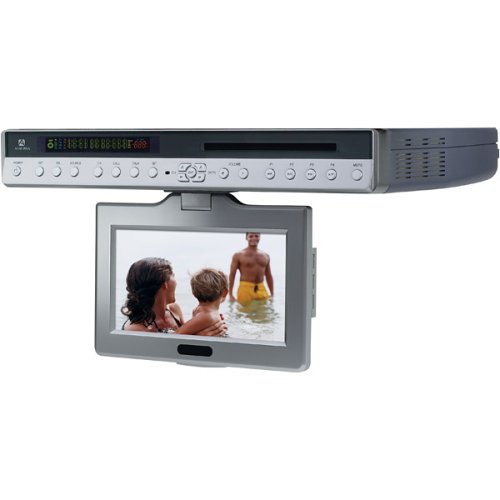
Gambar 1: Hareupeun view of the Audiovox VE720 unit. This image displays the 7-inch LCD screen and the integrated slot-load DVD player.
2. Setup jeung Instalasi
Before beginning installation, ensure all components are present: the VE720 unit, remote control, batteries, and mounting hardware.
2.1 Pasang Unit
- Pilih Lokasi: Choose a sturdy, flat surface under a cabinet for mounting. Ensure there is sufficient clearance for the screen to drop down and swivel without obstruction.
- Ngagantelkeun Plate Pemasangan: Use the provided mounting hardware (screws) to securely attach the mounting plate to the underside of the cabinet. Refer to the mounting template (if included in the physical manual) for precise screw placement.
- Amankeun Unitna: Slide the VE720 unit onto the mounted plate until it clicks securely into place. Double-check that the unit is firmly attached.
2.2 Connecting Power and Antennas
- Sambungan Daya: Plug the AC power adapter into the unit's power input, then into a standard electrical outlet.
- RF Input (TV Antenna/Cable): Connect your TV antenna or cable TV coaxial cable to the RF IN port on the unit.
- Composite AV Input (External Devices): If connecting external devices like a VCR or game console, use RCA cables to connect their video and audio outputs to the Composite AV IN ports on the VE720.
2.3 Setup Kontrol Jauh
Selapkeun dua batré AAA (kaasup) kana kadali jauh, mastikeun polaritasna bener.
3. Parentah Operasi
3.1 Operasi Dasar
- Hurungkeun/Pareuman: Pencét éta POWER tombol dina unit atawa remot kontrol.
- Panyebaran Layar: Gently pull down the screen from its folded position. It can then be swiveled for optimal viewing.
- Kontrol volume: Ngagunakeun éta VOL+ jeung VOL- tombol dina unit atawa jauh.
- Pilihan Sumber: Pencét éta SUMBER or MODÉ button to switch between TV, DVD, and AV input modes.
3.2 TV Operation
- Scan Channel: In TV mode, access the menu to perform an automatic channel scan to find available NTSC analog channels.
- Pilihan Saluran: Ngagunakeun éta CH+ jeung CH- buttons or the numeric keypad on the remote to change channels.
- Digital TV Note: This unit has an analog broadcast tuner. To receive over-the-air digital broadcasts after February 17, 2009, a separate digital-to-analog converter box is required.
3.3 Operasi Pamuter DVD
- Selapkeun piringan: Gently insert a DVD or CD into the slot-loading mechanism with the label side facing up. The player will automatically draw the disc in.
- Playback: The disc should begin playing automatically. Use the MUTER / Reureuh, EUREUN, LEWAT, jeung Maju gancang / mundur buttons on the remote for control.
- Cakram kaluarkeun: Pencét éta EJECT button on the unit or remote to remove the disc.
- Format anu Dirojong: The DVD player supports DVD video discs, audio CDs, CD-R/RW discs, and MP3 audio files.
3.4 AM / Operasi Radio FM
- Pilih Modeu Radio: Switch to AM/FM radio mode using the SUMBER or MODÉ kancing.
- Stasion-stasion Lagu: Ngagunakeun éta TUNE+ jeung TUNE- buttons to manually tune to stations, or use the SCAN function to automatically find and store stations.
- Adjustment anteneu: Extend and adjust the built-in wire antenna for optimal FM reception. For AM, the internal antenna is usually sufficient, but repositioning the unit slightly may improve reception.
4. Pangropéa
4.1 Ngabersihan Unit
- layar: Use a soft, lint-free cloth specifically designed for LCD screens. Do not use abrasive cleaners or solvents.
- Kabinet: Ngusap luar ku hipu, damp lawon. Hindarkeun Uap kaleuleuwihan.
- Slot Cakram: Do not attempt to clean the internal disc slot with foreign objects. If disc reading issues occur, consider a specialized DVD/CD lens cleaning disc.
4.2 Perawatan Umum
- Ulah nepi ka kakeunaan unit kana suhu anu ekstrim, sinar panonpoé langsung, atanapi kalembaban anu luhur.
- Entong meungpeung lawang angin.
- Handle discs by their edges to prevent scratches and fingerprints.
5. Cara ngungkulan
| Masalah | Mungkin Cukang lantaranana | Solusi |
|---|---|---|
| Taya kakuatan | ari kakuatan teu disambungkeun; outlet teu aktip. | Pastikeun kabel listrik dicolokkeun sacara aman. Uji stop kontak nganggo alat anu sanés. |
| No picture/sound in TV mode | Antenna not connected; incorrect source selected; no channels scanned. | Check RF cable connection. Select TV source. Perform a channel scan. |
| DVD not playing/Disc error | Disk kotor atanapi calar; disk teu dipasang kalayan leres; format disk teu dirojong. | Clean the disc. Ensure disc is inserted label-side up. Verify disc format compatibility. |
| Teu aya sora tina radio | Volume too low; incorrect mode; poor reception. | Increase volume. Ensure AM/FM mode is selected. Adjust antenna or unit position. |
| Kadali jauh teu jalan | Batré béak atanapi dipasang kalayan teu leres; aya halangan antara remot sareng unit. | Replace batteries. Check polarity. Remove any obstructions. Point remote directly at the unit. |
6. Spésifikasi
- model: VE720
- tampilan: 7 inci LCD
- Rasio Aspék: 16:9 (layar lebar)
- Resolusi: 1280x720 (Note: Product description states 1280x720, but this is unusually high for a 7-inch NTSC TV from 2005. It might be the internal processing resolution or a typo in the source data. The actual display resolution for NTSC would be lower.)
- TV Tuner: NTSC Standard 181-channel analog tuner
- Pamuter DVD: Slot-loading, compatible with DVD, CD, CD-R/RW, MP3
- Radio Tuner: AM/FM
- Kaluaran Audio: Diwangun-di Speaker stereo
- Input: 1 x RF In, 1 x Composite AV In (RCA)
- Téknologi konektipitas: Bluetooth (Note: This specification appears to be an anomaly in the provided data for a 2005 device. It is listed in the specifications but not in the product description or features. Users should verify if Bluetooth functionality is present.)
- kakuatan: AC Adapter (Batteries for remote: 2 x AAA, included)
- Ukuran (Produk): 15.8 x 2.2 x 11 inci (kira-kira)
- beurat: 7.5 pon (kira-kira)
- warna: pérak
7. Garansi jeung Rojongan
For warranty information and technical support, please refer to the documentation included with your product at the time of purchase or contact Audiovox customer service.
Important Consumer Alert: This television receiver has only an analog broadcast tuner. A converter box was required after February 17, 2009, to receive over-the-air broadcasts with an antenna due to the U.S.'s transition to digital broadcasting. Analog-only TVs continue to work with cable and satellite TV services, gaming consoles, VCRs, and DVD players. For more information, contact the Federal Communications Commission (FCC) or visit their digital-television websitus.


