Bubuka
The Kodak EasyShare C340 is a 5-megapixel digital camera designed for capturing still images and video. It features a 3x optical zoom lens, a 1.6-inch indoor/outdoor display, and various shooting modes to accommodate different photographic situations. This manual provides essential information for setting up, operating, maintaining, and troubleshooting your camera.
Disetél
Ngabongkar bungkusan
Carefully remove all items from the packaging. Ensure the camera body and lens are present.
Nyelapkeun Batré
The Kodak EasyShare C340 uses NiMH battery cells. Batteries are not included with the camera and must be purchased separately. For optimal performance, use rechargeable NiMH batteries.
- Tangtukeun lokasi panto kompartemen batré dina handapeun kaméra.
- Geserkeun konci pikeun mukakeun panto kompartemen.
- Insert the NiMH batteries according to the polarity indicators (+ and -) inside the compartment.
- Close the battery compartment door securely until it latches.
Nyelapkeun Kartu Mémori
The camera supports SD/MMC memory cards for expanded storage. A small amount of internal memory (16 MB) is also available.
- Pilari slot kartu memori, biasana caket kompartemen batré.
- Insert the SD or MMC card with the metal contacts facing the correct direction, as indicated by the diagram near the slot.
- Pencét kartu lalaunan nepi ka ngaklik dina tempatna.
- To remove, push the card in again until it springs out slightly, then pull it out.

Gambar 1: Top view of the Kodak EasyShare C340, illustrating the mode dial and the general area for battery and memory card access.
Ngoperasikeun kaméra
Ngahurungkeun/Pareuman
Rotate the mode dial to any shooting mode (e.g., Auto, Program) to power on the camera. To power off, rotate the mode dial to the 'OFF' position.
Nyandak Gambar
- Pilih Mode: Rotate the mode dial to your desired shooting mode (e.g., Auto for general use, Scene modes for specific conditions).
- Pigura Shot Anjeun: Use the 1.6-inch LCD display or the optical viewpanggihan pikeun nyusun gambar anjeun.
- fokus: The camera uses multi-zone autofocus. Press the shutter button halfway down to allow the camera to focus. A green indicator typically confirms focus.
- Zum: Use the zoom control (W/T buttons) to adjust the 3x optical zoom or 5x digital zoom.
- Capture: Pencét tombol jepret sapinuhna ka handap pikeun nyandak gambar.
Ngarékam Pidéo
The camera can record TV quality (VGA) video with audio in MP4 format.
- Rotate the mode dial to the video recording mode (usually indicated by a film camera icon).
- Pencét tombol jepret pikeun ngamimitian ngarékam.
- Pencét deui tombol jepret pikeun ngeureunkeun ngarékam.
ReviewGambar sareng Pidéo
Use the 1.6-inch indoor/outdoor display to review your captured media.
- Rotate the mode dial to the Review mode (usually indicated by a play icon).
- Use the navigation buttons to scroll through your pictures and videos.
- Press the 'OK' button to view a video or zoom into a picture.
- To delete an unwanted item, press the 'Delete' button and confirm.
On-Camera Cropping
The camera allows for basic image editing directly on the device.
- Dina Review mode, select the image you wish to crop.
- Access the menu options (refer to your camera's on-screen menu for specific steps).
- Select the 'Crop' option and follow the on-screen instructions to adjust the cropping area.
- Save the cropped image as a new file.
Mindahkeun Gambar ka Komputer
You can transfer your photos and videos to a computer using a USB cable or by directly inserting the memory card into a card reader.
- Using USB: Connect the camera to your computer using a compatible USB cable. The camera should appear as a removable drive. You can then drag and drop files.
- Ngagunakeun Card Reader: Remove the SD/MMC card from the camera and insert it into a compatible card reader connected to your computer. Access the card as a removable drive.
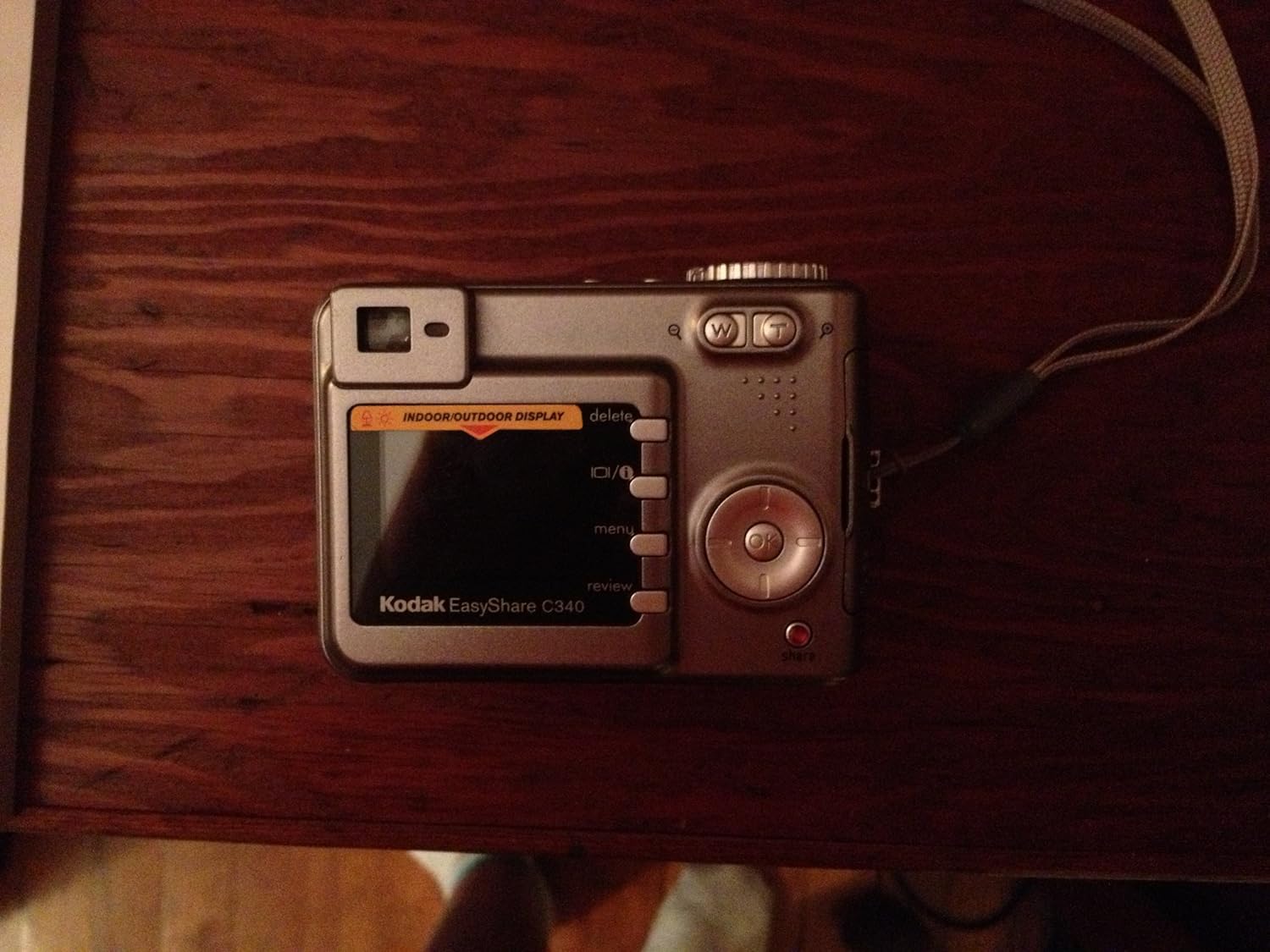
Gambar 2: Balik view of the Kodak EasyShare C340, highlighting the LCD display and control buttons for navigation and sharing.
Pangropéa
- Ngabersihan lensa: Use a soft, lint-free cloth specifically designed for camera lenses. Do not use abrasive materials or harsh chemicals.
- Ngabersihan tampilan: Gently wipe the LCD screen with a soft, dry cloth. For stubborn smudges, use a screen cleaner designed for electronics.
- Perawatan batré: If using rechargeable batteries, follow the manufacturer's instructions for charging and storage. Remove batteries if the camera will not be used for an extended period.
- Panyimpenan: Store the camera in a cool, dry place away from direct sunlight, dust, and extreme temperatures.
Pamérésan masalah
| Masalah | Solusi anu mungkin |
|---|---|
| Kaméra teu hurung. | Check battery insertion and charge level. Ensure batteries are correctly oriented. |
| Gambar blur. | Ensure the lens is clean. Press the shutter button halfway to allow the camera to focus before fully pressing. Use adequate lighting. |
| umur batre low. | Use fresh or fully charged NiMH batteries. Reduce LCD screen usage. |
| Cannot record video for long duration. | The camera has a limited recording capacity (e.g., 2 minutes on internal memory). Ensure sufficient space on the memory card. |
| Kasalahan kartu mémori. | Reinsert the memory card. Try a different, compatible SD/MMC card. Format the card (this will erase all data). |
spésifikasi
| Fitur | Rincian |
|---|---|
| Ngaran modél | Kodak Easyshare C340 |
| Resolusi Sénsor Poto | 5 megapiksel |
| Zoom optik | 3x |
| Zum Digital | 5x |
| Ukuran Layar Témbongkeun | 1.6 Inci (LCD) |
| Jenis Batré | NiMH (not included) |
| Rojongan Kartu Mémori | SD/MMC card, Internal (16 MB) |
| Resolusi Video | 480p (VGA) |
| Format Capture Video | MP4 |
| Minimum Shutter Speed | 4 detik |
| Maksimum Shutter Speed | 1/1400 detik |
| Item Beurat | 0.44 pon |
| Stabilisasi Gambar | Digital, Optik |
| Dirojong File Formatna | JPEG |
Garansi sareng Rojongan
For specific warranty information regarding your Kodak EasyShare C340 camera, please refer to the documentation provided at the time of purchase. For technical support, product registration, or additional resources, visit the official KODAK websitus atanapi ngahubungan departemén layanan palanggan maranéhna.


