1. Bubuka
The Altronix 6030 Timer-Bell Cut-Off Timer is a versatile electronic module designed to provide a timed delay function for various applications. It operates on either 6VDC or 12VDC power and features Single-Pole Double-Throw (SPDT) contacts rated at 8 amps / 115VAC. This manual provides detailed instructions for the proper installation, operation, and maintenance of your Altronix 6030 timer.
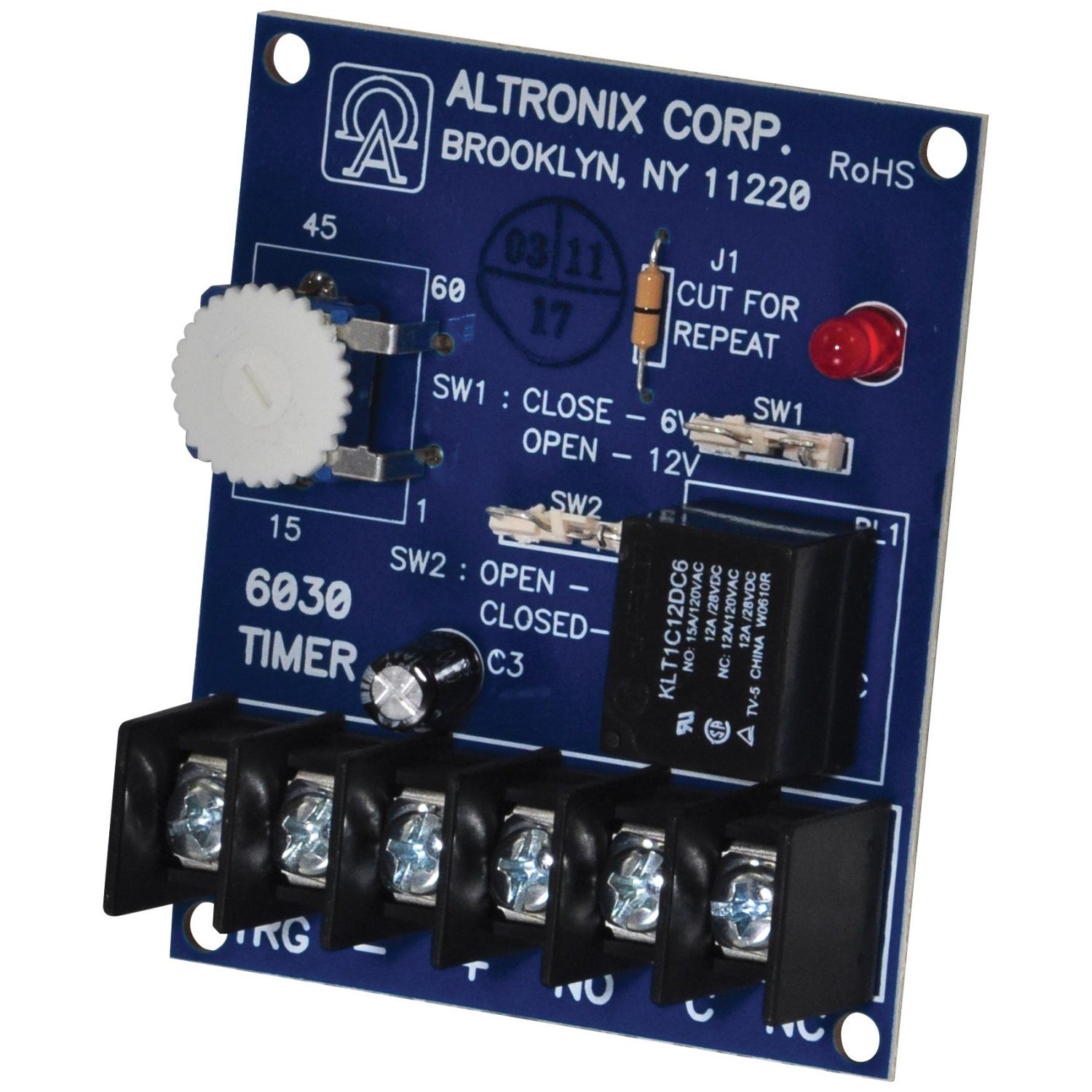
An image showing the compact Altronix 6030 Timer-Bell Cut-Off Timer module, typically a small circuit board with terminals and jumpers for configuration.
2. Fitur
- Masukan Voltage: Selectable 6VDC or 12VDC operation.
- Kontak Kaluaran: SPDT (Single-Pole Double-Throw) relay contacts.
- Peunteun kontak: 8 amps @ 115VAC.
- Tunda waktos: Adjustable from 1 to 60 seconds or 1 to 60 minutes via jumper selection.
- Desain kompak: Small footprint for easy integration.
3. Setup jeung Instalasi
Before installation, ensure that the power source is disconnected. Refer to the product's labeling for specific terminal identifications.
3.1 Pamilihan Input kakuatan
The Altronix 6030 timer supports both 6VDC and 12VDC power inputs. Locate the power selection jumper on the circuit board. Position the jumper to select the appropriate voltage (6VDC or 12VDC) that matches your power supply.
3.2 Time Range Selection
The timer's delay duration can be set for either seconds or minutes. Identify the time range selection jumper. Place the jumper in the position corresponding to your desired time unit (1-60 seconds or 1-60 minutes).
3.3 Pangaluyuan Reureuh Waktos
Once the time range is selected, use the onboard potentiometer (variable resistor) to fine-tune the exact delay within the chosen range (e.g., 15 seconds, 30 minutes). Turn the potentiometer clockwise to increase the delay and counter-clockwise to decrease it.
3.4 Sambungan Wiring
- Input Daya DC: Connect your 6VDC or 12VDC power supply to the designated DC input terminals. Ensure correct polarity (+ and -).
- Sambungan beban: Connect the device you wish to control to the SPDT relay output terminals. These typically include a Common (C), Normally Open (NO), and Normally Closed (NC) terminal.
- For a device to turn ON after the delay, connect it between the Common (C) and Normally Open (NO) terminals.
- For a device to turn OFF after the delay, connect it between the Common (C) and Normally Closed (NC) terminals.
- Trigger Input (Optional): If your application requires an external trigger to reset the relay, connect a Normally Open (NO) or Normally Closed (NC) switch to the designated trigger input terminals, as per your system design.
Catetan: Always ensure all connections are secure and insulated to prevent short circuits.
4. Parentah Operasi
The Altronix 6030 timer operates automatically once configured and powered.
- inisiasi: The timer automatically begins its countdown when DC power is initially applied to the unit.
- Timing Phase: During the set time delay, the internal relay remains in its default (unenergized) state. If connected to the NO contacts, the load will be OFF. If connected to the NC contacts, the load will be ON.
- Activation Phase: Once the set time delay has elapsed, the relay energizes. If connected to the NO contacts, the load will turn ON. If connected to the NC contacts, the load will turn OFF. The relay will remain in this energized state.
- Reset: To reset the timer and initiate a new cycle, either remove and reapply power to the unit, or activate the external NO/NC switch trigger if one is connected and configured for reset functionality.
5. Pangropéa
The Altronix 6030 Timer-Bell Cut-Off Timer is designed for reliable, long-term operation with minimal maintenance.
- beberesih: Jaga unit ieu bébas tina lebu sareng kokotor. Anggo lawon anu lemes sareng garing pikeun ngabersihkeun. Entong nganggo pembersih cair atanapi pelarut.
- Pamariksaan: Pariksa sadaya sambungan kabel sacara berkala pikeun mastikeun éta aman sareng bébas tina korosi.
- Lingkungan: Ensure the unit is operated within its specified environmental conditions (temperature, humidity) to prolong its lifespan.
6. Cara ngungkulan
- Timer does not activate:
- Verify that the correct DC input voltage (6VDC or 12VDC) is applied and that the power selection jumper is correctly set.
- Check all power connections for proper polarity and secure contact.
- Relay does not switch after delay:
- Confirm the time range jumper is correctly set (seconds/minutes).
- Adjust the time delay potentiometer to ensure it's not set to an extremely long or short duration.
- Ensure the load connected to the relay contacts does not exceed the 8 amp / 115VAC rating. Overloading can damage the relay.
- Timer resets unexpectedly:
- Check for intermittent power supply issues or loose power connections.
- If an external trigger is used, ensure it is not being inadvertently activated.
7. Spésifikasi
| merek | Altronix |
| Nomer modél | 6030 |
| Masukan Voltage | 6VDC or 12VDC (selectable) |
| Tipe Kontak | SPDT (Lemparan Ganda Galah Tunggal) |
| Kontak Rating | 8 amps @ 115VAC |
| Waktos Reureuh Range | 1-60 seconds or 1-60 minutes (selectable) |
| Bahan | palastik |
| Ukuran (Kira-kira.) | 30"D x 8"W x 6"H (Note: This dimension seems unusually large for a timer module and may refer to packaging or a different product. Please refer to actual product for precise dimensions.) |
| Item Beurat | 0.08 ons |
8. Garansi jeung Rojongan
For warranty information and technical support regarding your Altronix 6030 Timer-Bell Cut-Off Timer, please contact Altronix Corporation directly. Refer to the official Altronix websitus atanapi kemasan produk kanggo inpormasi kontak sareng syarat garansi anu pangénggalna.
Perusahaan Altronix
Websitus: www.altronix.com
Contact information typically available on their websitus.


