
Bubuka
This manual provides detailed instructions for the setup, operation, maintenance, and troubleshooting of your Panasonic DMR-E55S Progressive Scan DVD Recorder / Player. This unit allows for recording, editing, and storage on DVD-RAM and DVD-R discs, as well as playback of DVD, CD, CD-R, and MP3-on-CD formats. It features progressive scan video output for enhanced picture quality.
Disetél
1. Unpacking jeung Cék Komponén
Sacara saksama miceun sadaya komponén tina bungkusan. Pastikeun aya item di handap ieu:
- Panasonic DMR-E55S DVD Recorder / Player unit
- Kadali jauh
- Kabel listrik
- Kabel Audio/Video (tiasa béda-béda dumasar daérah)
Retain all packaging materials for future transport or service needs.
2. Nyambungkeun ka Télévisi Anjeun
The DMR-E55S offers multiple connection options for video and audio output. Choose the best option supported by your television for optimal quality.

Gambar 1: Hareupeun view of the Panasonic DMR-E55S unit. This image shows the disc tray, display panel, and front controls.
- Kaluaran Pidéo Komponén (Y, Pb, Pr): For the highest quality analog video connection, connect component video cables (green, blue, red) from the DMR-E55S to your TV's component video input.
- Kaluaran S-Video: Connect an S-video cable for improved video quality over composite video.
- Composite Video Output (Yellow RCA): Connect a composite video cable for standard video quality.
- Audio Output (Red/White RCA): Connect red and white RCA cables from the DMR-E55S to your TV's audio input or an audio receiver.
- Kaluaran Audio Digital Optik: For digital surround sound, connect an optical cable to a compatible audio receiver.
- RF Coaxial Output: Connect a coaxial cable from the RF OUT jack on the DMR-E55S to your TV's antenna/cable input.

Figure 2: Rear panel of the Panasonic DMR-E55S, illustrating the various audio and video input/output ports for connection to a television or audio system.
3. Sambungan Daya
Connect the power cord to the AC IN terminal on the rear of the unit, then plug the other end into a standard electrical outlet.
4. Daya Awal Hurung sareng Setélan Dasar
Press the power button on the unit or remote control. Follow any on-screen prompts for initial setup, such as language selection and automatic channel search if using the RF input.
Parentah Operasi
1. Disc Playback
The DMR-E55S supports playback of DVD-Video, DVD-R, DVD-RAM, CD, CD-R/RW, and MP3-on-CD discs.
- Pencét tombol OPEN/CLOSE pikeun muka baki disc.
- Place a disc on the tray with the label side facing up.
- Press OPEN/CLOSE again to close the tray. Playback will usually begin automatically.
- Use the remote control for playback functions such as Play, Pause, Stop, Fast Forward, and Rewind.

Figure 3: Front panel of the DMR-E55S during operation, showing the illuminated display with disc information.
2. Recording to DVD-RAM and DVD-R
The unit supports recording to both DVD-RAM and DVD-R discs. DVD-RAM discs allow for repeated recording and editing, while DVD-R discs are suitable for permanent recordings.
- Insert a Recordable Disc: Place a blank DVD-RAM or DVD-R disc into the disc tray.
- Pilih Sumber Input: Use the INPUT SELECT button on the remote or front panel to choose the desired input source (e.g., Line 1, Line 2, Tuner).
- Rekaman Hiji-Toél: Press the RECORD button to start recording immediately. Press it again to stop.
- Modeu Rekaman: The unit offers 4-mode recording (XP/SP/LP/EP) and Flexible Recording (FR) to optimize recording quality and duration based on available disc space.
- Ngarekam Timer: Access the timer recording menu to schedule recordings at specific times and channels.
- Finalizing DVD-R Discs: After recording to a DVD-R disc, it must be finalized through the menu system to be playable on other DVD players. DVD-RAM discs do not require finalization.
3. Time Slip Features
The DMR-E55S includes Time Slip functions, primarily for DVD-RAM discs:
- Chasing Playback: Begin watching a program from the beginning while it is still being recorded.
- Playlist Playback: Create custom playlists from recorded content on DVD-RAM discs.
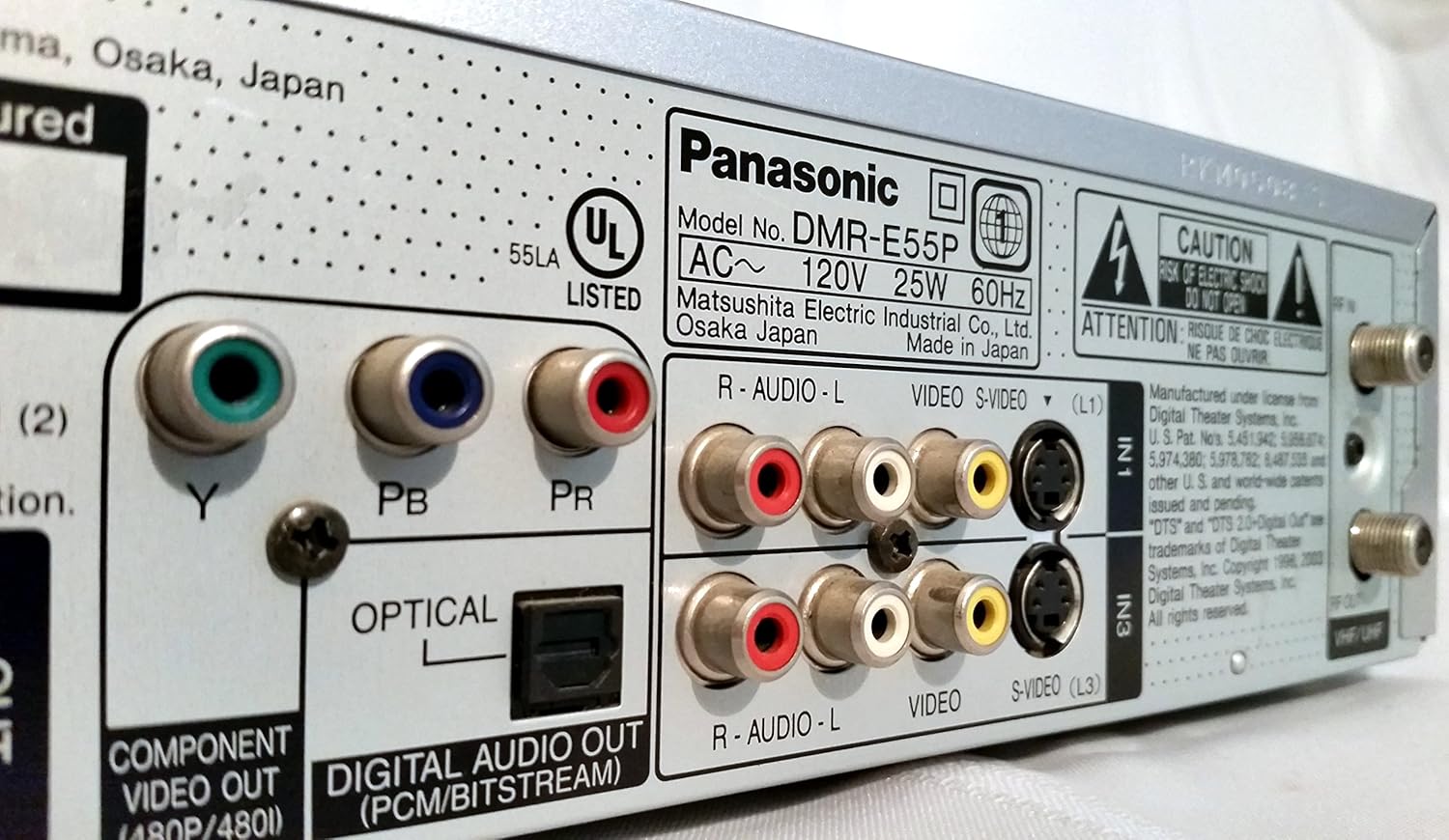
Figure 4: The remote control for the DMR-E55S, showing various buttons for playback, recording, and menu navigation.
Pangropéa
1. Ngabersihan Unit
Wipe the exterior of the unit with a soft, dry cloth. Do not use liquid or aerosol cleaners, as they may damage the finish or internal components.
2. Kamanusaan sarta Studi Disc
Handle discs by their edges to avoid fingerprints and scratches. Store discs in their cases when not in use. Clean dirty discs with a soft, lint-free cloth, wiping from the center outwards.
Pamérésan masalah
If you encounter issues with your DMR-E55S, refer to the following common problems and solutions:
| Masalah | Mungkin Cukang lantaranana / Solusi |
|---|---|
| Taya kakuatan | Ensure the power cord is securely connected to both the unit and a working electrical outlet. |
| Taya gambar atawa sora | Verify all audio and video cables are correctly connected between the DMR-E55S and your TV/audio system. Check that your TV is set to the correct input source. |
| Disc teu diputer | Check if the disc is inserted correctly (label side up). Ensure the disc type is supported by the unit. Clean the disc if it is dirty or scratched. |
| Teu tiasa ngarékam | Ensure a recordable DVD-RAM or DVD-R disc is inserted. Check if the disc has sufficient free space. Verify the input source is correctly selected. |
| Recorded DVD-R disc won't play on other players | The DVD-R disc may not have been finalized. Finalize the disc through the unit's menu system. |
| Kadali jauh teu jalan | Pariksa batré dina remot kontrol sareng gentos upami diperyogikeun. Pastikeun teu aya halangan antara remot sareng sénsor IR unit. |
spésifikasi
| Fitur | Katerangan |
|---|---|
| merek | Panasonic |
| Ngaran modél | DMR-E55S |
| Jenis Média | CD, DVD (DVD-RAM, DVD-R, DVD-Video, CD-R/RW, MP3-on-CD) |
| Fitur husus | Scan Kutang |
| Resolusi | 720 x 480 piksel |
| Resolusi Kaluaran Video | 480 p |
| Tipe Panyambung | RF, A/V (Composite), S-video, Component Video (Y, Pb, Pr), Optical Digital Audio |
| Mode Kaluaran Audio | Surround (Dolby Digital, DTS compatible via optical output) |
| Format Audio Dirojong | DVD-Audio (2-channel), DVD-Video with surround play, MP3 |
| Video Encoding | MPEG-2 (Hybrid Variable Bit Rate) |
| Analog Video Format | NTSC |
| Modeu Ngarekam | XP, SP, LP, EP, FR (Flexible Recording) |
| Ukuran (W x H x D) | 16.9" x 3.13" x 11.2" |
| Item Beurat | 8.58 pon |
| Kaasup Asesoris | Kadali jauh |
Émbaran jaminan
This Panasonic DMR-E55S unit comes with a one-year warranty covering parts and labor from the date of purchase. Please retain your proof of purchase for warranty claims. For detailed terms and conditions, refer to the warranty card included with your product or contact Panasonic customer support.
Ngarojong
For further assistance, technical support, or service inquiries, please contact Panasonic customer support. You can find contact information on the Panasonic official websitus atawa dina dokuméntasi disadiakeun kalawan produk Anjeun.