Bubuka
This manual provides essential instructions for the setup, operation, maintenance, and troubleshooting of your Trust Soundwave 1000P PC Speaker system. Please read this manual thoroughly before using the product to ensure proper functionality and longevity.
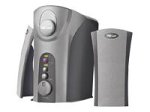
Image: The Trust Soundwave 1000P PC Speaker system, featuring a central subwoofer unit and two compact satellite speakers, designed for computer audio. The subwoofer is typically placed on the floor, while the satellite speakers are positioned on a desk.
Parentah Setup
Follow these steps to correctly set up your Trust Soundwave 1000P PC Speaker system.
- Ngabongkar bungkusan: Carefully remove all components from the packaging. Ensure you have the subwoofer, two satellite speakers, and all necessary cables.
- Penempatan Speaker:
- Place the subwoofer on the floor, preferably near your computer desk, to optimize bass response. The vertical bass reflex design benefits from clear space around it.
- Position the two satellite speakers on your desk, equidistant from your listening position, for optimal stereo sound.
- Nyambungkeun Spiker Satelit: Connect the cables from the satellite speakers to the corresponding output ports on the subwoofer unit. Ensure a secure connection.
- Connecting to Audio Source (PC): Connect the 3.5mm audio jack cable from the subwoofer to the audio output port (usually green) on your computer's sound card.
- Sambungan Daya: Colokkeun kabel daya tina subwoofer kana stop kontak listrik standar.
- Daya mimiti Hurung: Turn on the speaker system using the power control, typically located on the subwoofer or a wired remote.
Ngoperasikeun Speaker
Once set up, you can begin using your Soundwave 1000P speakers.
- Hurungkeun/Pareuman: Use the main power switch or button to turn the system on or off. An indicator light may confirm the power status.
- Kontrol volume: Adjust the overall volume using the dedicated volume knob or controls. Start with a low volume and gradually increase it.
- Penyesuaian Bass: The subwoofer features an adjustable bass control. Rotate the bass knob to achieve your desired level of deep bass.
- 3D Sound Switch: Activate or deactivate the 3D sound feature using the designated switch. Experiment with this setting to find your preferred audio experience for different content.
- Input Audio: The system primarily uses an AUX connection. Ensure your audio source is playing sound through its 3.5mm audio output.
Pangropéa sareng Perawatan
Proper maintenance ensures the longevity and optimal performance of your speaker system.
- beberesih:
- Pegatkeun sambungan listrik saméméh beberesih.
- Use a soft, dry cloth to wipe down the speaker surfaces.
- Do not use liquid cleaners, aerosols, or abrasive materials, as these can damage the finish or internal components.
- panempatan: Ulah neundeun spiker dina sinar panonpoé langsung, caket sumber panas, atanapi di daérah anu kalembabanna luhur. Pastikeun ventilasi anu cekap di sakitar subwoofer.
- Manajemén Kabel: Jaga kabel tetep rapih sareng hindari tikungan anu seukeut atanapi bengkok pikeun nyegah karusakan.
- Panyimpenan: If storing the speakers for an extended period, disconnect them from power, clean them, and store them in a dry, cool place, preferably in their original packaging.
Pitunjuk Ngungkulan
If you encounter issues with your Trust Soundwave 1000P speakers, refer to the following common problems and solutions.
| Masalah | Mungkin Cukang lantaranana | Solusi |
|---|---|---|
| Taya sora tina speaker. |
|
|
| Sora anu menyimpang atanapi teu jelas. |
|
|
| Subwoofer henteu ngahasilkeun bass. |
|
|
Spésifikasi produk
Key technical details for the Trust Soundwave 1000P PC Speaker system.
- Jumlah modél: 12616
- merek: Amanah
- Tipe Speaker: Subwoofer (2.1 system)
- Daya Kaluaran Puncak Maksimum: 1000 Watt
- RMS Wattage: 7 Watt (5 + 2 x 1 Watt RMS)
- Téknologi konektipitas: AUX (3.5mm jack)
- Mode Kaluaran Audio: Stereo
- Sumber Daya: Kabel Listrik
- Beurat barang: 10 g
- Tipe Pamasangan: Tabletop Mount (for satellites), Floor (for subwoofer)
- Métode kontrol: Toél
Émbaran jaminan
Produk ieu hadir kalawan a Garansi kawates. For specific terms and conditions, including warranty duration and claim procedures, please refer to the warranty card included with your purchase or visit the official Trust websitus. Simpen bukti pameseran anjeun pikeun klaim garansi.
Rojongan Palanggan
For further assistance, technical support, or inquiries not covered in this manual, please visit the official Trust support websitus atanapi ngahubungan departemén layanan palanggan maranéhna. Rincian kontak biasana tiasa dipendakan dina produsén websitus atanapi bungkusan produk.
Yayasan Resmi Websitus: www.trust.com


