1. Bubuka
The NETGEAR FSM726 is a 24-port managed switch designed to accommodate expanding business network needs. It features 24 10/100 ports and 2 Gigabit Ethernet ports, which can utilize either built-in copper or GBIC slots. This Layer 2 switch offers two management interface options: an easy-to-use, browser-based interface and a command line interface, making it an ideal solution for users new to managed switching. All ports are auto-negotiating and support Auto Uplink technology for simplified connectivity.
2. Émbaran Kasalametan
Please read all safety warnings and instructions before installing or operating this device. Failure to do so may result in injury or damage to the equipment.
- Sumber Daya: Use only the power adapter supplied with the device. Ensure the power outlet is properly grounded.
- Ventilasi: Ulah ngahalangan liang ventilasi naon waé. Pastikeun aliran hawa anu cekap di sakitar alat pikeun nyegah panas teuing.
- lokasi: Install the device in a stable, dry location away from direct sunlight, heat sources, and moisture.
- Palayanan: Entong nyobian ngalayanan produk ieu nyalira. Rujuk sadayana ngalayanan ka tanaga jasa anu mumpuni.
3. Eusi Paket
Pariksa yén pakét anjeun ngandung barang-barang ieu:
- NETGEAR FSM726 24-Port Managed Switch
- Adaptor/Kabel Daya
- Kit Rack-mount (upami aya)
- Resource CD (with documentation and utility software)
- Guide instalasi
If any items are missing or damaged, please contact your NETGEAR reseller or customer support.
4. Setélan
Follow these steps to set up your NETGEAR FSM726 switch:
- Buka bungkus saklar: Sacara saksama cabut saklar sareng sadaya asesoris tina bungkusan.
- Pamasangan (Opsional): If rack-mounting, attach the provided rack-mount brackets to the sides of the switch using the included screws. Secure the switch into a standard 19-inch equipment rack.
- Sambungkeun Alat Jaringan: Connect your network devices (computers, servers, other switches) to the 10/100 Ethernet ports on the front panel using standard Ethernet cables. The ports are auto-negotiating and support Auto Uplink.
- Connect Gigabit Ports: Utilize the two Gigabit Ethernet ports for high-speed connections to backbone devices or servers. These ports support either copper connections or GBIC modules (sold separately) for fiber optic links.
- Sambungkeun Kakuatan: Plug the power cord into the switch's power receptacle and then into a grounded electrical outlet. The power LED on the front panel should illuminate.
- Konfigurasi awal: Refer to the included Resource CD for detailed instructions on accessing the browser-based management interface or the command line interface for initial configuration. The default IP address and login credentials will be provided in the documentation.
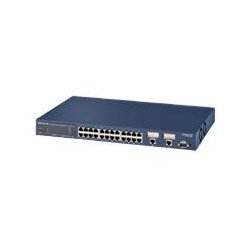
Gambar: Hareupeun view of the NETGEAR FSM726 24-Port Managed Switch, showing the 10/100 Ethernet ports, Gigabit ports, and status indicators.
5. Ngoperasikeun Switch
Once the switch is powered on and connected, it will begin forwarding network traffic. As a managed switch, the FSM726 offers advanced configuration options through its management interfaces.
- Ngaksés Antarmuka Manajemén: Buka a web browser on a computer connected to the same network segment as the switch. Enter the switch's IP address (default or configured) into the browser's address bar. Log in using the provided credentials.
- Pilihan Konfigurasi: The web interface allows you to configure various Layer 2 features such as VLANs, Quality of Service (QoS), port mirroring, link aggregation, and security settings.
- Antarmuka Jalur Komando (CLI): For advanced users, the CLI provides granular control over the switch's functions. Access the CLI via Telnet or a serial console connection.
- Ngawaskeun: The management interface also provides tools to monitor port status, traffic statistics, and system logs to ensure optimal network performance.
6. Pangropéa
Regular maintenance helps ensure the longevity and optimal performance of your NETGEAR FSM726 switch.
- beberesih: Keep the switch clean and free of dust. Use a soft, dry cloth to wipe the exterior. Do not use liquid or aerosol cleaners.
- Pembaruan firmware: Pariksa périodik rojongan NETGEAR website for firmware updates. Firmware updates can provide new features, performance improvements, and security enhancements. Follow the instructions provided with the firmware update carefully.
- Kaayaan Lingkungan: Ensure the operating environment remains within the specified temperature and humidity ranges to prevent hardware failure.
- Manajemén Kabel: Tetep kabel jaringan diatur tur diamankeun bener pikeun nyegah disconnections teu kahaja atawa karuksakan.
7. Cara ngungkulan
If you encounter issues with your NETGEAR FSM726 switch, refer to the following common troubleshooting steps:
- Henteu aya kakuatan:
- Pastikeun kabel listrik disambungkeun sacara aman ka saklar sareng stop kontak listrik anu tiasa dianggo.
- Pastikeun stop kontak listrik aktip ku cara nyolokkeun alat sejen.
- Henteu aya Link Lampu:
- Check the Ethernet cable connection between the switch port and the connected device. Try a different cable.
- Pastikeun alat nu disambungkeun dihurungkeun tur fungsina bener.
- Verify the port on the connected device is enabled.
- Teu Bisa Ngaksés Antarmuka Manajemén:
- Confirm your computer is on the same IP subnet as the switch.
- Verify the switch's IP address. If unknown, you may need to reset the switch to factory defaults (refer to the full manual for instructions).
- Pareuman heula samentawis firewall atawa software antivirus dina komputer anjeun pikeun nyingkahan gangguan.
- Kinerja Jaringan Lambat:
- Pariksa lalulintas jaringan anu kaleuleuwihi atanapi badai siaran.
- Pastikeun sadaya kabel dina kaayaan anu saé sareng nyambung kalayan leres.
- Verify duplex settings on the switch ports and connected devices.
For more detailed troubleshooting, consult the comprehensive user manual on the NETGEAR support websitus.
8. Spésifikasi
| merek | NETGEAR |
| Nomer modél | FSM726NA |
| Jumlah Palabuhan | 24 x 10/100 Mbps, 2 x Gigabit (Copper/GBIC) |
| Dimensi produk | 20.7 x 12.6 x 4.4 inci |
| Item Beurat | 7.75 pon |
| Alat nu cocog | Desktop, Servers, Network Devices |
| Manajemén | Managed (Browser-based GUI, CLI) |
| UPC | 606449026856 |
9. Émbaran jaminan
NETGEAR products are covered by a limited warranty. The specific terms and duration of the warranty may vary by region and product type. Please refer to the warranty card included with your product or visit the official NETGEAR websitus pikeun inpormasi jaminan lengkep sareng prosedur pendaptaran. Simpen bukti pameseran anjeun pikeun klaim garansi.
10. Rojongan Téknis
For technical assistance, product registration, or to download the latest drivers and firmware, please visit the official NETGEAR support websitus:
You may also find helpful resources, FAQs, and community forums on the support site. When contacting support, please have your product model number (FSM726NA) and serial number ready.


