Bubuka
This manual provides essential information for the safe and effective use of your Canon PowerShot S230 Digital ELPH Camera. Please read it thoroughly before operating the camera and keep it for future reference. The Canon PowerShot S230 is a compact 3.2-megapixel digital camera featuring a 2x optical zoom, designed for capturing high-quality still images and video clips.
1. Ngamimitian
1.1 Eusi pakét
Pastikeun yén sadaya item di handap ieu kalebet dina pakét kaméra anjeun:
- Canon PowerShot S230 Digital Camera
- 16 MB CompactFlash Card
- Lithium-ion Battery (Model NB-1LH)
- Battery Charger (Model CB-2LS)
- Kabel USB
- Kabel A/V
- Tali pigeulang
- CD-ROM with Imaging Software and USB Drivers
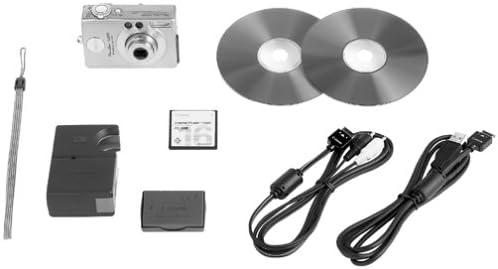
Image: Contents of the Canon PowerShot S230 package, including the camera, cables, battery, charger, memory card, and wrist strap.
1.2 Pamasangan Batré sareng Ngecas
- Buka panutup wadah batré dina kaméra.
- Insert the NB-1LH lithium-ion battery, ensuring correct orientation.
- Tutup panutup kompartemen batré aman.
- Connect the battery charger (CB-2LS) to a power outlet and insert the battery into the charger. The charging indicator will show the charging status.
- Sakali ngecas parantos réngsé, cabut batréna tina carjer.
1.3 Pamasangan Kartu Mémori
- Locate the CompactFlash card slot on the camera.
- Insert the 16 MB CompactFlash card into the slot with the correct orientation until it clicks into place.
- Tutup panutup slot kartu.
2. Operasi dasar
2.1 Kaméra Leuwihview
Familiarize yourself with the camera's controls and features.

Gambar: Hareupeun view of the Canon PowerShot S230, showing the lens, flash, and viewanu mendakan

Gambar: Tukangeun view of the Canon PowerShot S230, displaying the LCD screen, control buttons, and zoom lever.
2.2 Powering on / Pareum
Pencét tombol daya pikeun ngaktipkeun atanapi mareuman kaméra. Lénsa bakal ngalegaan nalika diaktipkeun.
2.3 Nyandak Poto Diam
- Hurungkeun kaméra.
- Select a shooting mode (e.g., Automatic, Portrait, Landscape, Sports) using the mode dial or menu.
- Frame your shot using the LCD screen or optical viewanu mendakan
- Use the zoom lever to adjust the 2x optical zoom or 3.2x digital zoom.
- Press the shutter button halfway to focus. The camera features a nine-point autofocus system.
- Pencét pinuh tombol jepret pikeun moto gambar.
2.4 Modeu Pilem
The PowerShot S230 can record video clips with sound.
- Switch to Movie Mode.
- Press the shutter button to start and stop recording.
- Video clips can be up to 3 minutes long.
- Available resolutions include 160 x 120, 320 x 240, and 640 x 480 pixels.
- An editing feature allows for trimming unwanted scenes during playback.
2.5 Image Playback and Deletion
- Pencét tombol Playback pikeun view captured images and videos on the 1.5-inch LCD screen.
- Use the directional buttons to navigate through your media.
- To delete an image or video, select it and press the Delete button, then confirm.
2.6 Nyambung kana Komputer
Transfer images and videos to your computer using the supplied USB cable.
- Pastikeun kaméra pareum.
- Sambungkeun hiji tungtung kabel USB kana port USB kaméra sareng tungtung anu sanésna kana komputer anjeun.
- Turn on the camera. Your computer should recognize the camera as a removable storage device.
- nyalin files from the camera's memory card to your computer.
- The camera is compatible with Windows Me/2000/XP and Mac OS 8.6 or later without additional driver installation.
3. Pangropéa
3.1 Ngabersihan Kaméra
- Anggo kaén anu garing sareng lemes pikeun ngabersihan awak kaméra.
- For the lens, use a lens brush or a soft, lint-free cloth specifically designed for camera lenses. Avoid touching the lens surface with your fingers.
- Clean the LCD screen gently with a soft, dry cloth.
3.2 Perawatan Batré
- Always use the specified Canon battery and charger.
- Simpen batréna di tempat anu tiis sareng garing upami henteu dianggo.
- Ulah ngalaan batré ka suhu ekstrim.
3.3 Panyimpenan
When storing the camera for extended periods, remove the battery and memory card. Store the camera in a dry, dust-free environment, preferably in a camera bag.
4. Cara ngungkulan
Upami anjeun mendakan masalah sareng kaméra anjeun, tingal solusi umum ieu:
- Kaméra teu hurung: Pastikeun batre tos dicas pinuh sareng diselapkeun leres.
- Gambar kabur: Check that the lens is clean. Ensure the camera has focused correctly before taking the shot. Use adequate lighting.
- Kasalahan kartu mémori: Reinsert the memory card. If the error persists, try a different compatible CompactFlash card.
- Lampu kilat henteu hurung: Check flash settings to ensure it is set to 'Auto' or 'On'.
- Komputer henteu mikawanoh kaméra: Ensure the USB cable is securely connected and the camera is powered on. Try a different USB port on your computer.
5. Spésifikasi
| Ngaran modél | Canon PowerShot S230 |
| Resolusi Sénsor Poto | 3.2 megapiksel |
| Zoom optik | 2x |
| Zum Digital | 3.2x |
| Tipe tampilan | LCD |
| Ukuran layar | 1.5 inci |
| Tipe Kartu Mémori | CompactFlash (Type I) |
| Dirojong File Formulir | JPEG, RAW |
| Resolusi Video | Up to 640x480 (Movie Mode) |
| Konektipitas | USB |
| Sumber Daya | Proprietary Lithium-ion Battery (NB-1LH) |
| Ukuran (approx.) | 3.4 x 2.2 x 1.1 inci |
| Beurat (approx.) | 6.4 ons (0.55 pon) |
6. Garansi jeung Rojongan
6.1 Émbaran jaminan
The Canon PowerShot S230 Digital ELPH Camera comes with a 1 Taun Garansi kawates ti produsén. Punten tahan bukti pameseran anjeun pikeun klaim garansi.
6.2 Rojongan Palanggan
For technical assistance, frequently asked questions, or to download the latest software and drivers, please visit the official Canon website. You may also find support resources and contact information there.


