
1. Bubuka
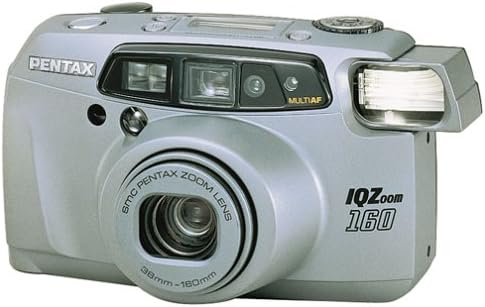
The Pentax IQ Zoom 160 is a compact 35mm film camera designed for ease of use and versatility. It features a powerful 38-160mm zoom lens, an advanced autofocus system, and various shooting modes to capture a wide range of photographic situations. This manual provides detailed instructions for the proper operation and care of your camera.

Gambar 1: Hareupeun view of the Pentax IQ Zoom 160 camera, showing the lens, flash, and viewanu mendakan
Fitur konci:
- 38-160mm power zoom lens for versatile framing.
- Five-point passive autofocus system for precise focusing.
- Six-segment multipattern metering system for optimal exposure.
- Automatic backlight compensation.
- Actual-image zoom viewfinder with diopter adjustment.
- Modeu panorama pikeun moto sudut lega.
- Multiexposure mode for creative effects.
- Self-timer function.
- Easy-to-read LCD instruction panel with automatic illumination.
2. Setélan
2.1. Pamasangan batré
The Pentax IQ Zoom 160 requires one 3V Lithium battery, type CR123A or SF123A. Ensure the battery is inserted with the correct polarity as indicated inside the battery compartment.
- Teangan tempat panutup kompartemen batré dina handapeun kaméra.
- Slide or twist the cover latch to open the compartment.
- Insert one CR123A/SF123A battery, matching the (+) and (-) terminals with the indicators.
- Tutup panutup kompartemen batré aman nepi ka klik kana tempatna.
Gambar 2: Handap view of the camera, showing the battery compartment and tripod mount.
2.2. Ngamuat Pilem
The camera uses standard 35mm film rolls. Always load film in subdued light to prevent accidental exposure.
- Open the camera back by sliding the film door release latch (usually on the side or top of the camera).
- Place a new 35mm film cartridge into the film chamber on the left side.
- Pull the film leader across to the film take-up spool on the right side, ensuring it catches on the spool's teeth.
- Close the camera back firmly until it latches. The camera will automatically advance the film to the first frame. The exposure counter on the LCD panel will display "1".

Gambar 3: Tukangeun view of the camera, showing the viewfinder and film door release.
3. Ngoperasikeun kaméra
3.1. Power On / Pareum sarta Pamilihan Mode
The user-friendly mode dial allows you to turn the camera on and off, and select various shooting modes.

Gambar 4: Top view of the camera, highlighting the mode dial and LCD instruction panel.
- Daya Hurung: Rotate the mode dial from "OFF" to any desired shooting mode (e.g., Auto). The lens will extend.
- Pareum listrik: Rotate the mode dial to "OFF". The lens will retract.
- Mode Dial Settings: The dial typically includes modes such as Auto, Red-eye Reduction, Flash Off, Self-timer, and Multiexposure. Refer to the icons on the dial for specific functions.
3.2. Nyandak Gambar
- Aim the Camera: Tingali ngaliwatan viewfinder and frame your subject.
- Zum: Use the zoom buttons (usually marked 'W' for Wide and 'T' for Telephoto) to adjust the focal length of the 38-160mm lens.
- fokus: Lightly press the shutter button halfway down. The camera's five-point passive autofocus system will focus on the subject. A focus indicator in the viewnu manggihan bakal mastikeun fokus.
- némbak: Pencét tombol jepret sapinuhna ka handap pikeun nyandak gambar.
3.3. Modeu Flash
The built-in flash provides illumination in low-light conditions. The camera features automatic backlight compensation, firing the flash when necessary to properly expose the subject.
- Flash Otomatis: Kamera sacara otomatis nangtukeun lamun lampu kilat diperlukeun.
- Pangurangan panon beureum: Fires a pre-flash before the main flash to reduce red-eye effect.
- Flash Pareum: Prevents the flash from firing, useful in situations where flash is prohibited or undesirable.
3.4. Special Shooting Functions
- Modeu Panorama: Switch to panorama mode via the mode dial or a dedicated button. The viewfinder will adjust to show the panorama framing area. This mode allows for wider aspect ratio images.
- Timer Timer: Activate the self-timer (typically 10 seconds) using the mode dial or a dedicated button. The camera will delay taking the picture, allowing the photographer to be included in the shot.
- Multiexposure Mode: This creative mode allows you to combine two or more exposures onto a single frame of film. Consult the LCD instruction panel for guidance on activating and using this feature.
3.5. Viewfinder and LCD Panel
The actual-image zoom viewpanyungsi nyadiakeun anu jelas view of your subject and includes a diopter adjustment for users with varying eyesight. The large LCD instruction panel displays essential camera settings and indicators, such as exposure counter, battery exhaustion warning, flash status, and selected mode. It automatically lights up for visibility in any lighting condition.
4. Pangropéa
4.1. Ngabersihan Kaméra
- Lensa: Use a soft, lint-free cloth or a lens brush to gently remove dust. For smudges, use a specialized lens cleaning solution and cloth. Avoid touching the lens surface with your fingers.
- Awak kaméra: Ngusap awak kaméra nganggo kaén anu garing sareng lemes. Keur kokotor bandel, rada dampen the cloth with water. Do not use solvents or abrasive cleaners.
- Viewpapanggihan: Use a soft brush or air blower to remove dust from the viewpanemu panon.
4.2. Panyimpenan
- Upami teu dianggo salami lami, cabut batréna pikeun nyegah bocor.
- Store the camera in a cool, dry place, away from direct sunlight, high humidity, and extreme temperatures.
- Use a camera bag or case to protect the camera from dust and physical damage.
5. Cara ngungkulan
| Masalah | Solusi | |
|---|---|---|
| Kaméra teu hurung. | Batré paéh atawa teu bener diselapkeun. | Replace battery with a fresh CR123A/SF123A, ensuring correct polarity. |
| Film teu maju. | Film not properly loaded or end of roll. | Re-load film, ensuring the leader catches the take-up spool. Check if the film counter shows 'S' or 'E'. |
| Gambar kabur. | Camera shake, subject too close, or focus error. | Hold camera steady, ensure subject is within focusing range, or use a tripod. Ensure focus confirmation appears before shooting. |
| Flash teu seuneu. | Flash is set to "Flash Off" mode or battery is low. | Pariksa setélan modeu lampu kilat. Ganti batré upami lemah. |
| Panon beureum dina poto. | Flash fired directly at subject's eyes. | Use Red-eye Reduction flash mode. Increase ambient lighting if possible. |
6. Spésifikasi
| Umum | |
|---|---|
| merek | Pentaks |
| Ngaran modél | IQ Zoom 160 |
| Nomer modél | 10124 |
| Faktor Bentuk | Kompak |
| Item Beurat | 16 ons |
| Bahan Kandang | palastik |
| Lensa | |
| Tipe Lénsa | Zum |
| Panjang Fokus Minimum | 38 milimeter |
| Panjang Fokus Maksimum | 160 milimeter |
| Aperture Minimum | 4.5 |
| Modeu Apertur | 4.5-12 |
| Exposure & Focus | |
| Kontrol paparan | Otomatis |
| Métode Pangukuran | Spot, Multi-pattern |
| Minimum Shutter Speed | 1/400 detik |
| Maksimum Shutter Speed | 2 detik |
| Téhnologi Pokus Otomatis | Contrast Detection, Multi area, sensor |
| Pokus otomatis | 5 |
| Modeu pokus | Single-Servo AF (AF-S) |
| Setélan Kasaimbangan Bodas | Otomatis |
| Ngalegaan ISO Minimum | 100 |
| Kilat | |
| Flash kaméra | Diwangun-Di |
| Modeu Flash | Automatic, Red Eye Reduction |
| Flash Sync Speed | 1/400 detik |
| Fitur séjén | |
| Viewpanyungsi | Optik |
| Tipe tampilan | LCD |
| Timer Timer | 10 Detik |
| Modeu shooting | Automatic, Panorama, Multiexposure, Self-timer |
| Fitur husus | Panorama |
| Jenis Batré | 3V Lithium CR123A/SF123A |
| Tingkat Résistansi Cai | Henteu Tahan Cai |
| Ngabogaan Stabilisasi Gambar | No |
7. Garansi jeung Rojongan
For specific warranty information, please refer to the documentation included with your purchase or visit the official Pentax website. For technical support or service inquiries, please contact Pentax customer service directly.
You can often find additional support resources, FAQs, and contact information on the manufacturer's official websitus.


