Bubuka
This manual provides detailed instructions for the setup, operation, and maintenance of your Audiovox CE-122 Personal CD Player with Car Kit. Please read this manual thoroughly before using your device to ensure proper functionality and to maximize your listening experience.
The Audiovox CE-122 is a portable CD player designed for versatile use, featuring a Digital Anti-Shock System (DASS) for uninterrupted playback during movement, a 22-track programmable memory, and a bass boost function. It includes a complete car kit for in-vehicle use.
Eusi pakét
Pastikeun yén sadaya item anu didaptarkeun di handap kalebet kana pakét anjeun:
- Audiovox CE-122 Portable CD Player
- Headphone
- Adaptor AC
- Adaptor Mobil
- Adaptor kaset
- Manual Pamaké (ieu dokumén)
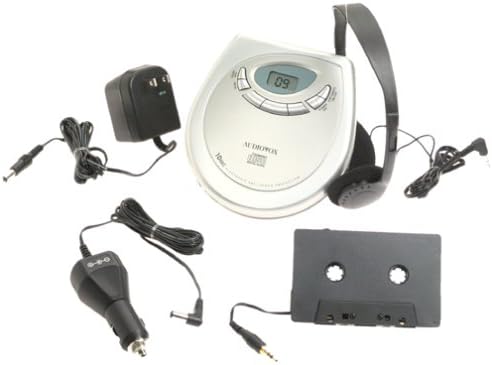
Gambar: The Audiovox CE-122 portable CD player shown with all its accessories, including headphones, AC adapter, car adapter, and cassette adapter.
Fitur produk
- Plays audio CD and CD-R/RW discs.
- AC/DC operation for home and portable use.
- Complete car kit included for in-vehicle audio.
- Digital Anti-Shock System (DASS) provides up to 20 seconds of skip protection.
- 22-track programmable memory for custom playback sequences.
- Bass boost feature for enhanced audio.
- Forward and reverse search functions.
- Repeat and pause functions.
- Key hold switch to prevent accidental button presses.
- Line out jack for connecting to external audio systems.
- Auto power off function to conserve battery life.
- Dual stereo headphone jack for shared listening.
- Built-in charger for rechargeable batteries (rechargeable batteries not included).
Disetél
1. Nyelapkeun Batré
The CD player operates on 4 AA batteries (included). For rechargeable batteries (not included), ensure they are inserted correctly for charging.
- Buka tutup kompartemen batréna anu aya di handapeun unit.
- Pasangkeun 4 batré AA, perhatikeun polaritas anu leres (+/-) sapertos anu dituduhkeun di jero kompartemenna.
- Tutup panutup kompartemen batré aman.
2. Connecting Power (AC Adapter)
For home use or to charge rechargeable batteries:
- Plug the small end of the AC adapter into the DC IN 4.5V jack on the CD player.
- Colokkeun tungtung nu sejen adaptor AC kana stop kontak standar.
- If using rechargeable batteries, select the 'charge' function (if available on your model) to begin charging.
3. Nyambungkeun headphone
Plug the headphones into one of the two headphone jacks on the side of the CD player.

Gambar: A nutup-up view of the headphones included with the Audiovox CE-122 CD player.
4. Car Kit Setup
To use the CD player in your vehicle:
- Plug the car adapter into your vehicle's cigarette lighter or 12V power outlet.
- Connect the small end of the car adapter to the DC IN 4.5V jack on the CD player.
- Insert the cassette adapter into your vehicle's cassette player.
- Connect the audio cable from the cassette adapter to the LINE OUT jack on the CD player.
- Ensure your car stereo is set to the cassette function to hear the CD player's audio.
Parentah Operasi
1. Nyelapkeun CD
- Press the OPEN button to open the CD compartment lid.
- Place a CD (audio CD or CD-R/RW) onto the center spindle with the label side facing up.
- Gently pencét CD ka handap nepi ka clicks kana tempatna.
- Tutup tutup kompartemen CD pageuh nepi ka kait.

Gambar: The Audiovox CE-122 portable CD player with its lid open, revealing the disc compartment where a CD is placed.
2. Playback dasar
- Maén: Pencét éta MUTER / Reureuh button to start playback. The track number will appear on the display.
- Reureuh: Pencét éta MUTER / Reureuh button during playback to pause. Press again to resume.
- Eureun: Pencét éta EUREUN tombol pikeun ngeureunkeun playback.
3. Lagu Napigasi
- Skip Track: Pencét éta Léngkah ka payun (►►) or LEWAT MUNDUR (◄◄) buttons to move to the next or previous track.
- Pilarian: Pencét jeung tahan tombol Léngkah ka payun (►►) or LEWAT MUNDUR (◄◄) buttons during playback to fast forward or rewind within a track.
4. Ulang Fungsi
Pencét éta ULANGAN button to cycle through repeat modes:
- Ulang 1: Ngulang lagu ayeuna.
- Ulang Sadayana: Ngulang sadaya lagu dina piringan.
- Ulang Pareum: Disables repeat function.
5. Programmable Memory
Anjeun tiasa ngaprogram dugi ka 22 lagu pikeun diputer dina urutan anu khusus:
- With the CD stopped, press the PROGRAM kancing.
- Ngagunakeun éta Léngkah ka payun (►►) or LEWAT MUNDUR (◄◄) buttons to select the desired track.
- Pencét PROGRAM again to add the track to the memory.
- Balikan léngkah 2 sareng 3 dugi ka 22 lagu.
- Pencét MUTER / Reureuh pikeun ngamimitian muter runtuyan anu diprogram.
6. Bass naekeun
Pencét éta BASS BOOST tombol pikeun ngaktipkeun atawa nganonaktipkeun fitur paningkatan bass.
7. Key Hold Switch
Geser ka TAHAN switch to the ON position to disable all buttons, preventing accidental operation during transport.
8. Digital Anti-Shock System (DASS)
The DASS provides up to 20 seconds of skip protection. This feature is automatically active during playback to ensure smooth audio even during movement.
9. Otomatis Pareuman Pareuman
The unit will automatically power off after a period of inactivity or when a CD finishes playing to conserve battery life.

Gambar: The Audiovox CE-122 portable CD player, a silver-colored device with a digital display and control buttons, shown alongside its black over-ear headphones.
Pangropéa
1. Cleaning the CD Player
- Ngusap bagian luar unit nganggo kaén anu lembut sareng garing. Ulah make cleaners abrasive atawa pangleyur.
- To clean the lens, use a specialized CD lens cleaner disc. Do not touch the lens directly.
2. Kaperawatan batré
- Cabut batré upami unit moal dianggo kanggo waktos anu panjang pikeun nyegah bocor.
- Replace all batteries at the same time; do not mix old and new batteries or different types of batteries.
3. Panyimpenan
Simpen pamuter CD di tempat anu tiis, garing, sareng jauh tina sinar panonpoé langsung sareng suhu anu ekstrim.
Pamérésan masalah
If you encounter issues with your Audiovox CE-122, please refer to the following common problems and solutions:
- Henteu aya kakuatan:
• Check if batteries are inserted correctly and are not depleted. Replace if necessary.
• Ensure the AC adapter or car adapter is securely connected and the power source is active. - CD Not Playing / Disc Error:
• Ensure the CD is inserted correctly with the label side up.
• Check if the CD is scratched or dirty. Clean the CD with a soft, lint-free cloth.
• Make sure the CD compartment lid is fully closed.
• The disc format may not be supported (e.g., data CD instead of audio CD or CD-R/RW). - Skipping During Playback:
• While the DASS provides protection, severe shocks or vibrations can still cause skipping. Try to keep the player stable.
• Ensure the CD is clean and free of scratches.
• Low battery power can sometimes affect anti-shock performance. Replace or recharge batteries. - Henteu aya sora:
• Check headphone connection and ensure they are fully plugged in.
• Saluyukeun tingkat polumeu.
• If using the car kit, ensure the car stereo is set to the correct input (cassette function) and volume is up. - Tombol Teu Ngabales:
• Pariksa naha éta TAHAN switch is in the ON position. Slide it to OFF to enable buttons.
spésifikasi
| Nomer modél | CE-122 |
| Format Cakram anu Dirojong | Audio CD, CD-R/RW (MP3 compatible) |
| Protection Anti shock | 20 seconds (Digital Anti-Shock System) |
| Mémori Programmable | 22 lagu |
| Sumber Daya | 4 x AA batteries, AC adapter (4.5V DC), Car adapter (12V DC) |
| Konektipitas | Auxiliary (Line Out), Dual Headphone Jacks |
| Ukuran (Kira-kira.) | 11.1 x 7.8 x 3.2 inci (Pakét) |
| Beurat (Kira-kira.) | 1.5 pon |
Garansi sareng Rojongan
For warranty information and customer support, please refer to the documentation provided at the time of purchase or contact Audiovox customer service. Keep your proof of purchase for warranty claims.


