1. Bubuka
The iKF V11 Pro is a versatile gaming headset designed for an immersive audio experience across multiple platforms. Featuring innovative four-mode connectivity, professional-grade 7.1 virtual surround sound, and advanced microphone technology, it delivers clear communication and precise audio positioning for competitive gaming and everyday use. This manual provides detailed instructions for setup, operation, maintenance, and troubleshooting to ensure optimal performance of your headset.

2. Eusi Paket
Mangga cék kotak pikeun item di handap ieu:
- iKF V11 Pro Gaming Headset
- Dongle Nirkabel USB-C 2.4GHz
- USB-A Adapter for 2.4GHz Dongle
- Kabel Audio 3.5mm
- Kabel Ngecas Tipe-C
- Manual pangguna (dokumén ieu)
3. Produk Langkungview
The iKF V11 Pro headset features an ergonomic design for comfort during extended use. Key components and features include:
- 53mm supir: For powerful and clear audio.
- Mikropon anu tiasa dicabut: With AI intelligent noise reduction and 360° omnidirectional pickup.
- Tombol kontrol: For volume adjustment and other functions.
- Headband adjustable: Pikeun nyaman dianggo.
- Sababaraha Modeu Sambungan: 2.4GHz wireless, Bluetooth V6.0, and wired 3.5mm audio.
- NTC Smart Temperature Control: Advanced technology for stable performance.


4. Parentah Setup
The iKF V11 Pro offers flexible connectivity options to suit various devices and preferences.
4.1. Konéksi Nirkabel 2.4GHz (Latensi Rendah)
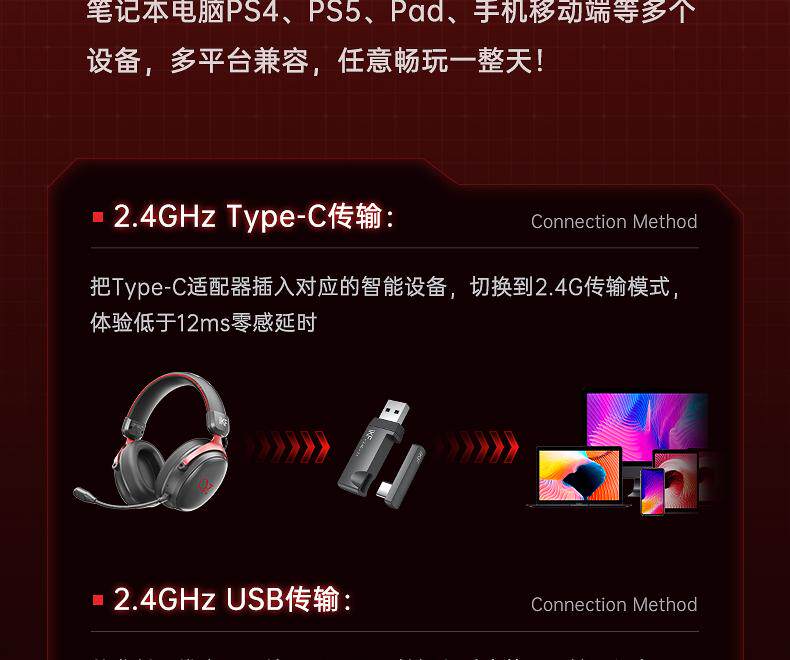
This mode provides ultra-low latency (under 12ms) for a seamless gaming experience, ideal for PCs, PS4, PS5, and other compatible devices.
- Pikeun Alat USB-C: Insert the 2.4GHz USB-C wireless dongle directly into your device's Type-C port.
- For USB-A Devices: Attach the USB-A adapter to the 2.4GHz USB-C wireless dongle, then insert the combined unit into your device's USB-A port.
- The headset will automatically connect to the dongle. Ensure the headset is powered on.

4.2. Bluetooth V6.0 Connection
Connect your headset wirelessly to Bluetooth-enabled devices such as smartphones, tablets, and laptops.
- Kakuatan dina headset.
- Activate Bluetooth pairing mode on the headset (refer to the headset's control button section for specific instructions, usually a long press of the power button or a dedicated Bluetooth button).
- Dina alat Anjeun, buka setelan Bluetooth tur teang alat nu sadia.
- Select "iKF V11 Pro" from the list to pair.

4.3. Sambungan kabel
For devices without wireless capabilities or when you prefer a wired connection, use the included 3.5mm audio cable.
- Colokkeun hiji tungtung kabel audio 3.5mm kana colokan audio headset.
- Plug the other end into the 3.5mm audio output port of your device (e.g., PC, iPad, laptop).
- The headset will function as a wired audio device.
5. Parentah Operasi
5.1. Daya Hurung / Pareum
- Daya Hurung: Press and hold the Power button for approximately 3 seconds until the indicator light turns on.
- Pareum listrik: Pencét jeung tahan tombol Daya salila kurang leuwih 5 detik nepi ka lampu indikator pareum.
5.2. Volume Control
- Ningkatkeun Jilid: Pencét tombol Volume Up.
- Turunkeun Jilid: Pencét tombol Jilid Turun.
5.3. Pamakéan mikropon
The detachable microphone features AI intelligent noise reduction and a 360° omnidirectional pickup pattern for clear voice communication.
- Attach/Detach: Insert the microphone into the designated port on the headset or remove it as needed.
- Ngajempékeun/Nganonaktipkeun: Use the dedicated microphone mute button on the headset (if available) or your device's settings.
- Pangurangan Noise AI: The microphone automatically employs AI noise reduction to filter out background noise, enhancing voice clarity.
5.4. Gaming Audio Features
The iKF V11 Pro is optimized for gaming with professional-grade audio features:
- 7.1 Virtual Surround Sound: Provides a panoramic soundstage and precise sound positioning, crucial for competitive gaming.
- Ningkatkeun footstep: Low-frequency boost to clearly identify enemy footsteps.
- Gunshot Enhancement: Accurate positioning of gunshots to anticipate and react quickly.

5.5. Batré jeung Ngecas
The headset is equipped with a 1000mAh battery, offering up to 125 hours of battery life.
- Ngecas: Connect the Type-C charging cable to the headset's Type-C port and a power source.
- Indikator ngecas: Lampu indikator bakal némbongkeun status ngecas (contona, beureum pikeun ngecas, biru/pareum pikeun dicas pinuh).
6. Pangropéa
- beberesih: Anggo lawon anu lemes sareng garing pikeun ngabersihkeun headset. Entong nganggo pembersih atanapi pelarut anu abrasif.
- Panyimpenan: Simpen headset di tempat anu tiis sareng garing jauh tina sinar panonpoé langsung sareng suhu anu ekstrim.
- Tahan cai: The headset has an IPX5 waterproof rating, meaning it can resist a sustained, low-pressure water jet spray. Do not immerse it in water.
- Résistansi lebu: The headset has an IP5X dustproof rating, offering protection against dust ingress.
7. Cara ngungkulan
- Henteu aya sora:
- Pariksa tingkat volume dina headset sareng alat anjeun.
- Ensure the correct audio output device is selected in your system settings.
- For wireless connections, ensure the headset is paired/connected and within range.
- For wired connections, ensure the 3.5mm cable is fully inserted.
- Mikropon Teu Gawé:
- Pastikeun mikroponna dipasang pageuh sareng henteu dibisukeun.
- Pariksa setelan input mikropon dina alat Anjeun.
- Uji mikroponna dina alat séjén upami tiasa.
- Masalah Koneksi (2.4GHz/Bluetooth):
- Ensure the headset is in pairing mode (for Bluetooth) or the dongle is properly inserted (for 2.4GHz).
- Move closer to your device to ensure you are within the wireless range (10-20m).
- Balikan deui headset sareng alat anjeun.
- Pupus papasangan Bluetooth samemehna dina alat Anjeun tur sapasangkeun deui.
- Batré Teu Ngecas:
- Ensure the Type-C charging cable is properly connected to both the headset and the power source.
- Coba kabel ngecas atawa adaptor kakuatan béda.
- Pastikeun sumber kakuatan aktip.
8. Spésifikasi
| Fitur | Spésifikasi |
|---|---|
| Ngaran Brand | iKF |
| Modél | V11 Pro |
| Bahan | Logam, Plastik |
| Kapasitas batré | 1000 mah |
| Jangkauan Wireless Max | 10m-20m |
| Kategori | Earphone & Headphone |
| Fitur | With microphone, Dual Connection, Active Noise Cancelling (for mic), Waterproof |
| Kalayan Mikropon | Sumuhun |
| Nyaéta nirkabel | Sumuhun |
| Peunteun waterproof | IPX5 |
| Peunteun tahan debu | IP5X |
| Volume Control | Sumuhun |
| Tombol kontrol | Sumuhun |
| Prinsip Vokalisme | Dinamis |
| Tipe Wireless | Bluetooth (V6.0) |
| Panyambung | Type-C (for charging/2.4G dongle) |
| Komunikasi | Nirkabel + Kabel |
| Sertifikasi | CE |
| Rojongan Kartu Mémori | No |
| Impedansi | 16Ω |
| Sora Ajakan | Dirojong |
| Platform cocog | AliOS, ANDROID, Windows, Windows Phone, iOS |
| Sensitipitas | 94dB/mW |
| Rentang Tanggapan Frékuénsi | 20-20000Hz |
| Métode Power Supply | Batré |
| Métode ngecas | Wired charging (Type-C) |
| Single or Double Ear | Supports both ears |
| Asisten sora Diwangun-di | No |
9. Tips pamaké
- For the best gaming experience, especially in competitive titles, utilize the 2.4GHz wireless connection for its ultra-low latency.
- Experiment with the 7.1 virtual surround sound settings in your game or system audio panel to find the optimal spatial audio for your preferences.
- Keep the headset charged to maximize the benefit of its long battery life. A quick charge before a long session can prevent interruptions.
- When using the microphone, ensure it is positioned correctly near your mouth for the clearest voice pickup and most effective AI noise reduction.
10. Garansi jeung Rojongan
The iKF V11 Pro Gaming Headset comes with a standard manufacturer's warranty. Please refer to your purchase documentation for specific warranty terms and duration. For technical support, troubleshooting assistance, or warranty claims, please contact the retailer or manufacturer's customer service.


