1. Bubuka
Hatur nuhun pikeun meuliasing the AIWA BBTC-550 Portable Radio Cassette Player. This versatile device combines classic audio formats with modern connectivity, allowing you to enjoy your music from various sources. Please read this manual carefully before using the unit to ensure proper operation and to maximize your listening experience. Keep this manual for future reference.
Fitur konci:
- Portable Radio Cassette with CD reader, USB, and Bluetooth 5.0 connection.
- Cassette player and recorder with Auto-Stop function.
- USB port for MP3 music playback.
- AUX IN input (3.5mm) for connecting external audio devices.
- Headphone socket (3.5mm).
- Compatible with CD/CD-R/MP3 discs with 20 programmable memories.
- FM PLL Radio with 40 programmable station presets.
- Digital clock with 24-hour display.
- High-frequency range dynamic speakers with super bass and amplified treble.
- Panoramic LCD screen with soft tonality backlight.
2. Produk Langkungview
The AIWA BBTC-550 is designed for ease of use and portability. Below are images illustrating the device's main components and features.

Gambar 2.1: Hareupeun view of the AIWA BBTC-550, showing the display, control buttons, and speakers.

Gambar 2.2: Top-handap view of the AIWA BBTC-550 with the CD compartment lid open.

Gambar 2.3: Sisi view of the AIWA BBTC-550 with the cassette compartment door open and the telescopic antenna extended.

Figure 2.4: Close-up of the side panel showing the 3.5mm headphone jack, 3.5mm AUX IN port, and USB/MP3 port.
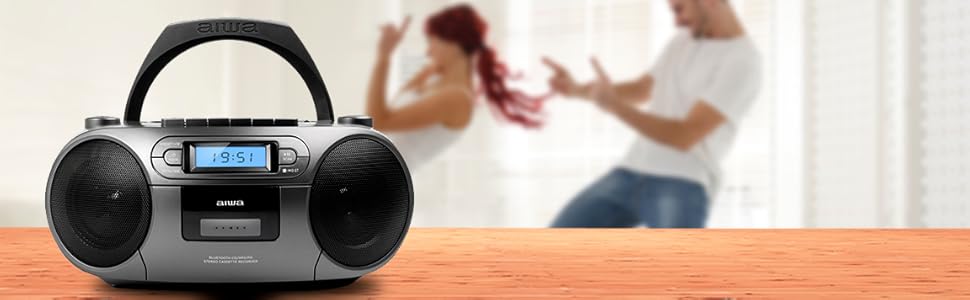
Figure 2.5: Promotional image highlighting the multi-functionality of the AIWA BBTC-550.
3. Setélan
3.1 suplai kakuatan
The AIWA BBTC-550 can be powered by either AC mains electricity or batteries for portable use.
- Daya AC: Connect the provided AC power cord to the AC IN socket on the unit and then to a standard 230V/50Hz wall outlet.
- Daya Batré: For portable use, insert 6 x 1.5V LR14/UM2/C batteries into the battery compartment located on the bottom of the unit. Ensure correct polarity (+/-) when inserting batteries.
3.2 Adjustment anteneu
For optimal FM radio reception, fully extend the telescopic antenna. Adjust its position and angle to achieve the clearest signal.
4. Parentah Operasi
4.1 Kadali umum
- Tombol DAYA: Pencét pikeun ngahurungkeun atanapi mareuman unit.
- Tombol MODE: Press to switch between CD, USB, Bluetooth, Radio, and Cassette modes.
- Tombol VOLUME: Rotate to adjust the sound level.
- Layar LCD: Shows current mode, track number, frequency, and time.
4.2 Playback CD
- Pencét éta MODÉ tombol pikeun milih modeu CD.
- Open the CD compartment lid and place a CD (CD/CD-R/MP3 compatible) with the label side facing up. Close the lid securely.
- The unit will read the disc, and the total number of tracks will appear on the display.
- Pencét éta MAÉN/JEUNDEU (►/❚❚) tombol pikeun ngamimitian playback.
- Pencét MAÉN/JEUNDEU (►/❚❚) again to pause, and press once more to resume.
- Pencét éta LUNcat (►►| / |◄◄) tombol pikeun skip ka lagu salajengna atawa saméméhna.
- Pencét éta Seureuh (■) tombol pikeun ngeureunkeun playback.
- Program Play: While in stop mode, press the PROG/WAKTU kancing. Ngagunakeun éta LEWAT buttons to select a track, then press PROG/WAKTU deui pikeun nambahkeun kana daptar program. Balikan deui nepi ka 20 lagu. Pencét ulin pikeun ngamimitian puteran anu diprogram.
4.3 Cassette Operation
- Pencét éta MODÉ tombol pikeun milih modeu Kaset.
- Buka panto kompartemen kaset teras selapkeun pita kaset. Tutupkeun pantona.
- Playback: Pencét éta MAÉN (►) button to start playing the tape.
- Maju gancang / Mundur: Pencét éta FF (►►) or REW (◄◄) kancing. Pencét Seureuh (■) to stop winding.
- Eureun: Pencét éta Seureuh (■) button to stop playback or winding. The unit features an Auto-Stop function at the end of the tape.
- Ngarékam: Insert a blank cassette. Select the desired audio source (CD, USB, Bluetooth, Radio, or AUX IN). Press the CATETAN (●) button on the cassette deck. The unit will start recording from the selected source. Press Seureuh (■) pikeun ngeureunkeun rékaman.
4.4 Playback USB
- Pencét éta MODÉ tombol pikeun milih modeu USB.
- Selapkeun USB flash drive nu ngandung audio MP3 files kana port USB.
- The unit will automatically detect and start playing the MP3 files.
- Ngagunakeun éta MAÉN/JEUNDEU (►/❚❚) jeung LUNcat (►►| / |◄◄) buttons for control, similar to CD playback.
4.5 Sambungan Bluetooth
- Pencét éta MODÉ button to select Bluetooth mode. The display will show 'BT' and start flashing, indicating it's in pairing mode.
- Dina alat Bluetooth-diaktipkeun anjeun (smartphone, tablet, jsb), aktipkeun Bluetooth tur neangan alat nu sadia.
- Select 'AIWA BBTC-550' from the list of devices.
- Once paired, the unit will emit a confirmation sound, and 'BT' on the display will stop flashing.
- You can now play audio from your connected device through the AIWA BBTC-550. Use your device or the unit's controls for playback.
4.6 Radio FM
- Pencét éta MODÉ tombol pikeun milih modeu Radio FM.
- Panjangkeun anteneu teleskopik pikeun panarimaan anu langkung saé.
- Scan Otomatis: Pencét jeung tahan tombol SCAN button to automatically scan and save available FM stations. The unit can store up to 40 presets.
- Tuning Manual: Pencét sakeudeung SCAN button to manually tune up or down the frequency.
- Pilih Preset: Ngagunakeun éta PRESET (+10) tombol pikeun ngagulung dina stasiun anu disimpen.
4.7 AUX IN
- Pencét éta MODÉ pikeun milih modeu AUX IN.
- Connect an external audio device (e.g., MP3 player, smartphone) to the 3.5mm AUX IN port using a 3.5mm audio cable (not included).
- Play audio from your external device. The sound will be output through the AIWA BBTC-550 speakers.
- Adjust the volume using the unit's VOLUME knob and/or your external device's volume control.
4.8 Paké headphone
To listen privately, plug 3.5mm stereo headphones into the HEADPHONES socket. The speakers will automatically mute when headphones are connected.
4.9 Nyetel Jam
The unit features a digital clock with a 24-hour display.
- Dina modeu standby, pencét jeung tahan tombol PROG/WAKTU kancing.
- Ngagunakeun éta LUNcat (►►| / |◄◄) tombol pikeun nyaluyukeun jam. Pencét PROG/WAKTU pikeun mastikeun.
- Ngagunakeun éta LUNcat (►►| / |◄◄) tombol pikeun nyaluyukeun menit. Pencét PROG/WAKTU to confirm and exit clock setting mode.
5. Spésifikasi
| Fitur | Spésifikasi |
|---|---|
| Ngaran Brand | AIWA |
| Nomer modél | BBTC-550 |
| Tipe | AM / FM Radio Cassette Player |
| Gaya | Tabletop / Portabel |
| Bahan Awak | palastik |
| Ukuran (PxLxT) | 38 x 38 x 26 cm |
| Beurat (Produk) | Kira-kira. 2.04 kg |
| Bluetooth | Leres (Vérsi 5.0) |
| WIFI | No |
| layar | Yes (Panoramic LCD with backlight) |
| Kasaluyuan CD | CD/CD-R/MP3 |
| USB Playback | MP3 files |
| NGARÉMÉ DI | 3.5mm jack |
| Kaluaran headphone | 3.5mm jack |
| Radio prasetél | 40 (FM PLL) |
| Catu daya (AC) | 230V / 50Hz |
| Pasokan Daya (DC) | 6 x 1.5V LR14/UM2/C batteries |
| Sertifikasi | CE, RoHS |
| Asalna | Cina |
| Ukuran Paket | 36.7 x 29 x 17.7 cm |
| Beurat pakét | 2.5 kg |
6. Pangropéa
6.1 Ngabersihan Unit
- Salawasna pegatkeun sambungan unit tina sumber kakuatan saméméh beberesih.
- Anggo kaén anu lembut sareng garing pikeun ngabersihan permukaan luar.
- Pikeun tanda pengkuh, enteng dampen lawon jeung cai sarta detergent hampang, teras usap garing langsung.
- Ulah make cleaners abrasive, lilin, atawa pangleyur sabab bisa ngaruksak finish.
6.2 Perawatan Lénsa CD
- Never touch the CD lens.
- If the CD lens gets dirty, use a commercially available CD lens cleaner to clean it.
6.3 Perawatan Dek Kaset
- Regularly clean the tape heads, capstan, and pinch roller with a cotton swab lightly moistened with tape head cleaner or isopropyl alcohol.
- Demagnetize the tape heads periodically to prevent sound degradation.
6.4 Ngagantian batré
- When the unit's performance diminishes or the display dims, it's time to replace the batteries.
- Open the battery compartment, remove old batteries, and insert new ones, ensuring correct polarity.
- Buang batré heubeul kalawan tanggung jawab nurutkeun peraturan lokal.
- Cabut batré upami unit moal dianggo kanggo waktos anu panjang pikeun nyegah bocor.
7. Cara ngungkulan
If you encounter any issues with your AIWA BBTC-550, please refer to the following common problems and solutions:
| Masalah | Mungkin Cukang lantaranana | Solusi |
|---|---|---|
| Taya kakuatan | Kabel AC teu nyambung kalawan bener; Batré béak atanapi dipasangna teu leres. | Check AC cord connection; Replace batteries, ensuring correct polarity. |
| Taya sora | Volume too low; Headphones connected; Incorrect mode selected. | Increase volume; Disconnect headphones; Select the correct mode (CD, USB, BT, Radio, AUX). |
| CD skipping atawa teu diputer | CD is dirty or scratched; CD inserted incorrectly; Lens is dirty. | Clean or replace CD; Insert CD with label side up; Clean CD lens. |
| Kaset teu diputer/direkam | Tape heads/capstan dirty; Cassette damaged; Incorrect mode. | Clean tape heads/capstan; Try a different cassette; Ensure Cassette mode is selected. |
| Bluetooth teu nyambung | Unit not in pairing mode; Bluetooth disabled on external device; Device too far. | Ensure unit is in Bluetooth pairing mode; Enable Bluetooth on your device; Move device closer (within 10m). |
| panarimaan radio FM goréng | Antenna not extended/adjusted; Weak signal area. | Pinuh manjangkeun tur saluyukeun anteneu telescopic; Coba pindahkeun unit ka lokasi anu béda. |
| USB teu dipikawanoh | USB drive formatted incorrectly; Files not MP3; USB drive damaged. | Ensure USB is FAT32 format; Check files nyaéta MP3; Coba USB drive béda. |
8. Garansi jeung Rojongan
The AIWA BBTC-550 comes with a standard manufacturer's warranty. Please refer to the warranty card included in your product packaging for specific terms and conditions, including the warranty period and coverage details.
Rojongan Palanggan:
If you experience any problems with your unit that are not covered in the troubleshooting section, or if you require further assistance, please contact your retailer or the AIWA customer support service in your region. Keep your purchase receipt as proof of purchase for warranty claims.
For the latest information and support, you may also visit the official AIWA websitus.


