Hyrje
The Signia Streamline TV 03 is a dedicated accessory designed to stream audio directly from your television to compatible Signia NX and BT 13 hearing aids. This device enables a personalized listening experience, allowing you to enjoy TV programs with enhanced clarity and individual volume control, without affecting the listening experience of others in the room.
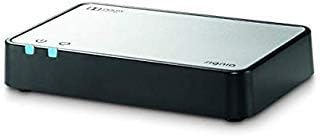
Imazhi 1: The Signia Streamline TV 03 device. This compact, rectangular unit features a black base and a silver top panel, with two small light indicators on its front edge, signifying power and connection status.
Konfigurimi
Follow these steps to set up your Signia Streamline TV 03 for optimal performance:
- Shpaketoni dhe identifikoni përbërësit: Ensure all necessary cables are present. The Streamline TV 03 typically includes various audio cables to accommodate different television setups.
- Connect to Television Audio Output:
- Locate the audio output ports on your television. Most modern TVs feature several options.
- Të Dalje audio optike port is generally recommended for the best sound quality. If available, use the optical cable provided to connect the Streamline TV 03 to your TV's optical output.
- Alternatively, if your TV has RCA audio out jacks (red and white), use the appropriate RCA cable to connect the Streamline TV 03.
- Ensure the cable is securely connected to both the TV and the Streamline TV 03 unit.
- Lidhja e energjisë: Plug the power adapter into the Streamline TV 03 unit, then connect it to a power outlet. The unit will power on automatically.
- Pairing with Hearing Aids:
- Ensure your Signia NX or BT 13 hearing aids are turned on and within range (up to 30 feet) of the Streamline TV 03.
- The pairing process is typically automatic or initiated through the Signia app. Refer to your hearing aid's specific instructions for pairing with accessories.
- Your hearing care professional may need to add a specific "TV program" to your hearing aids for optimal functionality, especially if you intend to use the device without the Signia app.
Udhëzimet e funksionimit
Once set up, the Streamline TV 03 provides a seamless audio experience:
- Lidhja automatike: After initial pairing, your hearing aids should automatically connect to the Streamline TV 03 when it is powered on and within range.
- Kontrolli individual i volumit: You can adjust the volume of the streamed audio directly through your hearing aids or via the Signia app on your smartphone. This allows for personalized volume settings without altering the TV's main volume.
- Qartësia e Përmirësuar: The Streamline TV 03 bypasses ambient room noise, delivering clear, direct audio to your hearing aids, which can significantly improve speech understanding.
- Signia App Integration: If you use the Signia app, controls for the Streamline TV 03 may appear within the app interface, offering convenient management of streaming functions and volume.
- Gama: The device can stream audio to your hearing aids from up to 30 feet away.
Mirëmbajtja
The Signia Streamline TV 03 requires minimal maintenance to ensure continued performance:
- Pastrimi: Gently wipe the exterior of the unit with a soft, dry cloth to remove dust. Avoid using liquid cleaners or abrasive materials.
- Magazinimi: Ruajeni pajisjen në një vend të freskët dhe të thatë kur nuk është në përdorim.
- Menaxhimi i kabllove: Ensure all connected cables are not kinked or strained to prevent damage.
Zgjidhja e problemeve
If you encounter issues with your Streamline TV 03, consider the following:
- Nuk ka zë:
- Verify that the Streamline TV 03 is powered on and its indicator lights are active.
- Check all cable connections between the TV and the Streamline TV 03. Ensure they are secure and correctly inserted into the audio output ports of the TV.
- Confirm that your TV's audio output settings are correctly configured to send audio through the selected port (e.g., Optical, RCA).
- Ensure your hearing aids are paired and connected to the Streamline TV 03.
- Adjust the volume on your hearing aids or through the Signia app.
- Intermittent Connection/Poor Sound Quality:
- Ensure your hearing aids are within the 30-foot operating range of the Streamline TV 03.
- Minimize obstructions between the Streamline TV 03 and your hearing aids.
- Kontrolloni për ndërhyrje të mundshme nga pajisje të tjera elektronike.
- Restart both the Streamline TV 03 and your hearing aids.
- Vështirësia e çiftëzimit:
- Ensure your hearing aids are compatible with the Streamline TV 03 (Signia NX & BT 13 models).
- Follow the specific pairing instructions for your hearing aid model.
- If issues persist, contact your hearing care professional for assistance, as they may need to adjust your hearing aid's programming.
- Unable to Pause Streaming: Some users have noted difficulty pausing streaming when conversing. This functionality may depend on your specific hearing aid model and app settings. Consult your hearing care professional for personalized advice.
Specifikimet
| Emri i markës | Signia |
| Emri i modelit | Streamline TV 03 |
| Numri i modelit të artikullit | 03 |
| ASIN | B07N35HMCD |
| Ngjyra | Argjend & E zeze |
| Pesha e artikullit | 1.15 paund |
| Dimensionet e paketës | 6.4 x 4.6 x 3.7 inç |
| Teknologjia e lidhjes | Bluetooth (for hearing aids), HDMI, USB (for TV connections, though optical/RCA are primary audio inputs) |
| Përdorimet e rekomanduara | Shtëpi Viewing |
| Vëlltage | 1.1E+2 Volt (AC) |
| Komponentët e përfshirë | Streamline TV 03 unit, various audio cables, power adapter. (Note: "Stand, TV" from original data refers to the TV itself, not included with Streamline TV 03) |
Garancia dhe Mbështetja
For specific warranty information, please refer to the documentation included with your purchase or contact Signia customer support directly. Support resources, including FAQs and contact details, are typically available on the official Signia webfaqe.
It is recommended to consult with your hearing care professional for any programming adjustments or advanced troubleshooting related to your hearing aids and their interaction with the Streamline TV 03.


