1. Wprowadzenie
Thank you for choosing the Timex TIME Machines® 29mm Elastic Fabric Kids Watch. This digital watch is designed for children, featuring a durable resin case, an easy-to-read digital display, and a comfortable elastic fabric strap. It includes essential functions such as a chronograph, alarm, and day-date calendar, along with the Indiglo light-up watch dial for visibility in low light conditions. This manual provides detailed instructions for setting up, operating, and maintaining your watch.

Rycina 1: Przód view of the Timex TIME Machines Watch.
2. Informacje dotyczące bezpieczeństwa
Please read the following safety guidelines carefully before using your watch:
- Wodoodporność: Ten zegarek jest wodoodporny do głębokości 50 metrów (165 stóp). Nadaje się do krótkotrwałego pływania rekreacyjnego, ale nie recommended for diving or snorkeling. Avoid pressing buttons underwater.
- Bateria: The watch contains a lithium metal battery. Do not attempt to open the watch case or replace the battery yourself, as this may damage the watch and void the warranty. Contact authorized service for battery replacement.
- Czyszczenie: Użyj miękkiego, damp Ściereczka do czyszczenia. Unikaj silnych środków chemicznych i materiałów ściernych.
- Temperatura: Avoid exposing the watch to extreme temperatures, either hot or cold, as this can affect battery life and watch performance.
3. składniki
Familiarize yourself with the main components of your Timex TIME Machines watch:
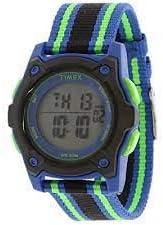
Rysunek 2: Strona view of the watch, illustrating the resin case and fabric strap.
- Wyświetlacz: Digital screen showing time, date, and other functions.
- Przycisk SET: Służy do wprowadzania i potwierdzania ustawień.
- Przycisk TRYB: Used to cycle through different watch modes (Time, Chronograph, Alarm).
- Przycisk START/STOP: Służy do uruchamiania/zatrzymywania funkcji w trybie chronografu i dostosowywania ustawień.
- Przycisk INDIGLO: Activates the Indiglo night-light for the display.
- Elastic Fabric Strap: Adjustable strap with hook-and-loop closure for a secure and comfortable fit.
4. Konfiguracja
4.1 Ustawianie czasu i daty
Aby ustawić godzinę i datę na zegarku:
- W trybie wyświetlania czasu normalnego naciśnij i przytrzymaj USTAWIĆ Naciskaj przycisk, aż sekundy zaczną migać.
- Naciśnij TRYB button to advance to the next setting (seconds, hours, minutes, year, month, day).
- Użyj START/STOP przycisk, aby dostosować migającą wartość.
- Powtarzaj kroki 2 i 3, aż do momentu zmiany wszystkich żądanych ustawień.
- Naciśnij USTAWIĆ Naciśnij przycisk ponownie, aby wyjść z trybu ustawień i zapisać zmiany.
4.2 Ustawianie alarmu
Your watch features a single alarm. To set it:
- W normalnym trybie wyświetlania czasu naciśnij przycisk TRYB button repeatedly until "ALARM" appears on the display.
- Naciśnij i przytrzymaj USTAWIĆ Naciskaj przycisk, aż zacznie migać godzina alarmu.
- Użyj START/STOP przycisk, aby ustawić godzinę alarmu.
- Naciśnij TRYB button to advance to the alarm minutes.
- Użyj START/STOP przycisk, aby dostosować minuty alarmu.
- Naciśnij USTAWIĆ przycisk, aby zapisać czas alarmu.
- Aby włączyć/wyłączyć alarm, naciśnij przycisk START/STOP button while in alarm mode. An alarm icon will appear when the alarm is active.
5. Instrukcja obsługi
5.1 Korzystanie z chronografu (stopera)
The chronograph function allows you to measure elapsed time:
- W normalnym trybie wyświetlania czasu naciśnij przycisk TRYB button repeatedly until "CHRONO" or "STOPWATCH" appears.
- Naciśnij START/STOP przycisk, aby uruchomić chronograf.
- Naciśnij START/STOP naciśnij przycisk ponownie, aby wstrzymać chronograf.
- Aby zresetować chronograf do zera, naciśnij przycisk USTAWIĆ przycisk, gdy chronograf jest wstrzymany.
5.2 Indiglo Lampka nocna
Naciśnij Indiglo button (typically on the side of the watch) to illuminate the watch display for a few seconds, making it easy to read in the dark.
5.3 Regulacja paska
The elastic fabric strap features a hook-and-loop closure for easy adjustment. Simply pull the strap through the buckle and secure the hook-and-loop sections to achieve a comfortable and snug fit on the wrist.

Figure 3: The watch with its adjustable elastic fabric strap.
6. Konserwacja
6.1 Czyszczenie zegarka
Aby Twój zegarek wyglądał jak najlepiej:
- Wipe the watch case and strap with a soft, slightly damp płótno.
- For the fabric strap, a mild soap solution can be used, but ensure it is thoroughly rinsed and air-dried before wearing.
- Avoid using chemical cleaners, solvents, or abrasive materials, as these can damage the watch's finish or components.
6.2 Wymiana baterii
The watch is powered by a long-lasting lithium metal battery. When the display becomes dim or functions are erratic, it may be time for a battery replacement. It is highly recommended to have the battery replaced by an authorized Timex service center or a professional watch repairer to ensure proper sealing and maintain water resistance.
7. Rozwiązywanie Problemów
If you encounter any issues with your Timex TIME Machines watch, refer to the following common problems and solutions:
| Problem | Możliwa przyczyna | Rozwiązanie |
|---|---|---|
| Wyświetlacz jest pusty lub przyciemniony. | Niski poziom naładowania baterii. | Wymień baterię (zaleca się skorzystanie z usług profesjonalnego serwisu). |
| Zegarek nie pokazuje dokładnego czasu. | Nieprawidłowe ustawienie czasu lub niski poziom naładowania baterii. | Reset the time and date (refer to Section 4.1). If problem persists, replace battery. |
| Przyciski nie reagują. | Zegarek może być zablokowany lub wystąpił wewnętrzny problem. | Try pressing all buttons to see if any respond. If not, a battery reset (by professional) might be needed. |
| Alarm nie działa. | Alarm nie jest aktywowany lub jest nieprawidłowo ustawiony. | Ensure the alarm is set and the alarm icon is visible on the display (refer to Section 4.2). |
If the issue persists after trying these solutions, please contact Timex customer support for further assistance.
8. Specyfikacje
- Numer modelu: TW7C260009J
- Materiał obudowy: Żywica
- Materiał soczewki: Akryl
- Materiał paska: Elastic Fabric (Nylon)
- Szerokość paska: 18mm
- Średnica koperty: 29mm
- Wodoodporność: 50 metrów (165 stóp)
- Typ baterii: 1 bateria litowo-metalowa (w zestawie)
- Zalecany wiek: 4 lata i więcej
- Cechy: Chronograph, Alarm, Day-Date Calendar, Indiglo Night-Light
9. Gwarancja i wsparcie
Timex stands behind its products. This watch is covered by the Timex Kids Loss Protection Plan, which offers a replacement for up to one year from the original date of purchase, with no questions asked. Please refer to the official Timex website or the original packaging for full warranty details and terms.
For customer support, service, or to inquire about battery replacement, please visit the official Timex weblub skontaktuj się z działem obsługi klienta. Więcej informacji i zasobów pomocy znajdziesz na stronie Sklep Timex na Amazonie.