

n-com SPCOM00000069 Adapter

INSTRUCTIONS FOR REPLACING THE SPCOM00000069
- Select the specific adapter for your helmet (the compatible helmet model is shown on the back of the support).
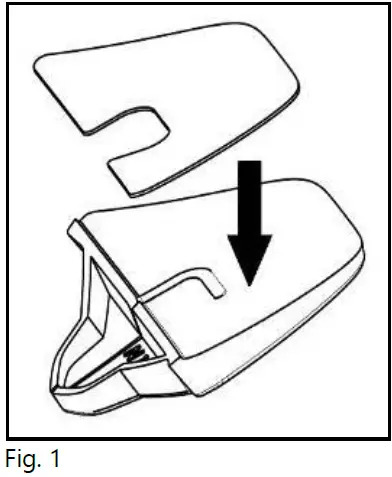
- Apply the double-sided adhesive tape supplied as standard equipment to the selected plastic adaptor (Fig. 1).
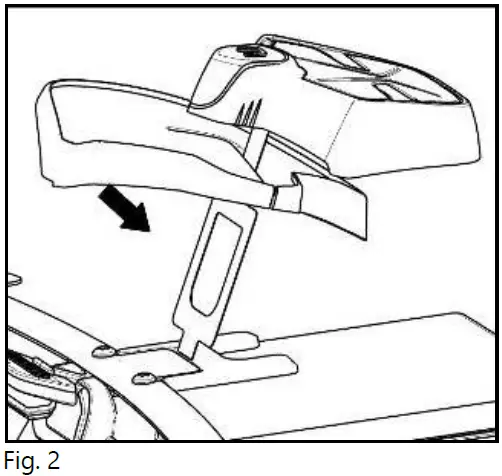
- Insert the FLEX cable of the ESS system in the hole of the selected adapter as illustrated, in the direction shown in the image (Fig. 2).
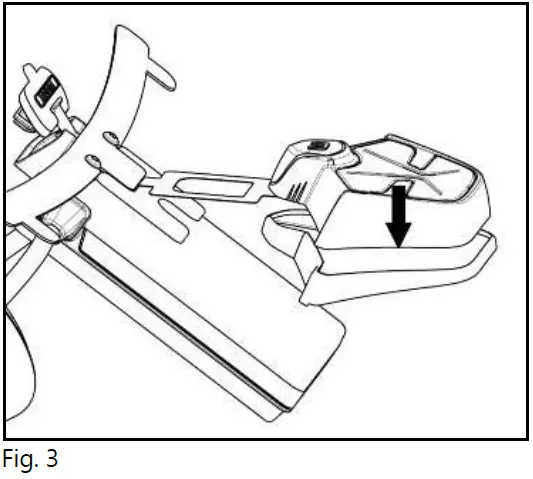
- Rotate the adapter until it is in a horizontal position like the ESS system, then press the two components together until they stick one onto the other (Fig. 3).
For more details, see the product manual instructions.
Documents / Resources
 | SPCOM00000069 Adapter |
References
- User Manualmanual.tools
Published: November 24, 2022