1. ആമുഖം
The ECHO Rainbow Lite Smartwatch is designed to integrate seamlessly into your daily life, offering advanced features for communication, health monitoring, and fitness tracking. This manual provides essential information to help you get the most out of your device.
ബോക്സിൽ എന്താണുള്ളത്
- ECHO Rainbow Lite Smartwatch
- Two interchangeable silicone straps (one pre-installed, one additional)
- മാഗ്നറ്റിക് ചാർജിംഗ് കേബിൾ
- ഉപയോക്തൃ മാനുവൽ (ഈ പ്രമാണം)

Image: The ECHO Rainbow Lite Smartwatch displayed with both a light pink and a light grey silicone strap, showcasing its customizable style.
2. സജ്ജീകരണ ഗൈഡ്
2.1 സ്മാർട്ട് വാച്ച് ചാർജ് ചെയ്യുന്നു
Before initial use, fully charge your ECHO Rainbow Lite Smartwatch. Connect the magnetic charging cable to the charging points on the back of the watch and plug the USB end into a standard USB power adapter (not included). A full charge takes approximately 1.5 hours and provides up to 5 days of battery life depending on usage.
2.2 Installing the Da Fit App
The ECHO Rainbow Lite Smartwatch requires the Da Fit application for full functionality. Download the Da Fit app from your smartphone's app store (available for Android and iOS devices).
- Scan the QR code provided in the quick start guide (if applicable) or search for "Da Fit" in the App Store (iOS) or Google Play Store (Android).
- നിങ്ങളുടെ സ്മാർട്ട്ഫോണിൽ ആപ്ലിക്കേഷൻ ഇൻസ്റ്റാൾ ചെയ്യുക.
2.3 നിങ്ങളുടെ സ്മാർട്ട്ഫോണുമായി ജോടിയാക്കൽ
നിങ്ങളുടെ സ്മാർട്ട്ഫോണിന്റെ ബ്ലൂടൂത്ത് പ്രവർത്തനക്ഷമമാക്കിയിട്ടുണ്ടെന്ന് ഉറപ്പാക്കുക.
- നിങ്ങളുടെ സ്മാർട്ട്ഫോണിൽ ഡാ ഫിറ്റ് ആപ്പ് തുറക്കുക.
- Follow the on-screen instructions to add a new device. The app will search for available Bluetooth devices.
- Select "Rainbow Lite" or a similar device name from the list.
- നിങ്ങളുടെ സ്മാർട്ട്ഫോണിലും സ്മാർട്ട് വാച്ചിലും പെയറിംഗ് അഭ്യർത്ഥന സ്ഥിരീകരിക്കുക.
- ജോടിയാക്കിയാൽ, ആപ്പ് നിങ്ങളുടെ വാച്ചുമായി ഡാറ്റ സമന്വയിപ്പിക്കും.
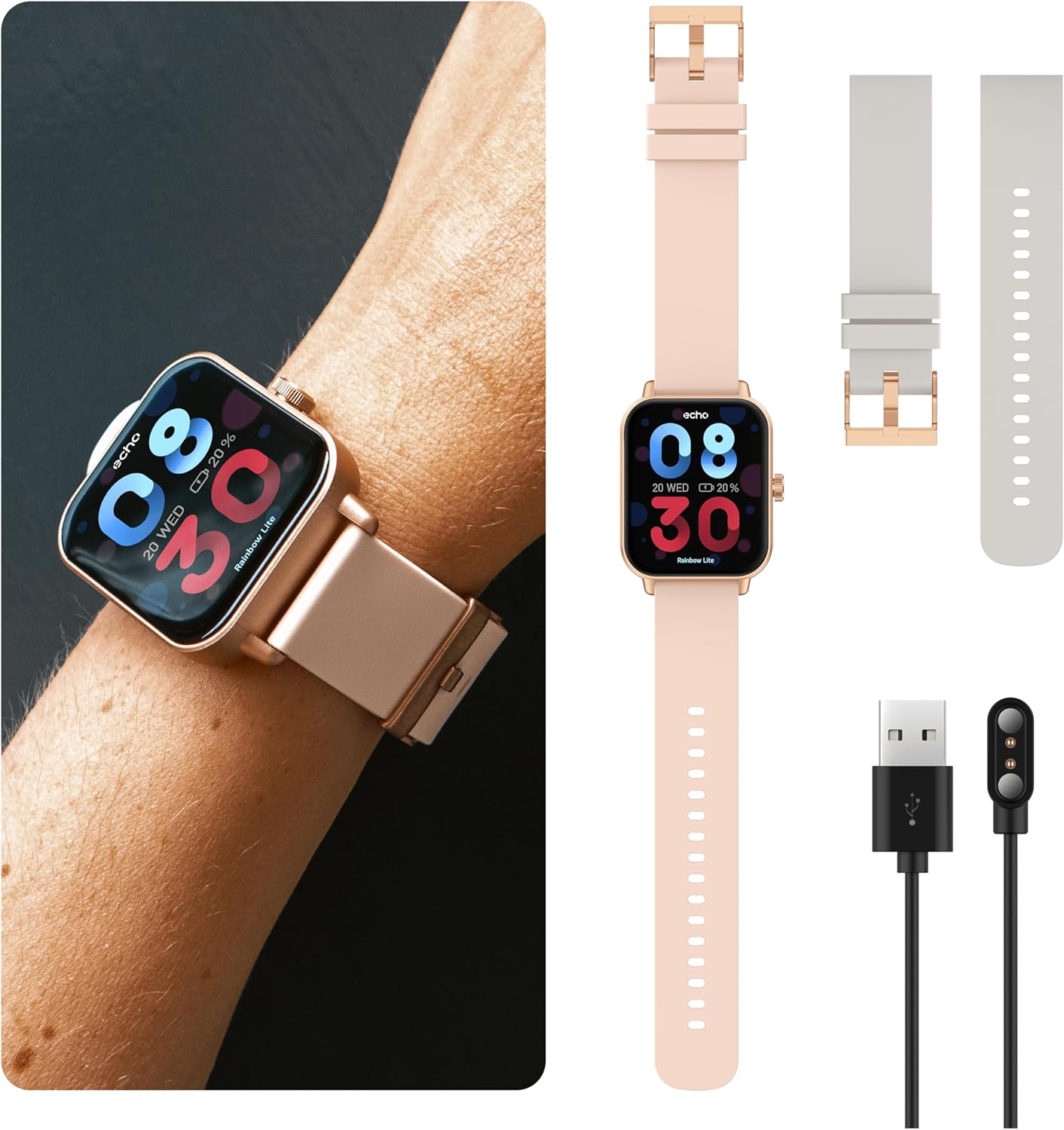
Image: The ECHO Rainbow Lite Smartwatch, its magnetic charging cable, and both the pink and grey silicone straps, illustrating the components included for setup.
3. പ്രവർത്തന നിർദ്ദേശങ്ങൾ
3.1 അടിസ്ഥാന നാവിഗേഷൻ
- ടച്ച് സ്ക്രീൻ: Swipe left, right, up, or down to navigate through menus and features. Tap to select an option.
- സൈഡ് ബട്ടൺ: ഹോം സ്ക്രീനിലേക്ക് മടങ്ങാൻ അമർത്തുക അല്ലെങ്കിൽ ഉപകരണം സജീവമാക്കുക. പവർ ഓപ്ഷനുകൾക്കായി ദീർഘനേരം അമർത്തുക.
3.2 ബ്ലൂടൂത്ത് കോളിംഗ്
The Rainbow Lite Smartwatch allows you to make and receive calls directly from your wrist, thanks to its integrated microphone and speaker. Ensure your watch is connected to your smartphone via Bluetooth.
- കോളുകൾ ചെയ്യുന്നു: ഒരു കോൾ ആരംഭിക്കാൻ നിങ്ങളുടെ വാച്ചിലെ ഡയലറോ കോൺടാക്റ്റ് ലിസ്റ്റോ ആക്സസ് ചെയ്യുക.
- കോളുകൾ സ്വീകരിക്കുന്നു: ഒരു കോൾ വരുമ്പോൾ, നിങ്ങൾക്ക് വാച്ച് സ്ക്രീനിൽ നിന്ന് നേരിട്ട് മറുപടി നൽകാനോ നിരസിക്കാനോ കഴിയും.
3.3 അറിയിപ്പുകൾ
Receive real-time notifications for calls, messages, and app alerts directly on your smartwatch. Manage notification settings through the Da Fit app on your smartphone.
3.4 ആരോഗ്യ നിരീക്ഷണം
The smartwatch is equipped with sensors to track various health metrics. These features are for informational purposes and are not intended for medical diagnosis or treatment.
- ഹൃദയമിടിപ്പ്: ദിവസം മുഴുവൻ നിങ്ങളുടെ ഹൃദയമിടിപ്പ് നിരീക്ഷിക്കുക.
- രക്ത ഓക്സിജൻ (SpO2): നിങ്ങളുടെ രക്തത്തിലെ ഓക്സിജൻ സാച്ചുറേഷൻ അളവ് അളക്കുക.
- രക്തസമ്മർദ്ദം: Track your estimated blood pressure.
- ഉറക്ക ട്രാക്കിംഗ്: Analyze your sleep patterns, including deep sleep, light sleep, and wake times.
- റിട്ടയർമീറ്റർ: Count your daily steps and estimate distance covered.

Image: The ECHO Rainbow Lite Smartwatch screen showing heart rate and blood oxygen saturation (SpO2) measurements, along with a smartphone screen displaying detailed health data within the Da Fit app.
3.5 Sport Modes and Coaching
The Rainbow Lite offers over 100 sport modes to track your workouts. The Da Fit app also provides coaching videos to enhance your fitness routines.
- പ്രവർത്തന ട്രാക്കിംഗ്: Record data for various activities like running, cycling, walking, and more.
- Coaching: Access guided exercises and training programs through the Da Fit app.

Image: A collage showing the ECHO Rainbow Lite Smartwatch interface with different sport modes, alongside smartphone screens illustrating fitness tracking and coaching features within the Da Fit app.
ഇഷ്ടാനുസൃതമാക്കാവുന്ന 3.6 വാച്ച് ഫെയ്സുകൾ
Personalize your smartwatch with over 100 downloadable watch faces available through the Da Fit app.
4. പരിപാലനം
4.1 നിങ്ങളുടെ സ്മാർട്ട് വാച്ച് വൃത്തിയാക്കൽ
To maintain optimal performance and appearance, regularly clean your smartwatch. Use a soft, lint-free cloth to wipe the screen and body. For stubborn dirt, slightly dampതുണിയിൽ വെള്ളം ഒഴിക്കുക. കഠിനമായ രാസവസ്തുക്കളോ ഉരച്ചിലുകളോ ഉള്ള വസ്തുക്കൾ ഉപയോഗിക്കുന്നത് ഒഴിവാക്കുക.
4.2 ജല പ്രതിരോധം
The ECHO Rainbow Lite Smartwatch is rated IP67 water-resistant. This means it is protected against immersion in water up to 1 meter for up to 30 minutes. It is suitable for daily use, such as washing hands or light rain, but not recommended for swimming, diving, or high-pressure water activities.
4.3 ബാറ്ററി കെയർ
To prolong battery life, avoid exposing the watch to extreme temperatures. Charge the watch regularly, even if not in use for extended periods, to prevent deep discharge.
5. പ്രശ്നപരിഹാരം
- വാച്ച് ഓണാകുന്നില്ല: Ensure the watch is fully charged. Connect it to the magnetic charger and check if the charging indicator appears.
- Unable to pair with smartphone:
- നിങ്ങളുടെ സ്മാർട്ട്ഫോണിൽ ബ്ലൂടൂത്ത് പ്രവർത്തനക്ഷമമാക്കിയിട്ടുണ്ടെന്ന് ഉറപ്പാക്കുക.
- വാച്ച് ബ്ലൂടൂത്ത് പരിധിക്കുള്ളിലാണെന്ന് ഉറപ്പാക്കുക (സാധാരണയായി 10 മീറ്റർ).
- നിങ്ങളുടെ സ്മാർട്ട്ഫോണും സ്മാർട്ട് വാച്ചും പുനരാരംഭിക്കുക.
- Check if the Da Fit app has necessary permissions enabled on your phone.
- കൃത്യമല്ലാത്ത ആരോഗ്യ ഡാറ്റ:
- വാച്ച് നിങ്ങളുടെ കൈത്തണ്ടയിൽ നന്നായി ധരിക്കുന്നുണ്ടെന്ന് ഉറപ്പാക്കുക, അധികം ഇറുകിയതോ അധികം അയഞ്ഞതോ അല്ല.
- വാച്ചിന്റെ പിൻഭാഗത്തുള്ള സെൻസർ വൃത്തിയാക്കുക.
- Note that environmental factors and individual physiology can affect readings. These measurements are not for medical use.
- അറിയിപ്പുകൾ ദൃശ്യമാകുന്നില്ല:
- Verify that notifications are enabled in the Da Fit app.
- Check your smartphone's notification settings to ensure the Da Fit app has permission to send notifications.
- വാച്ച് ബ്ലൂടൂത്ത് വഴി ബന്ധിപ്പിച്ചിട്ടുണ്ടെന്ന് ഉറപ്പാക്കുക.
6 സ്പെസിഫിക്കേഷനുകൾ
| ബ്രാൻഡ് | ECHO |
| മോഡലിൻ്റെ പേര് | റെയിൻബോ ലൈറ്റ് |
| ഇന്റേണൽ മോഡൽ നമ്പർ | 512553e7-4c5f-4e86-b901-f586539e6b59 |
| സ്ക്രീൻ വലിപ്പം | 1.83 ഇഞ്ച് |
| കണക്റ്റിവിറ്റി | ബ്ലൂടൂത്ത് V5.3 |
| പ്രത്യേക സവിശേഷതകൾ | Bluetooth Calling, Health Tracking (Heart Rate, SpO2, Blood Pressure), Sport Coaching, IP67 Water Resistance |
| അനുയോജ്യമായ ഉപകരണങ്ങൾ | Smartphones (Android/iOS), Tablets, Laptops, PCs |
| ബാറ്ററി ലൈഫ് | 5 ദിവസം വരെ (സാധാരണ ഉപയോഗം) |
| ചാർജിംഗ് സമയം | ഏകദേശം 1.5 മണിക്കൂർ |
| വാട്ടർ റെസിസ്റ്റൻസ് റേറ്റിംഗ് | IP67 |
| ഭാരം | Ultra-light (approx. 35g) |
7. വാറൻ്റിയും പിന്തുണയും
7.1 വാറൻ്റി വിവരങ്ങൾ
The ECHO Rainbow Lite Smartwatch comes with a standard manufacturer's warranty. Please refer to the warranty card included in your product packaging or contact your retailer for specific warranty terms and conditions.
7.2 ഉപഭോക്തൃ പിന്തുണ
If you encounter any issues or have questions not covered in this manual, please contact ECHO customer support through the contact information provided on the official ECHO website or your purchase platform. Please have your model number and purchase details ready when contacting support.


