ആമുഖം
This manual provides essential information for setting up, operating, and maintaining your HP Essential 17t Laptop TPN-I139. Please read these instructions carefully to ensure proper use and to maximize the lifespan of your device.
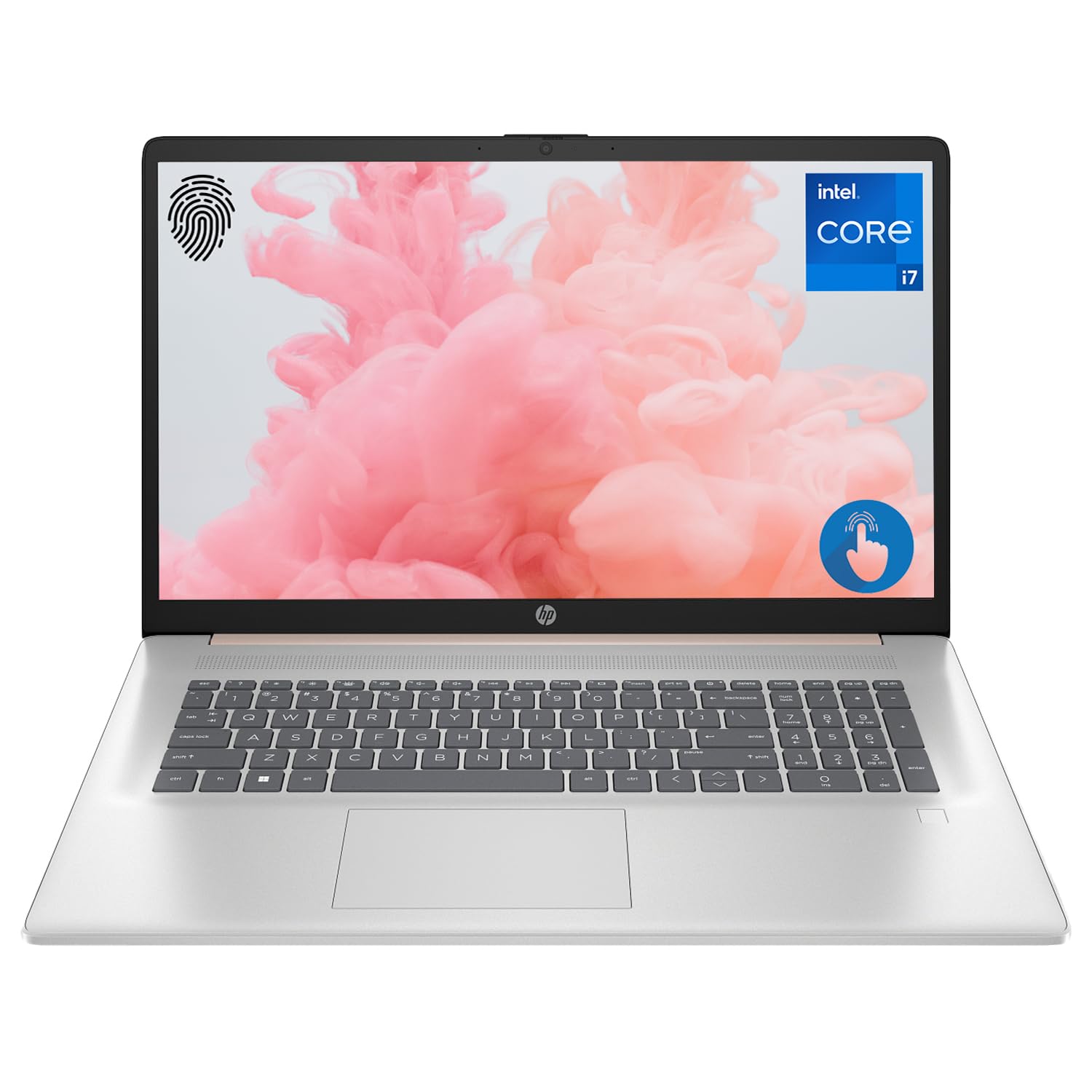
Figure 1: HP Essential 17t Laptop
The HP Essential 17t Laptop is designed for productivity and everyday use, featuring a 17.3-inch HD+ touchscreen, an Intel Core i7-1355U processor, 64GB of RAM, and a 2TB SSD. It comes pre-installed with Windows 11 Home.
ആമുഖം
1. ബോക്സിൽ എന്താണുള്ളത്?
- HP Essential Touchscreen Laptop
- എസി പവർ അഡാപ്റ്റർ
- ക്വിക്ക് സ്റ്റാർട്ട് ഗൈഡ് (ഉൾപ്പെടുത്തിയിട്ടുണ്ടെങ്കിൽ)
2. പ്രാരംഭ പവർ ഓണും സജ്ജീകരണവും
- Connect the AC power adapter to the laptop and a power outlet.
- ലാപ്ടോപ്പ് ലിഡ് തുറന്ന് പവർ ബട്ടൺ അമർത്തുക, സാധാരണയായി കീബോർഡ് ഡെക്കിൽ സ്ഥിതിചെയ്യുന്നു.
- Follow the on-screen instructions to complete the Windows 11 Home setup. This includes selecting your region, connecting to a Wi-Fi network, creating a user account, and accepting the license agreement.

Figure 2: Windows 11 Home Interface
ഹാർഡ്വെയർ കഴിഞ്ഞുview
തുറമുഖങ്ങളും കണക്ടറുകളും
ബാഹ്യ ഉപകരണങ്ങൾ ബന്ധിപ്പിക്കുന്നതിനായി നിങ്ങളുടെ ലാപ്ടോപ്പിലെ വിവിധ പോർട്ടുകൾ പരിചയപ്പെടുക.

ചിത്രം 3: ലാപ്ടോപ്പ് പോർട്ടുകളും കണക്ടറുകളും
- സൂപ്പർസ്പീഡ് യുഎസ്ബി ടൈപ്പ്-എ (5Gbps സിഗ്നലിംഗ് നിരക്ക്): മൗസ്, കീബോർഡുകൾ, അല്ലെങ്കിൽ ബാഹ്യ ഡ്രൈവുകൾ പോലുള്ള യുഎസ്ബി ഉപകരണങ്ങൾ ബന്ധിപ്പിക്കുന്നതിന്.
- HDMI 1.4b: ബാഹ്യ ഡിസ്പ്ലേകളിലേക്കോ പ്രൊജക്ടറുകളിലേക്കോ ബന്ധിപ്പിക്കുന്നതിന്.
- സൂപ്പർസ്പീഡ് യുഎസ്ബി ടൈപ്പ്-സി (5Gbps സിഗ്നലിംഗ് നിരക്ക്): A versatile port for data transfer and connecting compatible devices.
- Headphone/Microphone Combo Jack (3.5mm): ഹെഡ്ഫോണുകൾ, ബാഹ്യ സ്പീക്കറുകൾ, അല്ലെങ്കിൽ മൈക്രോഫോൺ ഉള്ള ഹെഡ്സെറ്റ് എന്നിവ ബന്ധിപ്പിക്കുന്നതിന്.
കീബോർഡും ടച്ച്പാഡും
The laptop features a full-size backlit keyboard for comfortable typing in various lighting conditions and a responsive touchpad for navigation.
പ്രദർശിപ്പിക്കുക
Your HP Essential 17t Laptop is equipped with a 17.3-inch HD+ (1600 x 900) touchscreen display, offering intuitive interaction with Windows 11.

Figure 4: 17.3" HD+ Touchscreen Display
നിങ്ങളുടെ ലാപ്ടോപ്പ് പ്രവർത്തിപ്പിക്കുന്നു
പവർ മാനേജ്മെൻ്റ്
- പവർ ഓൺ/ഓഫ്: Press the power button to turn the laptop on. To shut down, click the Start button, then Power > Shut down.
- സ്ലീപ്പ് മോഡ്: Close the lid or click the Start button, then Power > Sleep to put the laptop into a low-power state.
- ബാറ്ററി കെയർ: The laptop supports battery fast charge, reaching approximately 50% charge in 45 minutes. For optimal battery health, avoid consistently draining the battery to 0% or keeping it at 100% for extended periods.
ടച്ച്സ്ക്രീൻ ഉപയോഗിക്കുന്നു
Interact with your laptop directly on the screen using touch gestures. Common gestures include tapping to select, pinching to zoom, and swiping to scroll.
ഫിംഗർപ്രിൻ്റ് റീഡർ ഉപയോഗിക്കുന്നു
The integrated fingerprint reader allows for secure and quick login. Set up your fingerprints through Windows Hello in the Windows Settings app (Accounts > Sign-in options).
വൈഫൈയിലേക്ക് കണക്റ്റ് ചെയ്യുന്നു
To connect to a wireless network, click the Wi-Fi icon in the taskbar, select your desired network, and enter the password if prompted. The laptop supports Wi-Fi 6 for fast and reliable wireless connectivity.
ഉൽപ്പാദനക്ഷമത സവിശേഷതകൾ
This laptop integrates Copilot + AI capabilities to enhance productivity. These features can assist with scheduling, drafting emails, summarizing documents, and more, streamlining your workflow.

Figure 5: Copilot + AI for Enhanced Productivity
പരിപാലനവും പരിചരണവും
നിങ്ങളുടെ ലാപ്ടോപ്പ് വൃത്തിയാക്കൽ
- മൃദുവായ, ലിൻ്റ് രഹിത തുണി ഉപയോഗിക്കുകampഡിസ്പ്ലേ വൃത്തിയാക്കാൻ വെള്ളമോ സ്ക്രീൻ ക്ലീനറോ ഉപയോഗിച്ച് നനയ്ക്കുക.
- കീബോർഡിനും ഷാസിക്കും മൃദുവായതും ഉണങ്ങിയതുമായ തുണി ഉപയോഗിക്കുക. കഠിനമായ രാസവസ്തുക്കളോ ഉരച്ചിലുകളോ ഉള്ള വസ്തുക്കൾ ഒഴിവാക്കുക.
- വൃത്തിയാക്കുന്നതിനുമുമ്പ് ലാപ്ടോപ്പ് പവർ ഓഫ് ചെയ്തിട്ടുണ്ടെന്നും പ്ലഗ് ഊരിവെച്ചിട്ടുണ്ടെന്നും ഉറപ്പാക്കുക.
സോഫ്റ്റ്വെയർ അപ്ഡേറ്റുകൾ
നിങ്ങളുടെ സിസ്റ്റത്തിൽ ഏറ്റവും പുതിയ സുരക്ഷാ പാച്ചുകളും പ്രകടന മെച്ചപ്പെടുത്തലുകളും ഉണ്ടെന്ന് ഉറപ്പാക്കാൻ വിൻഡോസ് അപ്ഡേറ്റുകൾ പതിവായി പരിശോധിച്ച് ഇൻസ്റ്റാൾ ചെയ്യുക. ക്രമീകരണങ്ങൾ > വിൻഡോസ് അപ്ഡേറ്റ് എന്നതിലേക്ക് പോകുക.
ട്രബിൾഷൂട്ടിംഗ്
നിങ്ങളുടെ ലാപ്ടോപ്പിൽ പ്രശ്നങ്ങൾ നേരിടുകയാണെങ്കിൽ, ഇനിപ്പറയുന്ന അടിസ്ഥാന പ്രശ്നപരിഹാര ഘട്ടങ്ങൾ പരീക്ഷിക്കുക:
- ശക്തിയില്ല: ലാപ്ടോപ്പിലേക്കും പ്രവർത്തിക്കുന്ന ഒരു പവർ ഔട്ട്ലെറ്റിലേക്കും എസി അഡാപ്റ്റർ സുരക്ഷിതമായി ബന്ധിപ്പിച്ചിട്ടുണ്ടെന്ന് ഉറപ്പാക്കുക. മറ്റൊരു ഔട്ട്ലെറ്റ് പരീക്ഷിക്കുക.
- ഡിസ്പ്ലേ പ്രശ്നങ്ങൾ: സ്ക്രീൻ ശൂന്യമാണെങ്കിൽ, ലാപ്ടോപ്പിന്റെ ഡിസ്പ്ലേയിലാണോ പ്രശ്നം എന്ന് പരിശോധിക്കാൻ ഒരു ബാഹ്യ മോണിറ്റർ കണക്റ്റ് ചെയ്യാൻ ശ്രമിക്കുക.
- വൈഫൈ കണക്റ്റിവിറ്റി: Restart your router and modem. Ensure Wi-Fi is enabled on your laptop.
- മന്ദഗതിയിലുള്ള പ്രകടനം: Close unnecessary applications. Check for available Windows updates.
കൂടുതൽ സങ്കീർണ്ണമായ പ്രശ്നങ്ങൾക്ക്, HP പിന്തുണ പരിശോധിക്കുക. webസൈറ്റ് സന്ദർശിക്കുക അല്ലെങ്കിൽ HP ഉപഭോക്തൃ സേവനവുമായി ബന്ധപ്പെടുക.
സ്പെസിഫിക്കേഷനുകൾ
Below are the key technical specifications for the HP Essential 17t Laptop TPN-I139:

Figure 6: Intel Core i7-1355U Processor
| ഫീച്ചർ | സ്പെസിഫിക്കേഷൻ |
|---|---|
| മോഡലിൻ്റെ പേര് | TPN-I139 |
| പ്രോസസ്സർ | 13th Gen Intel Core i7-1355U (10 Cores, 12 Threads, up to 5.0 GHz) |
| റാം | 64 ജിബി DDR4 SDRAM (3200 MHz) |
| സംഭരണം | 2 ടിബി പിസിഐഇ എൻവിഎംഇ എം.2 എസ്എസ്ഡി |
| പ്രദർശിപ്പിക്കുക | 17.3" HD+ (1600 x 900) Touchscreen, BrightView, 250 നിറ്റുകൾ |
| ഗ്രാഫിക്സ് | ഇൻ്റൽ ഐറിസ് Xe ഗ്രാഫിക്സ് |
| ഓപ്പറേറ്റിംഗ് സിസ്റ്റം | വിൻഡോസ് 11 ഹോം |
| വയർലെസ് കണക്റ്റിവിറ്റി | Wi-Fi 6 (802.11ax) |
| തുറമുഖങ്ങൾ | 1x SuperSpeed USB Type-C (5Gbps), 2x SuperSpeed USB Type-A (5Gbps), 1x HDMI 1.4b, 1x Headphone/Microphone Combo |
| പ്രത്യേക സവിശേഷതകൾ | ബാക്ക്ലിറ്റ് കീബോർഡ്, ഫിംഗർപ്രിന്റ് റീഡർ |
| അളവുകൾ (LxWxH) | 15.78 x 10.15 x 0.78 ഇഞ്ച് |
| ഭാരം | 5.25 പൗണ്ട് |

Figure 7: Intel Iris Xe Graphics
വാറൻ്റിയും പിന്തുണയും
Your HP Essential 17t Laptop comes with a standard manufacturer's warranty. For detailed warranty terms and conditions, please refer to the documentation included with your product or visit the official HP support webസൈറ്റ്. സാങ്കേതിക സഹായം, ഡ്രൈവർ ഡൗൺലോഡുകൾ, അല്ലെങ്കിൽ സേവന അഭ്യർത്ഥനകൾ എന്നിവയ്ക്കായി, ദയവായി HP ഉപഭോക്തൃ പിന്തുണയുമായി നേരിട്ട് ബന്ധപ്പെടുക.
ഉൽപ്പന്നം കഴിഞ്ഞുview വീഡിയോ
ഒരു വിഷ്വൽ ഓവറിനായി ഈ വീഡിയോ കാണുകview of the HP Essential 17t Laptop's features and capabilities.
Video 1: HP Essential 17 Touchscreen 13th Gen i7 Laptop Overview by PCOnline US. This video highlights key features and design aspects of the laptop.