1. ആമുഖം
This manual provides comprehensive instructions for the assembly, operation, maintenance, and safety of your new Ikea Desk, Model 20204.82629.1814. Please read this manual carefully before use and retain it for future reference.
The Ikea Desk is designed to be a versatile and adaptable workspace for children, featuring height adjustment and integrated cable management to support a tidy and ergonomic environment.
2 സുരക്ഷാ വിവരങ്ങൾ
മുന്നറിയിപ്പ്: ഈ സുരക്ഷാ നിർദ്ദേശങ്ങൾ പാലിക്കുന്നതിൽ പരാജയപ്പെടുന്നത് ഉൽപ്പന്നത്തിന് പരിക്കോ കേടുപാടുകളോ ഉണ്ടാക്കാം.
- The desk can be unstable when set to maximum height or if it bears a load exceeding 50 kg.
- Ensure the desktop is properly assembled and securely fastened to prevent the risk of tipping over.
- Do not use the desktop without adult supervision, especially when adjusting height or if heavy items are placed on it.
- If an addition unit or desk shelf is placed on top of the desk, the entire combination must be placed against a wall to avoid the risk of tipping.
3. ഉൽപ്പന്നം കഴിഞ്ഞുview
The Ikea Desk is constructed with durable materials and designed for functionality and adaptability.
- ഡെസ്ക്ടോപ്പ്: Particleboard, Paper, Fiberboard, Acrylic Paint, ABS Plastic.
- Table Top Subframe: Steel, Pigmented Epoxy / Polyester Powder Coating.
- ക്രമീകരിക്കാവുന്ന ഉയരം: Designed to grow with your child, offering three different height settings.
- കേബിൾ മാനേജുമെന്റ്: Integrated holders between the front and rear legs for organizing cables and extension cords.

Figure 3.1: The Ikea Desk, featuring a white desktop and pink frame elements.
4. സജ്ജീകരണവും അസംബ്ലിയും
While specific assembly steps are not detailed here, the desk requires assembly. Please refer to the included assembly instructions provided with your product packaging for detailed, step-by-step guidance. Ensure all components are present and undamaged before beginning assembly.
പ്രധാന അസംബ്ലി പരിഗണനകൾ:
- എല്ലാ ഘടകങ്ങളും അൺപാക്ക് ചെയ്ത് നിങ്ങളുടെ അസംബ്ലി ഗൈഡിലെ പാർട്സ് ലിസ്റ്റുമായി താരതമ്യം ചെയ്ത് പരിശോധിക്കുക.
- Assemble the desk frame and attach the desktop securely.
- Ensure all screws and fasteners are tightened according to the instructions to guarantee stability.
- If using an addition unit or shelf, ensure the entire desk assembly is placed against a wall for stability.
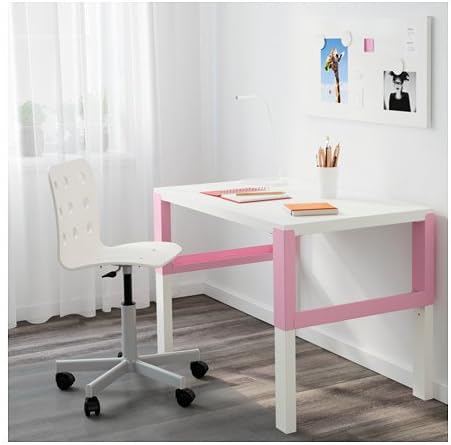
Figure 4.1: The Ikea Desk set up in a room, demonstrating its use as a children's workspace.
5. പ്രവർത്തന നിർദ്ദേശങ്ങൾ
5.1 ഉയരം ക്രമീകരിക്കൽ
The Ikea Desk is designed with three adjustable height settings to accommodate your child's growth. To adjust the desk height:
- Locate the adjustment knobs on the desk legs.
- Loosen the knobs on both legs.
- Carefully raise or lower the desktop to one of the three desired height settings (e.g., 60 cm, 66 cm, or 72 cm). Ensure the desk is level.
- Tighten the knobs firmly on both legs to secure the desk at the new height.
CAUTION: Always ensure the desk is stable after adjustment. Adult supervision is recommended during height adjustment.

Figure 5.1: Detail of the adjustment knob used to change the desk's height.
5.2. കേബിൾ മാനേജ്മെന്റ്
To maintain a tidy workspace and prevent cable clutter, utilize the integrated cable holders:
- Identify the cable holders located between the front and rear legs of the desk.
- Route power cords, charging cables, and extension cords through these holders.
- കേബിളുകൾ പിഞ്ച് ചെയ്തിട്ടില്ല അല്ലെങ്കിൽ സ്ട്രെയിൻ ചെയ്തിട്ടില്ലെന്ന് ഉറപ്പാക്കുക.
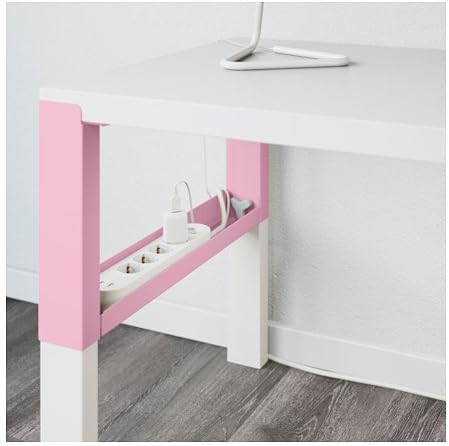
Figure 5.2: The integrated cable management tray, designed to keep cords organized.
6. പരിപാലനം
Regular cleaning and care will help maintain the appearance and longevity of your Ikea Desk.
- വൃത്തിയാക്കൽ: പരസ്യം ഉപയോഗിച്ച് മേശയുടെ പ്രതലങ്ങൾ തുടയ്ക്കുകamp cloth and a mild cleaner. Dry thoroughly with a clean cloth.
- കഠിനമായ രാസവസ്തുക്കൾ ഒഴിവാക്കുക: അബ്രാസീവ് ക്ലീനറുകളോ, ശക്തമായ ലായകങ്ങളോ, കഠിനമായ രാസവസ്തുക്കളോ ഉപയോഗിക്കരുത്, കാരണം ഇവ ഫിനിഷിന് കേടുവരുത്തും.
- ഫാസ്റ്റനറുകൾ പരിശോധിക്കുക: എല്ലാ സ്ക്രൂകളും ഫാസ്റ്റനറുകളും ഇറുകിയതാണെന്ന് ഉറപ്പാക്കാൻ ഇടയ്ക്കിടെ പരിശോധിക്കുക. ആവശ്യമെങ്കിൽ വീണ്ടും മുറുക്കുക.
- ഉപരിതലങ്ങൾ സംരക്ഷിക്കുക: Use coasters or placemats to protect the desktop from spills, heat, and scratches.
7. പ്രശ്നപരിഹാരം
If you encounter issues with your Ikea Desk, refer to the following common solutions:
| പ്രശ്നം | സാധ്യമായ കാരണം | പരിഹാരം |
|---|---|---|
| മേശ ഇളകുകയോ അസ്ഥിരമാവുകയോ ചെയ്യുന്നു. | Loose fasteners; uneven floor; desk at maximum height with heavy load. | Check and tighten all screws. Ensure desk is on a level surface. Reduce load if at maximum height. Ensure desk is against a wall if an addition unit is used. |
| ഉയരം ക്രമീകരിക്കുന്നതിൽ ബുദ്ധിമുട്ട്. | Knobs not sufficiently loosened; mechanism obstructed. | Ensure knobs are fully loosened. Check for any obstructions in the adjustment mechanism. |
| Scratches or damage to desktop. | Sharp objects; excessive force; lack of protective measures. | Use placemats or desk pads. Avoid dragging sharp objects across the surface. Minor scratches may be touched up with appropriate paint. |
8 സ്പെസിഫിക്കേഷനുകൾ
| ബ്രാൻഡ് | ഐകിയ |
| മോഡൽ നമ്പർ | 20204.82629.1814 |
| Material (Desktop) | Particleboard, Paper, Fiberboard, Acrylic Paint, ABS Plastic |
| Material (Subframe) | Steel, Pigmented Epoxy / Polyester Powder Coating |
| നിറം | White (Desktop), Pink (Frame accents) |
| അളവുകൾ (വീതി) | 96 സെ.മീ (37 3/4 ഇഞ്ച്) |
| അളവുകൾ (ആഴം) | 58 സെ.മീ (22 7/8 ഇഞ്ച്) |
| Adjustable Height (Min) | 60 സെ.മീ (23 5/8 ഇഞ്ച്) |
| Adjustable Height (Max) | 72 സെ.മീ (28 3/8 ഇഞ്ച്) |
| പരമാവധി ലോഡ് | 50 കി.ഗ്രാം (110 പൗണ്ട്) |
| പ്രത്യേക സവിശേഷതകൾ | Cable Holder, Height Adjustable |
9. വാറൻ്റിയും പിന്തുണയും
For information regarding warranty coverage, spare parts, or customer support, please refer to the documentation provided with your purchase or visit the official Ikea webസൈറ്റ്. വാറന്റി ക്ലെയിമുകൾക്കായി നിങ്ങളുടെ വാങ്ങലിന്റെ തെളിവ് സൂക്ഷിക്കുക.
ഐകിയ ഒഫീഷ്യൽ Webസൈറ്റ്: www.ikea.com


