
1. Вовед
This manual provides essential information for setting up, operating, and maintaining your HP OmniDesk Slim Desktop PC, Model S03-0006. This desktop PC is designed for daily tasks, offering an Intel Core i3-14100 processor, ample memory, and various connectivity options for productivity and entertainment.
2. Содржина на пакетот
Проверете дали сите артикли се присутни во пакувањето:
- HP S03-000 OmniDesk Slim Desktop PC
- Напојување
- USB Black Wired Keyboard (if included with specific bundle)
- USB Wired Mouse (if included with specific bundle)
Забелешка: Дополнителните додатоци може да се продаваат одделно.
3. Производот завршиview
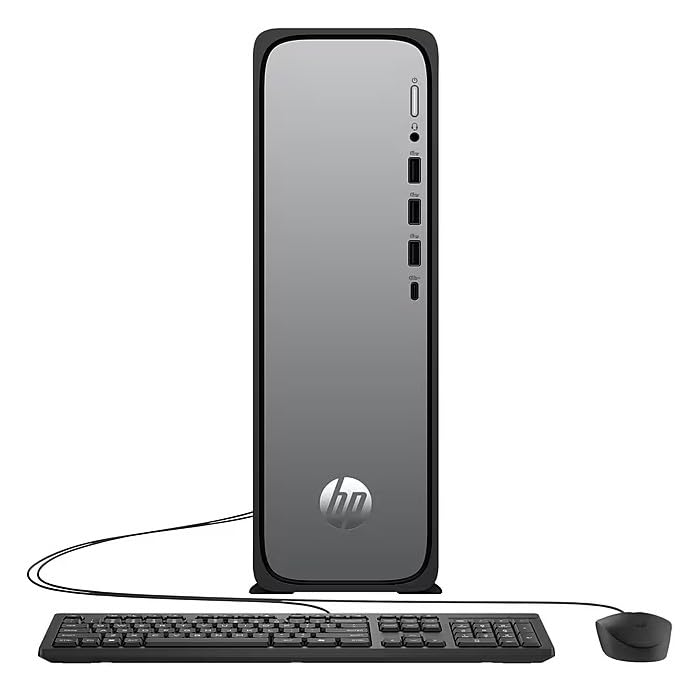
The HP OmniDesk Slim Desktop PC features a compact design with essential components for efficient computing.

Слика 3.1: HP OmniDesk Slim Desktop PC showcasing е slim profile, Intel Core i3-14100 processor, 8GB DDR5 RAM, 256GB SSD, Intel UHD Graphics 710, Wi-Fi 6, Bluetooth 5.4, Windows 11, and dual display support.
3.1. Порти и конектори
Familiarize yourself with the various ports on your desktop PC for connecting peripherals and displays.
Слика 3.2: Front and rear port layout of the HP OmniDesk Slim Desktop PC. Front ports include a headphone/microphone combo jack, USB Type-A 5Gbps ports, and a USB Type-C 10Gbps port. Additional ports (typically rear) include 4 USB 2.0 Type-A, 1 RJ-45 (Ethernet), 1 HDMI Out, and 1 DisplayPort 1.4.
- Предни пристаништа:
- Комбинација за слушалки/микрофон
- USB Type-A 5Gbps signaling rate (3 ports)
- USB Type-C 10Gbps signaling rate (1 port)
- Задни пристаништа:
- USB 2.0 Type-A (4 ports)
- RJ-45 (Етернет)
- HDMI 1.4b (1 port)
- DisplayPort 1.4a (1 port)
4. Водич за поставување
Follow these steps to set up your HP OmniDesk Slim Desktop PC:
- Поврзете го мониторот: Connect your monitor to the PC using an HDMI or DisplayPort cable. Ensure the cable is securely plugged into both the PC and the monitor.
- Поврзете периферни уреди: Plug in your USB keyboard and mouse into the available USB ports on the PC.
- Поврзете напојување: Connect the power supply cable to the PC's power input, then plug the other end into a wall outlet or surge protector.
- Вклучување: Press the power button on the front of the PC. The system will boot up, and you will see the Windows 11 setup screen.
- Првично поставување на Windows: Следете ги упатствата на екранот за да го завршите поставувањето на Windows 11, вклучувајќи го јазикот, регионот, мрежната врска и креирањето корисничка сметка.
5. Упатства за работа
5.1. Основно работење
- Вклучување/исклучување: Press the power button to turn on the PC. To shut down, click the Start button, then Power > Shut down.
- Рестартирајте: Кликнете на копчето „Старт“, потоа на Вклучување > Рестартирај.
- Режим на спиење: Кликнете на копчето „Старт“, потоа на „Вклучување“ > „Спиење“.
5.2. Поврзување на мрежа
Your PC supports both wired (Ethernet) and wireless (Wi-Fi) network connections.
- Жична врска: Connect an Ethernet cable from your router or modem to the RJ-45 port on the back of the PC.
- Безжична конекција (Wi-Fi 6):
- Кликнете на иконата Wi-Fi во лентата со задачи.
- Изберете ја саканата Wi-Fi мрежа од листата.
- Внесете го мрежниот безбедносен клуч (лозинка) ако е побарано, потоа кликнете Поврзете се.
5.3. Dual Display Support
To extend your desktop to a second monitor:
- Connect the second monitor to an available video output port (HDMI or DisplayPort) on your PC.
- Кликнете со десното копче на работната површина и изберете Поставки за прикажување.
- Under "Multiple displays," select how you want the displays to behave (e.g., Extend these displays, Duplicate these displays).
6. Одржување
- Ажурирања на софтверот: Редовно проверувајте и инсталирајте ажурирања на Windows за да обезбедите стабилност и безбедност на системот. Одете на Поставки > Ажурирање на Windows.
- Ажурирања на возачот: Keep your device drivers updated. HP Support Assistant (MyHP) can help manage these updates.
- Чистење: Use a soft, dry cloth to clean the exterior of the PC. Avoid liquid cleaners directly on components. Ensure ventilation openings are clear of dust.
- Резервни податоци: Редовно правете резервни копии од важност files на надворешен диск или складирање во облак за да се спречи губење на податоци.
7 Смена на проблеми
| Проблем | Можно решение |
|---|---|
| Компјутерот не се вклучува. |
|
| Нема приказ на мониторот. |
|
| Нема интернет конекција. |
|
| Периферните уреди (тастатура/глушец) не работат. |
|
8. Спецификации
| Име на моделот | HP OmniDesk Desktop HP S03-000 PC |
| Број на модел | OmniDesk Slim S03-0006 |
| Процесор | Intel Core i3-14100 (3.5 GHz, 6 MB Cache) |
| Графика | Intel UHD Graphics 710 (интегрирана) |
| RAM меморија | 8 GB DDR5 (4800 MT/s), Max 64 GB |
| Складирање | 256 GB SSD (солидна состојба) |
| Оперативен систем | Windows 11 Home |
| Поврзување | Realtek Wi-Fi 6 (2x2), Bluetooth 5.4, Gigabit Ethernet (RJ-45) |
| Пристаништа |
|
| Димензии (В x Ш x Д) | 11.61 x 3.94 x 11.97 инчи |
| Тежина | 8.38 фунти |
| Сертификати | ENERGY STAR certified, EPEAT Gold with Climate+ |
9. Гаранција и поддршка
9.1. Информации за гаранцијата
This HP OmniDesk Slim Desktop PC comes with a 90-дневна ограничена гаранцијаВе молиме погледнете ја гарантната документација вклучена со вашиот производ за специфични услови и одредби.
9.2. Техничка поддршка
За техничка помош, преземање драјвери или дополнителни информации, посетете ја официјалната страница за поддршка на HP. website. You can also utilize the pre-installed MyHP application for device customization, optimization, and access to helpful messages and settings.
Always provide your product model number (S03-0006) and serial number when contacting support.