
1. Вовед
This manual provides essential information for the safe and efficient use of your HP 17.3 Inch FHD Business Laptop. Please read this guide thoroughly before operating your device to ensure optimal performance and longevity. This laptop is designed for business and everyday computing tasks, offering a large display, robust performance, and portability.
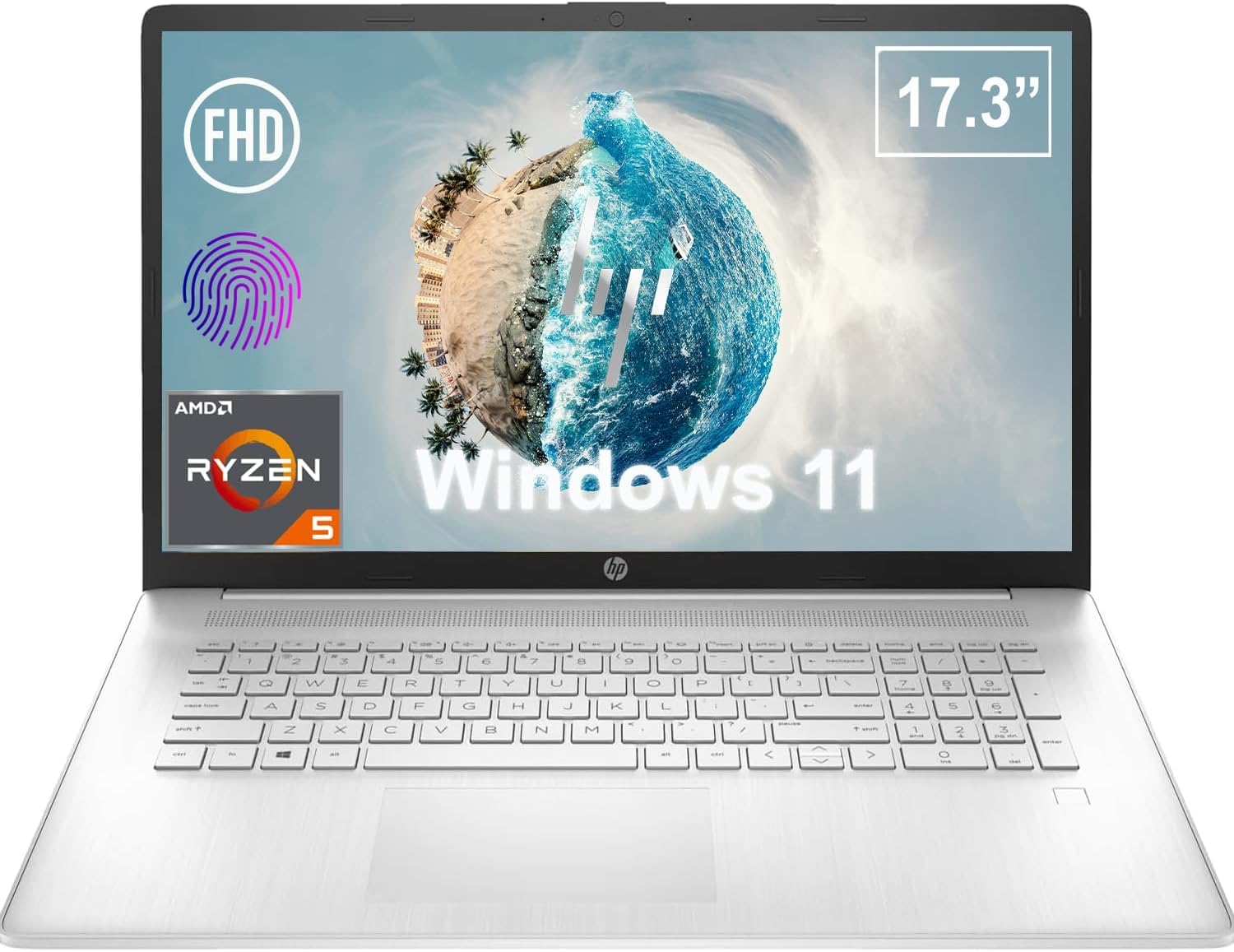
Слика 1.1: Предна страна view of the HP 17.3 Inch FHD Business Laptop, showcasing the large display and keyboard.
2. Поставување
2.1 Распакување и првична инспекција
Внимателно отстранете ги сите компоненти од пакувањето. Проверете дали се присутни следниве елементи:
- HP 17.3 Inch FHD Business Laptop
- Power Adapter (45 W Smart AC Power Adapter)
- Документација (ова упатство, информации за гаранцијата)
Inspect the laptop and accessories for any signs of damage. If any items are missing or damaged, contact your retailer or HP support immediately.
2.2 Поврзување на адаптерот за напојување
Before first use, ensure the laptop is fully charged. Connect the power adapter to the AC smart pin port on the side of the laptop and then plug the adapter into a power outlet.
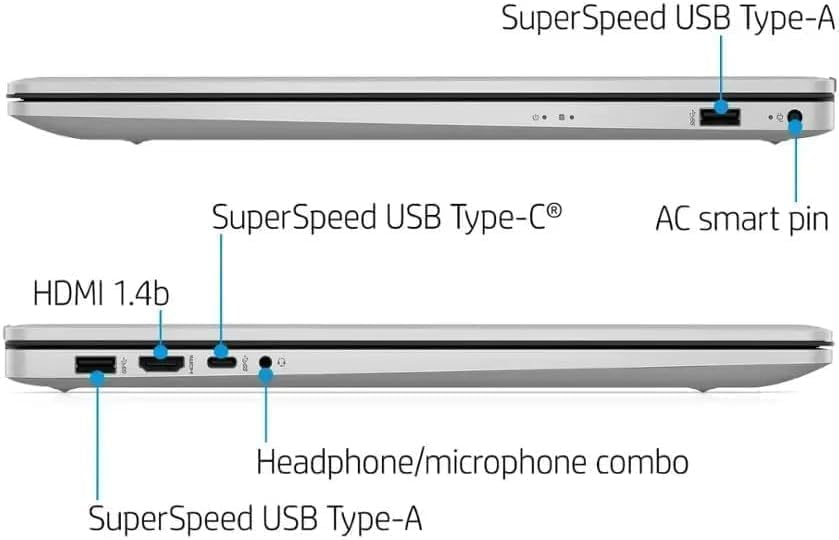
Слика 2.1: Страна view illustrating the location of the AC smart pin and other ports.
2.3 Првично вклучување и поставување на Windows
Press the power button to turn on the laptop. Follow the on-screen instructions to complete the Windows 11 Home setup process. This includes setting up your user account, network connection, and initial preferences.
3. Ракување со лаптопот
3.1 Тастатура и тачпед
The laptop features a full-size QWERTY keyboard with a 10-key number pad for efficient data entry. The integrated touchpad provides precise cursor control. Refer to the operating system's settings for customizing touchpad gestures and keyboard shortcuts.
3.2 Читач на отпечатоци од прсти
For enhanced security and convenient login, utilize the integrated fingerprint reader. Set up your fingerprints through Windows Hello in the Windows 11 settings.
3.3 Webкамера и микрофони
The HP True Vision 720p HD Camera and integrated dual array digital microphones are located at the top of the display. These are suitable for video conferencing and online communication.
3.4 Поврзување
- Wi-Fi: The laptop supports 802.11a/b/g/n/ac Wi-Fi for wireless internet access. Connect to available networks via the Windows network settings.
- Bluetooth: Bluetooth 5 allows for wireless connection to compatible devices such as headphones, mice, and keyboards. Enable and manage Bluetooth devices through Windows settings.
3.5 Ports and External Devices
Лаптопот е опремен со различни порти за поврзување на надворешни уреди:
- 1 x USB Type-C (5Gbps, Data Only): For connecting USB-C compatible devices and data transfer.
- 2 x USB Type-A (5Gbps): For connecting standard USB devices like external drives, mice, or keyboards.
- 1 x HDMI 1.4b: For connecting to external displays or projectors.
- 1 x Headphone/Microphone Combo: For connecting a headset with a single 3.5mm jack.
- 1 x AC Smart Pin: For connecting the power adapter.

Figure 3.1: Open view of the laptop, highlighting the keyboard and touchpad area.
3.6 Управување со батерии
The laptop is powered by a 3-Cell, 41 Wh Li-ion battery, offering up to 8 hours and 30 minutes of video playback. Use the provided 45 W Smart AC Power Adapter for charging. HP Fast Charge technology allows for quicker charging times.
4. Одржување
4.1 Чистење на лаптопот
To maintain the laptop's appearance and functionality:
- Користете мека крпа без влакненца гampизмијте со вода или со специјализирано средство за чистење на екранот.
- За тастатурата и куќиштето, користете мека, сува крпа. Избегнувајте груби хемикалии или абразивни материјали.
- Пред чистење, проверете дали лаптопот е исклучен од струја и изваден од струја.
4.2 Ажурирања на софтверот
Редовно ажурирајте го вашиот оперативен систем и драјверите на Windows за да обезбедите оптимални перформанси, безбедност и компатибилност. До Windows Update може да се пристапи преку менито Поставки.
4.3 Security Software
The laptop comes preloaded with McAfee LiveSafe for security. Ensure this software is active and updated to protect against viruses and other threats.
5 Смена на проблеми
Овој дел се однесува на вообичаени проблеми со кои може да се соочите со вашиот HP лаптоп.
5.1 Проблеми со напојувањето
- Лаптопот не се вклучува: Ensure the power adapter is securely connected to both the laptop and a working power outlet. Verify the battery is charged.
- Батеријата не се полни: Проверете го адаптерот за напојување и кабелот за оштетување. Обидете се со друг штекер.
5.2 Проблеми со приказот
- Нема слика на екранот: Поврзете надворешен монитор за да проверите дали проблемот е со екранот на лаптопот. Рестартирајте го лаптопот.
- Треперење или искривена слика: Ажурирајте ги драјверите за графичка картичка. Прилагодете ја резолуцијата на екранот и брзината на освежување во поставките на Windows.
5.3 Проблеми со поврзувањето
- Wi-Fi не се поврзува: Ensure Wi-Fi is enabled. Restart your router and the laptop. Check network settings for correct password and configuration.
- Bluetooth уредот не се спарува: Проверете дали Bluetooth е овозможен на двата уреди. Проверете дали уредот е во режим на спарување и е во опсег.
За посложени проблеми, погледнете ја поддршката на HP. webсајт или контактирајте со службата за корисници.
6. Спецификации
| Карактеристика | Детал |
|---|---|
| Бренд | HP |
| Име на моделот | HP17 |
| Број на модел | i5-1135G7 |
| Големина на екранот | 17.3 инчи |
| Тип на дисплеј | IPS, Anti-Glare, LED |
| Резолуција | 1920 x 1080 (FHD) |
| Стапка на освежување | 60 Hz |
| Процесор | AMD Ryzen 5 5500U (6 Cores, 12 Threads, up to 4.0 GHz Max Boost Clock) |
| Графика | Интегрирана AMD Radeon графика |
| RAM меморија | 32 GB DDR4-3200 MHz (Max 64 GB) |
| Складирање | 1 TB PCIe NVMe M.2 SSD |
| Оперативен систем | Windows 11 Home, 64-bit, English |
| Безжично поврзување | 802.11a/b/g/n/ac Wi-Fi, Bluetooth 5 |
| Пристаништа | 1x USB Type-C (5Gbps), 2x USB Type-A (5Gbps), 1x HDMI 1.4b, 1x Headphone/Microphone Combo, 1x AC Smart Pin |
| Webкамера | HP True Vision 720p HD Camera |
| Аудио | Dual Speakers, Integrated Dual Array Digital Microphones |
| Батерија | 3-Cell, 41 Wh Li-ion (Up to 8.5 hours video playback) |
| Адаптер за напојување | 45 W Smart AC Power Adapter |
| Димензии (Ш x Д x В) | 40.07 x 25.78 x 2.06 cm (14.14"L x 9.31"W x 0.78"Th) |
| Тежина | Почнувајќи од 2.07 кг |
| Посебни карактеристики | Fingerprint Reader, Lightweight Design, HP Fast Charge |
7. Гаранција и поддршка
7.1 Информации за гаранцијата
This HP laptop comes with a 1-year manufacturer's limited warranty. For detailed terms and conditions, please refer to the warranty documentation included with your product or visit the official HP support webсајт.
7.2 Поддршка за корисници
If you encounter issues that cannot be resolved using the troubleshooting steps in this manual, please contact HP customer support. You can find contact information and additional resources on the official HP webсајт:
- Поддршка на HP Webсајт: support.hp.com
- HP продавница: HP продавница на Amazon