
Вовед
This manual provides essential information for setting up, operating, maintaining, and troubleshooting your HP 15.6-inch FHD IPS Touchscreen Laptop. Please read this guide thoroughly to ensure optimal performance and longevity of your device. This laptop features an AMD Ryzen 7 7730U processor, 64GB DDR4 RAM, 2.28TB storage (2TB SSD + 288GB Docking Station Set), AMD Radeon Graphics, and runs on Windows 11 Pro.
Поставување
Unpacking and Initial Power-On
Carefully remove all components from the packaging. Connect the power adapter to the laptop and a power outlet. Press the power button to turn on the laptop. Follow the on-screen instructions to complete the initial Windows 11 Pro setup.
Вклучени додатоци
Your laptop package includes the following accessories:
- 1x 7-in-1 Docking Station with 256GB Storage
- 1x 32GB MicroSD Card with Adapter
- 1x кабел за податоци од тип C
- 1x 3-in-1 Charging Cable
- 1x Suede Cleaning Cloth
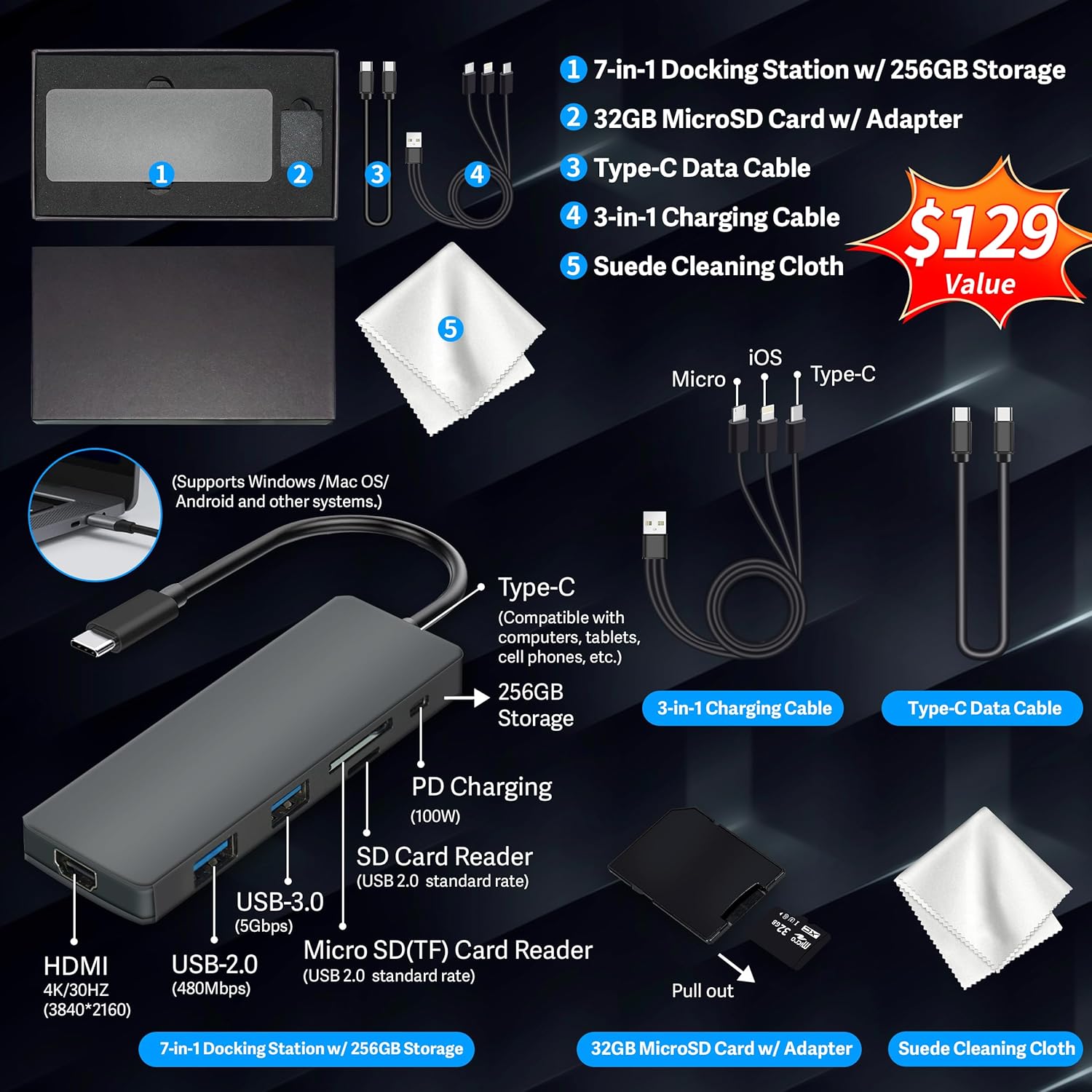
Figure 1: Included accessories, including the 7-in-1 docking station, various cables, and a cleaning cloth.
Ракување со вашиот лаптоп
Карактеристики на прикажување
The HP 15.6-inch laptop features an FHD IPS touchscreen display with a resolution of 1920 x 1080 pixels and an anti-glare coating. This display provides clear and vibrant visuals from various viewинг агли.

Figure 2: The 15.6-inch FHD IPS display offers crisp and vivid details.
Поврзување и периферни уреди
Your laptop is equipped with various connectivity options and integrated features to enhance your user experience.
- 720p HD Camera: For video calls and online meetings.
- Wi-Fi 6: За брза безжична интернет конекција.
- Bluetooth: For connecting wireless peripherals such as mice, keyboards, and headphones.
- Нумеричка тастатура: A full numeric keypad is integrated for efficient data entry and calculations.

Figure 3: Key features for staying connected and productive, including the numeric keypad.
The laptop includes multiple ports for connecting external devices:
- 2x USB Type-A ports
- 1x USB Type-C порт
- 1x HDMI порта
- 1x Headphone/Microphone Combo jack

Figure 4: Multi-port configuration on the laptop for various connections.
Перформанси и мултитаскинг
Equipped with an AMD Ryzen 7 7730U processor, 64GB DDR4 RAM, and AMD Radeon Graphics, this laptop is designed for efficient multitasking and demanding applications. The 2.28TB storage (2TB SSD + 288GB Docking Station Set) provides ample space and fast access to your files.

Figure 5: Core specifications for performance and storage.

Figure 6: Laptop demonstrating effortless multitasking with several applications running simultaneously.
The laptop is designed for extended use, offering reliable battery life to support your daily tasks.

Figure 7: The laptop supports continuous work throughout the day with its battery performance.
Одржување
To ensure the longevity and optimal performance of your HP laptop, follow these maintenance guidelines:
- Чистење: Use the provided suede cleaning cloth or a soft, lint-free cloth to clean the screen and exterior. Avoid harsh chemicals.
- Ажурирања на софтверот: Regularly update your Windows 11 Pro operating system and drivers to ensure security and performance.
- Нега на батеријата: Избегнувајте често целосно празнење на батеријата. За долгорочно складирање, наполнете ја батеријата до околу 50-70%.
- Вентилација: Проверете дали отворите за вентилација на лаптопот не се блокирани за да спречите прегревање. Користете го лаптопот на тврда, рамна површина.
- Складирање: Чувајте го лаптопот на ладно и суво место, подалеку од директна сончева светлина и екстремни температури.
Решавање проблеми
Овој дел се однесува на вообичаени проблеми со кои може да се соочите со вашиот лаптоп.
Laptop Does Not Power On
- Осигурајте се дека адаптерот за напојување е безбедно поврзан и со лаптопот и со функционален штекер.
- Проверете дали штекерот е функционален со вклучување на друг уред.
- Доколку батеријата е целосно испразнета, оставете ја да се полни најмалку 15-30 минути пред да се обидете да ја вклучите.
Screen Remains Blank
- Проверете дали лаптопот е вклучен (индикаторска ламба за напојување).
- Try connecting an external monitor to see if display output is available.
- Прилагодете ја осветленоста на екранот користејќи ги функционалните копчиња.
Проблеми со Wi-Fi поврзување
- Проверете дали Wi-Fi е овозможен во поставките на Windows.
- Рестартирајте го вашиот рутер и модем.
- Ажурирајте ги драјверите за Wi-Fi преку Управувачот со уреди.
- Check for any physical obstructions or interference.
Бавни перформанси
- Затворете ги непотребните апликации што работат во позадина.
- Проверете го „Управувачот со задачи“ за процеси што трошат многу процесорска или RAM меморија.
- Осигурајте се дека вашиот оперативен систем и драјверите се ажурирани.
- Извршете чистење на дискот и дефрагментација (за HDD, не е потребно за SSD).
- Скенирајте за малициозен софтвер или вируси.
Спецификации
Below are the detailed technical specifications for your HP 15.6-inch FHD IPS Touchscreen Laptop.

Figure 8: Laptop dimensions and weight for portability.
| Карактеристика | Детал |
|---|---|
| Бренд | HP |
| Име на моделот | HP 15.6" FHD IPS Touchscreen Laptop |
| Големина на екранот | 15.6 инчи |
| Резолуција на екранот | 1920 x 1080 пиксели (FHD) |
| Тип на дисплеј | LED IPS Touchscreen |
| Процесор | AMD Ryzen 7 7730U (8 Cores, 2 GHz base) |
| Графички копроцесор | AMD Radeon графика (интегрирана) |
| RAM меморија | 64 GB DDR4 (3200 MHz) |
| Складирање | 2 TB SSD + 288 GB Docking Station Set (Total 2.28 TB) |
| Оперативен систем | Windows 11 Pro |
| Поврзување | Wi-Fi 6 (802.11ax), Bluetooth, HDMI, USB |
| Пристаништа | 2x USB Type-A, 1x USB Type-C, 1x HDMI, 1x Headphone/Microphone Combo |
| Webкамера | 720p HD камера |
| Тастатура | Full-size with Numeric Keypad |
| Димензии (Д x Ш x В) | 14.17" x 9.29" x 0.73" |
| Тежина на ставката | 3.52 фунти (приближно 1.6 кг) |
| Боја | Сребрена |
| UPC | 196188514924 |
| ASIN | B0FX2NR2WN |
Информации за гаранцијата
Your HP laptop comes with a manufacturer's warranty. For upgraded components (RAM/SSD), a 1-year warranty is provided by SnowBell. The original 1-year manufacturer warranty applies to all other components of the laptop. Please retain your proof of purchase for warranty claims. For detailed terms and conditions, refer to the warranty documentation included with your product or visit the official HP support webсајт.
Поддршка
За понатамошна помош, техничка поддршка или барања за услуги, ве молиме погледнете ги следните ресурси:
- Официјална поддршка на HP Webсајт: Посетете support.hp.com за драјвери, упатства и водичи за решавање проблеми.
- Онлајн помош: Utilize the built-in Windows 11 Pro help features for software-related questions.
- Контактирајте го продавачот на мало: For issues related to upgraded components or purchase, contact SnowBell or your point of purchase.