
1. Вовед
Thank you for choosing the DazzlingStage 60W 9LED RGBW Stage Wall Wash Bar Light. This manual provides essential information for the safe and effective operation of your lighting fixture. Please read it thoroughly before installation and use, and retain it for future reference.
Ова сtage light bar features 9 high-power RGBW LEDs, offering a wide spectrum of colors and dynamic lighting effects suitable for various events and venues.

Слика 1.1: Готовоview of the DazzlingStage 60W 9LED RGBW Stage Wall Wash Bar Lights in various colors.
2. Инструкции за безбедност
- Електрична безбедност: Обезбедете ја јачината на напојувањетоtage matches the specifications of the fixture. Always disconnect power before cleaning, servicing, or moving the unit.
- Инсталација: Install the fixture in a well-ventilated area, away from heat sources. Ensure secure mounting to prevent accidental falls.
- Операција: Do not look directly into the light source when the fixture is operating, as it can cause eye damage. Avoid operating the unit in wet or damp услови.
- Одржување: Refer all servicing to qualified personnel. Do not attempt to repair the unit yourself.
- Деца: Чувајте го уредот подалеку од дофат на деца.
3. Содржина на пакетот
По распакувањето, проверете дали сите артикли наведени подолу се вклучени и се во добра состојба:
- DazzlingStage 60W 9LED RGBW Stage Wall Wash Bar Light (x1 per pack)
- Power Cord (x1 per pack)
- Remote Control (x1 per pack)
- Mounting Bracket (x1 per pack)
- Knobs (x2 per pack)
- Black Gaskets (x2 per pack)
- Instruction Manual (x1 per pack)

Слика 3.1: Содржина вклучена во пакувањето на производот.
4. Компоненти на производот
Familiarize yourself with the main components of the light bar:
- LED Array: 9 RGBW LEDs for color mixing.
- Контролен панел: Features a 4-digit LED display and control buttons (MENU, UP, DOWN, ENTER) for mode selection and parameter adjustment.
- DMX IN/OUT Ports: For connecting to a DMX controller or linking multiple units.
- Влез/Излез на напојување: For power connection and daisy-chaining power to other units.
- Држач за монтирање: Adjustable bracket for floor standing or truss mounting.
- Топлина: Integrated cooling system to maintain optimal operating temperature.

Image 4.1: Key components and dimensions of the light bar.
5. Поставување и инсталација
The DazzlingStage Wall Wash Bar Light offers flexible installation options:
5.1 Монтирање на држачот
Attach the included mounting bracket to the light bar using the provided knobs and gaskets. Ensure the bracket is securely fastened.
5.2 Опции за поставување
- Стоење на подот: The bracket allows the light bar to stand upright on a flat surface. Adjust the angle as needed.
- Монтирање на решетка: Користете соодветни clamps (not included) to attach the bracket to a lighting truss. Ensure the truss and clamps can support the weight of the fixture.
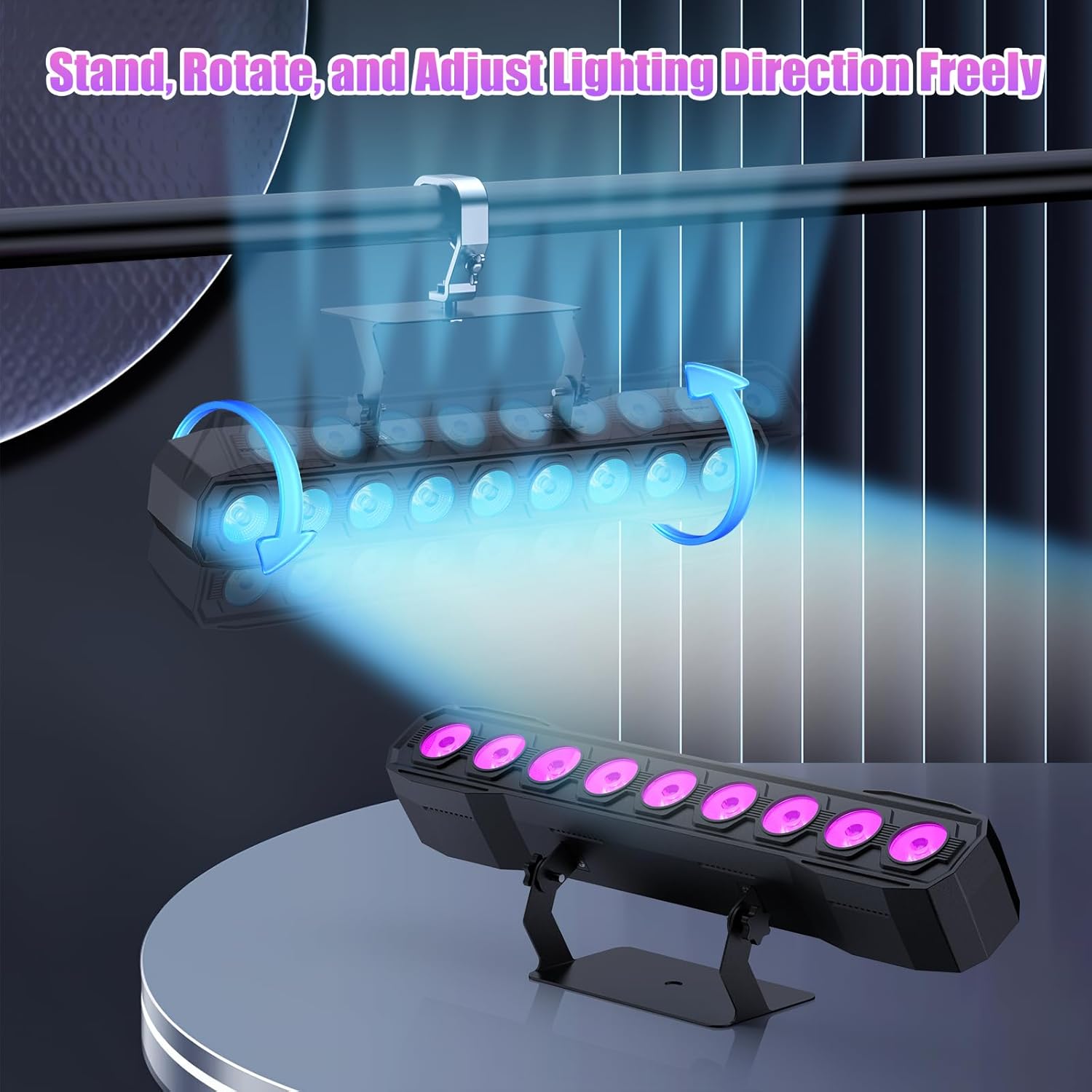
Image 5.1: Illustration of mounting and angle adjustment options.
5.3 Поврзување за напојување
Connect the power cord to the Power IN port on the back of the fixture and then to a suitable power outlet. Multiple units can be daisy-chained using the Power OUT port to simplify wiring for larger setups.
6. Работни режими
The DazzlingStage Wall Wash Bar Light supports several control modes:
- Контрола DMX512: За професионална контрола преку DMX конзола.
- Автоматски режим: Pre-programmed lighting sequences.
- Sound-Activated Control: Lights react to ambient sound.
- Далечински управувач: Convenient wireless control using the included remote.
- Режим Master-Slave: Link multiple units where one acts as a master and others as slaves, synchronizing effects.
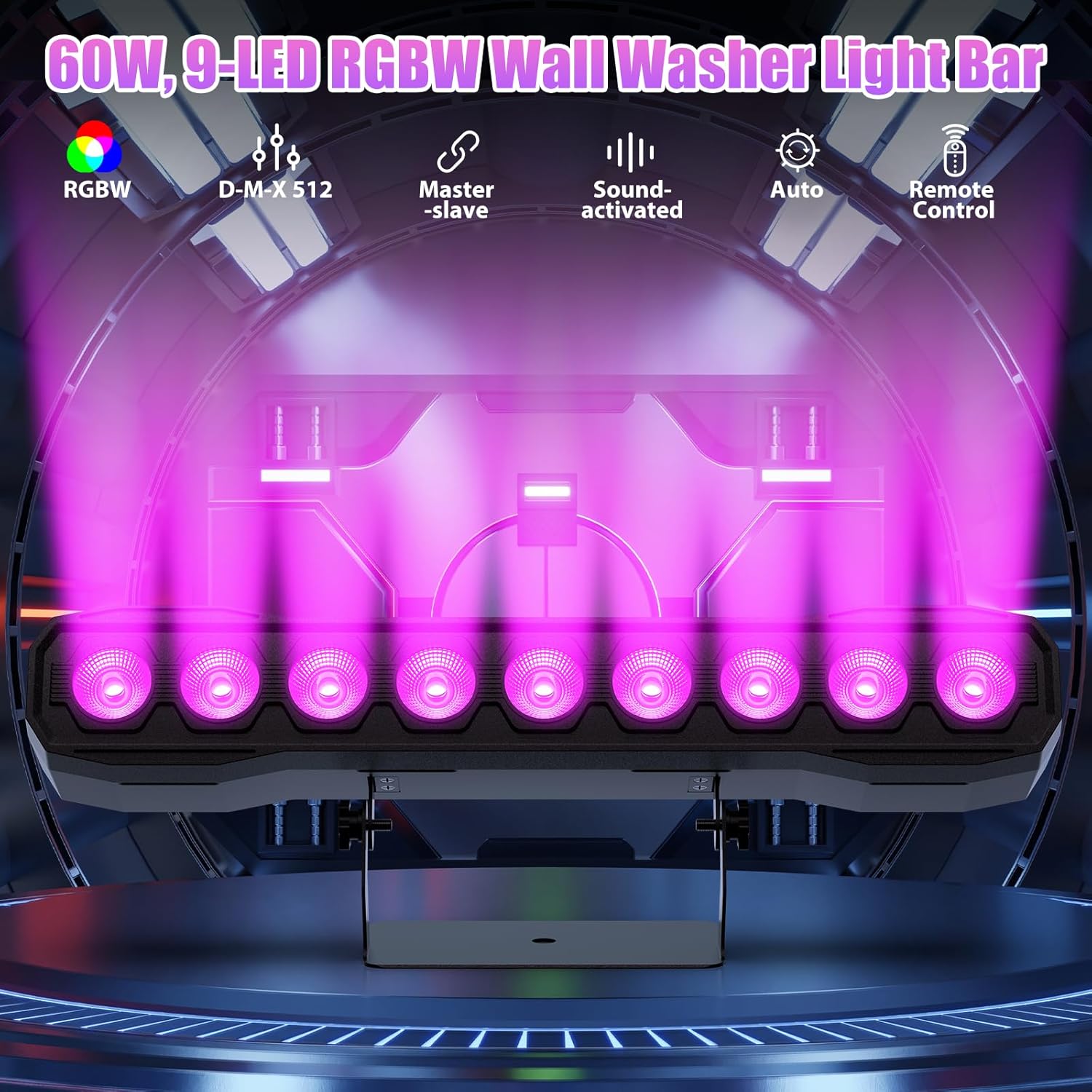
Слика 6.1: Готовоview на достапните режими на контрола.
6.1 Display Panel Operation
Use the buttons on the back of the fixture to navigate the menu and select modes:
- МЕНИ: Се движи низ опциите на главното мени.
- ГОРЕ ДОЛУ: Adjusts values or navigates sub-menus.
- Внесете: Го потврдува изборот.
6.2 Светлосни ефекти
The fixture supports various dynamic effects:
- Мешање на бои: Over 16.7 million color combinations with 0-100% linear dimming.
- Строб: Flashing effect.
- Скок: Instant color changes.
- Избледени: Нежни транзиции помеѓу боите.
- Пулс: Gradual changing effects.
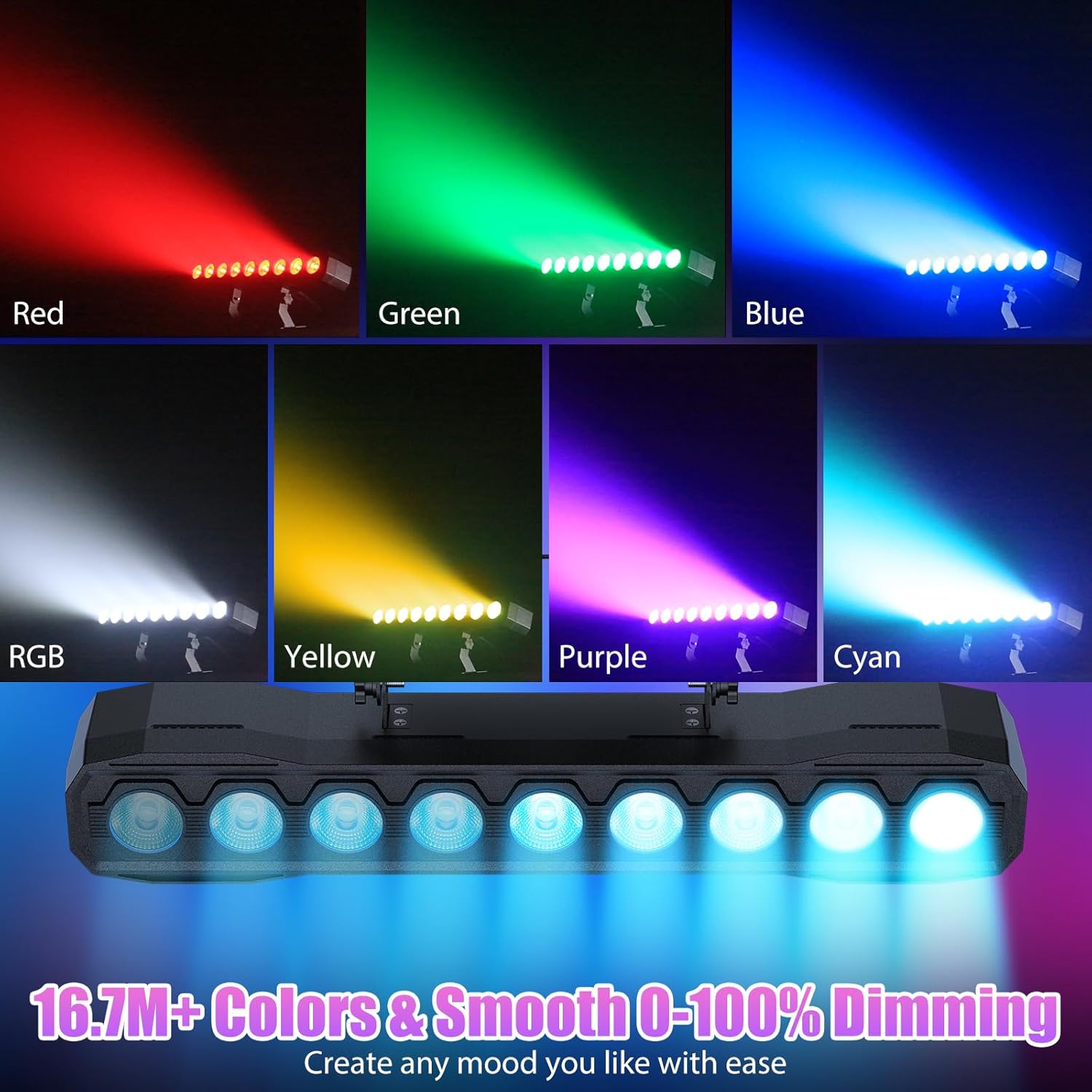
Слика 6.2: На пр.amples of color mixing and dimming capabilities.

Image 6.3: Visual representation of Strobe, Jump, Fade, and Pulse effects.
7. Функции на далечински управувач
Вклучениот далечински управувач овозможува лесен пристап до разни функции:
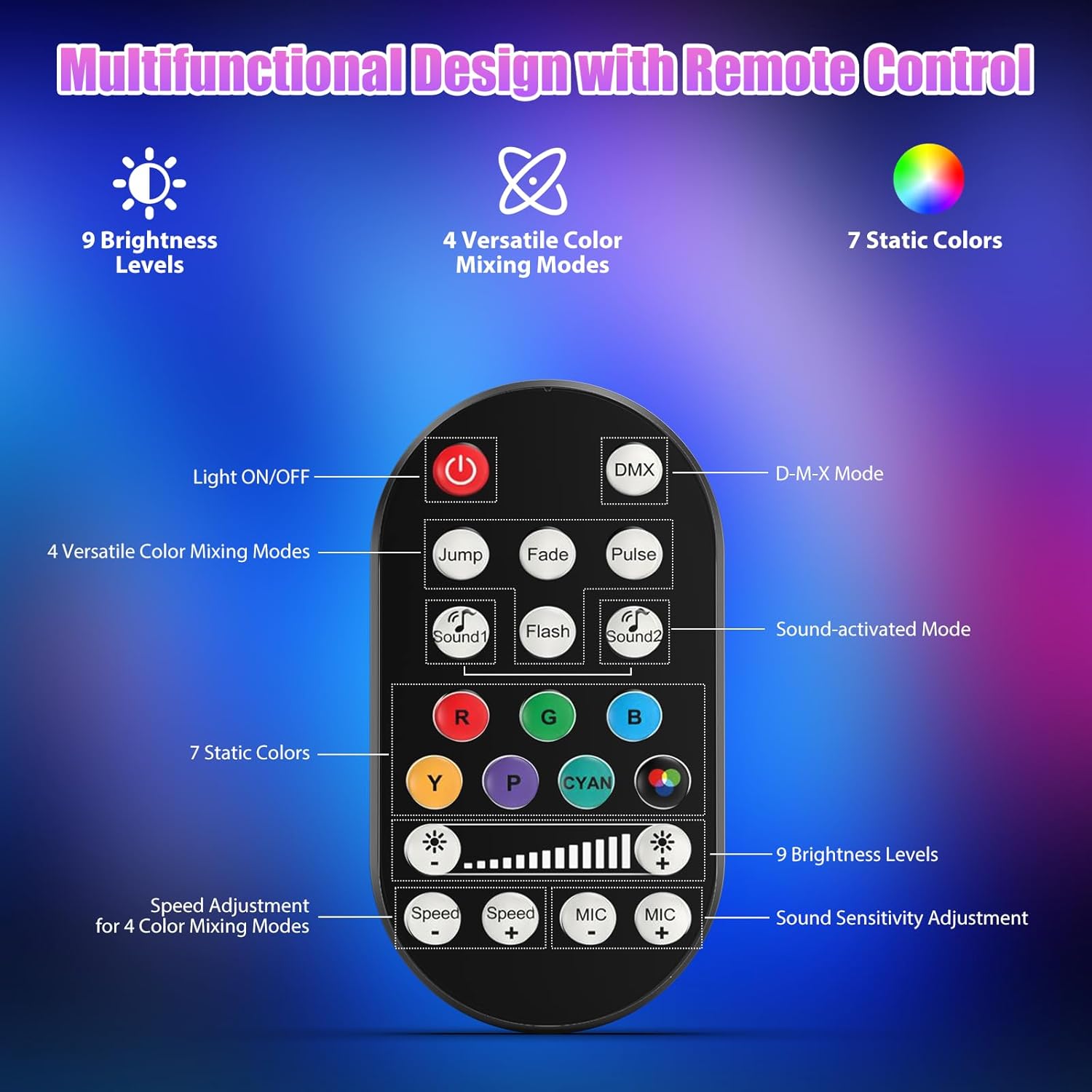
Слика 7.1: Распоред и функции на далечинскиот управувач.
- ВКЛУЧЕНО/ИСКЛУЧЕНО светло: Го вклучува или исклучува уредот.
- DMX: Го активира режимот на контрола на DMX.
- Jump, Fade, Pulse, Flash: Selects different color mixing modes.
- Sound1, Sound2: Activates sound-activated modes with different sensitivities.
- R, G, B, Y, P, Cyan, White: Selects static colors.
- Нивоа на осветленост: Adjusts the overall intensity of the light (9 levels).
- Брзина +/-: Ја прилагодува брзината на динамичките ефекти.
- МИКРОФОН +/-: Adjusts the sound sensitivity for sound-activated modes (15 levels).
8. DMX512 Control
For advanced control, connect the fixture to a DMX512 controller. The light bar typically uses 4 or 8 DMX channels. Refer to the display panel for DMX address setting and channel assignments.
8.1 Поставување DMX адреса
Use the MENU, UP, DOWN, and ENTER buttons on the fixture's display panel to set the DMX starting address. The display will show 'AXXX' where XXX is the address (e.g., A001).
8.2 DMX Channel Functions (Example - 8 Channel Mode)
| Канал | Функција | Опсег на вредности | Опис |
|---|---|---|---|
| CH1 | Господар Димер | 0-255 | Вкупна осветленост (0% до 100%) |
| CH2 | Црвен интензитет | 0-255 | Red LED brightness (0% to 100%) |
| CH3 | Зелен интензитет | 0-255 | Green LED brightness (0% to 100%) |
| CH4 | Син интензитет | 0-255 | Blue LED brightness (0% to 100%) |
| CH5 | Бел интензитет | 0-255 | White LED brightness (0% to 100%) |
| CH6 | Strobe/Effect | 0-255 | 0-10: No function; 11-255: Strobe speed (slow to fast) |
| CH7 | Автоматска програма | 0-255 | Selects and controls speed of built-in auto programs |
| CH8 | Звук активен | 0-255 | Activates sound mode and adjusts sensitivity |
Табела 8.1: Прample DMX Channel Functions (may vary slightly by firmware version).
9. Одржување
Regular maintenance ensures optimal performance and extends the lifespan of your fixture.
- Чистење: Periodically clean the lens and housing with a soft, lint-free cloth. Do not use abrasive cleaners or solvents. Ensure the fixture is powered off and cool before cleaning.
- Инспекција: Редовно проверувајте ги каблите за напојување, DMX каблите и монтажниот хардвер за какви било знаци на абење или оштетување. Веднаш заменете ги оштетените компоненти.
- Складирање: When not in use for extended periods, store the fixture in a dry, dust-free environment.
10 Смена на проблеми
Доколку наидете на проблеми, погледнете ги следните вообичаени проблеми и решенија:
| Проблем | Можна причина | Решение |
|---|---|---|
| Нема моќ | Power cable disconnected; No power from outlet; Blown fuse | Check power cable connection; Test outlet with another device; Replace fuse if necessary |
| Нема излез на светлина | Dimmer channel at 0%; Incorrect mode selected; DMX signal issue | Increase dimmer level; Select desired operating mode; Check DMX cable and address settings |
| Incorrect colors/effects | Incorrect DMX channel values; Remote control interference | Verify DMX channel settings; Ensure remote is pointed directly at the sensor; Check for other IR interference |
| Режимот активиран со звук не работи | Microphone sensitivity too low; No sound input | Increase MIC sensitivity via remote or display; Ensure sufficient sound is present near the fixture |
| Прегревање на тела | Poor ventilation; Blocked heat sink | Ensure adequate airflow around the unit; Clean any dust or debris from the heat sink fins |
11. Спецификации
| Карактеристика | Детал |
|---|---|
| Бренд | DazzlingStage |
| Број на модел | ZQ06190 |
| Извор на светлина | 9 x 60W RGBW LED диоди |
| Мешање на бои | RGBW 4-in-1, 16.7 million colors |
| Затемнување | 0-100% линеарно електронско затемнување |
| Агол на зрак | Широк агол од 35° |
| Контролни режими | DMX512, Auto, Sound-Activated, Remote Control, Master-Slave |
| DMX канали | 4 or 8 Channels (selectable) |
| Приказ | 4-цифрен LED дисплеј |
| Материјал | Акрилонитрил бутадиен стирен (ABS) |
| Димензии на производот | 18.1 x 5.5 x 5.1 инчи (46 x 14 x 13 см) |
| Тежина на ставката | Прибл. 1.98 фунти (0.9 кг) |
| Влез на енергија | AC 100-240V, 50/60Hz |
| Производител | Shenzhen Zhuoqiong Technology Co., Ltd. |
12. Гаранција и поддршка
DazzlingStage products are designed for reliability and performance. For warranty information, please refer to the terms and conditions provided at the time of purchase or contact your retailer.
If you require technical assistance or have questions not covered in this manual, please contact DazzlingStage customer support through the retailer's platform or the official brand website. Please have your model number (ZQ06190) and purchase details ready when contacting support.