
1. Вовед
Thank you for choosing the Dreo 110-Pint Smart Dehumidifier. This appliance is designed to efficiently remove excess moisture from large spaces up to 4500 square feet, such as basements, bedrooms, living rooms, bathrooms, and laundry rooms. Featuring smart controls, multiple operating modes, and dual drainage options, it provides a comfortable and healthy environment by maintaining optimal humidity levels. Please read this manual thoroughly before operation to ensure proper use and maintenance.
2. Важни безбедносни инструкции
За да го намалите ризикот од пожар, електричен удар или повреда, секогаш следете ги основните безбедносни мерки на претпазливост при ракување со овој апарат.
- Прочитајте ги сите упатства пред да го користите одвлажнувачот.
- Овој апарат е само за внатрешна употреба.
- Осигурете се дека напојувањето одговара на јачината на звукотtage наведено на етикетата за оценување.
- Не го користете одвлажнувачот со оштетен кабел или приклучок.
- Always unplug the unit before cleaning, servicing, or moving.
- Не блокирајте ги влезовите или излезите за воздух.
- Keep the unit upright for at least 24 hours before plugging it in after transport.
- The Dreo Dehumidifier is ETL-certified to meet stringent electrical safety standards, featuring a 90° tilt waterproof design that automatically powers off when tilted, along with comprehensive thermal protection (23°F to 248°F) to prevent overheating and 15A overcurrent protection against power surges.
3. Производот завршиview
3.1. Компоненти
The Dreo 110-Pint Smart Dehumidifier is designed for efficient and user-friendly operation. Below are the main components:
- Контролен панел: Located on the top, with touch buttons and a digital display.
- Излез за воздух: Top-mounted for efficient moisture expulsion.
- Влез за воздух: Rear-mounted for air intake.
- Резервоар за вода: Front-loading, 2-gallon (8L) capacity with a visible water level indicator.
- Drain Hose Outlet: Located at the rear for continuous drainage.
- Кастерни тркала: 360° smooth-rolling wheels for easy mobility.
- Рачки за носење: Integrated on the sides for convenient lifting.
- Филтер за перење: Easily accessible for cleaning to maintain air quality.
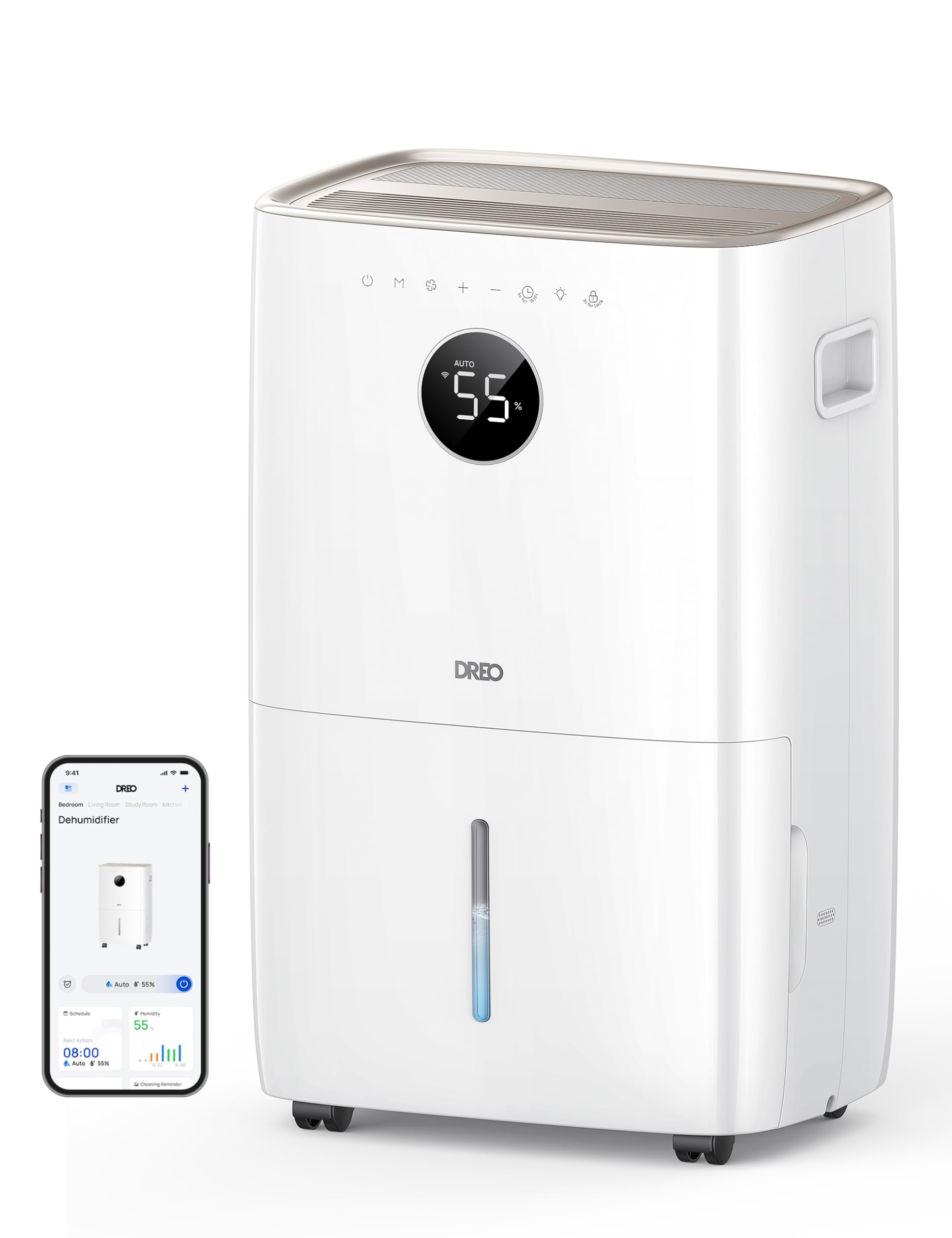
Слика: напред view of the Dreo 110-Pint Smart Dehumidifier, highlighting its compact design and dimensions (11.3"D x 15.4"W x 24.4"H).
3.2. Контролен панел
The intuitive control panel allows for easy operation and monitoring of your dehumidifier.
- Копче за вклучување: Го вклучува или исклучува уредот.
- Копче за режим: Cycles through Auto, Comfort, and Continuous modes.
- Копче за брзина на вентилаторот: Ја прилагодува брзината на вентилаторот (ниска, средна, висока).
- Копчиња за прилагодување на влажноста (+/-): Sets desired humidity level in Auto Mode.
- Копче за тајмер: Sets a 24-hour timer for automatic on/off.
- Индикатор за Wi-Fi: Го прикажува статусот на Wi-Fi конекцијата.
- Копче за заклучување за деца: Ја заклучува контролната табла за да спречи случајни промени.
- Индикатор за ресетирање на филтерот: Lights up when the filter needs cleaning.
- Целосна тревога за вода: Illuminates when the water tank is full, and the unit stops operation.
- Индикатор за одмрзнување: Activates automatically at 41°F (5°C) for optimal performance in cold environments.

Image: Close-up of the dehumidifier's control panel, showing the digital display set to 55% humidity in Auto Mode, with various function icons.
4. Поставување
4.1. Распакување и поставување
- Внимателно извадете го одвлажнувачот од пакувањето.
- Place the unit upright on a flat, stable surface. Ensure there is at least 8 inches (20 cm) of space around the air inlets and outlets for proper airflow.
- Оставете го уредот да стои исправено најмалку 24 часа пред да го вклучите во струја за да се наталожи фреонот.
4.2. Поврзување за напојување
Plug the power cord into a grounded electrical outlet. Ensure the outlet meets the electrical requirements of the dehumidifier.
4.3. Опции за дренажа
The Dreo dehumidifier offers two drainage methods: manual emptying of the water tank or continuous drainage via a hose.

Image: The dehumidifier illustrating both the manual water tank removal and the continuous drainage hose connection.
4.3.1. Рачно одводнување
- When the water tank is full, the unit will automatically stop and display a "Water Full" alert.
- Carefully pull out the water tank from the front of the unit using the integrated handle.
- Истурете ја собраната вода во мијалник или одвод.
- Slide the empty water tank back into the unit until it clicks into place. The dehumidifier will resume operation.
4.3.2. Континуирано одводнување
- Locate the drain hose outlet at the rear of the dehumidifier.
- Remove the rubber stopper from the outlet.
- Connect the provided drain hose (or a standard garden hose) to the outlet. Ensure the connection is secure to prevent leaks.
- Route the hose to a suitable drain point (e.g., floor drain, sink, or sump pump). Ensure the hose is sloped downwards to allow gravity to drain the water and is free of kinks.
- The dehumidifier will now continuously drain water without needing to empty the tank manually.
5. Упатства за работа
Притиснете го Копче за напојување to turn the dehumidifier on. The unit will start operating in its last used mode and settings.
5.1. Работни режими
Притиснете го Копче за режим to cycle through the available operating modes:
- Автоматски режим: The dehumidifier intelligently adjusts fan speed to maintain your target humidity level within a 5% tolerance. Use the копчиња +/- to set your desired humidity (e.g., 45-55% is generally recommended).
- Комфорен режим: The unit operates to maintain a comfortable humidity level based on ambient temperature.
- Континуиран режим: The dehumidifier runs continuously at the selected fan speed, regardless of the ambient humidity. This is ideal for very damp conditions or for continuous drainage.
5.2. Прилагодување на брзината на вентилаторот
In Auto or Continuous mode, press the Копче за брзина на вентилаторот to select between Low, Medium, or High fan speeds.
5.3. Функција на тајмер
Притиснете го Копче за тајмер to set a desired operating duration (from 1 to 24 hours). The unit will automatically turn on or off after the set time has elapsed.
5.4. Smart Control (DREO App)
The Dreo 110-Pint Smart Dehumidifier can be controlled remotely via the DREO app on your smartphone or through voice assistants like Alexa and Google Home.

Image: A smartphone displaying the DREO app interface, showing remote control capabilities for the dehumidifier.
5.4.1. Connecting to the DREO App
- Download the DREO app from your smartphone's app store (available on iOS and Android).
- Направете сметка или најавете се.
- Follow the in-app instructions to add your Dreo 110-Pint Smart Dehumidifier (Model DH711S). Ensure your phone is connected to a 2.4GHz Wi-Fi network.
Video: This video demonstrates the process of downloading the DREO app and creating a new user account to manage your smart dehumidifier.
Video: This video provides a step-by-step guide on how to connect your Smart Dehumidifier DH711S to the DREO app for remote control and smart features.
5.4.2. Карактеристики на апликацијата
Through the DREO app, you can:
- Следете ги нивоата на влажност во реално време.
- Поставете распореди и тајмери.
- Adjust operating modes and fan speeds.
- Receive notifications (e.g., water tank full, filter cleaning reminder).
- Control the unit using voice commands with Alexa or Google Home.
6. Одржување
Редовното одржување обезбедува оптимални перформанси и долготрајност на вашиот одвлажнувач на воздух.
6.1. Чистење на филтерот за воздух
The filter reset indicator will light up after approximately 250 hours of operation, signaling that the filter needs cleaning.
- Исклучете го одвлажнувачот од штекерот.
- Отстранете го филтерот за воздух од задниот дел на уредот.
- Измијте го филтерот со чиста вода (не потопла од 40°C) и благ детергент.
- Rinse thoroughly and allow it to air dry completely before reinstalling.
- Once the filter is reinstalled, plug in the unit and press the Копче за ресетирање на филтерот for 3 seconds to clear the indicator.

Image: A hand removing the washable air filter from the back of the dehumidifier for cleaning.
6.2. Чистење на резервоарот за вода
Редовно чистете го резервоарот за вода за да спречите појава на мувла и габи.
- Remove the water tank as described in the Manual Drainage section.
- Измијте го резервоарот со топла вода и благ детергент.
- Темелно исплакнете го и целосно исушете го пред да го вратите во уредот.
6.3. Општо чистење
Избришете ја надворешноста на одвлажнувачот со мека, гamp крпа. Не користете груби хемикалии или абразивни средства за чистење.
7 Смена на проблеми
Доколку наидете на проблеми со вашиот одвлажнувач на воздух, погледнете ги следните вообичаени проблеми и решенија:
| Проблем | Можна причина | Решение |
|---|---|---|
| Одвлажнувачот не се вклучува. | No power, power cord loose, water tank full. | Check power connection, ensure plug is secure, empty water tank. |
| Unit is not collecting water. | Нивото на влажност е прениско, температурата во просторијата е прениска, филтерот за воздух е затнат. | Increase target humidity, ensure room temp is above 41°F (5°C), clean air filter. |
| Единицата е бучна. | Уредот не е на рамна површина, филтерот за воздух е затнат. | Place on a flat surface, clean air filter. |
| Истекува вода од единицата. | Water tank not properly installed, continuous drain hose is loose or kinked. | Reinstall water tank correctly, check drain hose connection and ensure no kinks. |
| Display shows fluctuating numbers. | Normal adjustment to current humidity. | This is normal operation as the sensor adjusts to ambient conditions. |
| Unit isn't defrosting automatically. | Issue with the condenser. | Контактирајте ја поддршката за корисници за помош. |
8. Спецификации
| Карактеристика | Детал |
|---|---|
| Бренд | Дрео |
| Име на моделот | DR-HDH001S |
| Капацитет | 110 Pints (at 86°F, RH 90%) / 50 Pints per Day (DOE Standard) |
| Областа на покриеност | До 4500 квадратни стапки |
| Волумен на резервоарот за вода | 2 литри (8 литри) |
| Режими на работа | Auto, Comfort, Continuous |
| Брзини на вентилаторот | 3 (ниско, средно, високо) |
| Капацитет на проток на воздух | 210 кубни стапки во минута (CFM) |
| Контрола на влажност | Adjustable, with ±5% precision sensor |
| Посебни карактеристики | Smart Control (DREO App, Alexa, Google Home), Auto-Defrost, 90° Tilt Waterproof Design, Thermal Protection, 15A Overcurrent Protection, Washable Filter, 360° Caster Wheels |
| Димензии на производот | 11.3" Д x 15.4" Ш x 24.4" В |
| Тежина на ставката | 43.7 фунти |
| Материјал | Метал, пластика |
| Сертификати | Сертифициран со ETL |
9. Гаранција и поддршка
Dreo products come with a standard warranty. For specific warranty details, please refer to the warranty card included in your product packaging or visit the official Dreo webсајт.
9.1. Поддршка за корисници
If you have any questions, concerns, or require assistance with your Dreo 110-Pint Smart Dehumidifier, please contact Dreo Customer Support:
- Е-пошта: support@dreo.com
- Webсајт: www.dreo.com
Please have your model number (DR-HDH001S) and purchase information ready when contacting support.