
1. Вовед
The iGPSPORT BSC300T is an advanced GPS bike computer designed to enhance your cycling experience. Featuring a 2.4-inch color touchscreen, comprehensive data tracking, and global navigation capabilities, it provides essential information for road cycling, mountain biking, and e-bike use.
2. Што е вклучено
Проверете дали сите компоненти се присутни во вашето пакување:
- iGPSPORT BSC300T Bike Computer x 1
- Dedicated Mount x 1
- Rubber Rings x 2
- Упатство за употреба x 1

Image: Contents of the iGPSPORT BSC300T package, including the bike computer, mount, rubber rings, and user manual.
Video: An unboxing demonstration of the iGPSPORT BSC300T, showing the contents of the package and initial handling of the device.
3. Поставување и инсталација
3.1 Уредот завршиview
The BSC300T features a 2.4-inch color touchscreen and 6 physical buttons for intuitive operation. Familiarize yourself with the device layout before installation.

Слика: напред view of the iGPSPORT BSC300T bike computer, showing its color display with navigation data, speed, and distance.
3.2 Монтирање на уредот
Follow these steps to securely mount your BSC300T to your bicycle handlebars:
- Stack the two narrow bases together.
- Place the stacked bases on the bicycle handlebar.
- Cross the two elastic rubber bands to attach the base.
- Прилагодете го аголот за оптимално viewинг.
- Прицврстете го велосипедскиот компјутер на основата со вртење на неговото место.
- Инсталирањето е завршено.

Image: Visual guide demonstrating the six steps for installing the BSC300T bike computer mount on handlebars.
3.3 Првично вклучување и избор на јазик
Upon first use, power on the device and select your preferred language from the available options. The device supports multiple languages for user convenience.

Image: The BSC300T screen showing a list of language options, including English, French, German, Spanish, and Italian.
3.4 GPS Configuration
The BSC300T utilizes 5-satellite geolocation (GPS, Beidou, GLONASS, GALILEO, and QZSS) for fast and precise positioning. You can configure the GPS settings to optimize performance based on your region.

Image: The BSC300T displaying its GPS settings, allowing selection of different satellite systems for enhanced accuracy.
4. Ракување со уредот
4.1 Navigation and Map Features
The BSC300T offers comprehensive map navigation with offline map downloads, route recording, preview, and voice guidance. It also provides deviation alerts to keep you on track.
- Офлајн мапи: Download worldwide maps to the 8GB internal memory.
- Упатство за рута: Follow pre-loaded routes with turn-by-turn directions and voice prompts.
- Deviation Alerts: Receive notifications if you stray from your planned route.

Image: The BSC300T showing map navigation with a route highlighted, alongside a cyclist on a road.

Image: The BSC300T showcasing its integrated offline map functionality, useful for navigation without internet access.
4.2 Приказ и прилагодување на податоци
The device records over 130 types of cycling data, including speed, distance, elevation, cadence, calories burned, time, temperature, and more. You can customize the display with various color themes and data layouts.

Image: The BSC300T screen showing multiple data fields, including average speed, maximum heart rate, calories, and distance.

Image: The BSC300T showcasing different customizable color themes for its display interface.
4.3 Карактеристики за напредна обука
Personalize your training sessions or download them directly from the iGPSPORT app. The device supports advanced training metrics and segment notifications.

Image: The BSC300T showing advanced training screens with target zones, power output, speed, and cadence data.

Image: The BSC300T showing real-time segment notifications, indicating progress and remaining distance for a segment.
4.4 Sensor and E-Bike Connectivity
The BSC300T supports dual ANT+/Bluetooth 5.0 protocols, allowing connection to various sports devices such as speed, cadence, and heart rate sensors, as well as e-bikes and smart trainers.
- Компатибилност со сензори: Connect to heart rate monitors, speed sensors, cadence sensors, and power meters.
- Интеграција на е-велосипед: Display odometer, remaining range, and gear mode for compatible e-bikes.
- Паметни светла: Control iGPSPORT smart lights and view нивоа на батеријата.

Image: The BSC300T illustrating its broad compatibility with sensors like cadence, heart rate, power meters, and Di2 systems.
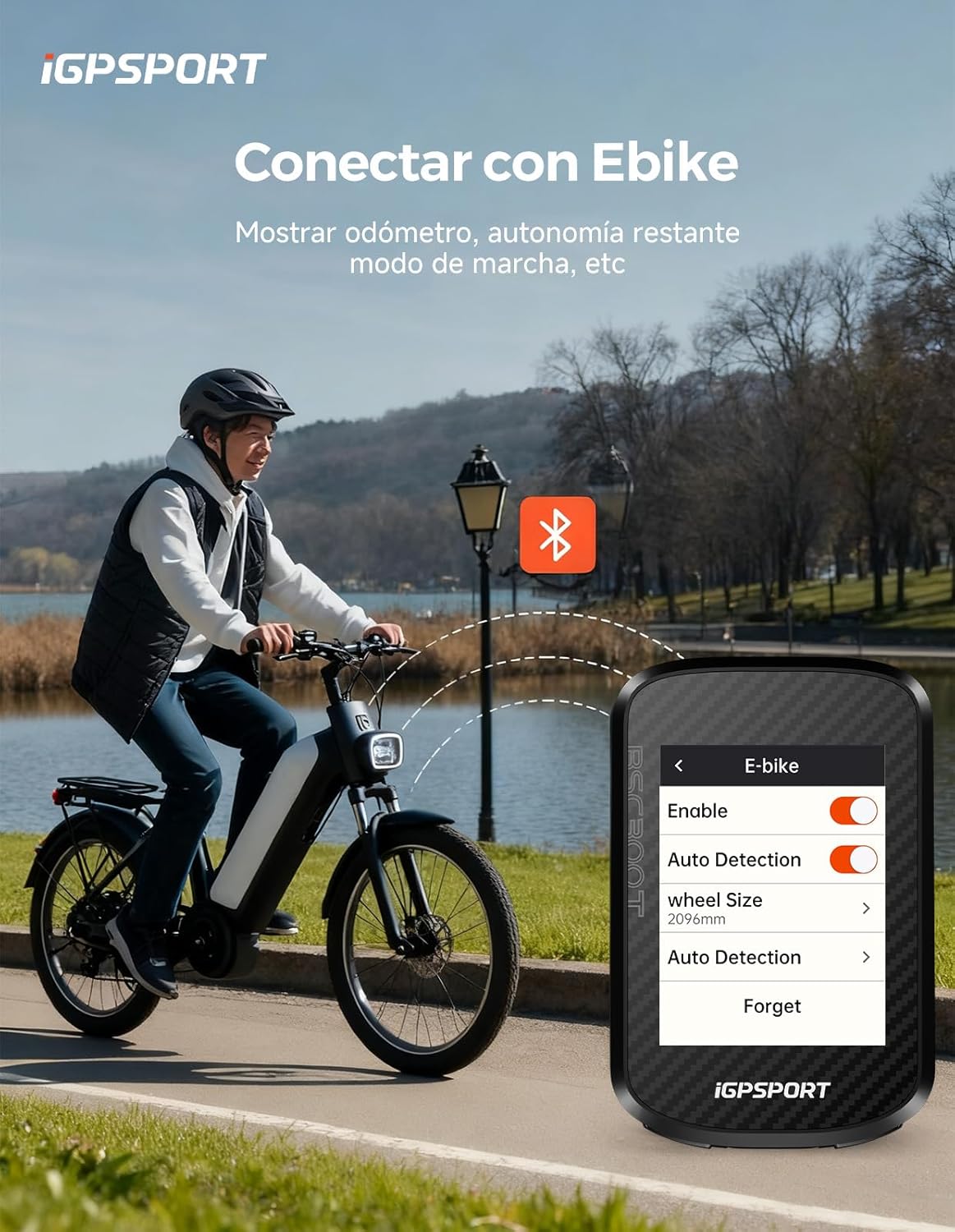
Image: The BSC300T screen showing e-bike connection settings and data, such as auto-detection and wheel size.

Image: The BSC300T screen showing the 'Add Sensor' menu, listing various sensor types like HRM, Power, Shift, and Cadence.

Image: The BSC300T interface showing controls for iGPSPORT smart lights, including light modes and battery life.
4.5 Smart Notifications and Live Tracking
When paired with your smartphone, the BSC300T can display smart notifications for calls and messages. It also supports real-time tracking, allowing you to share your position with others.
- Паметни известувања: Receive alerts for incoming calls and SMS messages directly on your device.
- Следење во живо: Share your real-time location with teammates or friends, preventing route errors during group rides.

Image: The BSC300T screen showing smart notifications for incoming calls and messages when paired with a phone.

Image: A smartphone displaying the iGPSPORT app with live tracking, showing a cyclist's real-time position on a map.
5. Data Management and Sharing
The BSC300T is compatible with the iGPSPORT application, allowing you to analyze your ride data and share it with popular platforms like Strava and Komoot.
- Компатибилност со апликации: Connect to the iGPSPORT app for detailed analysis and customization.
- Интеграција од трета страна: Share your activities seamlessly with Strava, Komoot, and other platforms.

Image: The BSC300T displaying its compatibility with the iGPSPORT app, as well as other popular cycling platforms like Strava and Komoot.

Image: A visual representation of the BSC300T's wide compatibility with various cycling applications for data recording and sharing.
Video: A demonstration of the iGPSPORT BSC300T in use, highlighting its features like data display, navigation, and connectivity during a ride.
6. Одржување
6.1 Водоотпорност
The BSC300T features IPX7 water resistance, making it suitable for use in various weather conditions. Avoid submerging the device in water for extended periods.

Image: A cyclist riding in the rain, illustrating the IPX7 water resistance of the iGPSPORT BSC300T.
6.2 Firmware and Map Updates
Regularly check for firmware updates and new map versions to ensure optimal performance and access to the latest features. Updates can typically be managed through the iGPSPORT webсајт или апликација.

Image: A step-by-step guide on how to download world maps and firmware updates from the iGPSPORT webсајт.
7. Спецификации
| Карактеристика | Детал |
|---|---|
| Име на моделот | BSC300T |
| Големина на екранот | 2.4 инчи |
| Тип на екран | LCD, екран на допир во боја |
| Тип на материјал | Пластика |
| Технологија за поврзување | ANT, Bluetooth 5.0 |
| GPS систем | GPS, Beidou, GLONASS, GALILEO, QZSS |
| Внатрешна меморија | 8 GB |
| Отпорност на вода | IPX7 |
| Траење на батеријата | До 23 часа |
| Тип на монтирање | Монтирање на рачката |
| Димензии (Д x Ш x В) | 5.3 x 1.44 x 8.2 cm |
| Тежина | 66 грама |
8 Смена на проблеми
If you encounter any issues with your iGPSPORT BSC300T, please consider the following common solutions:
- Уредот не се вклучува: Уверете се дека уредот е целосно наполнет. Поврзете го со извор на енергија користејќи го испорачаниот USB кабел.
- Проблеми со GPS сигналот: Осигурајте се дека сте на отворено место со чист простор view of the sky. Check GPS settings to confirm the correct satellite systems are enabled.
- Сензорот не се поврзува: Verify that the sensor's battery is not depleted. Ensure the sensor is awake and within range. Check the device's sensor pairing menu.
- Проблеми со поврзувањето на апликациите: Ensure Bluetooth is enabled on both your phone and the BSC300T. Restart both devices and try pairing again.
- Неточни податоци: Ensure all sensors are correctly installed and calibrated (if applicable). Check for any physical obstructions or interference.
For further assistance, refer to the official iGPSPORT support resources or contact customer service.
9. Гаранција и поддршка
iGPSPORT offers customer support for any questions or concerns regarding your BSC300T. Your satisfaction is a priority.
- Услуга за клиенти: Contact iGPSPORT customer service for assistance. Responses are typically provided within 24 hours.
- Информации за гаранцијата: Refer to the product packaging or the official iGPSPORT webстраница за детални услови за гаранција.
За повеќе информации, посетете ја официјалната iGPSPORT Brand Store.